What if your enterprise knowledge — locked in PDFs, reports, and documents — could answer questions in natural language, in any language, using just SQL? With Oracle Select AI RAG on Autonomous Database, this is not a future promise. It is available today.
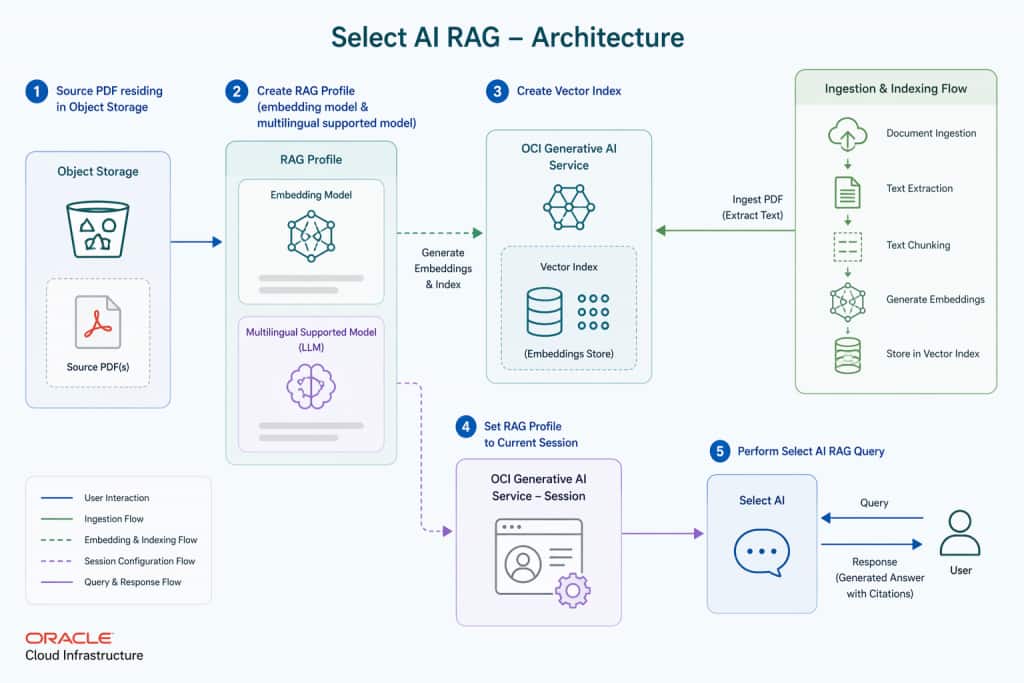
In this article, i’ll walkthrough, to build a simple production-grade Retrieval Augmented Generation (RAG) pipeline on Oracle Autonomous Database (ADB). We will index a Tamil-language science PDF, generate multilingual vector embeddings using Cohere Embed Multilingual v3, store them in Oracle AI Vector Search, and answer questions in both English and Tamil using nothing but SQL — no Python, no LangChain, no external orchestration framework.
This approach is especially valuable for enterprises handling multilingual content, compliance documents, or proprietary knowledge bases that cannot leave the database perimeter.
Why Select AI RAG?
Traditional LLMs are trained on public internet snapshots. They have no knowledge of your private enterprise data — internal reports, policy documents, product manuals, or regional-language content. RAG solves this by retrieving relevant private content at query time and injecting it into the LLM prompt, dramatically improving accuracy and eliminating hallucinations for domain-specific questions.
Oracle Select AI with RAG automates every step of this pipeline natively inside ADB:
- No external orchestration — no LangChain, no Vertex AI pipeline, no custom Python code
- Native SQL interface —
SELECT AI NARRATE <your question>is all you need - Automatic pipeline —
DBMS_CLOUD_AI.CREATE_VECTOR_INDEXhandles chunking, embedding, indexing, and refresh - Multilingual by default — Cohere Embed Multilingual supports 100+ languages including Tamil, Telgu, Hindi etc. Ref Cohere-official-doc for all supported languages
- Source citations built-in — responses include the source document URL automatically
- Enterprise security Enabled — data never leaves your Oracle Cloud tenancy perimeter
Prerequisites
Before running any SQL, ensure the following are in place:
| Oracle ADB | Autonomous Database (Serverless) — Oracle Database >= 23ai, with db_user (For this exercise, I created APPUSER schema.) |
| OCI Object Storage | Bucket with PDF uploaded |
| OCI API Signing Key | user_ocid, tenancy_ocid, private_key, fingerprint to access OCI GenAI Public/On_Demand Service |
| OCI GenAI Access | Subscription to region OCI Generative AI Models [ I am using in us-chicago-1 (Cohere + Gemini)] |
Note: This solution uses OCI Signing Key credentials — not Resource Principals — for cross-service access. The entire pipeline runs inside Oracle ADB with no external compute required.
Admin Grants
Connect as ADMIN and run these grants once. They enable APPUSER to use DBMS_CLOUD_AI, create vector index pipelines, and store vector data.
GRANT EXECUTE ON DBMS_CLOUD_AI       TO APPUSER;
GRANT EXECUTE ON DBMS_CLOUD          TO APPUSER;
GRANT EXECUTE ON DBMS_CLOUD_PIPELINE TO APPUSER;
ALTER  USER   APPUSER QUOTA UNLIMITED ON DATA;
Note: DBMS_CLOUD_PIPELINE is required for the vector index pipeline to read files from Object Storage. Omitting this grant will cause the pipeline to fail silently.
Create OCI Credential
Switch to APPUSER. Create the OCI credential using your API signing key. This credential authenticates all calls to Object Storage and OCI GenAI.
BEGIN
  DBMS_CLOUD.CREATE_CREDENTIAL(
    credential_name => 'OCI_APPUSER_CRED',
    user_ocid       => 'ocid1.user.oc1..<your_user_ocid>',
    tenancy_ocid    => 'ocid1.tenancy.oc1..<your_tenancy_ocid>',
    private_key     => '<your_pem_private_key_content>',
    fingerprint     => '<xx:xx:xx:xx:xx:xx:xx:xx:xx:xx:xx:xx:xx:xx:xx:xx>'
  );
END;
/

-- Verify
SELECT credential_name, username, enabled
FROM   user_credentials
WHERE  credential_name = 'OCI_APPUSER_CRED';
Create RAG Embedding Profile
Note: This profile is used during vector index creation to call the Cohere embedding model. Ref Oracle-doc for more information.
/*
BEGIN
     DBMS_CLOUD_AI.DROP_PROFILE(profile_name => 'OCI_MULTILING_EMBED_PROFILE');
END;
/*

BEGIN
  DBMS_CLOUD_AI.CREATE_PROFILE(
    profile_name => 'OCI_MULTILING_EMBED_PROFILE',
    attributes   => '{
      "provider":        "oci",
      "credential_name": "OCI_APPUSER_CRED",
      "embedding_model": "cohere.embed-multilingual-v3.0",
      "model":           "google.gemini-2.5-flash",
      "region":          "us-chicago-1",
      "vector_index_name": "OCI_TAMIL_RAG_VECTOR_IDX",
      "enable_sources": true
    }'
  );
END;
Note:
- Why Cohere Multilingual?
cohere.embed-multilingual-v3.0produces 1024-dimension embeddings that semantically understand cross-lingual text. An English question can retrieve Tamil document chunks — and vice versa — because both are mapped into the same semantic vector space. Ref oracle-cohere-doc and cohere-doc for more information
- With “enable_sources”: true, every RAG response includes the source document filename and URL — critical for auditability in enterprise deployments.
- We can use any LLM based on your other factors like cost, max tokens. For this exercise i am using google-gemini-2.5-flash Please check OCI-Doc for OCI offerings and Retirement Dates.
- Ref: Region specific OCI Gen-AI Models
Create Vector Index
This single procedure call does everything: reads the PDF from Object Storage, chunks it into 512-token segments, generates 1024-dimension Cohere embeddings, stores them in Oracle AI Vector Search, and sets up an automatic refresh pipeline for every 10 mins.
BEGIN
  DBMS_CLOUD_AI.CREATE_VECTOR_INDEX(
    index_name => 'OCI_TAMIL_RAG_VECTOR_IDX',
    attributes => '{
      "vector_db_provider":            "oracle",
      "location":                      "https://objectstorage.ap-mumbai-1.oraclecloud.com/n/<namespace>/b/pdf/o/",
      "object_storage_credential_name":"OCI_APPUSER_CRED",
      "profile_name":                  "OCI_MULTILING_EMBED_PROFILE",
      "vector_dimension":               1024,
      "vector_distance_metric":        "cosine",
      "chunk_overlap":                  128,
      "chunk_size":                     512,
      "refresh_rate":                   10
    }'
  );
END;
Explanation of KEY Parameters
| Parameter | Value | Purpose |
|---|---|---|
vector_dimension | 1024 | Must match Cohere Embed Multilingual v3 output dimensions |
vector_distance_metric | cosine (default) | Best for semantic text similarity; required by Cohere |
chunk_size | 512 | Tokens per chunk — balances context richness with retrieval precision ( Default 1024) |
chunk_overlap | 128 (default) | 25% overlap prevents context loss at chunk boundaries |
refresh_rate | 10 min | Automatically indexes new files added to the bucket |
Monitor the Pipeline
CREATE_VECTOR_INDEX is asynchronous. A background pipeline job handles chunking and embedding. Monitor progress before running any SELECT AI queries.
-- Pipeline overview (STATUS = STARTED means monitoring mode — normal)
SELECT pipeline_name, pipeline_type, status, last_execution, status_table
FROM   user_cloud_pipelines;

-- File-level processing result (what you actually need to check)
SELECT id, name, bytes, status, error_code, error_message,start_time,end_time
FROM   <status_table>;  # output of status_table from previous query
Expected Result
The pipeline view shows STATUS = STARTED — this is normal and means the pipeline is in monitoring mode watching for new files. The file-level view (PIPELINE$4$2_STATUS) must show STATUS = COMPLETED with null ERROR_CODE before proceeding.
Verify the Vector Table
Once the pipeline completes, verify that your PDF content has been successfully chunked and embedded.
-- Step 1: Find the exact vector table name Oracle created
SELECT table_name
FROM   user_tables
WHERE  table_name LIKE '%OCI_TAMIL%'
ORDER BY table_name;
-- Result: OCI_TAMIL_RAG_VECTOR_IDX$VECTAB

-- Step 2: Count chunks generated from your PDF
SELECT COUNT(*) AS total_chunks
FROM   "OCI_TAMIL_RAG_VECTOR_IDX$VECTAB";

-- Step 3: Preview Tamil text extracted from PDF
SELECT SUBSTR(CONTENT, 1, 400) AS tamil_preview
FROM   "OCI_TAMIL_RAG_VECTOR_IDX$VECTAB"
FETCH FIRST 3 ROWS ONLY;
Run SELECT AI queries.
Set the profile once per session, then use natural language. Select AI handles the full RAG cycle: embedding your question, running a cosine similarity search, retrieving matching Tamil document chunks, and sending an augmented prompt to Gemini.
EXEC DBMS_CLOUD_AI.SET_PROFILE('OCI_MULTILING_EMBED_PROFILE');

-- Ask questions in natural language

SELECT AI NARRATE what animals are described in this document;
Output:
“The document describes the following animals:
- **Paucidentomys ver
midax**: This is commonly known as a Shrew rat. Its name, Paucidentomys, means “without molars”.
- Cercopithecus hamlyni: This animal is a monkey with an owl-like face, found in the eastern rainforests of Congo. It has green-grey skin and a white line below its nose.
- Cercopithecus lomamiensis: This is a new species of monkey, discovered in 2012, and is related to the owl-faced monkey.
- Hetrometrus yaleensis: This is known as the Yala Giant Scorpion.
Sources:
- puthumai_uyirigal_a4.pdf (https://objectstorage.ap-mumbai-1.oraclecloud.com/n/xxxxx/b/pdf/o/puthumai_uyirigal_a4.pdf)”
*/
Now let we request to respond in Tamil Language for same prompt
SELECT AI NARRATE what animals are described in this document, respond in Tamil language;Output:
“இந்த ஆவணத்தில் விவரிக்கப்பட்டுள்ள விலங்குகள்:
- ஆந்தை குரங்கு (Cercopithecus hamlyni மற்றும் Cercopithecus lomamiensis)
- எலி (Paucidentomys vermidax), இது பொதுவாக ஷ்ரூ எலி என்று அழைக்கப்படுகிறது.
- திமிங்கலம் (நீரில் வாழும் பாலூட்டி).
- யாலா காட்டுத் தேள் / யாலா ராட்சத தேள் (Hetrometrus yaleensis).
Sources:
- puthumai_uyirigal_a4.pdf (https://objectstorage.ap-mumbai-1.oraclecloud.com/n/xxxxx/b/pdf/o/puthumai_uyirigal_a4.pdf)”
SELECT AI NARRATE 'what animals are described in this document return response in tamil language' ;
Output:
“இந்த ஆவணத்தில் விவரிக்கப்பட்டுள்ள விலங்குகள்:
- செர்கோபிதேகஸ் ஹாம்லினி (Cercopithecus hamlyni): இது ஆந்தை மக்ம என்று அழைக்கப்படுகிறது. இது காங்கோவின் மழைக்காடுகளில் வாழ்கிறது. இது பச்சை கலந்த சாம்பல் நிறத்தில் இருக்கும், மேலும் அதன் நீண்ட மூக்கின் கீழே ஒரு வெள்ளை கோடு இருக்கும், இது ஆந்தை போன்ற தோற்றத்தை அளிக்கிறது.
- பாசிடென்டோமிஸ் வெர்மிடாக்ஸ் (Paucidentomys vermidax): இது பொதுவாக ்ஷுர எலி (Shrew rat) என்று அழைக்கப்படுகிறது. இதன் பெயர் “குறைந்த பற்கள் கொண்ட எலி” என்று பொருள்படும்.
- செர்கோபிதேகஸ் லோமாமிஎன்சிஸ் (Cercopithecus lomamiensis): இதுவும் ஒரு ஆந்தை மக்ம இனமாகும், இது 2012 ஆம் ஆண்டில் ஒரு புதிய இனமாக அடையாளம் காணப்பட்டது.
- ஹெட்ரோமெட்ரஸ் யாலென்சிஸ் (Hetrometrus yaleensis): இது யாலா காட்டுத் தேள் அல்லது யாலா ராட்சதத் தேள் என்று அழைக்கப்படுகிறது.
- நியோபெலிஸ் (Neofelis): இது மேக மூட்டப்பட்ட சிறுத்தை என்று அழைக்கப்படுகிறது. இதற்கு சுந்தா மேக மூட்டப்பட்ட சிறுத்தை, டியார்டின் மேக மூட்டப்பட்ட சிறுத்தை மற்றும் டியார்டின் பூனை போன்ற பெயர்களும் உண்டு. இதன் பெயர் “புதிய பூனை” என்று பொருள்படும்.
Sources:
- puthumai_uyirigal_a4.pdf (https://objectstorage.ap-mumbai-1.oraclecloud.com/n/xxxxx/b/pdf/o/puthumai_uyirigal_a4.pdf)”
Few more sample prompt that results appropriate response in TAMIL language
SELECT AI NARRATE which animal can survive without breathing oxygen, respond in tamil;

SELECT AI NARRATE which organism survived 24000 years frozen in ice;
SELECT AI NARRATE what is Brookesia nana, respond in Tamil language;
SELECT AI NARRATE which animal lives without oxygen, respond in Tamil language;
SELECT AI NARRATE what is the kitefin shark and why does it glow; # by default we will get response in English.
Key Takeaway
By completing this walkthrough, you have built something genuinely significant — a production-grade, multilingual RAG pipeline entirely inside Oracle Autonomous Database, with no external orchestration layer
Here’s what you have proven is possible with Oracle ADB today:
- A single
DBMS_CLOUD_AI.CREATE_VECTOR_INDEXcall replaces hundreds of lines – chunking, embedding, indexing, refresh scheduling, and pipeline management are all handled automatically inside the database SELECT AI NARRATE <your question>is the entire query interface and same SQL profile works across languages — English questions retrieve Tamil document chunks because Cohere Embed Multilingual maps both into the same 1024-dimension semantic space- The entire RAG pipeline — object storage, embedding, vector indexing, similarity search, LLM inference — runs within the Oracle Cloud tenancy boundary. Your private documents never leave your control
Conclusion
The question enterprises most often ask about generative AI is not “is it capable?” — the models are clearly capable. The question is “can we trust it with our private data, integrate it with our existing systems, and maintain it without building a dedicated AI engineering team?”
Oracle Select AI with RAG answers all three.
By building this pipeline on Oracle Autonomous AI Database, is a production database feature available to every Oracle ADB customer today — secured by the same enterprise-grade identity, audit, and encryption controls your organization already relies on.
The source PDF can be downloaded from here
Acknowledgments : This post is written in collaboration with Gunasekar Ranganathan (Principal Cloud Architect) and Baskar Babu (Principal Data Engineer, JAPAC SEHUB). Thanks for their contribution.