
OCI Confidential Computing now supports AMD Secure Encrypted Virtualization (SEV) with Secure Nested Paging (SNP) to the newest E5 and E6 Standard instance families (AMD EPYC-based). Easily enable these features during instance creation to protect your data in use with minimal performance impact and no additional cost.
Why use Confidential Computing
Organizations increasingly need to protect sensitive workloads not only at rest and in transit, but also while data is actively processed. Protecting data throughout its lifecycle is critical for highly regulated industries such as finance, healthcare, and public sector. Organizations can use Confidential Computing to help meet and maintain regional and industry framework regulatory compliance.
Example use cases:
- Protecting PII/PHI during transformation, scoring, and analytics jobs.
- Secret-bearing services (tokenization, signing, payments) where keys must not be exposed to infrastructure admins.
- Multi-tenant SaaS workloads seeking stronger isolation guarantees between tenants.
- Confidential ML inference pipelines processing sensitive inputs.
- Secure data processing in CI/CD or build systems where credentials and proprietary source code reside in memory.
- Zero trust / assume breach architectures that require hardware-backed isolation layers.
Confidential Computing encrypts and isolates in-use data and the applications processing that data, helping protect against unauthorized access or modification even in powerful threat scenarios. By providing security through the lowest layers of hardware, Confidential Computing minimizes the list of trusted parties (OS, ecosystem partners, and administrators), thereby helping reduce the risk of data exposure. You gain these benefits from OCI’s Confidential Computing without application code changes and with minimal performance impact.
What is Confidential Computing
Confidential Computing helps protect data in use by encrypting and isolating in-memory data while workloads run. On OCI, confidential VMs use AMD SEV and rely on keys generated at VM creation and held in the AMD Secure Processor. These keys are not accessible to applications, the guest, the hypervisor, or OCI.
Earlier SEV generations primarily focus on preventing the hypervisor from reading guest memory. SEV with Secure Nested Paging for E5 and E6 shapes adds strong memory integrity protection to help prevent malicious hypervisor-based attacks like data replay and memory re-mapping. Secure Nested Paging also enables hardware-backed attestation that lets you verify (cryptographically) that your workload is running in the expected confidential environment before you release secrets (keys, tokens, datasets). OCI E5 and E6 shapes support the Bring Your Own Attestation Service (BYAS) model, where customers deploy an attestation server using OCI guidance documents.
Key security features:
- Memory Isolation: Each VM is encrypted with a unique key known only to the processor, protecting data even if the host system is compromised.
- No Code Changes: You can “lift-and-shift” existing workloads into these confidential environments without modifying your application code.
- Runtime Attestation: The system provides auditable logs and remote attestation to verify that your workloads are running in a protected state.
Pricing and Availability
There is no additional cost for enabling Confidential Computing. This feature is available for BM.Standard.E5 and BM.Standard.E6 in all realms and regions. This feature is available for VM.Standard.E6.Flex in all public regions and VM.Standard.E5.Flex in most public regions (except ZRH/SIN/ORD). Supported OS images are Oracle Linux 9 (UEK8), Oracle Linux 10 (UEK8), and Ubuntu 24.04. Confidential Computing must be enabled at launch and cannot be turned on/off after instance creation. Shielded Instances and Confidential Computing are mutually exclusive (can’t enable both).
Try it yourself
- Access the Console
- Navigate to Compute > Instances.
- Select the “Create instance”.
- Choose a compatible image and shape by looking for the “Confidential computing” security option.
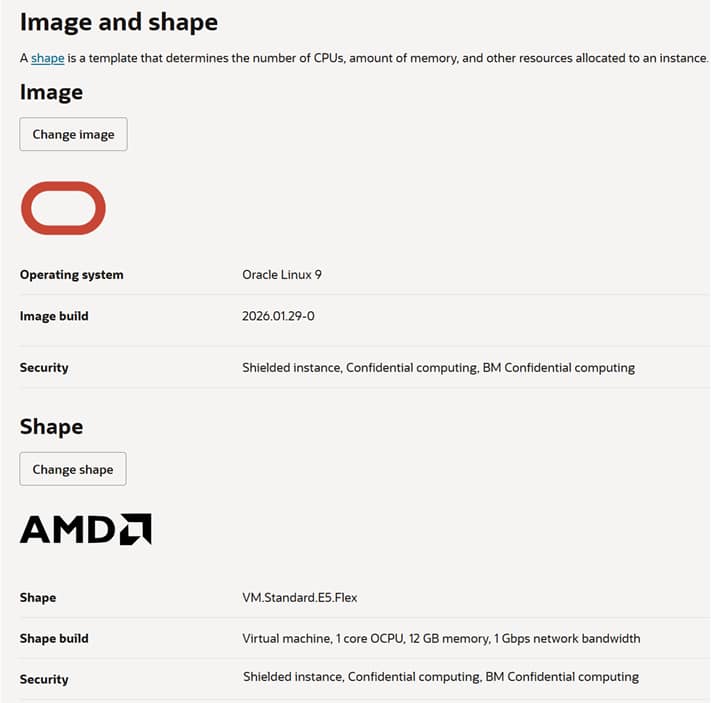
- Toggle Confidential Computing on in the Security setup options.
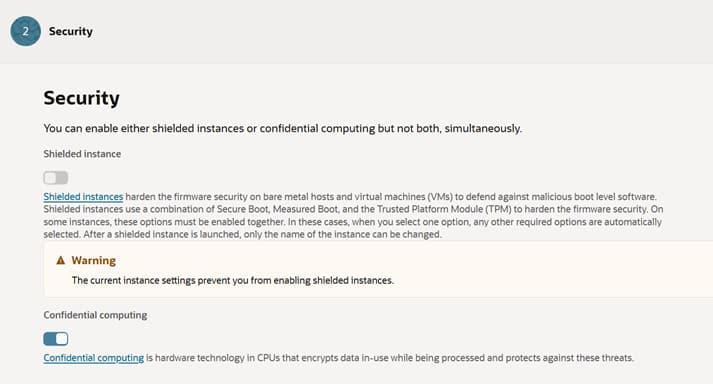
- Launch Instance.
Documentation
Additional details related to this feature can be found at the following links:
- OCI Confidential Computing overview: https://docs.public.content.oci.oraclecloud.com/iaas/Content/Compute/References/confidential_compute.htm
- Shielded Instances limitations (mutual exclusivity): https://docs.oracle.com/en-us/iaas/Content/Compute/References/shielded-instances.htm
- Performance benchmarking reference: https://blogs.oracle.com/cloud-infrastructure/perf-impact-of-confidential-computing-on-oci-vms
- AMD Confidential Computing overview: https://www.amd.com/en/products/processors/server/epyc/confidential-computing.html
- AMD SEV developer page: https://www.amd.com/en/developer/sev.html
- AMD SEV with Secure Nested Paging attestation overview: https://www.amd.com/content/dam/amd/en/documents/developer/lss-snp-attestation.pdf