
The challenge of cloud native cost monitoring
In the past, IT cost metering and chargeback was focused on physical capacity rather than virtual resource usage. Instead of real-time, pay-as-you-go metrics, IT costs were generally handled through capital budgeting and allocated to business units based on estimates or fixed, non-granular allocations. The cloud native era ushered in utility computing and real-time, pay-as-you-go metrics that enabled granular cost management. More recently, the shift from virtual machines to containers introduced a new challenge: how to adapt cost monitoring to meet new resource usage patterns, including further resource subdivision and multi-tenancy.
Cloud service providers, including Oracle Cloud Infrastructure (OCI) offer cost management tools that can be used to track resource consumption at the service level, for example costs associated with Compute virtual machines, but do not have awareness of individual containers deployed through OCI Kubernetes Engine (OKE).
Many enterprises deploy workloads to multi-tenant Kubernetes clusters. This approach involves a single cluster running applications that belong to different teams, departments, or customers. Rather than running many smaller single-tenant clusters, a shift to fewer larger multi-tenant clusters with logical separations between tenants can improve resource utilization, reduce management overheard, and prevent fragmentation. Shared multi-tenant infrastructure comes with a new challenge: how to efficiently manage usage and appropriately attribute and bill costs to each tenant.
Take for example a modern enterprise with many departments making use of GPU accelerated infrastructure for their AI/ML projects. Given the cost and relative scarcity of GPUs, they’ve chosen to consolidate all of their GPUs into one OKE cluster shared across a number of internal tenants to improve resource utilization. It is critical they are able to correctly charge back costs to the respective organizations sharing the infrastructure based on their use. OCI’s cost management tools provide detailed cost data for the overall cluster, but without granular, Kubernetes-level cost allocation for individual resources, or namespaces, which are commonly used to logically separate resources within the same cluster, it is impossible to know which workloads are consuming the most resources or to accurately chargeback to different cost centers.
How does OpenCost solve this need?
OpenCost is an open source cost monitoring project built for Kubernetes. It is used to measure cloud infrastructure and container spend. OpenCost give teams visibility into current and historic cloud service usage with a Kubernetes resource level of granularity and can be used for real-time metering and chargeback. It offers users cost clarity in environments that support multiple applications, teams, and departments and can also provide visibility into cloud costs across multiple providers.
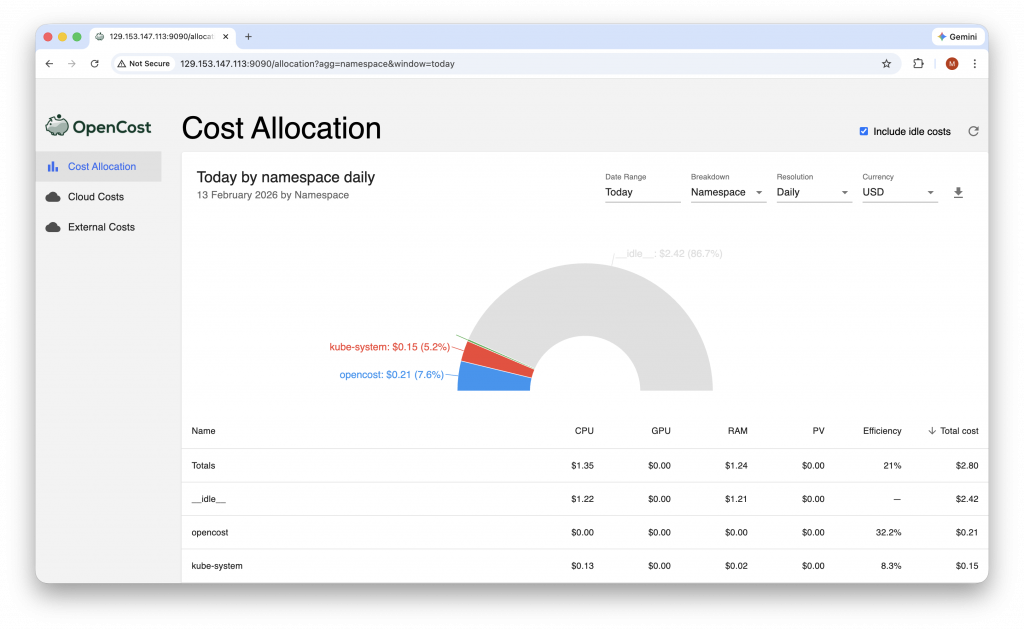
OpenCost provides the crucial connective tissue between Kubernetes and cloud provider costs. OpenCost uses the industry standard open source Prometheus monitoring toolkit to scrape and store metrics related to cloud infrastructure usage. It allows users to breakdown usage by a variety of Kubernetes resource types, including cluster, node, namespace, deployment, pod, and more, to give organizations the ability to appropriately measure and allocate costs. It also captures historical data and offers cost efficiency metrics. OpenCost includes a number of features to interact with collected data:
- The OpenCost UI console interface.
- A queryable OpenCost API.
- A kubectl plugin that provides easy CLI access to Kubernetes cost allocation metrics via the API.
- A Prometheus metric exporter that allows you to write PromQL queries to calculate the cost and efficiency of any Kubernetes concept or to create custom alerts via AlertManager and custom dashboards via Grafana.
- The ability to export cost allocation data in CSV format.
- An OpenCost MCP (Model Context Protocol) server used to provide AI agents with access to cost allocation and asset data through a standardized interface.
OpenCost on OCI
You may install OpenCost on OCI Kubernetes Engine (OKE) clusters or onto Kubernetes on OCI (KOCI) clusters, such as those created using the Cluster API Provider for OCI (CAPOCI). At a high level, to use OpenCost you will need to install Prometheus, create your OpenCost namespace, configure your cluster pricing and cloud costs, and then install OpenCost.
OpenCost will automatically detect OCI as the cloud service provider (CSP) by reading node information from node.spec.providerID. When OCI is detected as the CSP, OpenCost will attempt to retrieve pricing data from the OCI Price List API. No API key is required to retrieve the public pricing data. To import actual, billed costs for your account, enabling visibility into specific discounts, OpenCost offers the option to Configure the Cloud Costs OCI authorizer for your OCI account.
Pre-Requisites
To install OpenCost on an OCI Kubernetes Engine (OKE) cluster, you will need:
- An OKE cluster. See: Creating Kubernetes Clusters.
- Set up Kubernetes tools on your local machine and ensure the kubectl command-line tool has communication with your cluster.
- OCI CLI installed on your local machine. See: install and configure the OCI Command Line Interface (CLI).
- Helm version 3 or above installed.
Installation
For the most up-to-date installation steps, refer to the official OpenCost Installing on Oracle Cloud Infrastructure (OCI) documentation.
1. Install Prometheus
OpenCost requires Prometheus metrics scraping and data storage. Use the following command to install Prometheus in the prometheus-system namespace with default settings for use with OpenCost.
helm install prometheus --repo https://prometheus-community.github.io/helm-charts prometheus \
  --namespace prometheus-system --create-namespace \
  --set prometheus-pushgateway.enabled=false \
  --set alertmanager.enabled=false \
  -f https://raw.githubusercontent.com/opencost/opencost/develop/kubernetes/prometheus/extraScrapeConfigs.yaml
For example:
helm install prometheus --repo https://prometheus-community.github.io/helm-charts prometheus \
--namespace prometheus-system --create-namespace \
--set prometheus-pushgateway.enabled=false \
--set alertmanager.enabled=false \
-f https://raw.githubusercontent.com/opencost/opencost/develop/kubernetes/prometheus/extraScrapeConfigs.yaml
NAME: prometheus
LAST DEPLOYED: Thu Jan 15 17:36:46 2026
NAMESPACE: prometheus-system
STATUS: deployed
REVISION: 1
TEST SUITE: None
NOTES:
The Prometheus server can be accessed via port 80 on the following DNS name from within your cluster:
prometheus-server.prometheus-system.svc.cluster.local
Get the Prometheus server URL by running these commands in the same shell:
export POD_NAME=$(kubectl get pods --namespace prometheus-system -l "app.kubernetes.io/name=prometheus,app.kubernetes.io/instance=prometheus" -o jsonpath="{.items[0].metadata.name}")
kubectl --namespace prometheus-system port-forward $POD_NAME 9090
For more information on running Prometheus, visit:
https://prometheus.io/
If you already have Prometheus installed in your cluster, prefer to use an alternative Prometheus installation method or another compatible technology, please refer to the Prometheus installation page.
2. Create the opencost namespace for your installation:
$ kubectl create namespace opencost
namespace/opencost created
(Optional) If you choose to configure Cloud Costs to important actual, billed costs from your OCI account, you must pass in your OCI API keys.
Use Helm to install OpenCost with the following command:
helm install opencost --repo https://opencost.github.io/opencost-helm-chart opencost \
  --namespace opencost
For example:
helm install opencost --repo https://opencost.github.io/opencost-helm-chart opencost \
--namespace opencost
NAME: opencost
LAST DEPLOYED: Wed Feb 11 15:29:33 2026
NAMESPACE: opencost
STATUS: deployed
REVISION: 1
DESCRIPTION: Install complete
TEST SUITE: None
NOTES:
Thank you for installing the OpenCost Helm Chart!
Your release is named: opencost
To verify that OpenCost is running, execute the following commands:
1. Check the status of the pods:
kubectl get pods -l app.kubernetes.io/instance=opencost -n opencost
2. Access the OpenCost UI:
If the service is only accessible within the cluster, you can use port-forwarding:
export SVC_NAME=opencost
kubectl port-forward svc/$SVC_NAME 9090 -n opencost
Alternatively, you can port-forward directly to the OpenCost pod:
export POD_NAME=$(kubectl get pod -l app.kubernetes.io/instance=opencost -n opencost -o jsonpath="{.items[0].metadata.name}")
kubectl -n opencost port-forward $POD_NAME 9090
For more information, visit the OpenCost documentation:
https://www.opencost.io/docs/
3. To verify OpenCost was installed, run:
kubectl get pods -l app.kubernetes.io/instance=opencost -n opencost
For example:
kubectl get pods -l app.kubernetes.io/instance=opencost -n opencost
NAME                        READY   STATUS    RESTARTS   AGE
opencost-6ffc778dc4-g6w6p   2/2     Running   0          37s
4. To access the OpenCost UI, open a port forward:
# Port-forward to access the OpenCost UI
kubectl port-forward -n opencost service/opencost 9090:9090
# Open in browser
open http://localhost:9090
5. OpenCost exposes a REST API for programmatic access. To query the OpenCost API for cost data:
# Get cost allocation for all namespaces (last 7 days)
curl "http://localhost:9090/allocation/compute?window=7d&aggregate=namespace"
# Get cost by deployment in production namespace
curl "http://localhost:9090/allocation/compute?window=30d&aggregate=deployment&filterNamespaces=production"
# Get cost by Kubernetes label
curl "http://localhost:9090/allocation/compute?window=7d&aggregate=label:team"
Conclusion
Deploying OpenCost to your multi-tenant OKE or Kubernetes on OCI (KOCI) clusters provides Kubernetes-level, and therefore tenant-level, visibility into resource usage and costs. This solution enables platform teams to accurately measure and appropriately allocate costs to tenants based on their resource usage.
For more information:
- OpenCost Documentation
- Overview of OCI Kubernetes Engine (OKE)
- Installing OpenCost on Oracle Cloud Infrastructure (OCI)
- Use the OCI billing and cost management tools to help you manage the cost of OCI services
- Get started with Oracle Cloud Infrastructure today with our Oracle Cloud Free Trial