
Announcing enhancements for OCI Object Storage S3 Compatibility API supporting S3 POST and virtual-hosted style URLs. The improved S3 compatibilities make it easier to integrate a broader range of tools and workflows.
Uploading Objects with S3 POST
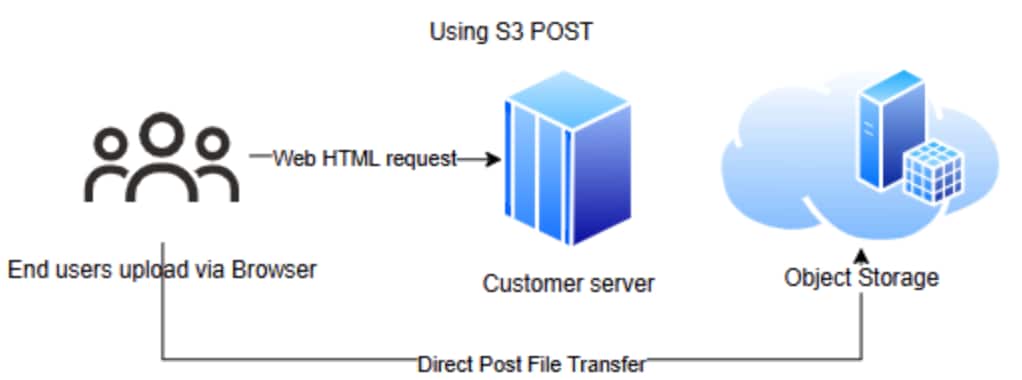
You can now upload objects directly from a browser using an HTML form and a pre-signed POST policy in Object Storage. This method provides fine-grained control over upload parameters, enforces security requirements, and supports key features like server-side encryption and checksum validation.
POST is designed for browser-based uploads via an HTML form and a pre-signed POST policy. Post is an alternative to using PUT. The PUT method is easy to use since fewer variables are available, and everything in the URL itself is encoded with the body containing only the object data. PUT only applies to the resource identified in the URL. POST gives customers more flexibility and the ability to improve security since the policy defines parameters around what can be uploaded.
S3 POST is a method for uploading objects into a bucket that uses an HTTP POST request. The POST policy is a transient JSON object used to validate conditions for the upload (such as file size, prefix, policy expiration, checksum header, etc.). Flexible conditions include a size range of the object to be uploaded or using a variable such as prefix “starts with”. Security is improved because specific conditions can be set; such as the exact time the policy expires to type of object to be uploaded (i.e., an image/png file).
After creating the POST policy, it needs to be signed with an IAM credential with valid permissions to the bucket. Documentation for signature computation can be found here. The policy and the signature are sent to the client. The client then submits a standard HTML form, embedding the policy and signature, to upload files securely without exposing storage credentials.
In summary, S3 POST supports fine-grained controls (file size, path), keeps credentials hidden (improving security), and is useful for web applications where you want to allow end users to upload files directly to storage.
Virtual-hosted style URLs
OCI Object Storage now supports both path-style and virtual-hosted style URL access for buckets. The addition of virtual-hosted style URLs improves our S3 API compatibility and expands integration with third-party tools.
Only newly created buckets using the virtual-hosted endpoint support virtual-hosted style URLs. Many of our customers maintain conformance to AWS S3 because the S3 API is the dominant standard for object storage and is supported by a large ecosystem of SDK’s and third party tools.
OCI still supports path-style URL’s which have the bucket name in the URL path and would look like this:
https://<namespace>.compat.objectstorage.<region>.oci.customer-oci.com/<bucket_name>/<object_nameVirtual-hosted style URLs have the bucket name included as the subdomain and use the virtual host-style compatibility endpoint, and would look like this:
https://<bucket_name>.vhcompat.objectstorage.<region>.oci.customer-oci.com/<object_name>By supporting both path-style and virtual-hosted style, URLs’ compatibility with legacy tools remain while expanding compatibility with tools only supporting virtual-hosted style URLs.
Moving Forward
Expanding S3 compatibility allows customers to use multi-cloud deployments and migrate from other cloud providers with fewer code changes. It also provides more choices for various open-source projects and third-party tools. Moving forward, we will continue to add S3 compatibility features. Get started today with S3 POST uploads and virtual-hosted-style URL’s.