
OCI Policy Analysis is an unofficial tool for Oracle Cloud Infrastructure (OCI) administrators, focused on understanding and managing IAM policies, dynamic groups, and user permissions. By visualizing and analyzing OCI policy statements and identity configurations, the tool empowers tenancy owners to quickly assess access, security exposure, and compliance across all compartments and users.
The tool was written entirely using Python, with OCI’s Python SDK as the main conduit to OCI data, showcasing how easy and satisfying it can be to author a custom tool that fulfills a need. Everything in this tool came from the needs exhibited by customers, internal teams, and anyone tasked with managing OCI Policy as part of their responsibilities. Between getting things done and keeping the cloud secure lies the area in which many of us reside. So, anything that makes it easier and safer to work should be worth a look.
This is a 2 part blog – in this part we’ll cover the end product and how to get started using the tool. Separately, we’ll focus on the development and the journey from simple script to user-friendly tool. I hope it is both useful and inspiring to see how an idea evolves into a side project and ultimately a reusable asset for a wide swath of personas. Enjoy!
All code, documentation, and releases are located within this Github repository: https://github.com/agregory999/oci-policy-analysis
Core Functionality & Features
The tool’s main functionality is around loading all necessary identity data from a tenancy or CIS Compliance extract, then organizing this data internally so that it can be parsed, searched, filtered, and sorted as necessary. All of the functionality listed below relies on the ability to load the data into cohesive set of information. Only when the combined set of all policy statements across all compartments, along with groups, dynamic groups, and user membership, is loaded and parsed, can we begin to see the full picture. With that, it will be easier to answer some of the core questions:
- Who has too much privilege in the wrong place?
- Why doesn’t this service work the way it should?
- What has changed over time?
Here is a summary of the basic features, which are shown in the UI’s tabbed interface.
- Policy Browser: View/search policies in the compartment hierarchy
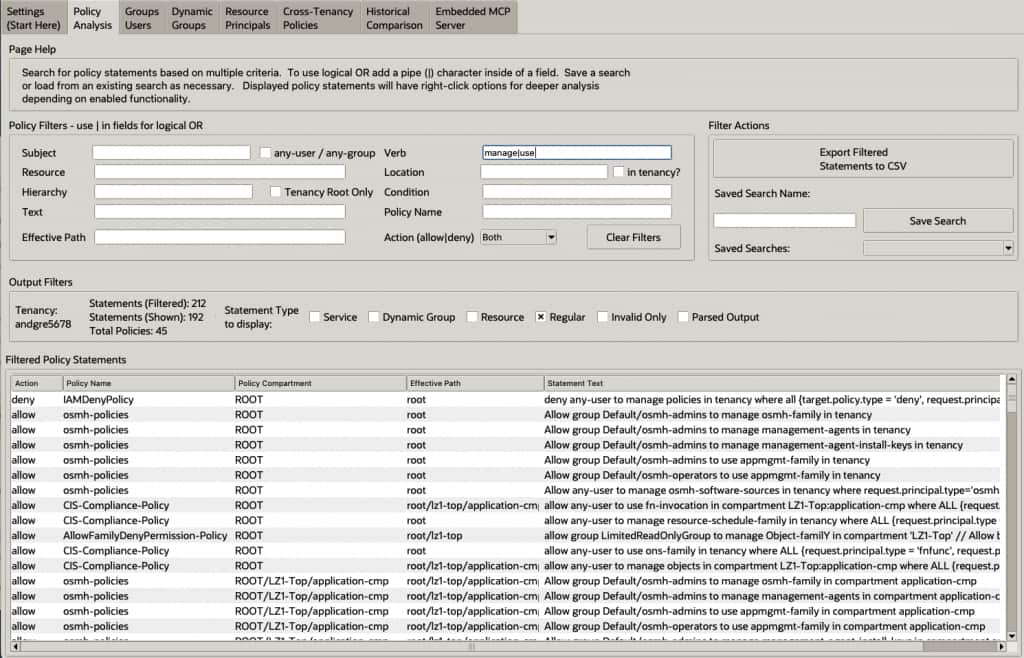
- Policy Analysis: View, filter, and understand parsed IAM policy statements across compartments, seeing subjects, verbs, resources, and conditions.
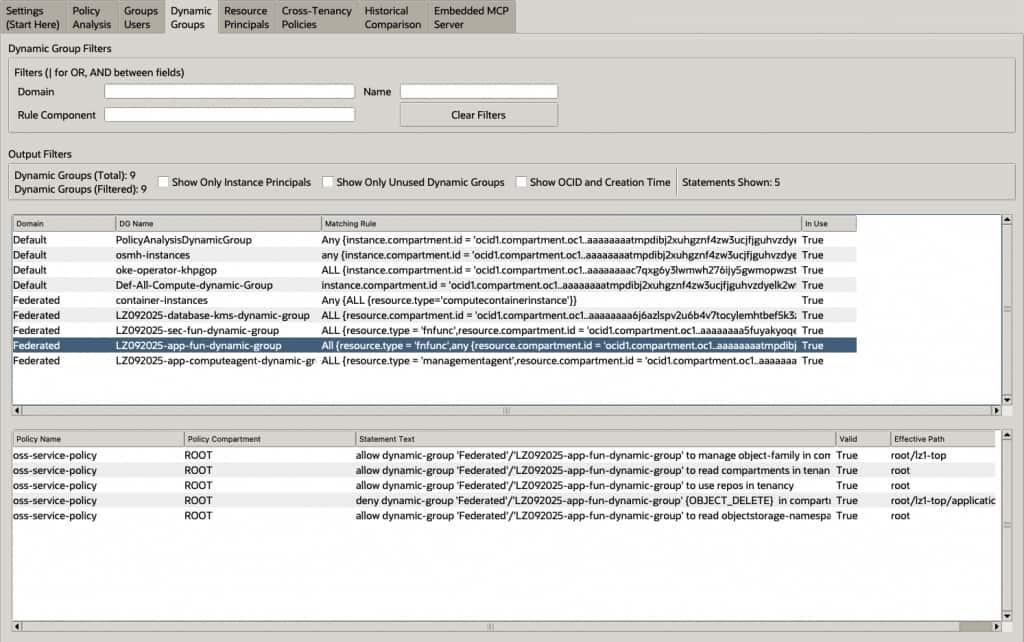
- Dynamic Group Analysis: Display and review matching rules for dynamic groups, and identify unused or misconfigured groups.
- Resource Principal & User Analysis: Explore resource principals and analyze effective permissions for users through group memberships.
- Cross-Tenancy Policies: View Define, Admit, and Endorse policy statements across a tenancy.
- Historical Comparison: Compare current and previous policy sets to detect changes over time.
Screen Shots
There are many tabs within the tool, containing different views of the same information, but to get started, here are a couple screenshots. For example, this is the main policy browser, with filtering shown:
And here is the dynamic group view, showing statements relating to a selected dynamic group.
Additional Functionality
Additionally, the tool has some usability features, designed for greater flexibility and additional insights.
- Caching: Save/load complete policy and identity data locally for offline or remote analysis.
- Export & Import: Export filtered analysis results to CSV or JSON for further review, sharing, or external audit.
- CIS Compliance Script Load: Load Policy and Identity information from Compliance Script output – these scripts are recommended for customers to gain insights around their overall security posture.
- AI Insights: Get generative AI explanations for policy statements to assist with interpretation, highlighting possible risks or misconfigurations.
- Context Help: Each tab contains a help area, where specific messages are displayed about a section or widget on that tab.
Beyond core analysis, OCI Policy Analysis leverages the full downloaded OCI configuration data to generate new insights and intelligence. This rich context powers a set of advanced features—accessible as dedicated tabs or integrations—which automate deeper investigations and provide more actionable visibility than traditional, static reviews.
Advanced Features & Tools:
- OCI API Simulation: Simulate scenarios where an API is called against resources in a specific compartment as a given principal – will those actions be allowed? And what permissions are missing?
- Policy Recommendations: See collected intelligence in a way that suggests remediation actions that could be taken
- MCP Server Integration: Expose your OCI tenancy as an MCP server to answer policy questions from tools such as Claude or VSCode, driven by real tenancy data.
For more information, see the repository documentation.
Getting Started / Using the Tool
There are 2 ways to run the tool – via built executable files, or by building and running the python code directly.
Quick Start (Python via command line):
NOTE: Python 3.12+ is required to run the application from your command line.
python3 -V  # Should be 3.12+
python3 -m venv .venv # Create a virtual environment
source .venv/bin/activate # Activate virtual environment
pip install -e . # Install pre-requisites
python -m oci_policy_analysis.main # Run the UI program
Packaged Executable Releases:
Find these within the Releases section of GitHub, then select the latest (or specific) release and download the platform-specific binary.
- Windows: oci-policy-analysis.exe
- macOS: oci-policy-analysis.app
- (for Linux, run from python as above)
Launch the application and follow the on-screen prompts to load your OCI configuration or authenticate as an instance principal. Once your tenancy data is loaded, core analysis features are accessible via an intuitive tabbed interface.
For detailed documentation or advanced usage—including data caching, exporting, or MCP server integration—see the full documentation.
This post is part 1 of a two-part series on OCI Policy Analysis. Part 2: Strategy and Development Insights –Link to Part 2 here