
Running Nextflow in the cloud improves agility and time-to-results, but cost and completion time can still be dominated by suboptimal instance selection, scheduling friction, and wasted spend when capacity does not match stage demand. OCI addresses this with dynamic resource provisioning, transparent pay-as-you-go pricing, and consistent performance; in our earlier production-grade nf-core/methylseq study, OCI delivered up to 70% lower batch compute cost than another cloud’s dynamic batch service in an apples-to-apples comparison (see: Cut Nextflow costs by 70% with OCI).
Now that GPU acceleration and Arm CPU computing are on the table, you can push optimization further: GPUs can shorten the stages that benefit from acceleration, while Arm CPU capacity can reduce CPU cost further for compatible workloads. In this article, we show how to mix and match x86 CPU, Arm CPU, and GPU in a single Nextflow pipeline on OCI so each stage runs on the best-fit infrastructure and capacity follows demand instead of sitting idle.
In this post we:
- Show how OCI enables heterogeneous compute per stage in Nextflow—mixing x86 CPU, Arm CPU, and GPU capacity in a single pipeline via label-based routing on a demo pipeline.
- Use the pipeline’s resource footprint (task counts, requested CPUs/memory/GPUs, and Nextflow trace/timeline reports) to make the workload’s dynamic nature explicit and to tie it back to cost and time-to-results.
- Show how OCI’s first-class IaC support lets customers treat infrastructure as software: define, version, and automate OCI resources as code to make execution repeatable at scale.
Background: Heterogeneous Nextflow pipelines and OCI infrastructure
Nextflow is a workflow engine widely used in genomics, bioinformatics, and data-intensive AI. A single production pipeline often mixes stages with very different compute profiles, and that heterogeneity is now practical to operationalize on OCI:
- x86 CPU for broad software compatibility and “default path” performance across mature toolchains and containers.
- GPU for parallelizable stages where acceleration reduces wall-clock time (for example, certain alignment, deep learning, and accelerated analytics steps).
- Arm CPU for cost-efficient throughput and high core counts, which can be attractive for highly threaded, CPU-bound stages when your containers and dependencies support Arm.
In real pipelines, resource demand is also dynamic over time. You may see long, time-consuming stages (for example, alignment) where acceleration matters most, followed by bursts of short fanout work, followed by memory- or I/O-bound stages where CPU is not the limiting factor.
OCI is a good fit for this pattern because it lets you map each stage to the best-fit compute (x86, Arm, GPU) with consistent infrastructure performance and transparent pay-as-you-go pricing. The goal is a programmable, stage-aware execution model where capacity follows demand and customers optimize both cost and time-to-results.
Technical architecture on OCI
This blog uses an Infrastructure as Code (IaC) execution model to make heterogeneous compute practical: each Nextflow stage is routed to best-fit OCI compute (x86 CPU, Arm CPU, or GPU) and provisioned on demand for the lifetime of the task, with OCI Object Storage used as the durable backend for work directories and artifacts.
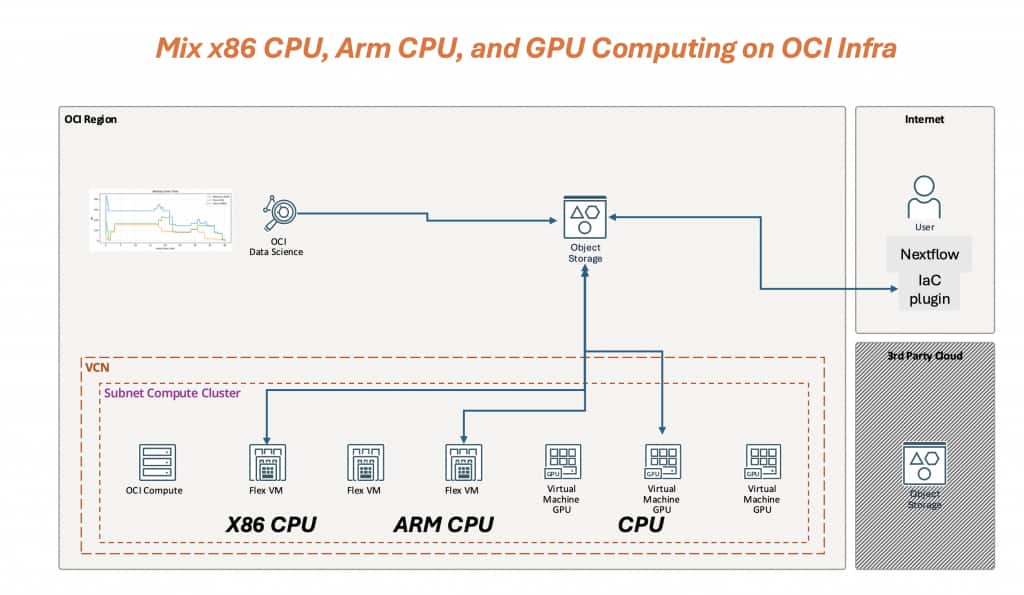
Figure 1 – Mix x86 CPU, Arm CPU, and GPU computing on OCI: a Nextflow IaC executor provisions per-stage OCI compute inside a VCN/subnet, while OCI Object Storage provides a durable work/artifact layer shared by all stages.
Figure 1 shows three key ideas:
- Dynamic: capacity follows the pipeline timeline. CPU stages land on x86 or Arm Flex VMs; GPU capacity appears only when GPU stages run.
- Programmable (IaC): the mapping from process labels → OCI shapes/images/network/storage is defined as code, versioned, and automated.
- Heterogeneous-native: x86 CPU, Arm CPU, and GPU are first-class options for different stages in the same workflow, without splitting the pipeline into separate runs.
Configuration / how-to
1) Enable Arm + GPU with label routing (config)
To configure heterogeneous computing on OCI, route stages using Nextflow selectors—most commonly withLabel (and optionally withName)—and pin OCI shape and image per stage. In the config below:
- armcpu stages run on Arm by specifying ext.shape + ext.image.
- gpu stages request a GPU shape and GPU allocation.
process {
  executor = 'iac'
  withLabel: gpu {
      cpus = 15
      memory = '240 GB'
      accelerator = [ type: 'VM.GPU.A10.1', request: 1 ]
      containerOptions = '--gpus all'
  }

  withLabel: armcpu {
      cpus = 4
      memory = '8 GB'
      ext.shape = '1 VM.Standard.A1.Flex'
      ext.image = 'ocid1.image.oc1.ap-singapore-1.aaaaaaaasnihixxx'
  }
}
In practice, x86 CPU stages simply inherit the defaults in your IaC settings (for example, defaultShape and image), while Arm and GPU stages override what they need.
2) Demo pipeline: x86 FASTP → 20x Arm CPU_FANOUT_STAGE → GPU GPU_STAGE
The demo pipeline below is intentionally small but shows the full heterogeneous flow at a glance:
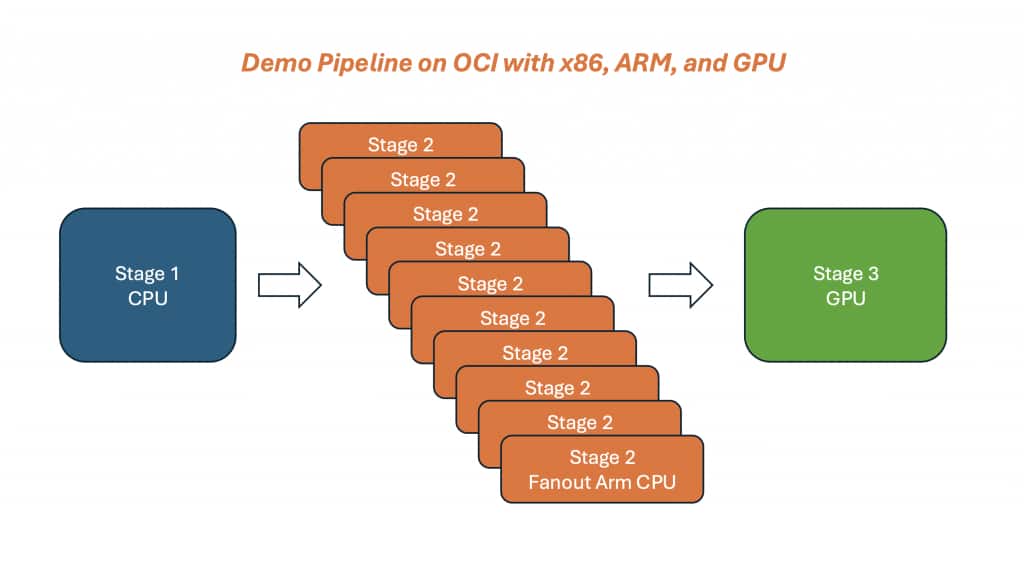
Figure 2 – A single Nextflow run mixing x86 CPU (QC), Arm CPU fanout (20 tasks), and a GPU consolidation stage (2 batches). Stage routing is driven by labels.
- FASTP uses label ‘cpu’ (x86 by default for compatibility with common bioinformatics containers).
- CPU_FANOUT_STAGE uses label ‘armcpu’ and fans out into 20 short tasks to emulate bursty, threaded throughput work.
- GPU_STAGE uses label ‘gpu’ and consolidates the fanout outputs into two GPU batches.
The key takeaway is that stage placement is driven by labels: x86 for compatibility, Arm for cost-efficient throughput, and GPU only where acceleration pays off.
Results and figures
This demo run is small, but it already shows the two behaviors we care about on OCI: heterogeneous compute per stage and dynamic, IaC-driven provisioning that follows the pipeline timeline.
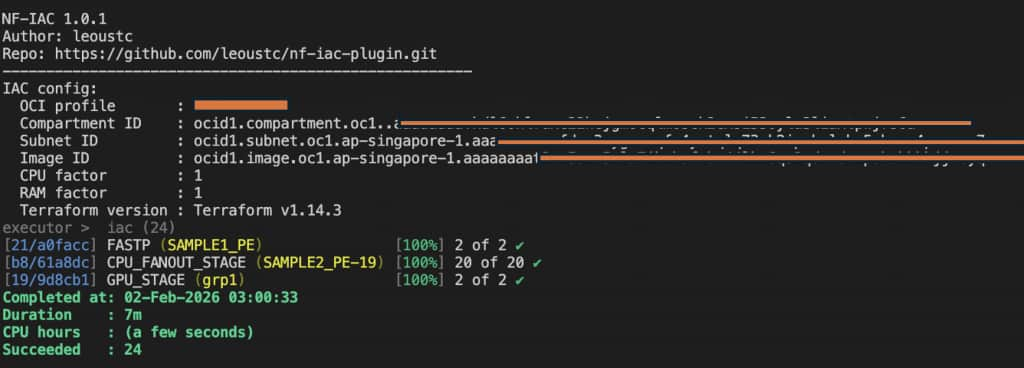
Figure 3 – The Nextflow run completes successfully with the IaC executor: x86 QC tasks, an Arm fanout burst, and two GPU tasks. This is the “single pipeline, mixed infrastructure” outcome we want.
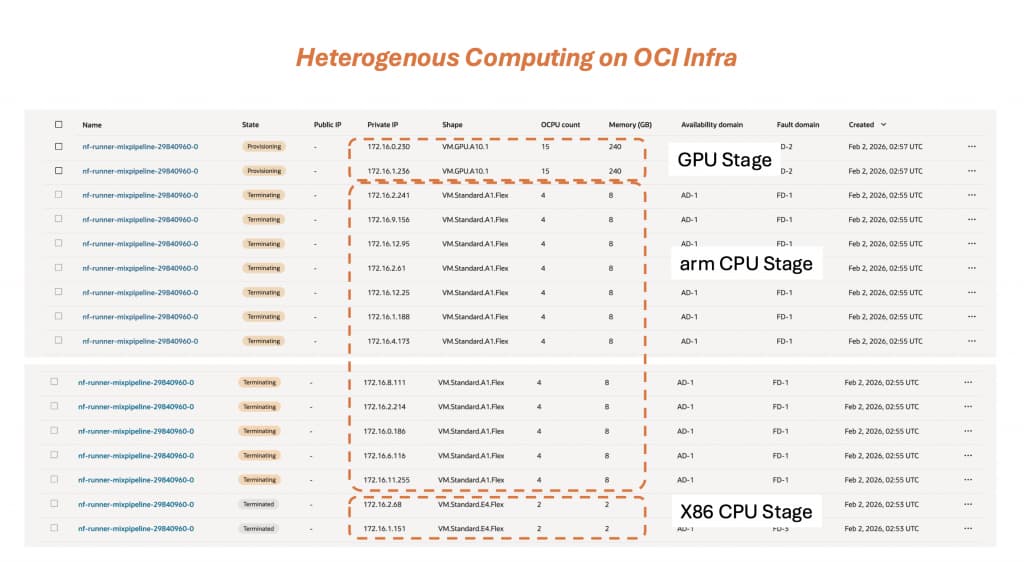
Figure 4 – OCI Console evidence of heterogeneous computing in one run: an x86 CPU stage, a burst of Arm CPU workers, and GPU workers sized for the accelerated stage. Instances appear and terminate as stages complete (IaC-driven lifecycle).
From the run telemetry, we can also visualize how requested resources evolve over time (1-minute bins). The plots below are step-shaped on purpose: each “step” corresponds to a stage that uses a different compute profile.
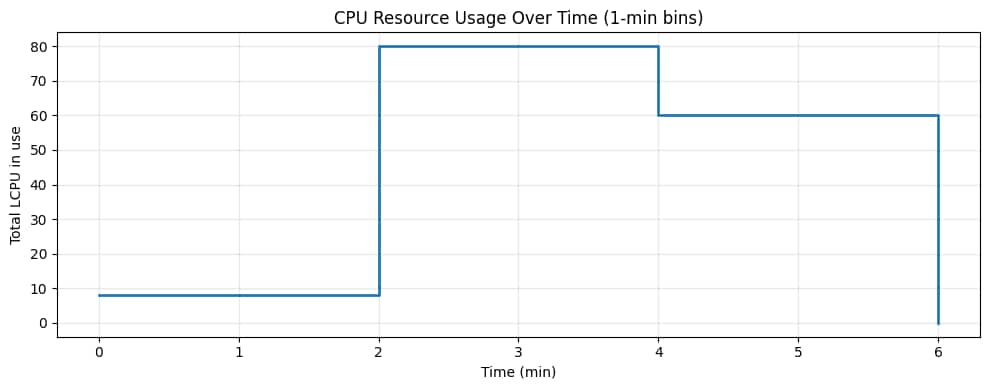
Figure 5 – CPU over time. The baseline x86 QC stage is small, the Arm fanout stage spikes CPU with many parallel tasks, and the GPU stage consumes fewer but larger CPU allocations to feed accelerated work.
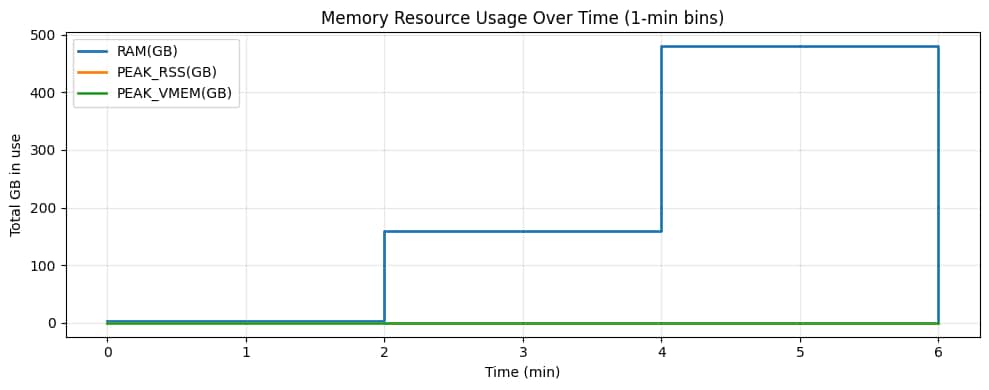
Figure 6 – Memory over time. The Arm fanout phase increases aggregate memory (many small workers), then the GPU phase jumps to a higher memory plateau (fewer, larger GPU workers).
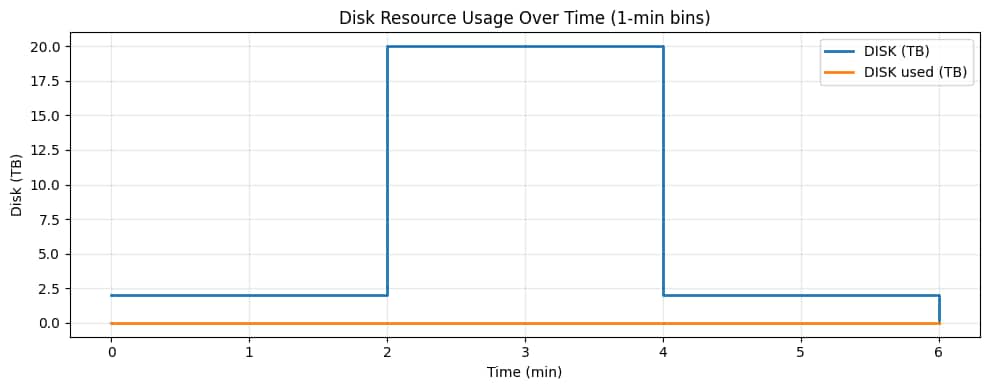
Figure 7 – Disk over time. Disk is allocated per worker VM, so the fanout burst increases total allocated disk even if actual data written is small. This is the “dynamic infrastructure as code” signal: storage and compute capacity scale with the stage, then release when the stage completes.
Conclusion
This PoC demonstrates that OCI infrastructure can run a single Nextflow pipeline with truly heterogeneous compute—mixing x86 CPU, Arm CPU, and GPU stages—and provisioning the right resources dynamically as the workflow advances (Figures 3–7). Instead of forcing one “best effort” cluster shape across the entire run, each stage lands on the best-fit compute profile, and capacity is created and released automatically.
Three takeaways:
- Heterogeneous computing, natively: Nextflow stages can target x86 for compatibility, Arm for cost-efficient throughput, and GPUs for accelerated stages in one continuous run.
- Infrastructure as Code for flexibility: customers can program OCI as they planned—pinning shapes and images per stage, versioning the configuration, and making execution repeatable.
- Optimize cost and completion time: with a mixed pipeline, you can reduce waste by avoiding always-on GPUs and also accelerate time-to-results when urgent stages benefit from GPU acceleration.