
Deploying Essbase on OCI Marketplace requires setting up the right access controls on your tenancy—both for the user deploying the stack and for the stack itself. Typically, this means writing policy statements for users or groups, and creating a dynamic group with its own set of policy statements for the deployed resources.
Getting these policies right can be tedious and error-prone, especially for teams new to OCI. That’s why we’re introducing Policy Manager in Essbase 21.8.1—a one-click solution that automatically generates the dynamic group and policy statements your Essbase deployment needs.
What is Policy Manager?
Policy Manager is a new, optional workflow available on the Essbase OCI Marketplace Create Stack page starting with version 21.8.1.0.1. It’s designed for OCI tenancy administrators who want a faster, less error-prone way to set up the deployment prerequisites.
When you run Policy Manager, it automatically creates:
- The dynamic group required for the Essbase deployment, with the correct matching rules for your target compartment.
- The policy statements that grant members of that dynamic group the access rights they need—covering compute, networking, database, storage, and related OCI services.
That’s it. Policy Manager focuses on the dynamic group and its associated policies. It does not create user groups or user-specific policy statements—those remain the responsibility of your tenancy administrator.
Who can run Policy Manager?
Only tenancy-level administrators can run Policy Manager. Creating dynamic groups and tenancy-level policies requires elevated privileges, so if a non-admin user attempts to run this workflow, the job will fail. Make sure the user executing the stack has the necessary administrator rights on the tenancy before proceeding.
How to run Essbase Policy Manager
The recommended workflow is straightforward: run Policy Manager first as a separate job, review the generated policies, and then launch a new Create Stack job to deploy Essbase.
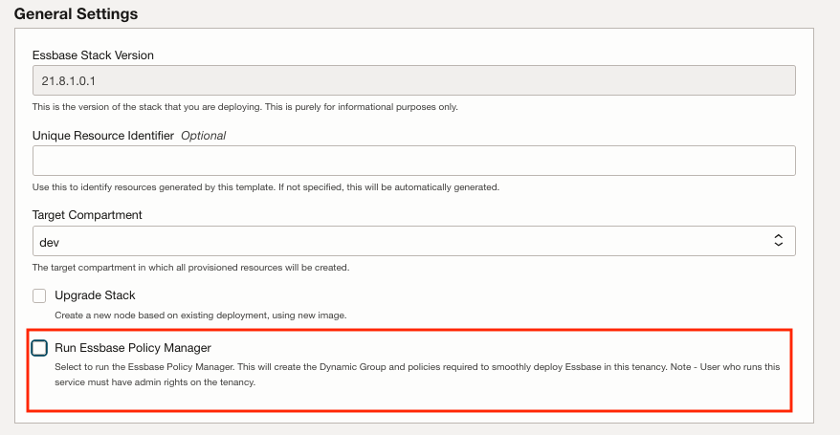
- On the Create Stack page (from the Marketplace Essbase listing), under General Settings, select Run Essbase Policy Manager.
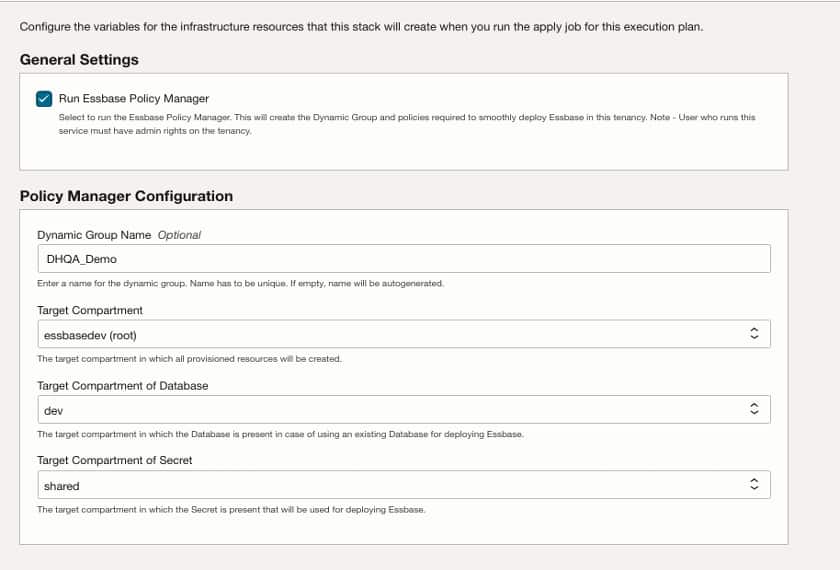
- (Optional) Enter a unique Dynamic Group Name, or leave it blank to auto-generate one.
- Select the Target Compartment where resources will be provisioned.
- Select the Target Compartment of Database (if using an existing database).
- Select the Target Compartment of Secret (where the Essbase deployment secret is stored).
- Click Next to review your configuration.
- Select Run apply and click Save changes.
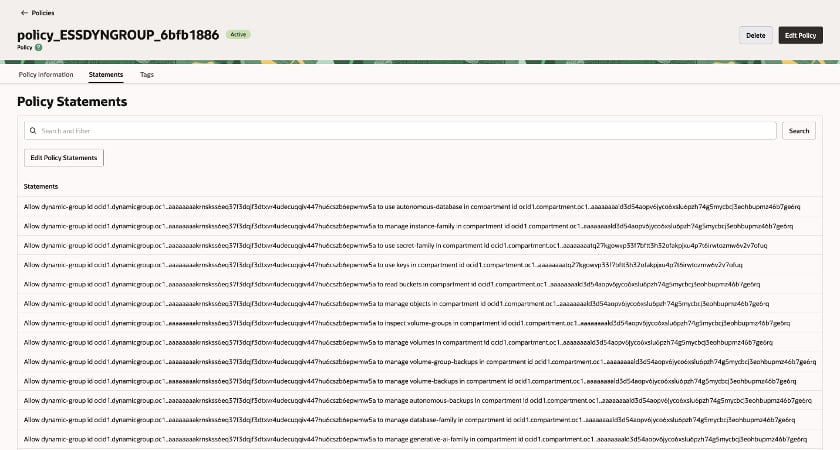
Once the job completes, Policy Manager will have created the required dynamic group and a policy containing all the necessary statements for your Essbase deployment.
Important things to know
Before you get started, keep these points in mind:
- Run Policy Manager as a separate job. After it completes, launch a new Marketplace Create Stack job to deploy Essbase. Do not edit the same stack to choose other workflows—doing so will destroy the policies that were just created.
- Review and customize. The generated policies cover the standard deployment requirements. You can edit them to fine-tune granularity or adjust permission levels for your organization’s governance model.
- User-level policies are not included. Policy Manager handles the dynamic group and its policies. Setting up user groups and user-group-specific policies is still a manual step for your tenancy administrator.
- It’s a one-time setup. Policy Manager is designed to run once to establish the deployment prerequisites. You don’t need to run it again for subsequent Essbase deployments in the same tenancy, unless your compartment structure changes.
Get started
Policy Manager is available now in Essbase 21.8.1.0.1 on OCI Marketplace. To learn more, see the Essbase Policy Manager documentation.
If you’re deploying Essbase on OCI for the first time, start with the Essbase Stack Deployment guide for end-to-end instructions on getting up and running.