

Part of Oracle JSON Insights, we are sharing how to add search to your applications. Oracle AI Database enables search capabilities through various APIs. In a previous post (read it here), we covered the wide ranging topic of search on JSON Collections via the Mongo API.
In this post I dive into the same search examples, but through SQL an PL/SQL APIs. Same rich capabilities, same database, just using a different API.
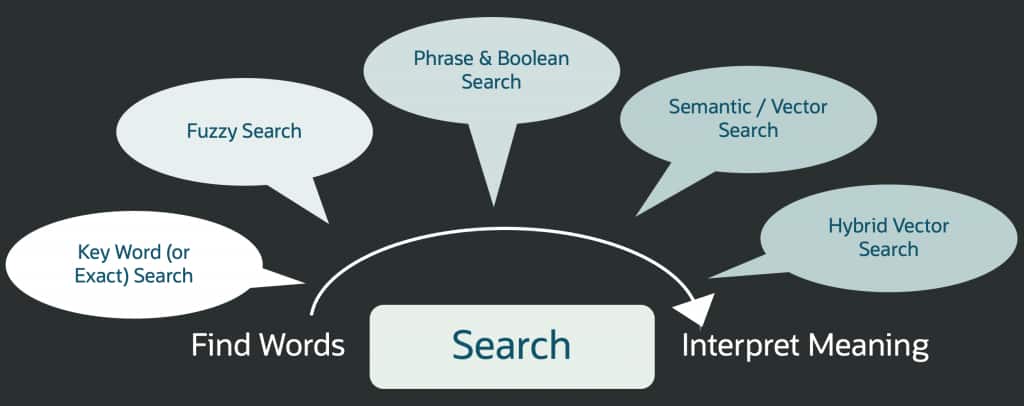
We will start with keyword search, move into vector search, and then finish with hybrid vector search, because that is where things start to feel a bit more like how people actually search.
Setting up the Environment
We will work with the movies dataset. This is the same dataset that you may have already loaded for the Mongo API search example.
-- create and load movie json collection from a public bucket on object storage

begin
dbms_cloud.copy_collection(
    collection_name => 'MOVIES',
    file_uri_list   => 'https://objectstorage.us-ashburn-1.oraclecloud.com/n/c4u04/b/moviestream_landing/o/movie/*.json',
    format          => '{ignoreblanklines:true}'
);
end;
/
Next let’s load a vector embedding model that we will use to generate our vectors.
-- Load an ONNX model of choice from Oracle Object Storage into your database.
-- Replace the URI with your model location.

BEGIN
  DBMS_VECTOR.LOAD_ONNX_MODEL_CLOUD(
    model_name => 'MULTILINGUAL_E5_LARGE',
    credential => NULL,
    uri        => '<object_store_url>/multilingual_e5_large.onnx'
  );
END;
/
Now that the embedding model is loaded, let’s use it to generate a vector embedding from the summary field of each JSON document and store that vector in the collection at $.summary_embedding.
Generating embeddings can take time and use a lot of database resources, especially when updating many rows. You can add the /*+ PARALLEL */ hint to the UPDATE statement to let Oracle process more rows at the same time.
-- Populate the vector column from the movie summary.

UPDATE MOVIES
  SET data =
    JSON_TRANSFORM(
      data,
      SET '$.summary_embedding' =
        to_vector(VECTOR_EMBEDDING(
          MULTILINGUAL_E5_LARGE
          USING JSON_VALUE(data, '$.summary' RETURNING VARCHAR2(32767) null on error) AS data
        )));

COMMIT;
Indexes
Each type of search typically requires an appropriate index to facilitate the search. In our example we use a single index for keyword search and a single index for the vector searches. Later on in the article we show an example of using a single Hybrid Vector Index.
For the keyword search example, we create a search index named movies_json_search_idx with dynamic mappings so that all fields can be indexed automatically. This gives us a simple way to support fast keyword search.
-- Create a JSON SEARCH index on the MOVIES collection
-- This gives us full-text search with JSON_TEXTCONTAINS.

CREATE SEARCH INDEX movies_json_search_idx
ON movies (data)
FOR JSON;

-- Optional, more targeted title-only version if you only need title search:

CREATE SEARCH INDEX movies_title_search_idx
ON movies (data)
FOR JSON PARAMETERS ('SEARCH_ON TEXT INCLUDE ($.title)');
For vector search, we create a function-based HNSW index. HNSW is Oracle’s in-memory, graph-based vector index designed for fast approximate nearest-neighbor search. The function-based form lets us build that graph from an expression rather than requiring a separate VECTOR column.
In our case, the expression extracts the embedding directly from the JSON document, and Oracle stores the resulting vectors in the HNSW index. This lets us keep the source data naturally in JSON while still getting the low-latency nearest-neighbor search characteristics of HNSW. Oracle automatically maintains the index as the underlying data changes.
-- Create a vector index
-- HNSW function-based vector index over $.summary_embedding COSINE distance.

CREATE VECTOR INDEX summary_vec_idx
ON MOVIES(json_value(data, '$.summary_embedding' returning vector))
ORGANIZATION INMEMORY NEIGHBOR GRAPH
DISTANCE COSINE
WITH TARGET ACCURACY 90
online parallel 16;
Once the indexes are created, you can check the text/search index metadata via catalogue views. The exact columns you look at may vary depending on what you want to verify, but this is a simple starting point.
-- Check Oracle Text / search indexes

SELECT idx_name,
       idx_sync_type,
       idx_maintenance_type
FROM   ctx_user_indexes
WHERE  idx_name IN ('MOVIES_JSON_SEARCH_IDX');

-- Check vector indexes

SELECT index_name,
       index_type,
       status
FROM   user_indexes
WHERE  index_name IN ('SUMMARY_VEC_IDX');
Keyword Searches – Matching Words
We start with the simplest case. Keyword search does well when the user knows a title fragment or an obvious keyword. Here we use “avengers”.
--Keyword search for "avengers"

SELECT JSON_VALUE(data, '$.title' RETURNING VARCHAR2(200)) AS title,
       JSON_VALUE(data, '$.year'  RETURNING NUMBER)        AS year
FROM   movies
WHERE  JSON_TEXTCONTAINS(data, '$.title', 'avengers', 1)
ORDER  BY SCORE(1) DESC;
Sample Output
TITLE                         YEAR
-----------------------------  ----
Avengers: Infinity War         2018
Avengers: Endgame              2019
Avengers: Age of Ultron        2015
The Avengers                   2012
Next up, the ask contains multiple words in the title, leading to a multi-term search request. With Oracle Text query syntax we can make that expression explicit.
--Multi-term title search

SELECT JSON_VALUE(data, '$.title' RETURNING VARCHAR2(200)) AS title,
       JSON_VALUE(data, '$.year'  RETURNING NUMBER)        AS year
FROM   movies
WHERE  JSON_TEXTCONTAINS(data, '$.title', 'avengers ACCUM endgame', 2)
ORDER  BY SCORE(2) DESC
FETCH FIRST 3 ROWS ONLY;
Sample output
TITLE                         YEAR
-----------------------------  ----
Avengers: Infinity War         2018
Avengers: Endgame              2019
Avengers: Age of Ultron        2015
To better control the results, conditions can be added into the search query. In this case we are looking to add a bit of leeway so users get a result with some of the terms. Here the request is that any of the terms should be present in the title.
--Any-term title search

SELECT JSON_VALUE(data, '$.title' RETURNING VARCHAR2(200)) AS title,
       JSON_VALUE(data, '$.year'  RETURNING NUMBER)        AS year
FROM   movies
WHERE  JSON_TEXTCONTAINS(data, '$.title', 'avengers OR captain', 3)
ORDER  BY SCORE(3) DESC
FETCH FIRST 5 ROWS ONLY;
Sample output
TITLE                                      YEAR
------------------------------------------  ----
Captain Marvel                              2019
Captain America: The Winter Soldier         2014
Captain Mike Across America                 2007
Captain America: Civil War                  2016
Avengers: Infinity War                      2018
So, is it not possible to get looser matching? How does search handle typos, close matches, and that inevitable moment when someone types “indeana jons”? Easy, use fuzzy text search. In Oracle Text syntax, the question mark prefix (“?”) asks Oracle Text to expand the term to fuzzy matches. You could also type “fuzzy” explicitly instead of “?”.
--Fuzzy title search using '?'

SELECT JSON_VALUE(data, '$.title' RETURNING VARCHAR2(200)) AS title,
       JSON_VALUE(data, '$.year'  RETURNING NUMBER)        AS year
FROM   movies
WHERE  JSON_TEXTCONTAINS(data, '$.title', '?indeana AND ?jons', 4)
ORDER  BY SCORE(4) DESC;

--Fuzzy title search using 'fuzzy'

SELECT JSON_VALUE(data, '$.title' RETURNING VARCHAR2(200)) AS title,
       JSON_VALUE(data, '$.year'  RETURNING NUMBER)        AS year
FROM   movies
WHERE  JSON_TEXTCONTAINS(data, '$.title', 'fuzzy(indeana) AND fuzzy(jons)', 4)
ORDER  BY SCORE(4) DESC;
Sample output
TITLE YEAR
------------------------------------------------- ----
Indiana Jones and the Last Crusade 1989
Indiana Jones and the Temple of Doom 1984
Indiana Jones and the Kingdom of the Crystal Skull 2008
And this is the thing to take away from the keyword section: fuzzy keyword search is still keyword search. It helps with spelling and close matches, but it does not suddenly understand the meaning of a sentence. It can also produce a bigger result set than you want if you make it too loose. Good to solve a lot of requirements, but not the whole search problem.
Semantic Searches (meaning or intent)
This is where embeddings make a real difference. Instead of checking whether the query words appear in the movie title or summary, we compare the meaning of the query with the meaning of the summary.
For each movie, $.summary_embedding stores the embedding generated from the movie summary inside the JSON document. At query time, SQL generates an embedding for the user input and compares it with the stored embeddings using VECTOR_DISTANCE. Because we created a function-based HNSW index on $.summary_embedding, the examples use approximate nearest-neighbor search to traverse the HNSW graph efficiently.
-- Semantic search query 1

SELECT JSON_VALUE(m.data, '$.title'
                  RETURNING VARCHAR2(200)) AS title,
       JSON_VALUE(m.data, '$.year'
                  RETURNING NUMBER) AS year,
       JSON_QUERY(m.data, '$.genre'
                  RETURNING VARCHAR2(1000)) AS genre,
       JSON_VALUE(m.data, '$.main_subject'
                  RETURNING VARCHAR2(200) NULL ON ERROR) AS main_subject
FROM movies m
ORDER BY VECTOR_DISTANCE(
           JSON_VALUE(
             m.data,
             '$.summary_embedding'
             RETURNING VECTOR
           ),
           VECTOR_EMBEDDING(
             MULTILINGUAL_E5_LARGE
             USING 'a team of heroes working together to protect others' AS data
           ),
           COSINE
         )
FETCH FIRST 5 ROWS ONLY
WITH TARGET ACCURACY 90;
Sample output
{"title":"Saving Private Ryan","year":1998,"genre":["War","Drama","Action"],"main_subject":"Invasion of Normandy"}
{"title":"Avengers: Infinity War","year":2018,"genre":["Action","Sci-Fi","Adventure"],"main_subject":"genocide"}
{"title":"Avengers: Endgame","year":2019,"genre":["Action","Adventure"],"main_subject":null}
{"title":"Suicide Squad","year":2016,"genre":["Sci-Fi","Action","Adventure","Crime","Fantasy"],"main_subject":null}
{"title":"The Avengers","year":2012,"genre":["Action","Sci-Fi","Adventure"],"main_subject":"alien invasion"}
Now we are no longer depending on literal overlap between the query and the text. We are retrieving movies whose summaries are semantically similar to the user intent. This is also where you start seeing why vector search can be powerful and, occasionally, a little surprising. “Saving Private Ryan” is not an Avengers movie, but the summary can still live near the idea of a team protecting others.
Another Example
The query is: “an ordinary person rising to the occasion and becoming a hero.” Again, SQL generates the query embedding and uses the vector index.
-- Semantic search query 2

SELECT JSON_VALUE(m.data, '$.title' RETURNING VARCHAR2(200)) AS title,
       JSON_VALUE(m.data, '$.year' RETURNING NUMBER) AS year,
       JSON_QUERY(m.data, '$.genre' RETURNING VARCHAR2(1000)) AS genre,
       JSON_VALUE(m.data, '$.main_subject'
                  RETURNING VARCHAR2(200) NULL ON ERROR) AS main_subject
FROM movies m
ORDER BY VECTOR_DISTANCE(
           JSON_VALUE(
             m.data,
             '$.summary_embedding'
             RETURNING VECTOR
           ),
           VECTOR_EMBEDDING(
             MULTILINGUAL_E5_LARGE
             USING 'an ordinary person rising to the occasion and becoming a hero' AS data
           ),
           COSINE
         )
FETCH FIRST 5 ROWS ONLY
WITH TARGET ACCURACY 90;
Sample output
{"title":"The Hero","year":2017,"genre":["Comedy"],"main_subject":null}
{"title":"No Ordinary Hero","year":2013,"genre":["Comedy","Drama"],"main_subject":null}
{"title":"Just Say Hi","year":2013,"genre":["Unknown"],"main_subject":null}
{"title":"6 Below: Miracle on the Mountain","year":2017,"genre":["Thriller","Drama","Biography","Adventure"],"main_subject":null}
{"title":"Being Elmo: A Puppeteer's Journey","year":2011,"genre":["Documentary"],"main_subject":null}
Semantic Search with Filter
Semantic search gives us the right neighborhood, and the filter narrows it down. The query below first retrieves the top 10 vector matches and then applies a genre filter.
-- Vector search, then JSON genre filter

WITH nearest AS (
  SELECT m.data
  FROM movies m
  ORDER BY VECTOR_DISTANCE(
             JSON_VALUE(
               m.data,
               '$.summary_embedding'
               RETURNING VECTOR
             ),
             VECTOR_EMBEDDING(
               MULTILINGUAL_E5_LARGE
               USING 'a team of heroes working together to protect others' AS data
             ),
             COSINE
           )
  FETCH FIRST 10 ROWS ONLY
  WITH TARGET ACCURACY 90
)
SELECT JSON_VALUE(n.data, '$.title' RETURNING VARCHAR2(200)) AS title,
       JSON_VALUE(n.data, '$.year' RETURNING NUMBER) AS year,
       JSON_QUERY(n.data, '$.genre' RETURNING VARCHAR2(1000)) AS genre
FROM nearest n
WHERE EXISTS (
  SELECT 1
  FROM JSON_TABLE(
         n.data,
         '$.genre[*]'
         COLUMNS genre VARCHAR2(30) PATH '$'
       ) g
  WHERE g.genre IN ('Action', 'Adventure', 'Sci-Fi', 'Drama')
);
And this produces the following search results:
Sample output
{"title":"Saving Private Ryan","year":1998,"genre":["War","Drama","Action"]}
{"title":"Avengers: Infinity War","year":2018,"genre":["Action","Sci-Fi","Adventure"]}
{"title":"Avengers: Endgame","year":2019,"genre":["Action","Adventure"]}
{"title":"Suicide Squad","year":2016,"genre":["Sci-Fi","Action","Adventure","Crime","Fantasy"]}
{"title":"The Avengers","year":2012,"genre":["Action","Sci-Fi","Adventure"]}
{"title":"6 Below: Miracle on the Mountain","year":2017,"genre":["Thriller","Drama","Biography","Adventure"]}
{"title":"I Am Legend","year":2007,"genre":["Fantasy","Thriller","Drama","Action","Horror"]}
Sort By Year
We can also sort the semantic results by year after retrieval. This is useful when the vector search finds the candidate set, but the application wants a time-based ordering on top.
-- Vector search, then sort by year

WITH nearest AS (
  SELECT m.data
  FROM movies m
  ORDER BY VECTOR_DISTANCE(
             JSON_VALUE(
               m.data,
               '$.summary_embedding'
               RETURNING VECTOR
             ),
             VECTOR_EMBEDDING(
               MULTILINGUAL_E5_LARGE
               USING 'a team of heroes working together to protect others' AS data
             ),
             COSINE
           )
  FETCH FIRST 5 ROWS ONLY
  WITH TARGET ACCURACY 90
)
SELECT JSON_VALUE(data, '$.title' RETURNING VARCHAR2(200)) AS title,
       JSON_VALUE(data, '$.year' RETURNING NUMBER) AS year,
       JSON_QUERY(data, '$.genre' RETURNING VARCHAR2(1000)) AS genre
FROM nearest
ORDER BY year;
And these are the search results that we get:
Sample output
{"title":"Saving Private Ryan","year":1998,"genre":["War","Drama","Action"]}
{"title":"The Avengers","year":2012,"genre":["Action","Sci-Fi","Adventure"]}
{"title":"Suicide Squad","year":2016,"genre":["Sci-Fi","Action","Adventure","Crime","Fantasy"]}
{"title":"Avengers: Infinity War","year":2018,"genre":["Action","Sci-Fi","Adventure"]}
{"title":"Avengers: Endgame","year":2019,"genre":["Action","Adventure"]}
Union Search
Finally, we can combine text search and vector search into one result set. This is not yet the native hybrid vector index. It is just SQL doing what SQL does well: composing query blocks. We label each row by source so the application can see whether the match came from keyword search or vector search.
-- Text results UNION ALL vector results

WITH text_results AS (
  SELECT JSON_VALUE(data, '$.title' RETURNING VARCHAR2(200)) AS title,
         JSON_VALUE(data, '$.year'  RETURNING NUMBER)        AS year,
         'text' AS source
  FROM   movies
  WHERE  JSON_TEXTCONTAINS(data, '$.title', 'avengers', 1)
),
vector_results AS (
  SELECT JSON_VALUE(m.data, '$.title' RETURNING VARCHAR2(200)) AS title,
         JSON_VALUE(m.data, '$.year'  RETURNING NUMBER)        AS year,
         'vector' AS source
  FROM   movies m
  ORDER BY VECTOR_DISTANCE(
             JSON_VALUE(
               m.data,
               '$.summary_embedding'
               RETURNING VECTOR
             ),
             VECTOR_EMBEDDING(
               MULTILINGUAL_E5_LARGE
               USING 'a team of heroes working together to protect others' AS data
             ),
             COSINE
           )
  FETCH FIRST 3 ROWS ONLY
  WITH TARGET ACCURACY 90
)
SELECT title, year, source
FROM   text_results
UNION ALL
SELECT title, year, source
FROM   vector_results
ORDER BY year, source DESC, title
fetch first 3 ROWS ONLY;
Sample output
{"title":"Saving Private Ryan","year":1998,"source":"vector"}
{"title":"The Avengers","year":2012,"source":"text"}
{"title":"Avengers: Age of Ultron","year":2015,"source":"text"}
{"title":"Avengers: Infinity War","year":2018,"source":"vector"}
{"title":"Avengers: Infinity War","year":2018,"source":"text"}
{"title":"Avengers: Endgame","year":2019,"source":"vector"}
{"title":"Avengers: Endgame","year":2019,"source":"text"}
Hybrid Vector Index
So far, we combined keyword and vector search manually. That is useful, and sometimes it is exactly what you want. But with a hybrid vector index, both sides are handled natively by the database. The index combines full-text search structures and vector search structures, and DBMS_HYBRID_VECTOR.SEARCH gives us one query API.
For this example we will be using the same movie collection on a table and creating the Hybrid Vector Index on the JSON “data” column. Please note that the movies collection does not need to store the vector embeddings this time as the Hybrid Vector Index will vectorize the data internally on our behalf using the embedding model that we specify.
-- Removes the collection and its metadata.

SELECT DBMS_SODA.DROP_COLLECTION('MOVIES')
FROM dual;

-- Reload sample data

BEGIN
  DBMS_CLOUD.COPY_COLLECTION(
    collection_name => 'MOVIES',
    file_uri_list   => 'https://objectstorage.us-ashburn-1.oraclecloud.com/n/c4u04/b/moviestream_landing/o/movie/*.json',
    format          => '{ignoreblanklines:true}'
  );
END;
/
Now we create a vectorizer preference. This is PL/SQL, and it tells the hybrid vector index how to chunk, embed, and create the vector part of the index. We explicitly set vector_idxtype to HNSW to match our prior vector index example. We also tell it to use the embedding model that we loaded. We optionally customize the size of the “chunks” (blocks) of text that will be vectorized to be 200 words long. We specify that the $.title, $.summary and $.main_subject paths will all be turned into vectors.
--Create the vectorizer preference

BEGIN
  DBMS_VECTOR_CHAIN.DROP_PREFERENCE('movies_hvi_pref');
EXCEPTION
  WHEN OTHERS THEN NULL;
END;
/

BEGIN
  DBMS_VECTOR_CHAIN.CREATE_PREFERENCE(
    pref_name => 'movies_hvi_pref',
    pref_type => DBMS_VECTOR_CHAIN.VECTORIZER,
    params    => JSON('{
      "vector_idxtype" : "hnsw",
      "model"          : "MULTILINGUAL_E5_LARGE",
      "accuracy"       : 95,
      "by"             : "words",
      "max"            : 200,
      "overlap"        : 20,
      "split"          : "recursively",
      "language"       : "english",
      "paths"          : [
        {
          "type"      : "STRING",
          "path_list" : ["$.title", "$.summary", "$.main_subject"]
        }
      ]
    }')
  );
END;
/
Now we use this vectorizer preference to create a Hybrid Vector Index and presto! All the work of creating a search index, embeddings and an HSNW vector index are replaced with a single step.
-- Create the Hybrid Vector Index directly on the JSON column.
-- The JSON paths are supplied in the vectorizer preference above.
-- MEMORY and PARALLEL are shown because larger document sets need real build resources.

CREATE HYBRID VECTOR INDEX movies_hvi
ON movies (data)
PARAMETERS ('VECTORIZER movies_hvi_pref MEMORY 1G')
PARALLEL 4;
Now we can run a hybrid search via the DBMS_HYBRID_VECTOR.SEARCH API. In the default shape below, the same search_text is used for the text query and the vector query. The database fuses the results and returns a single score.
--Run a hybrid search with the same search terms for both keyword and vector

SELECT JSON_VALUE(m.data, '$.title' RETURNING VARCHAR2(200)) AS title,
       r.score
FROM JSON_TABLE(
       DBMS_HYBRID_VECTOR.SEARCH(
         JSON('{
           "hybrid_index_name" : "MOVIES_HVI",
           "search_scorer"     : "rsf",
           "vector" : {
             "search_text"  : "a team of heroes working to protect others",
             "search_mode"  : "DOCUMENT",
             "inpath"       : ["$.summary", "$.main_subject"],
             "score_weight" : 10
           },
           "text" : {
             "contains"     : "avengers OR superhero OR hero",
             "score_weight" : 3
           },
           "return" : {
             "values" : ["rowid", "score"],
             "topN"   : 5
           }
         }')
       ),
       '$[*]'
       COLUMNS (
         rid   VARCHAR2(30) PATH '$.rowid',
         score NUMBER       PATH '$.score'
       )
     ) r
JOIN movies m
  ON m.ROWID = CHARTOROWID(r.rid)
ORDER BY r.score DESC;
Sample output
TITLE SCORE
------------------------------ -----
X-Men 70.82
Avengers: Infinity War 70.32
Spider-Man 70.21
X-Men: Days of Future Past 69.35
Avengers: Age of Ultron 68.72
We can also run a hybrid query where the keyword query and the vector query are different as in the example below. This is super helpful for combining the power of the broader vector query (“a team of heros..”) and a precise keyword match (“avengers”) that can refine our results.
--Run a hybrid search with different queries for the keyword and vector

SELECT JSON_VALUE(m.data, '$.title' RETURNING VARCHAR2(200)) AS title,
       JSON_VALUE(m.data, '$.year'  RETURNING NUMBER)        AS year,
       r.score
FROM   JSON_TABLE(
         DBMS_HYBRID_VECTOR.SEARCH(
           JSON('{
             "hybrid_index_name" : "MOVIES_HVI",
             "search_fusion"     : "INTERSECT",
             "vector"            : {
               "search_text" : "a team of heroes working together to protect others"
             },
             "text"              : {
               "contains" : "avengers"
             },
             "return"            : {
               "values" : ["rowid", "score"],
               "topN"   : 5
             }
           }')
         ),
         '$[*]'
         COLUMNS (
           rid   VARCHAR2(30) PATH '$.rowid',
           score NUMBER       PATH '$.score'
         )
       ) r
       JOIN movies m
         ON m.ROWID = CHARTOROWID(r.rid)
ORDER  BY r.score DESC;
Sample output
TITLE SCORE
------------------------------------------ -----
The Avengers 81.80Fort the search wizzes out there, you can also customize how individual vectors within a document should be aggregated, and how the keyword and vector results should be weighted and fused together!
-- Run a hybrid search with different queries for the keyword and vector

SELECT JSON_VALUE(m.data, '$.title' RETURNING VARCHAR2(200)) AS title,
       JSON_VALUE(m.data, '$.year'  RETURNING NUMBER)        AS year,
       r.score
FROM   JSON_TABLE(
         DBMS_HYBRID_VECTOR.SEARCH(
           JSON('{
             "hybrid_index_name" : "MOVIES_HVI",
             "search_fusion"     : "UNION",
             "search_scorer"     : "RSF",
             "vector"            : {
               "search_text"   : "a romantic drama about love, relationships, heartbreak, and emotional connection",
               "search_mode"   : "DOCUMENT",
               "aggregator"    : "MAX",
               "score_weight"  : 5
             },
             "text"              : {
               "contains"      : "avengers",
               "score_weight"  : 1
             },
             "return"            : {
               "values" : ["rowid", "score"],
               "topN"   : 5
             }
           }')
         ),
         '$[*]'
         COLUMNS (
           rid   VARCHAR2(30) PATH '$.rowid',
           score NUMBER       PATH '$.score'
         )
       ) r
       JOIN movies m
         ON m.ROWID = CHARTOROWID(r.rid)
ORDER BY r.score DESC;
Sample output
TITLE YEAR SCORE
---------------------------- ----- -----
Blue Is the Warmest Colour 2013 72.85
Novel Romance 2006 71.94
Like Crazy 2011 71.77
In a Relationship 2018 71.53
Long Weekend 1978 71.46Where Hybrid Search Helps
Hybrid search is useful because users are wonderfully inconsistent. Sometimes they know the exact term. Sometimes they know the concept. Sometimes they know both, but type only part of it. Keyword search is excellent for precision. Vector search is excellent for intent. Hybrid search lets you pull from both signals and then rank the combined result set.
A pure vector query for “a team of heroes working together to protect others” may find war movies, superhero movies, rescue stories, and documentaries. That can be good, but it can also feel broad. A pure keyword query for “avengers” finds the franchise titles, but misses documents that describe the concept without using that exact word. Hybrid search gives you a way to keep the exact-word anchor while still using the semantic neighborhood.
There is also a ranking advantage. Text scores and vector scores are not naturally the same kind of number. A hybrid vector index gives the database a place to combine those signals with fusion and scoring options, instead of leaving every application team to invent its own ranking math. When you need to tune the experience, DBMS_HYBRID_VECTOR.SEARCH also gives you options such as text-only, vector-only, union, intersect, score weights, and filtering.
And yes, this is still one database. Your JSON fields, relational filters, security, transactions, and indexing strategy do not have to live in separate systems just because the search experience got smarter.
This is Not Only for JSON
The movie examples use JSON because the dataset is a JSON collection and because it maps nicely to the MongoDB API blog. But Oracle Text search indexes are not limited to JSON. You can create text indexes on relational columns such as VARCHAR2 and CLOB. You can also index BLOB columns containing binary documents such as PDFs, or index file names that point to documents stored outside the table.
-- Text stored directly in relational columns.

CREATE TABLE docs_in_db (
  doc_id NUMBER PRIMARY KEY,
  title  VARCHAR2(200),
  body   CLOB
);

-- Create Hybrid Vector Index on the text content of the CLOB
-- Here we use the model name (required) and vector index type
-- We could also create a vectorizer preference as in the JSON example

CREATE HYBRID VECTOR INDEX docs_body_hvi
ON docs_in_db (body)
PARAMETERS ('MODEL MULTILINGUAL_E5_LARGE VECTOR_IDXTYPE HNSW');
If the document is a PDF stored in the database, use a BLOB column. For binary document formats, create a filter preference such as AUTO_FILTER so Oracle Text can extract and index the text.
PDFs stored as BLOBs
-- Binary documents stored in the database.

CREATE TABLE pdf_docs (
  doc_id    NUMBER PRIMARY KEY,
  pdf_file  BLOB
);

-- Create the filter preference once in your schema.
BEGIN
  CTX_DDL.CREATE_PREFERENCE('pdf_auto_filter', 'AUTO_FILTER');
END;
/

CREATE HYBRID VECTOR INDEX pdf_docs_hvi
ON pdf_docs (pdf_file)
PARAMETERS ('MODEL MULTILINGUAL_E5_LARGE VECTOR_IDXTYPE HNSW FILTER pdf_auto_filter');
If the table stores a pointer to a file, you can use an Oracle Text datastore preference. For example, a DIRECTORY_DATASTORE can read files from an Oracle directory object. The table column stores the file name, and the index reads the document content from that location.
-- Documents referenced by file name
-- Files stored outside the table, with file names in a column.
-- PDF_DIR is an Oracle directory object that points to the file location.

CREATE TABLE pdf_file_docs (
  doc_id    NUMBER PRIMARY KEY,
  file_name VARCHAR2(512)
);

-- Create the directory object

CREATE OR REPLACE DIRECTORY pdf_dir AS '/path/on/database/server/pdfs';

BEGIN
  CTX_DDL.CREATE_PREFERENCE('pdf_dir_ds', 'DIRECTORY_DATASTORE');
  CTX_DDL.SET_ATTRIBUTE('pdf_dir_ds', 'DIRECTORY', 'PDF_DIR');
  CTX_DDL.CREATE_PREFERENCE('pdf_dir_filter', 'AUTO_FILTER');
END;
/


CREATE HYBRID VECTOR INDEX pdf_file_docs_hvi
ON pdf_file_docs (file_name)
PARAMETERS ('MODEL MULTILINGUAL_E5_LARGE VECTOR_IDXTYPE HNSW DATASTORE pdf_dir_ds FILTER pdf_dir_filter');
Then use the same DBMS_HYBRID_VECTOR.SEARCH API to search on this index!
That is a big deal in real applications. Search data is rarely all one shape. Some of it is JSON. Some of it is relational text. Some of it is contracts, manuals, PDFs, tickets, and transcripts. The index input column does not need to be JSON for Oracle Text or a hybrid vector index to be useful.
Which One Should I Use?
It is tempting to jump straight to vectors because they are the new fun thing. And many applications will eventually land on hybrid search because users want both precision and meaning. But, as always, there are trade-offs.
Do not over-engineer. If the application only needs exact words, titles, product names, SKUs, or codes, keyword search may be exactly the right answer. If the application needs natural-language discovery, recommendations, or RAG-style retrieval, vector search starts to make sense. If the user experience needs both, especially when exact terms and user intent both matter, hybrid search is usually where you want to look.
The nice thing is that you do not need to pick a different data platform for each of those choices. SQL, JSON, text, vectors, and hybrid search are all available in Oracle AI Database. Same data. Same governance. Same security model. Different search patterns for different user needs.
Oracle JSON Insights
Learn from the team that build the features at Oracle. Read articles like this post, watch demos and webcasts, or start to develop using the LiveLabs, all on available from one page: Oracle JSON Insights.