
Part of Oracle JSON Insights, this post covers the wide ranging topic of search on JSON Collections. Read on to see detailed code examples and key tips on how to vectorize data and create indexing strategies for maximum search result quality.
Prep work
Setting up the data for the examples
In the examples shown here we use the movies data set used in many of the Livelabs on livelabs.oracle.com.

This shows the actual command. To get to the LiveLab and this section, visit Build a Data Lake with Oracle Autonomous AI Lakehouse › Load and Analyze JSON Data livelab using this link.
How to vectorize the data
One of the examples we use is a vector index. To do the same, you will have to vectorize the input data.
You may use whatever method you wish to in order to embed vectors into JSON. Let’s look at how I did this for these examples.
--Load onnx model of choice from Oracle Object Storage into your database
BEGIN
  DBMS_VECTOR.LOAD_ONNX_MODEL_CLOUD(
    model_name => 'MULTILINGUAL_E5_LARGE',
    credential => NULL,
    uri => '<object_store_url>/multilingual_e5_large.onnx'
  );
END;
/

-- Update documents to have a new summary_embedding field
-- which would be the vector representation of the summary field
-- via the onnx model
UPDATE MOVIES
  SET data =
    JSON_TRANSFORM(
      data,
      SET '$.summary_embedding' =
        to_vector(VECTOR_EMBEDDING(
          MULTILINGUAL_E5_LARGE
          USING JSON_VALUE(data, '$.summary' RETURNING VARCHAR2(32767) null on error) AS data
        )));
For more details on loading in-database ONNX models refer to this link.
Words vs Semantics
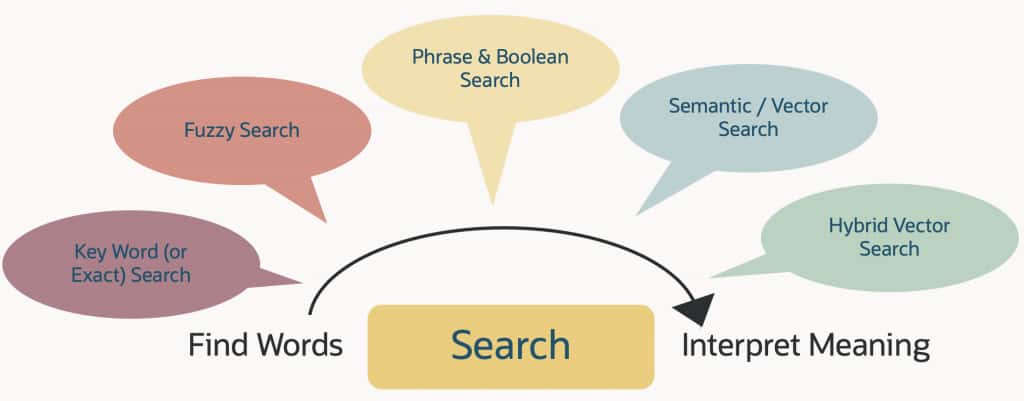
Let’s start of with defining the key search areas we will cover in this post: keyword search and semantic search.
Definitions
Keyword search matches the exact words or phrases a user types against words in documents, so it works best when the query uses the same terminology as the content. Semantic search tries to match the meaning or intent behind the query, often using embeddings or language models, so it can find relevant results even when the wording differs.
In practice, keyword search is precise and predictable for known terms, names, codes, or filters, while semantic search is better for exploratory questions, natural-language queries, and cases where users do not know the exact vocabulary used in the content.
Indexes
Each of the searches typically requires a (set of) index(es). In our example here we use a single index for keyword search and a single index for the vector searches. In another post in the JSON Insights series we will discuss Hybrid Vector Indexes in depth, and we will cover a bit later on in this post.
Here are the indexes, starting with the keyword example and showing the vector (semantic) index after.
Note: The indexes are created using the Oracle AI Database API for MongoDB. Search features are currently exposed under the preview mode as features are being actively added.
For the keyword search example, we create a search index named title_idx with dynamic mappings so that all fields can be indexed automatically. This gives us a simple way to support fast keyword search.
db.MOVIES.createSearchIndex("title_idx", {mappings: { dynamic: true }, preview: true});For the vector search example, we create a vector index named summary_vec_idx over the summary_embedding field. This lets us run semantic search using 1024-dimensional embeddings and cosine similarity.
db.MOVIES.createSearchIndex("summary_vec_idx", "vectorSearch", { fields: [ { type: "vector", path: "summary_embedding", numDimensions: 1024, similarity: "cosine" }], preview: true }); Once the indexes are created, a statement to check them is here:
db.MOVIES.aggregate([{$listSearchIndexes:{"hint": { "$preview": 1 }} }]);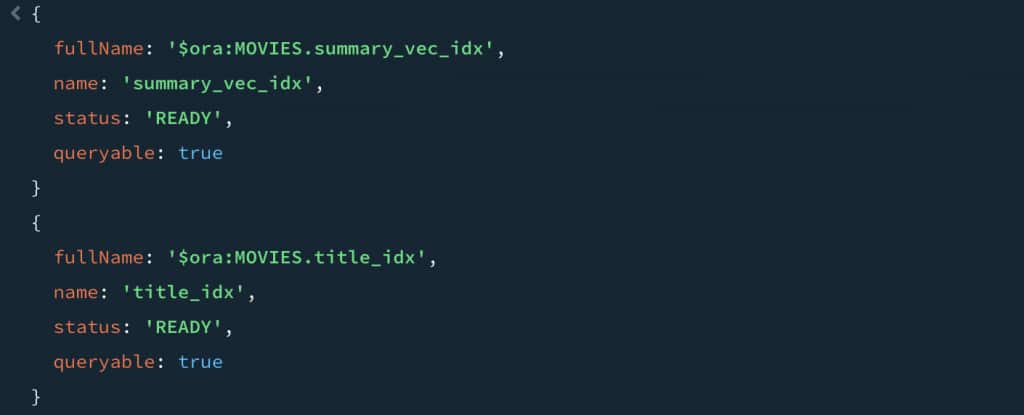
Both indexes show the status of ready and are queryable. So, all good here.
Keyword searches (matching words)
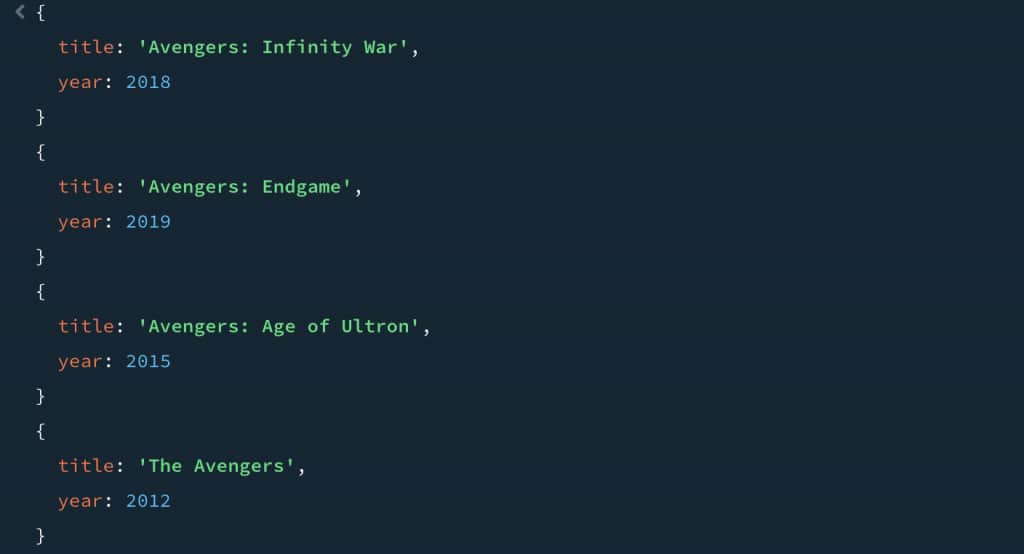
We start with the simplest case. Keyword search does well when the user knows a title fragment or an obvious keyword. Here we use “avengers”:
db.MOVIES.aggregate([
  {
    $search: {
      text: {
        path: "title",
        query: "avengers"
      },
      hint: {"$preview": 1}
    }
  },
  {
    $project: {
      _id: 0,
      title: 1,
      year: 1
    }
  }
]);
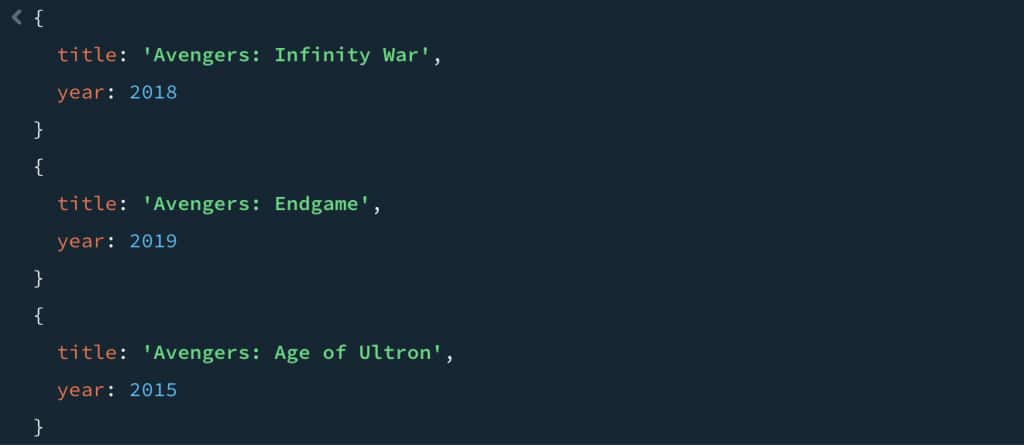
Next up, the ask now contains multiple words if the title, leading to a multi term search request:
db.MOVIES.aggregate([
  {
    $search: {
      text: {
        path: "title",
        query: "avengers endgame"
      },
      hint: { "$preview": 1 }
    }
  },
  {
    $project: {
      _id: 0,
      title: 1,
      year: 1
    }
  }
]); 
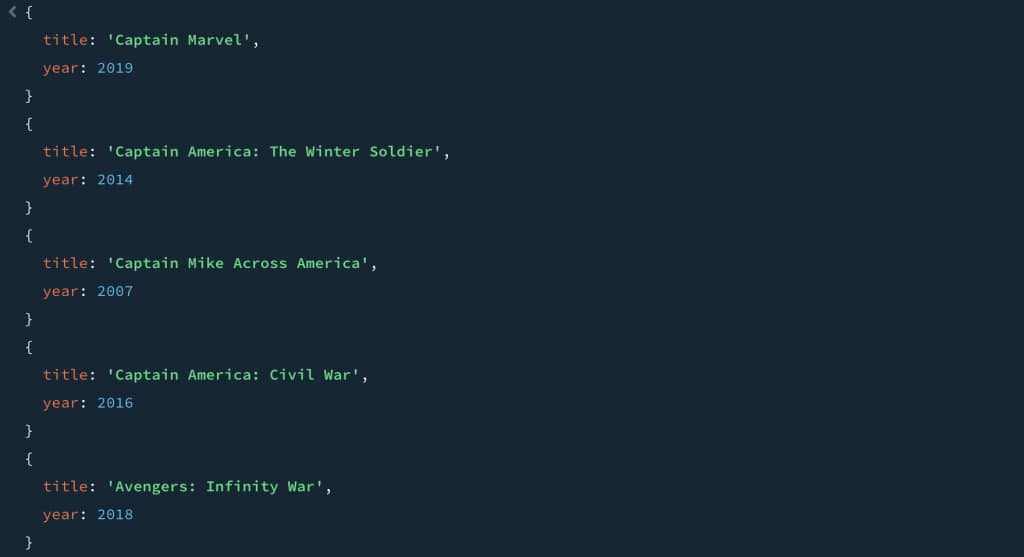
To better control the results, specific conditions can be added into the search queries. In this case we are looking to add in a bit of leeway so users get a result with some of the terms. Here it is “any” of the terms should be present in the title:
db.MOVIES.aggregate([
  {
    $search: {
      text: {
        path: "title",
        query: "avengers captain",
        matchCriteria: "any"
      },
      hint: { "$preview": 1 }
    }
  },
  {
    $project: {
      _id: 0,
      title: 1,
      year: 1
    }
  },
  { "$limit": 5 }
]); 
So, is it not possible to get some looser matching? How does search enable typos, close matches, and things like that? Easy, you can add the fuzzy key word and have it look across any word in the title:
db.MOVIES.aggregate([
  {
    $search: {
      text: {
        path: "title",
        query: "indeana jons",
        matchCriteria: "all",
        fuzzy: {}
      },
      hint: { "$preview": 1 }
    }
  },
  {
    $project: {
      _id: 0,
      title: 1,
      year: 1
    }
  }
]);
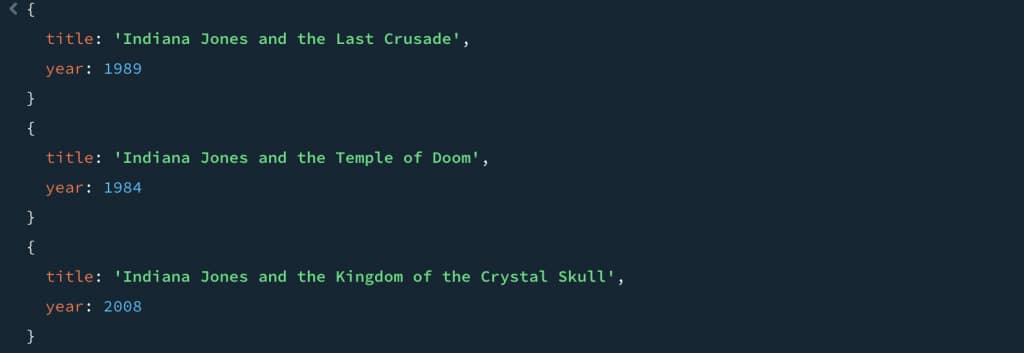
But, and this is the big thing to take away from this example, this doesn’t enable the searching for meaning. It is a literal search, but now it allows for fuzziness. It also likely – especially with the any keyword – drives a large result set. Here we used “all” to keep the fuzziness from giving all sorts of “false positives”. Good to solve for a great number of requirements, but not great when you need to search based on the meaning expressed in the user’s question.
This leads us to explore semantic search capabilities.
Semantic Searches (meaning or intent)
This is where embeddings make a real difference. Instead of checking whether the query words appear in the movie summary, we compare the meaning of the query with the meaning of the summary. For each movie, we store a 1024-dimensional embedding in summary_embedding. At query time, we generate an embedding for the user’s intent and retrieve the nearest summaries.
The examples here use the vector index, and as the query is executed, converts the user inputs into vector embeddings. As we are coding against the Oracle AI Database API for MongoDB, you will also see examples where we apply the search and then filter on other elements in the documents to refine the result set.
A few vector index examples
In the first example we are looking for “a team of heroes working together to protect others”.
We generate the query vector in SQL and paste the result directly into the script. You may use whatever method you wish to use to generate the query vector.
--Via SQL
SELECT 'const queryVector1 = ' ||
       VECTOR_SERIALIZE(
         VECTOR_EMBEDDING(
           MULTILINGUAL_E5_LARGE USING 'a team of heroes working together to protect others' AS data
         )
       ) ||
       ';'
FROM dual;

--In the Mongo shell
const queryVector1 = [ /* 1024 numbers */ ];
db.MOVIES.aggregate([
  {
    $vectorSearch: {
      index: "summary_vec_idx",
      path: "summary_embedding",
      queryVector: queryVector1,
      limit: 5,
      exact: false,
      hint: { "$preview": 1 }
    }
  },
  {
    $project: {
      _id: 0,
      title: 1,
      year: 1,
      genre: 1,
      main_subject: 1
    }
  }
]).forEach(doc => print(JSON.stringify(doc)))
Now we are no longer depending on literal overlap between the query and the text. We are retrieving movies whose summaries are semantically similar to the user’s intent.
Another example
The query is: “an ordinary person rising to the occasion and becoming a hero.”
Again, we generate the embedding in SQL and use it as queryVector2. This lets us search by meaning, not just by exact wording.
--Via SQL
SELECT 'const queryVector2 = ' ||
       VECTOR_SERIALIZE(
         VECTOR_EMBEDDING(
           MULTILINGUAL_E5_LARGE USING 'an ordinary person rising to the occasion and becoming a hero' AS data
         )
       ) ||
       ';'
FROM dual;

--In the Mongo shell
const queryVector2 = [ /* 1024 numbers */ ];
db.MOVIES.aggregate([
  {
    $vectorSearch: {
      index: "summary_vec_idx",
      path: "summary_embedding",
      queryVector: queryVector2,
      limit: 5,
      exact: false,
      hint: { "$preview": 1 }
    }
  },
  {
    $project: {
      _id: 0,
      title: 1,
      year: 1,
      genre: 1,
      main_subject: 1
    }
  }
]).forEach(doc => print(JSON.stringify(doc)))
Semantic search with filter
Semantic search gives us the right neighborhood, and the filter narrows it down. After finding the closest matches, we apply a genre filter to keep only the movie types we care about.
db.MOVIES.aggregate([
  {
    $vectorSearch: {
      index: "summary_vec_idx",
      path: "summary_embedding",
      queryVector: queryVector1,
      limit: 10,
      exact: false,
      hint: { "$preview": 1 }
    }
  },
  {
    $match: {
      genre: { $in: ["Action", "Adventure", "Sci-Fi", "Drama"]}
    }
  },
  {
    $project: {
      _id: 0,
      title: 1,
      year: 1,
      genre: 1
    }
  }
]).forEach(doc => print(JSON.stringify(doc))); 
Sort by year
We can also sort the semantic results by year after retrieval. This is useful when we want a time-based ordering on top of the vector search results.
db.MOVIES.aggregate([
  {
    $vectorSearch: {
      index: "summary_vec_idx",
      path: "summary_embedding",
      queryVector: queryVector1,
      limit: 5,
      exact: false,
      hint: {"$preview": 1}
    }
  },
  { $sort: { year: 1 } },
  {
    $project: {
      _id: 0,
      title: 1,
      year: 1,
      genre: 1
    }
  }
]).forEach(doc => print(JSON.stringify(doc)));
Union Search
Finally, we can combine text search and vector search with $unionWith. This gives us one result set that includes both keyword-based matches and semantically similar matches, each labeled by source.
db.MOVIES.aggregate([
  {
    $search: {
      text: {
        path: "title",
        query: "avengers"
      },
      hint: { "$preview": 1 }
    }
  },
  {
    $project: {
      _id: 0,
      title: 1,
      year: 1,
      source: { $literal: "text" }
    }
  },
  {
    $unionWith: {
      coll: "MOVIES",
      pipeline: [
        {
          $vectorSearch: {
            index: "summary_vec_idx",
            path: "summary_embedding",
            queryVector: queryVector1,
            limit: 3,
            exact: false,
            hint: { "$preview": 1 }
          }
        },
        {
          $project: {
            _id: 0,
            title: 1,
            year: 1,
            source: { $literal: "vector" }
          }
        }
      ]
    }
  },
  {
    $sort: { year: 1 }
  }
]).forEach(doc => print(JSON.stringify(doc)));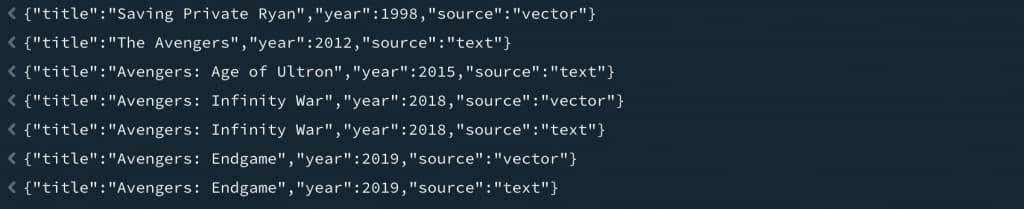
Hybrid vector index
So far, we combined keyword and vector search manually. With a hybrid vector index, both are handled natively in the database. We can still call it through the Mongo API using $sql, while the database takes care of the hybrid search and ranking behind the scenes.
First, we create a vectorizer preference that covers the text fields and the embedding field, then we build the hybrid vector index on MOVIES(data)
begin
  dbms_vector_chain.drop_preference('jhvipref');
exception
  when others then null;
end;
/

begin
  dbms_vector_chain.create_preference(
    'jhvipref',
    DBMS_VECTOR_CHAIN.VECTORIZER,
    json('{
      "model": "MULTILINGUAL_E5_LARGE",
      "paths": [
        {
          "type": "STRING",
          "path_list": ["$.title", "$.summary", "$.main_subject"]
        },
        {
          "type": "VECTOR",
          "path_list": ["$.summary_embedding"]
        }
      ]
    }')
  );
end;
/

DROP INDEX movies_hvi FORCE;

CREATE HYBRID VECTOR INDEX movies_hvi
ON MOVIES(data)
PARAMETERS('vectorizer jhvipref');
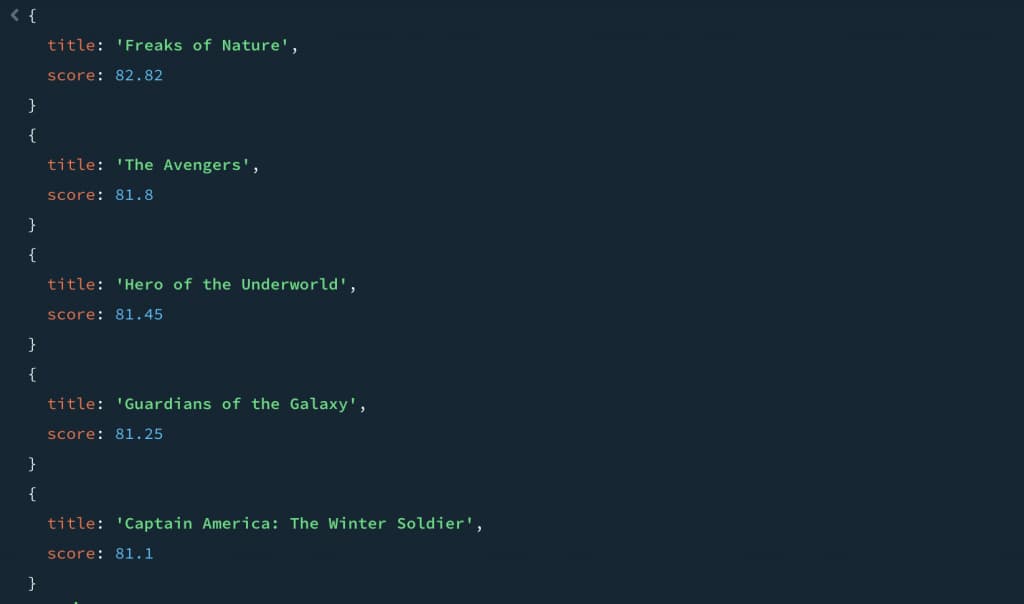
Then we can run a hybrid searchvia the MongoAPI use a $sql operator like this:
db.MOVIES.aggregate([
  {
    $sql: `
      select json_object(
               'title' value json_value(q.data, '$.title'),
               'score' value r.score
               returning json
             ) data
      from (
        select dbms_hybrid_vector.search(
          json('{
            "hybrid_index_name": "MOVIES_HVI",
            "search_text": "a team of heroes working together to protect others",
            "return": {
              "values": ["rowid", "score"],
              "topN": 20
            }
          }')
        ) as vs
        from dual
      ),
      json_table(vs, '$[*]'
        columns (
          rid   varchar2(30) path '$.rowid',
          score number       path '$.score'
        )
      ) r
      join movies q
        on q.rowid = r.rid
      order by r.score desc
      fetch first 5 rows only
    `
  }
]);
Which one should I use?
It is of course tempting to go with the new vector capabilities, and many people will settle for hybrid scenarios where you get the best of both worlds. But as always, there are many trande-offs. We’ll cover these in a later post.
For now, lets end with: don’t over engineer. If the application solves its business requirements with keyword search, than that is really what you use. Vectors look for meaning, but will also give you “false positives”. Hybrid will work well, but if you don’t need the meaning, why have the extra indexes, the extra code?
Oracle JSON Insights
Learn from the team that build the features at Oracle. Read articles like this post, watch demos and webcasts, or start to develop using the LiveLabs, all on available from one page: Oracle JSON Insights