
Security teams ask us the same question in almost every Autonomous AI Database on Dedicated Exadata Infrastructure (ADB-D) engagement: when someone tries the ADMIN password, grants a powerful privilege or changes an audit policy, how fast can our SOC see it? The answer we give them is: in well under a minute, with full context, in the SIEM they already run.
In this post we build that pipeline end to end. Oracle Data Safe watches the database and raises alerts, OCI Events turns every Data Safe alert into a structured event, OCI Streaming buffers those events durably, and a small forwarder delivers them to Splunk HTTP Event Collector, or to any other destination that accepts JSON over HTTPS. Every step uses the OCI Console or the OCI CLI, and every number in this post comes from a live setup on ADB-D.
What Is Oracle Data Safe?
Oracle Data Safe is a unified security service for Oracle databases in OCI, in other clouds and on premises. From one console it assesses security configuration and user privileges, audits database activity, discovers and masks sensitive data, and manages SQL Firewall.
Three Data Safe capabilities matter for this post:
- Activity auditing collects the unified audit trail from your database continuously and keeps it for up to 12 months online, with archive retention beyond that.
- Alert policies evaluate every collected audit record and raise an alert when it matches a rule, such as failed logins by an admin user or a change to a user’s privileges.
- User and security assessments take a snapshot of accounts and configuration, compare each refresh with a baseline you set, and flag any drift.
Everything Data Safe does is published as an event to OCI Events: 310 event types in 16 categories. That is what makes the rest of this architecture possible.
For ADB-D, Data Safe is included with your database subscription, so you can follow this post without a new license.
The Architecture at a Glance
The design rests on one idea: route every Data Safe event through a single Events rule into a single stream, and let each consumer read that stream at its own pace.
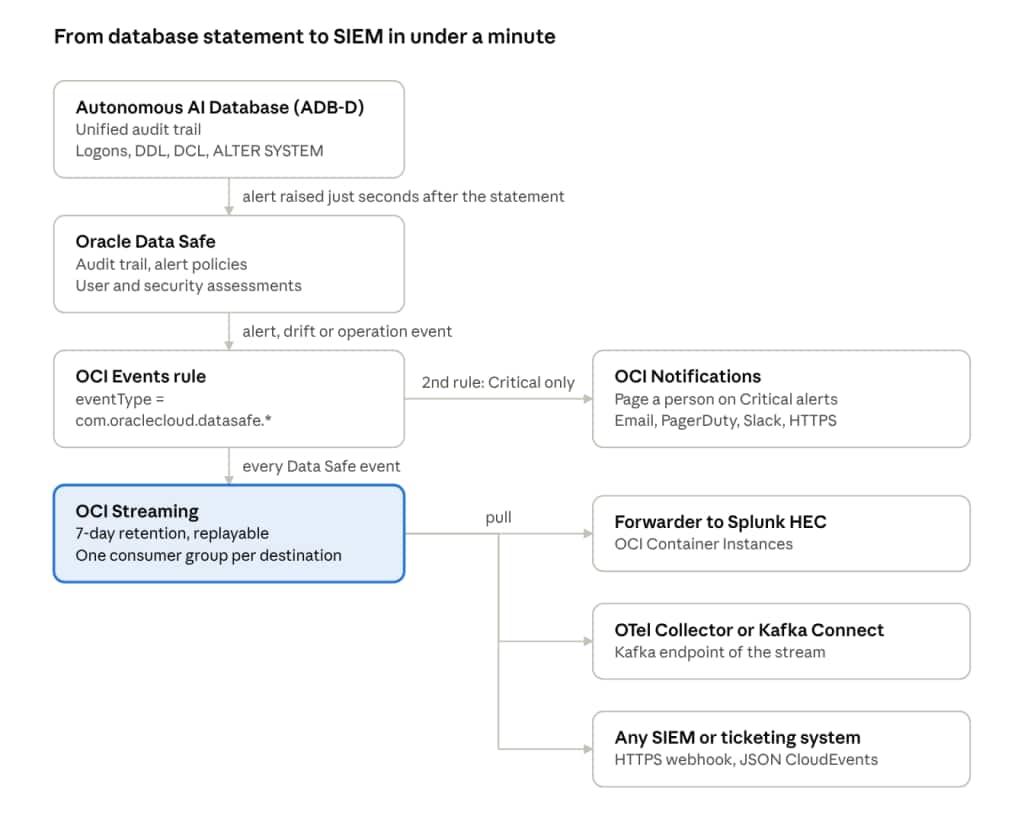
- The database writes unified audit records for logons, DDL, privilege changes and configuration changes.
- Data Safe collects those records within seconds, evaluates its alert policies, and publishes an event for each alert, drift finding and operation.
- An OCI Events rule matches every Data Safe event type and writes it to a stream. A second, narrower rule can page a person on Critical alerts in parallel.
- OCI Streaming keeps the events durably and lets each destination read them with its own consumer group, so Splunk, a second SIEM and an archive never interfere with each other.
- A forwarder reads the stream and posts each event to the SIEM, and only marks its position in the stream after the SIEM has accepted the batch.
Why a stream rather than calling the SIEM directly from the Events rule? Because a SIEM can be down for maintenance, slow, or behind a firewall change. The stream holds every event for up to seven days, so the forwarder can catch up from exactly where it stopped, and nothing is lost.
Building It Step by Step
Let’s build the pipeline. You need an ADB-D database, permission to manage Data Safe, Streaming and Events in a compartment, and a Splunk HEC token (or any HTTPS collector). We use <security-compartment> for the compartment that holds the stream and the rule.
Step 1: Register your ADB-D database with Data Safe
In the OCI Console, open Oracle Database > Data Safe – Database Security > Target Databases > Register Database, choose Autonomous AI Database, and select your ADB-D database. Data Safe connects to ADB-D through a Data Safe private endpoint in the database’s VCN; the wizard creates one if you don’t have it yet. Provide the database credentials the wizard asks for.
When registration completes, the target shows Active.
Step 2: Confirm audit collection is running
Under Activity Auditing > Audit Trails, the unified audit trail of the new target should show Collecting. If it doesn’t, select it and choose Start. Collection is continuous; in our tests, audit records reached Data Safe between 2 and 32 seconds after the statement ran.
Step 3: Provision audit policies
Under Activity Auditing > Audit Policies, select the target and enable at least:
- Critical database activity: user, role, privilege, profile and audit policy changes, and
ALTER SYSTEM. - Database schema changes: DDL on tables, views, procedures and other schema objects.
Data Safe creates and enables these as unified audit policies in the database for you. The predefined ORA_LOGON_FAILURES policy that records unsuccessful logons is already on in Autonomous AI Database, and Data Safe collects it too.
Step 4: Apply alert policies
Under Security Center > Alerts > Alert Policies, apply the predefined policies to the target. Each one turns matching audit records into an alert:
| Alert policy | Severity | What it catches |
|---|---|---|
| Failed logins by admin user | Critical | Logon errors such as ORA-01017 on administrative accounts |
| Profile changes | Critical | CREATE, ALTER, DROP PROFILE |
| SQL Firewall violations | Critical | SQL or connection paths outside the SQL Firewall allow-list |
| Audit policy changes | High | CREATE, ALTER, DROP AUDIT POLICY, AUDIT, NOAUDIT |
| Database parameter changes | High | ALTER SYSTEM SET |
| User creation/modification | Medium | CREATE, ALTER, DROP USER, account lock and unlock |
| User entitlement changes | Medium | GRANT and REVOKE |
| Database schema changes | Medium | CREATE, ALTER, DROP on schema objects |
You can also write custom alert policies with your own rules and severity; they arrive as the same event type.
Optionally, set a baseline for the target’s latest User Assessment and Security Assessment, and schedule a daily refresh. Every refresh that differs from the baseline then emits a drift event.
Step 5: Create the stream
One partition carries far more than Data Safe produces. Set retention to the maximum of 168 hours so that a week-long SIEM outage loses nothing; retention is fixed when the stream is created.
oci streaming admin stream create \
  --compartment-id <security-compartment-ocid> \
  --name datasafe-events --partitions 1 --retention-in-hours 168
Step 6: Let OCI Events write to the stream
allow service cloudEvents to use stream-push in compartment <security-compartment>
allow service cloudEvents to read streams in compartment <security-compartment>
Step 7: Create the Events rule
This condition matches every current and future Data Safe event type. Place the rule in a compartment at or above your Data Safe targets; it also matches events from child compartments.
oci events rule create \
  --compartment-id <security-compartment-ocid> \
  --display-name datasafe-all-events --is-enabled true \
  --condition '{"eventType":"com.oraclecloud.datasafe.*"}' \
  --actions '{"actions":[{"actionType":"OSS","isEnabled":true,"streamId":"<stream-ocid>"}]}'
To page someone on Critical alerts as well, add a second rule with a Notifications action and this condition:
{"eventType": ["com.oraclecloud.datasafe.generateauditalert"],
 "data": {"additionalDetails": {"severity": ["Critical"]}}}
Step 8: Run the forwarder on OCI Container Instances
The reference forwarder that accompanies this post, dsfwd, is a small Python service built on the OCI SDK. It reads the stream with a consumer group, maps each event to Splunk HEC fields, and commits its stream position only after HEC accepts the batch. If HEC rejects one event in a batch, it isolates that event, logs it, and delivers the rest.
Build the image from the repository’s Dockerfile, push it to OCI Container Registry, and create a container instance (an Ampere A1 shape with 1 OCPU is plenty) in a private subnet with outbound access to your SIEM, with these environment variables:
DSFWD_AUTH=resource_principal
DSFWD_STREAM_ID=<stream-ocid>
DSFWD_GROUP=splunk
DSFWD_HEC_URL=https://<your-splunk>:8088
DSFWD_HEC_TOKEN=<hec-token>
DSFWD_HEC_INDEX=oci_security
Then grant that container instance, and only that instance, read access to the stream:
allow any-user to use stream-pull in compartment <security-compartment>
  where request.principal.id = '<container-instance-ocid>'
allow any-user to read streams in compartment <security-compartment>
  where request.principal.id = '<container-instance-ocid>'
The forwarder also runs as a systemd service on a VM (with instance principal) or anywhere with an OCI API key; the repository includes the unit file, an environment template and the IAM statements for each option.
Prefer not to run your own forwarder? The same stream works with the Splunk Distribution of the OpenTelemetry Collector or Kafka Connect with the Splunk Sink Connector, both through the stream’s Kafka-compatible endpoint, or with Connector Hub sending the stream to an OCI Function.
Seeing It Work
With the pipeline in place, let’s try it. Someone attempts to connect as ADMIN with the wrong password:
$ sqlplus admin@proddb01_high
Enter password:
ORA-01017: invalid credential or not authorized; logon denied
Seconds later, the stream holds this event (identifiers shortened):
{
  "eventType": "com.oraclecloud.datasafe.generateauditalert",
  "source": "DataSafe",
  "eventTime": "2026-10-26T17:33:25Z",
  "eventID": "3f6c2a9e-1b47-4d2a-9c58-7e0b4a1d6f23",
  "data": {
    "compartmentName": "DatabaseSecurity",
    "resourceName": "alert",
    "additionalDetails": {
      "ruleName": "Failed logins by admin user",
      "severity": "Critical",
      "operation": "LOGIN",
      "operationStatus": "Failed",
      "errorCode": "ORA-01017",
      "userName": "ADMIN",
      "clientIPs": "10.0.4.25",
      "clientHostname": "jump-host-01",
      "clientProgram": "sqlplus@jump-host-01 (TNS V1-V3)",
      "osUserName": "oracle",
      "targetName": "PRODDB01",
      "operationTime": "2026-10-26T17:04:55.145915Z",
      "alertURLInConsole": "https://cloud.oracle.com/data-safe/alerts/..."
    }
  }
}
Everything an analyst needs is in the event: who, from where, with which program, what the database answered, and a link straight to the alert in the OCI Console. For DDL and privilege changes, commandText carries the statement itself, with passwords masked (create user APP_RO identified by *).
The forwarder posts it to HEC with _time set to the Data Safe event time, host set to the target name, a sourcetype per event family (oci:datasafe:alert, oci:datasafe:drift, oci:datasafe:audittrail and so on), and indexed fields for severity and event type. In Splunk, the SOC’s first search is one line:
index=oci_security sourcetype=oci:datasafe:alert severity::CRITICAL
| table _time host event.data.additionalDetails.userName
        event.data.additionalDetails.clientIPs
        event.data.additionalDetails.errorCode
Here is what we measured on a basic 4 ECPU ADB-D (Oracle AI Database 26ai) when we fired controlled statements and timed each hop:
| Scenario | Statements | Statement to Data Safe alert | Statement to SIEM |
|---|---|---|---|
| Wrong ADMIN password, repeated | 6 logon attempts | 2 to 32 s | 14 to 48 s (at the stream) |
| Privilege, profile, schema and parameter changes | 6 statements | 15 s | 20 to 29 s (at HEC) |
| Burst of user, role, audit policy and DDL changes | 15 statements in 0.7 s | 8 s | 52 to 65 s (at the stream) |
Every alert Data Safe raised reached its destination. We also stopped the forwarder, raised three alerts while it was down, and started it again: it resumed at the next uncommitted position in the stream and delivered exactly those three, with no repeats.
Posture changes arrive the same way. After we created a user and refreshed the assessments, the stream received userassessmentdriftfrombaseline and securityassessmentdriftfrombaseline, plus userassessmentpasswordexpirydate listing accounts with expired passwords. And if anyone pauses audit collection, stopaudittrail and resumeaudittrail events say so, which makes a quiet audit trail visible to the SOC too.
What It Costs
For an ADB-D customer, this pipeline costs very little: Data Safe is included with your database for the volumes most targets generate, and the rest of the services charge only for what you use.
| Component | How it is priced |
|---|---|
| Oracle Data Safe | No charge for Oracle cloud databases, including ADB-D: the price list item Data Safe for Database Cloud Service – Databases is $0 per target. Each target includes the first 1 million audit records per month; collection beyond that is billed at $0.10 per 10,000 audit records per target per month (pay-as-you-go list price). Audit data is kept 12 months online by default, and you can archive it for up to 6 more years. |
| OCI Events | Free. You pay only for the services that publish and receive events (Events Service). |
| OCI Streaming | Pay per GB stored per hour and per GB written and read. A Data Safe event is about 2 KB, so even 10,000 events a day is about 20 MB, which costs cents a month. |
| OCI Notifications (optional paging rule) | The first 1 million delivery operations and the first 1,000 emails each month are free. |
| OCI Container Instances (forwarder) | Billed per OCPU hour and per GB of memory per hour. A forwarder with 1 OCPU and 2 GB on Ampere A1 runs 24×7 for under $10 a month at list price ($0.01 per OCPU hour, $0.0015 per GB hour), and the free monthly Ampere A1 allowance, which also applies to Container Instances, can cover it entirely when the tenancy is not already using it. |
Running Oracle Databases outside OCI as well? Data Safe protects those too, and through February 28, 2027 we are waiving Data Safe service charges for on-premises Oracle Databases, Oracle Databases on compute instances, and Amazon RDS for Oracle (promotion details). Audit record collection above the free monthly limit is still billed as usual. Current list prices for every Data Safe item are on the Oracle Cloud Price List.
Two settings keep the Data Safe line predictable:
- Paid usage is on by default, so Data Safe keeps collecting after the first million records in a month. Leave it on for Autonomous AI Database targets: if you turn it off and a target reaches the free limit, collection pauses until the next month and records from that month can be missed.
- Audit policies drive volume. The policies in this post audit administrative and security-relevant actions, not ordinary application queries, so most ADB-D targets stay well inside the free million. Each target’s Audit Profile shows the audit data volume Data Safe collects, and Data Safe excludes its own service account’s activity from the count.
Tips for Production
- Watch the pipeline itself. Alert in the SIEM on
stopaudittrail.end,auditcollectionwarning,disabledtargetalertpolicyassociationandthrottlealertgeneration, and on silence: if no Data Safe event has arrived for longer than your assessment refresh interval, something upstream needs a look. - One consumer group per destination. Splunk, a second SIEM and an archive each read the same stream at their own pace. To re-send a period, start a new group at a timestamp; production is unaffected.
- De-duplicate on
eventID. Events and Streaming deliver at least once. The forwarder drops repeats it has already sent; useeventIDin correlation searches for the rest. - Keep secrets in OCI Vault. Store the HEC token as a Vault secret and inject it at deploy time rather than writing it into configuration files.
- Filter where it helps. Forward everything to the SIEM, and use a narrow Events rule (for example, Critical alerts only) for paging. Custom alert policies let you add rules specific to your schemas, such as reads of a sensitive table by anyone other than the application account.
- Plan for the long term in Data Safe. The SIEM gets real-time alerts; the complete audit history stays in Data Safe for up to seven years, ready for investigations and compliance reports.
Conclusion
With Oracle Data Safe, OCI Events and OCI Streaming, ADB-D customers can deliver database security events to their SIEM in well under a minute, with full context and without losing a single event when the SIEM is busy. The building blocks are services you already have in OCI, the configuration fits in one afternoon, and the same stream can feed every security tool your organization adopts next.
We would love to hear how you put this pattern to work in your environment.