
Oracle Autonomous AI Lakehouse brings SQL analytics together with access to supported enterprise and lake data, including Apache Iceberg tables. AI agents querying that data also need its business meaning: which measures to use, how sources relate, and how results should be aggregated.
If a company’s core data already lives in Oracle Database, it can stay there. Through Oracle AI Data Catalog, teams can also create Analytic Views (AVs) over supported connected data across the estate. The Autonomous AI Database Catalog provides the broader connectivity foundation. The rows and columns are only part of the analytical model. Copying them elsewhere does not automatically recreate the approved calculations, relationships, and hierarchies defined in Oracle Analytic Views. Those definitions must also be preserved or translated. Keeping those definitions in a shared model lets authorized analysts, applications, and agents use the same definitions without rebuilding that logic in another platform.
A catalog helps locate and access the data. An Analytic View gives analysts and agents a shared model for analyzing the data, with measures and calculations, relationships to dimensions, and hierarchies for grouping results.
For broader platform context, see Activate AI Agents on your entire enterprise data estate with innovations in Oracle Autonomous AI Lakehouse.
What teams gain
- More consistent answers: Analysts and agents can use the same approved measures and reporting definitions.
- Reusable business logic: Define calculations and relationships in the database and reuse them across SQL clients, applications, and agents.
- Easier modeling: Begin with a few useful measures and dimensions, then extend the model as requirements grow.
- Use of existing connected data: Query supported data across the estate through a shared analytical model and authorized database access.
A question that needs more than a column name
Suppose a finance leader asks:
“How did net profit margin change by product group this quarter?”
An agent can find columns called REVENUE and COST, but the calculation still contains business choices. Does revenue account for returns? Which costs are included?
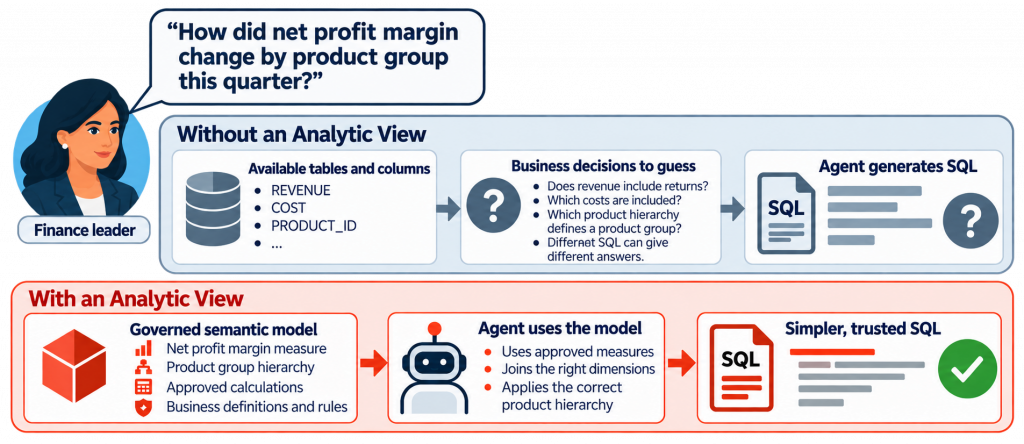
Finance can settle the calculation and reporting definitions in a shared model. Oracle Analytic Views connect fact data to dimensions and hierarchies and expose base and calculated measures. An analyst writing SQL and an agent generating SQL can then use the same business vocabulary. When a definition changes, there is a shared model to update instead of many copied query fragments.
Start with the business definition
Use Cube Builder to create an AV from user intent. The first model can start with a short brief:
“Net profit margin uses net revenue after returns and the approved cost measure. Report it by the finance product hierarchy.”
To answer the original question, also agree on the comparison period and include the time hierarchy. The product hierarchy determines how products roll up; the time hierarchy and comparison definition determine what “change this quarter” means.
Teams can also create the model in SQL or use Oracle Data Studio’s visual authoring workflow. Authors can choose fact data, generate and review candidate hierarchies and measures, define calculations, validate the model, and explore the results. A data owner reviews the business definitions and checks results against the source data.
An existing semantic model can also provide a starting point: import an Apache Ossie YAML model into Cube Builder to create an AV. The author reviews how the source model’s measures, relationships, and dimensions map into the Oracle model before using it.
If AI assists with drafting the model, its proposed definitions still need review. A business description or exchanged model is the starting point for authoring; the data owner approves the business meaning.
What the answer could look like
Say finance has agreed on which revenue and costs count toward net profit margin. For a question about Q2, the agent could compare it with Q1 and return this made-up example:
| Product group | Q1 net profit margin | Q2 net profit margin | Change (percentage points) |
|---|---|---|---|
| Hardware | 18.0% | 15.5% | -2.5 |
| Services | 24.0% | 25.0% | +1.0 |
Hardware’s margin fell by 2.5 percentage points, while Services’ rose by 1.0 point. Finance could ask the Hardware product owner to check returns, discounts, and costs, then decide whether a pricing or cost change makes sense.
Grow the model when the business needs more
A simple model is a useful starting point. Analytic Views can also represent richer requirements with multiple business dimensions, multilevel hierarchies, and calculated measures.
For example, a finance model can organize products into groups, regions into territories, and dates into months, quarters, and years. Calculated measures can express ratios, shares, rankings, or period comparisons. Those definitions give more detailed reporting a reusable foundation while letting simpler questions use only the measures and dimensions they need. Oracle’s Analytic View documentation describes these modeling and calculation capabilities.
The model should reflect the business requirement. Add complexity when it captures a needed definition or reporting rule, and review the result at each relevant level of aggregation.
What changes for an agent?
An agent working only from tables and column names must infer the measure, join path, grouping, and aggregation for each question. An agent that queries an Analytic View can use definitions that have already been reviewed. It has fewer business decisions to reconstruct at query time, and the same model can serve human analysts and other applications.
For related guidance on grounding generated SQL in schema metadata and shared definitions, see Best practices to improve NL2SQL accuracy with Oracle Select AI.
An established foundation, with continued improvements
Analytic Views provide an established foundation of reusable measures, calculations, and hierarchies for today’s analytical agents.
Follow-up articles will examine DDL defaults that reduce repeated key declarations and query refinements that express common business groupings more directly, with release-specific syntax and worked examples. These improvements build on the same principle: define business meaning close to the data and make it easier for people and agents to use.
Start with one recurring question
Choose a question that people already ask and identify its approved measure, relationships, hierarchy, and comparison period. Define those choices in an Analytic View, then check the agent’s SQL and returned results against reviewed expected answers using the intended database identity and privileges.
Keeping business meaning with the data gives people and agents a shared basis for analysis. Begin with the definitions that matter to one useful question, then extend the model as the business needs more.
References
- Oracle Autonomous AI Lakehouse overview – platform context for SQL analytics, supported external data access, and AI capabilities.
- Announcing Open Enterprise Data Access with the Oracle Autonomous AI Database Catalog – catalog connectivity, connected SQL access, and the distinction between federated access and loading data.
- Analytic View Objects, Oracle Database 26 – dimensions, hierarchies, measures, calculated measures, and SQL examples.
- Analyze Data with Data Studio in Autonomous AI Database – the visual Analytic View authoring and analysis workflow.
- The Data Analysis Tool: Creating Analytic Views – the documented Data Studio → Data Analysis → Create → Create Analytic View visual workflow.
- Apache Ossie – the open semantic-model interchange specification, formerly OSI, supporting YAML and JSON.
- Activate AI Agents on your entire enterprise data estate with innovations in Oracle Autonomous AI Lakehouse