
Fully managed multidimensional analytics with AI-assisted workflows, natural-language exploration, and planning in Excel.
Oracle Essbase on Autonomous AI Lakehouse brings multidimensional analysis and planning to an Oracle-managed service, with deployment choices across OCI, AWS, Microsoft Azure, and Google Cloud. Existing Essbase customers can modernize the platform supporting their business models while continuing to use familiar analytical concepts and tools.
An Essbase application captures how your business works: how products and markets roll up, how revenue and margin are calculated, and how a forecast change affects the plan. Those definitions are a substantial investment. The managed service combines that business model with a database foundation for data and metadata, AI-assisted cube creation, and conversational access through the Essbase MCP Server.
The examples below show how teams can put these capabilities to work: build a model for a promotion, ask an inventory question, and turn relational sales history into a budget and forecast. They also explain how to assess an existing application for migration.
Build business models with AI and explore them in natural language
Existing Essbase models already contain valuable business definitions. New questions can also require a new model or a new source of data. AI Cube Builder helps bridge relational data and multidimensional analysis by using the schema together with your analytical intent to propose a cube you can review and refine.
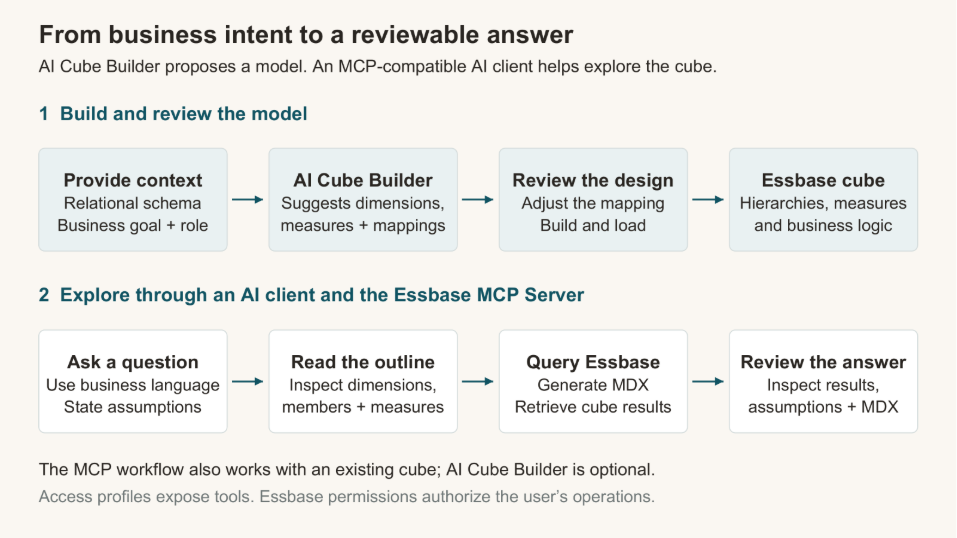
AI Cube Builder proposes a design for review. Through the Essbase MCP Server, an AI client can inspect an existing or newly created cube, query it and return results for review.
Choose a single table, selected tables, or a full schema, then describe your analytical goal and role. The AI uses that context to recommend a fact table, dimensions, hierarchies, and measures. Your business intent guides the design beyond what table names and relationships alone can reveal.
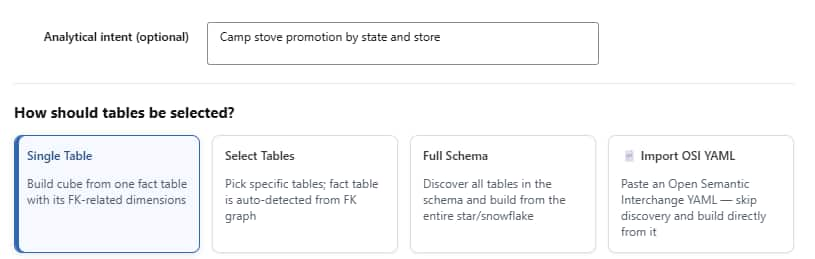
Describe the business goal and choose the scope of data that Cube Builder should analyze.
You review and adjust the proposed mapping before building and loading the cube. This gives Essbase teams a starting point for new applications. For a database team, it provides a way to explore multidimensional modeling without first learning every Essbase design interface. The model remains visible and editable after creation, including the hierarchies and formulas that give the data business meaning.
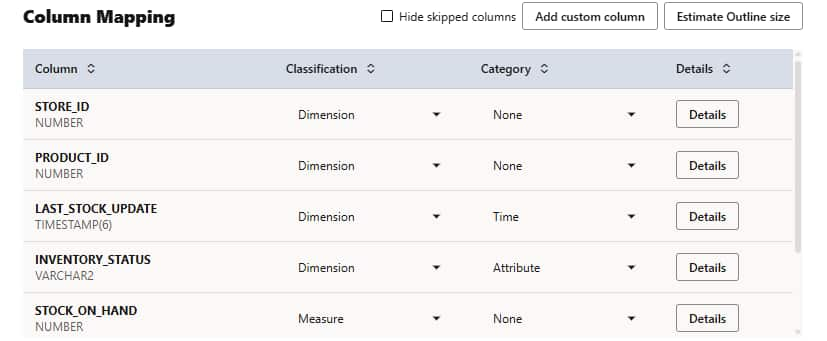
Review how source columns become dimensions and measures, and adjust the mapping to match the analysis you need.
Ask business questions through the Essbase MCP Server
The Essbase MCP Server connects an MCP-compatible AI client to your cubes so users can ask business questions in plain language: which locations have enough stock for a promotion, which products explain a variance, or how results differ across markets. The client can inspect the outline, query the cube, and use its dimensions, hierarchies, and calculations to explain the answer.
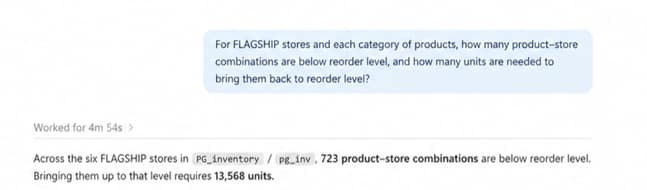
A natural-language inventory question identifies stock below reorder level and the units needed to replenish it. Excerpt from a response using illustrative data.
The built-in server exposes 35 Essbase tools, covering querying, calculations, data loading, outline operations, and administration. These tools are built on the Essbase REST API; some group several related operations. This allows an authorized AI client to help with analytical and operational tasks as well as answer questions.
These workflows can use existing cubes, preserving the business definitions your teams already maintain. MCP access profiles determine which tools the client can see; Essbase permissions authorize each operation. Users can inspect the query and assumptions behind an answer.
Run Essbase on a fully managed cloud foundation
With the managed service, Oracle operates the Essbase infrastructure and its integration with Autonomous AI Lakehouse. Your team does not separately install and patch Essbase or manage its server and filesystem infrastructure. Autonomous Database provides the underlying managed database services, including automated backup and recovery, encryption, and access controls.
Your application team continues to own the work that depends on business knowledge: preparing data, designing dimensions and hierarchies, maintaining calculations, assigning access, and validating results. For a finance application, that means concentrating on the next forecast or reporting change while Oracle manages the supporting infrastructure. The managed service documentation explains this division of responsibility.
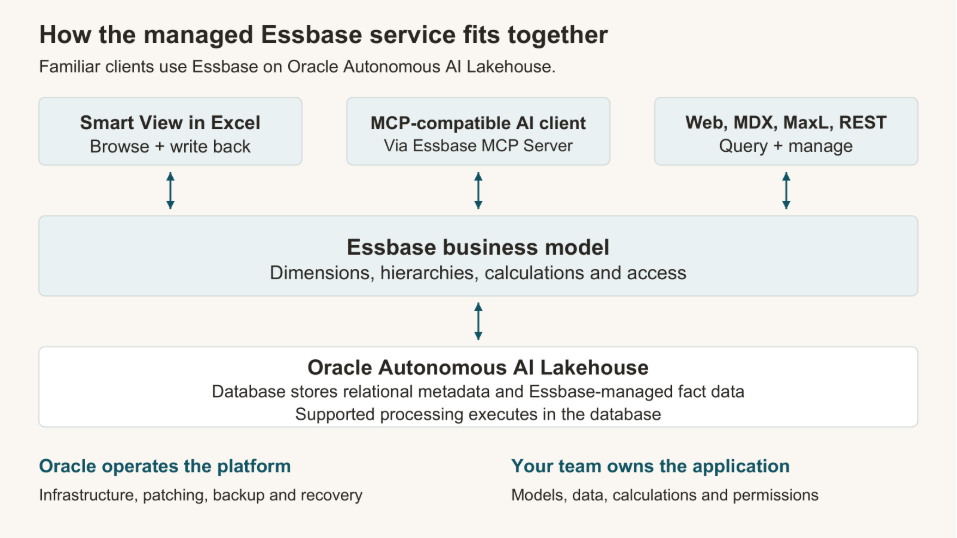
Logical service overview: clients use the Essbase model while the underlying database stores its metadata and managed fact data. Oracle operates the platform; your team maintains the application.
Essbase continues to provide the multidimensional model and business logic, while its metadata and Essbase-managed fact data reside in Autonomous Database. Supported work can execute in the database, where the data is stored. Teams also retain familiar interfaces such as Smart View, MDX, MaxL, REST APIs, and the Essbase web interface.
Multicloud deployment adds another practical migration choice. Organizations running applications and data in OCI, AWS, Microsoft Azure, or Google Cloud can evaluate Essbase alongside their preferred Oracle Autonomous AI Lakehouse deployment. For example, a team using Oracle AI Database@AWS can enable Essbase for its Oracle Autonomous AI Lakehouse and bring multidimensional analysis to that environment.
Build analytical models with Oracle database and lakehouse data
Oracle database and lakehouse data can become a shared business model for analysis. For example, organize sales by Product, Market, and Time, with common definitions for revenue, margin, and period comparisons. Users can follow a question from a category total to a product or from a state to a store using the same hierarchies and calculations.
Turn relational actuals into a budget and forecast
In a separate planning example, consider a retailer preparing next year’s sales plan. At year-end, the team loads the closing year’s actual sales from a relational table into the cube’s PrevYear member. The load preserves monthly sales by product and store, creating a historical baseline that retains the business’s seasonal patterns.
Finance then enters a growth assumption of 10%. A formula defined in the cube uses the corresponding prior-year month to calculate the new budget:
Monthly budget = PrevYear sales × (1 + growth assumption)
For example, prior-year January sales of 100,000 produce a January budget of 110,000. When January closes with actual sales of 105,000, the model shows a shortfall of 5,000 against budget.
Through Smart View in Excel, the manager can explore that shortfall by store and product and enter a separate forecast growth assumption for the remaining months. A formula defined in the cube combines actual sales for closed months with prior-year sales adjusted by the forecast assumption for future months. The original budget remains available for comparison. Essbase’s time hierarchy, product and store hierarchies, and shared formulas keep the comparisons consistent as the user moves between detailed results and totals.
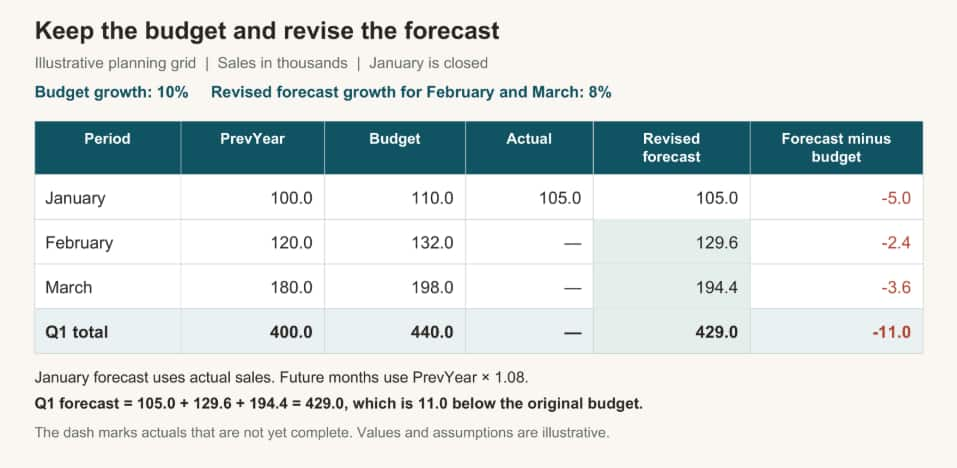
Illustrative planning grid, with sales in thousands: January actuals and an 8% forecast assumption for February and March produce a revised first-quarter forecast of 429, compared with the original budget of 440.
This turns relational sales history into a reusable planning model: the team defines its time comparisons and business calculations in the cube, then uses them to monitor performance, investigate gaps, and evaluate changes to the plan.
Extend the model to lakehouse data
Autonomous AI Lakehouse also provides access to external data, including Apache Iceberg tables. Through supported integration and loading workflows, teams can prepare that data for Essbase applications. The source data still needs to match the cube’s members, dimensions, and measures.
Add multidimensional analysis and writeback to your analytics
For database and lakehouse users, Essbase adds calculations and interactions that support planning, forecasting, and financial reporting. You can compare actuals with budgets, calculate year-to-date results, and explore a forecast across products, markets, and time periods using a consistent business model.
With writeback, authorized users can update planning values in the model through Smart View for Microsoft Excel. The application’s calculations show how the revised plan affects results. This connects analysis with planning decisions.
Keep the Essbase experience you know
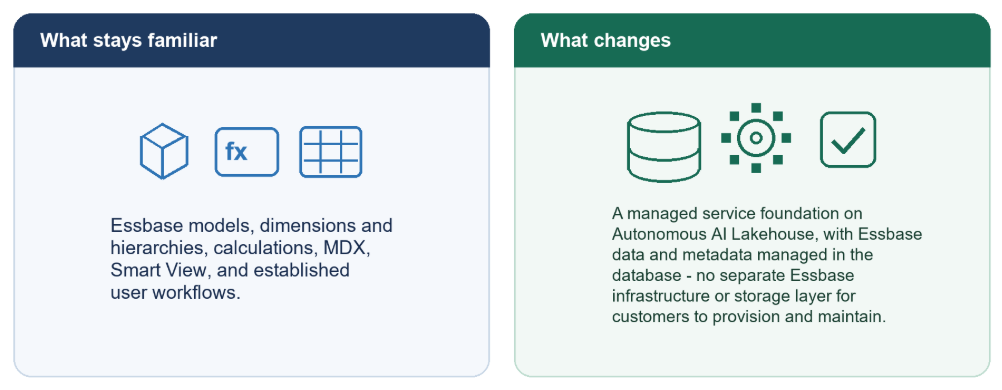
Essbase users continue to work with dimensions, hierarchies, financial and time intelligence, calculations, and multidimensional navigation. Smart View keeps Excel at the center of familiar analysis and writeback workflows. Teams can also use supported MDX, MaxL, and REST operations to query and manage their applications.
This continuity matters for an existing application. Business definitions remain in the Essbase model and can be reused across connected clients. A calculation maintained in the cube can support both a Smart View analysis and a query initiated through an AI assistant. Migration assessment identifies any formulas, administrative operations, or integrations that need adaptation for the managed service.
Scale when your business needs it
Essbase workloads are rarely constant. Month-end reporting may bring more concurrent users and heavier aggregation than a normal week. Autonomous Database supports elastic compute and compute auto scaling, so database capacity can respond to those peaks. When enabled, compute auto scaling allows the database to use up to three times its configured base CPU and I/O capacity as demand requires. A License Included database with 16 base ECPUs, for example, can use up to 48. Additional compute consumption is billed. Deployment and licensing limits apply.
Auto scaling supports variable peaks. For predictable cycles, teams can schedule base-compute changes through their own automation using the database API or CLI. For unused development or test periods, a start/stop schedule can reduce active compute time. Stopping the database ends active sessions, so plan shutdowns when the environment is not needed.
Plan Essbase compute and database resources together, then test your actual queries, calculations, and concurrency. This gives you a basis for matching capacity and cost to the workload.
Get started
Enable Essbase in your Autonomous AI Database environment and start with one business question.
To Enable Essbase
- go to your AI Lakehouse details page
- click on Tool Configuration from the ribbon options
- scroll down to Essbase
- click Edit
- then toggle an Enable Essbase
- After AI Lakehouse finishes enabling, the URL of Essbase is available for you.
It takes only a few minutes to get an Essbase instance up and running. The Oracle LiveLabs link below provides a step-by-step guide to provisioning Essbase.
New users can build a model from relational data with AI Cube Builder. Existing customers can validate a representative application, then connect a compatible AI assistant to explore its results.
Explore Essbase on Autonomous AI Lakehouse