
Introduction
External Table Cache accelerates access to data stored outside Autonomous AI Database. Rather than repeatedly retrieving the same remote files, the database materializes selected data in a schema-local cache and transparently serves eligible reads without changing application SQL.
In Autonomous AI Database Serverless (ADB-S), this capability is part of Lake Cache; in Autonomous AI Database on Dedicated Exadata Infrastructure (ADB-D), it is referred to as External Table Cache. This article focuses on policy-based external-table caching, with a practical example performed on Serverless.
The walkthrough covers prerequisites, suitable workloads, and the steps to create, populate, monitor, verify, and remove a cache for Parquet files in OCI Object Storage.
1. Scope and requirements
The practical example uses Autonomous AI Database Serverless running Oracle AI Database 26ai. The target schema must own the external table, have access to the source files and the required package privileges, and have sufficient tablespace and cache quota.
The Serverless deployment provides Lake Cache for external tables and eligible tables exposed through catalogs mounted with DBMS_CATALOG, with both policy-based and automatic management. In the Dedicated model, the External Table Cache is applied only with policy-based caching. Both implementations use DBMS_EXT_TABLE_CACHE for policy-based cache management. The walkthrough below was performed on Serverless and does not assume identical capabilities across deployment types.
Policy-based and automatic cache management
- Policy-based caching provides explicit control over file selection, population, refresh, and retirement. It is possible to cache all files or select a percentage, recently modified files, or files that match path patterns. In this article, partial or hybrid caching describes local access to cached data alongside external access to uncached files; it is not a separate management mode.
- Autonomous AI Database Serverless also supports automatic caching. When enabled through the AUTO_CACHE property using DBMS_CACHE, the database uses query patterns and workload activity to create, populate, periodically refresh, and remove eligible Lake Caches within the resolved quota.
Existing policy-based settings take precedence over automatic behavior. Automatic caching is outside the scope of this article, which focuses on explicit, policy-based management.
2. Benefits and suitable workloads
Repeated scans of remote files can incur object-store request overhead, network latency, and parsing or decompression work. Loading the data into native tables is an alternative, but requires data-loading and synchronization processes.
Caching offers an intermediate approach: retain the external source of truth while materializing frequently accessed data locally. The SQL interface remains unchanged, and uncached files remain accessible from the external source.
- BI dashboards, recurring reports, and scheduled aggregations that repeatedly scan the same external files.
- Data-science exploration, feature engineering, and repeated joins between external reference data and native tables.
- Frequently accessed data in landing zones or partitioned lakes, particularly when repeated network access is a concern.
Workload considerations
- The best-suited SQL patterns are repeated scans, filtered scans, aggregations, projections, and joins over the same external data.
- Caching does not accelerate writes or turn an external table into an indexed transactional table. Native tables are appropriate when transactional DML or index-driven access is a primary workload requirement.
Where the cache resides
The cache is a schema-owned object in persistent database storage. Cached data occupies database data files and is subject to the applicable schema and cache quotas. This additional storage must be considered when selecting the working set.
3. Policy-based caching: management flow
The following workflow uses DBMS_EXT_TABLE_CACHE to manage the cache lifecycle. Chapter 4 applies these steps in Autonomous AI Database Serverless.
| Step | Action |
|---|---|
| 1. Prepare source | The credential and external table are created; source access is verified. |
| 2. Create cache | CREATE_CACHE creates an empty cache; VALIDATE checks it. |
| 3. Set capacity | Cache preferences are set; resolved and remaining quotas are checked. |
| 4. Populate | ADD_TABLE or selective population loads data; queries use the original external table. |
| 5. Verify / maintain | Cache views and SQL Monitor confirm use; files are repopulated, retired, or cleared. |
| 6. Disable / remove | DISABLE / ENABLE control use; CLEAR removes data; DROP_CACHE removes the cache. |
4. Practical example: policy-based caching on Serverless
The practical example was performed on Autonomous AI Database Serverless. It uses external table EXT_TEST1 in schema DEMO to cache selected Parquet files from OCI Object Storage. The References section links to the package documentation and prerequisites.
4.1. User setup and external-table mapping
The example uses the DEMO schema with a 500G quota on the DATA tablespace. The quota is applied by an administrator; the remaining steps run as DEMO:
ALTER USER demo QUOTA 500G ON DATA;The following block creates the credential for the DEMO user to access the Parquet files in OCI Object Storage. The placeholders must be replaced with the appropriate OCI identity details and authentication token.
BEGIN
  DBMS_CLOUD.CREATE_CREDENTIAL (
    credential_name => 'OBJ_STORE_CRED',
    username        => '<identity_domain>/<oci_username>',
    password        => '<authentication_token>'
  );
END;
/
For the setup above, this LiveLabs describes how to get a token in LAB6-Task5. For OCI Object Storage authentication and the CREATE_CREDENTIAL function, this is the reference documentation.
The following block creates EXT_TEST1 in DEMO for the Parquet files matched by the URI. The column list is abbreviated; the ellipsis must be replaced with the complete file schema before execution.
BEGIN
  DBMS_CLOUD.CREATE_EXTERNAL_TABLE(
    table_name      => 'EXT_TEST1',
    credential_name => 'OBJ_STORE_CRED',
    file_uri_list =>
      'https://<namespace>.objectstorage.<region>.' ||
      'oci.customer-oci.com/n/<namespace>/b/<bucket_name>' ||
      '/o/<folder>/sourcedata_1_*.parquet',
    format =>   '{"type":"parquet", "schema":"first"}',
    column_list => q'[
      COL1                      VARCHAR2(32767),
      COL2                      VARCHAR2(32767),
      ...
      COL13                     DATE,
      COL14                     NUMBER(38,20),
      COL15                     VARCHAR2(32767)
    ]'
  );
END;
/- The format parameter can be edited based on the file; supported types are CSV, Parquet, ORC, AVRO, and Iceberg. This example uses Parquet. Assuming the table is valid, let’s proceed to create the cache.
4.2. Create and populate the cache
The following block creates and validates the empty cache when executed as DEMO, the external-table owner:
BEGIN
  DBMS_EXT_TABLE_CACHE.CREATE_CACHE(
    owner          => 'DEMO',
    table_name     => 'EXT_TEST1',
    partition_type => 'FILE'
  );
  DBMS_EXT_TABLE_CACHE.VALIDATE(
    owner        => 'DEMO',
    table_name   => 'EXT_TEST1',
    raise_errors => TRUE
  );
END;
/- FILE partitioning organizes the cache by source file. The next block configures a schema-level quota preference:
BEGIN
  DBMS_EXT_TABLE_CACHE.SET_USER_PROPERTY(
    property_name  => 'MAX_CACHE_PERCENT',
    property_value => 60,
    owner          => 'DEMO');
END;
/- MAX_CACHE_PERCENT specifies the cache-size percentage preference for DEMO; it does not reserve storage. Before population, the applicable quota base and resolved available space must be confirmed for the target environment.
The following block populates a selected percentage of the files mapped to EXT_TEST1:
BEGIN
  DBMS_EXT_TABLE_CACHE.ADD_TABLE (
    owner         => 'DEMO',
    table_name    => 'EXT_TEST1',
    percent_files => 80);
END;
/- percent_files => 80 means that 80% of EXT_TEST1 contents will be loaded into the cache. This is referred to as hybrid caching mode, where the resulting cache is partially populated: eligible reads use local cached data, while uncached files remain accessible through Object Storage.
- ADD_TABLE populates the schema-local cache with selected external data. ADD_BY_LIKE supports file selection based on path or filename patterns.
4.3. Monitor cache usage and quota
In this example, EXT_TEST1 maps 411 Parquet files. The following query inspects the cached-file inventory for DEMO.EXT_TEST1:
SELECT *
FROM   all_external_tab_cache_locations
WHERE  owner = 'DEMO'
AND    table_name = 'EXT_TEST1';
The following ALL_EXTERNAL_TAB_CACHES view inspects the cache’s current storage consumption:
SELECT owner,
       external_table_name,
       cache_cur_size,
       ROUND(cache_cur_size / POWER(1024, 3), 2) AS cache_size_gb
FROM   all_external_tab_caches
WHERE  owner = 'DEMO'                       -- the schema user
AND    external_table_name = 'EXT_TEST1';    -- the external table name

OWNER    EXTERNAL_TABLE_NAME       CACHE_CUR_SIZE    CACHE_SIZE_GB
________ ______________________ _________________ ________________
DEMO     EXT_TEST1                    51381272576            47.85
CACHE_CUR_SIZE reports the current space occupied by the cached Parquet files.
Alternatively, before more files are added, we can verify the cache occupation under the DEMO schema with the GET_AVAILABLE_QUOTA function from this documentation:
DECLARE
  l_available_quota NUMBER;
  l_total_quota     NUMBER;
  l_no_cache        BOOLEAN;
BEGIN
  l_available_quota := DBMS_EXT_TABLE_CACHE.GET_AVAILABLE_QUOTA(
                         owner       => 'DEMO',
                         table_name  => 'EXT_TEST1',
                         no_cache    => l_no_cache,
                         total_quota => l_total_quota);

  IF l_no_cache THEN
    DBMS_OUTPUT.PUT_LINE('NO_CACHE=TRUE');
  ELSE
    DBMS_OUTPUT.PUT_LINE('NO_CACHE=FALSE');
  END IF;

  DBMS_OUTPUT.PUT_LINE('TOTAL_QUOTA=' || l_total_quota);
  DBMS_OUTPUT.PUT_LINE('AVAILABLE_QUOTA=' || l_available_quota);
END;
/

NO_CACHE=FALSE
TOTAL_QUOTA=  51539607552
AVAILABLE_QUOTA=158334976
Here TOTAL_QUOTA (48 GiB) equals the space already used by the cache, CACHE_CUR_SIZE (about 47.85 GiB), plus AVAILABLE_QUOTA (about 151 MiB), so the cache quota for this schema is almost fully used. The quota covers all caches in the DEMO schema, including objects managed in automatic or manual cache mode, so it is not exclusive to the EXT_TEST1 table.
4.4. Verify cache use with SQL Monitor
A representative query against EXT_TEST1, together with its SQL Monitor Active Report, provides evidence of the data-access path and cache use.
DISABLE prevents the optimizer from using the cache while retaining its contents. The following block disables the cache; a subsequent query execution exposes the external-data access path:
BEGIN
  DBMS_EXT_TABLE_CACHE.DISABLE(
    owner      => 'DEMO',
    table_name => 'EXT_TEST1'
  );
END;
/
After the uncached execution is captured, the following block re-enables caching before the same query is rerun:
BEGIN
  DBMS_EXT_TABLE_CACHE.ENABLE(
    owner      => 'DEMO',
    table_name => 'EXT_TEST1'
  );
END;
/
The SQL Monitor plan operations and object names identify the access path for each execution. The following observations apply to this Serverless example; execution plans may differ for other queries.
Execution-plan evidence
The captured plans show how the same SQL statement can use different data-access paths:
- With the cache disabled, the plan accesses EXT_TEST1 through EXTERNAL TABLE ACCESS STORAGE FULL.
- With partial caching enabled, the plan includes a local scan of EXT_TEST1$XTCACHE$DMND and an external-table scan of EXT_TEST1 for uncached files. UNION ALL combines the branches before aggregation.
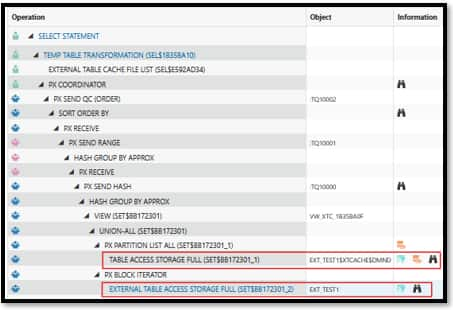
The internal cache object name is specific to this example. Applications continue to query EXT_TEST1, without referencing the internal object or changing their SQL.
4.5. Maintain or remove cached content
Policy-based Lake Caches do not refresh automatically; refresh remains administrator-controlled. When the source files change, we can use an explicit call to DBMS_EXT_TABLE_CACHE.REFRESH_TABLE that updates the cache by removing data for deleted source files and loading new or modified files as suggested here.
BEGIN
  DBMS_EXT_TABLE_CACHE.REFRESH_TABLE(
    owner      => 'DEMO',
    table_name => 'EXT_TEST1'
  );
END;
/
Furthermore, the procedures DROP_FILE and DROP_BY_LIKE remove selected cached files, while RETIRE_FILES applies a retirement policy. The following block removes the entire cache:
BEGIN
    DBMS_EXT_TABLE_CACHE.DROP_CACHE (
      owner          => 'DEMO',           -- the schema user
      table_name     => 'EXT_TEST1');     -- the external table name
END;
/- DROP_CACHE removes the cache metadata and cached data and releases the associated storage. It does not remove the external-table definition or the source files in Object Storage. DBMS_EXT_TABLE_CACHE.CLEAR removes the cached data while retaining the cache definition.
Conclusions
External Table Cache brings frequently accessed external data into local database storage without changing application SQL. This article outlined the requirements and suitable workloads, then demonstrated the policy-based workflow for an external Parquet table on Autonomous AI Database Serverless.
The walkthrough covered cache creation, selective population, quota monitoring, execution-plan verification, and cleanup. The SQL Monitor plan illustrated local reads from the cache alongside external reads of uncached files. A defined set of frequently accessed data provides a starting point for verifying cache use and assessing workload-specific storage requirements.
References
- Oracle blog — Introducing External Table Cache in Oracle Autonomous AI Database
- ADB Serverless — Use Lake Cache to Improve Performance for External Tables and Mounted Catalog Tables
- ADB Serverless — DBMS_EXT_TABLE_CACHE Package
- ADB Dedicated — DBMS_EXT_TABLE_CACHE Package
- ADB Dedicated — Improve Query Performance with External Table Cache