
Start each step as soon as it is ready. DAG-based scheduling shortens a pipeline to its critical path while preserving dependency control, validation, and recovery.
Parallelism turns waiting time into throughput
Oracle Data Transforms, the pipeline builder in Autonomous AI Lakehouse, can load data from more than 100 application and database sources. Its workflows coordinate and run loads, data flows, SQL steps, variables, and nested workflows. Parallel Workflow Execution starts each step as soon as its dependencies are satisfied, so independent work no longer waits in a fixed sequence.
Why Data Transforms
Data Transforms is built into Autonomous AI Lakehouse, so there is nothing extra to install. It covers the full pipeline in one tool: load data from applications, databases, files, and object storage; transform it with a no-code data flow designer or SQL; orchestrate and schedule the steps as workflows; and monitor each run from one console. Transformations execute inside the Lakehouse, so data does not need to move to a separate engine and back.
The tool also connects to Oracle Fusion, NetSuite, Salesforce, other SaaS applications, major cloud warehouses and lakehouses, and open formats such as Apache Iceberg. Teams can see what ran, what failed, and why in one place. Parallel Workflow Execution also lets Data Transforms handle orchestration that teams might otherwise send to an external scheduler to fan out independent loads.
Parallelism turns waiting time into throughput
Most pipelines contain steps that do not depend on one another. A sequential workflow runs them in a fixed order anyway, so a ready step can wait behind unrelated work. In parallel mode, the workflow graph determines what can start: every step with satisfied dependencies is eligible to run, and new work is released as soon as its upstream steps finish.
Operational data usually has to finish loading within a fixed window. As volumes grow, a sequential pipeline can run out of time because each step waits for the ones before it. Parallel Workflow Execution lets independent steps run at the same time, so the pipeline completes when its longest chain of dependent steps completes.
- Ready branches start immediately. A step runs as soon as its prerequisites are satisfied.
- Unrelated work does not block. A short branch does not wait behind a long branch it does not depend on.
- Real pipeline shapes are supported. Parallel and serial sections, including nested workflows, can share one orchestration graph.
- Dependencies stay explicit. OK, NOK, and OK/NOK edges define success, failure, and unconditional paths.
- Steps remain isolated. Each step uses the existing step-execution path, so parallel steps do not interfere with one another.
Declare dependencies and let the engine find the parallelism
Previously, getting parallelism from a pipeline meant designing it by hand. Teams had to decide which loads could overlap, estimate their durations, stagger start times, or split the pipeline into separately scheduled jobs. They might also add padding so a fact load would not start before its dimensions were ready. When a source grew or a step slowed down, timings drifted and the design had to be redone. The padding itself became waiting time built into the plan.
Parallel Workflow Execution replaces timing assumptions with dependencies. Define what each step needs; the engine watches what has finished and starts each eligible step at the first opportunity. There is no need to estimate or stagger start times, or retune the schedule as volumes change. If a dimension load finishes early, the work that depends on it can start early. The workflow follows its critical path by construction.
The more independent branches a pipeline has, the more waiting time parallel execution can remove. That is especially useful for branches that wait on sources, APIs, or object storage. Each step already runs as parallel SQL inside Autonomous AI Lakehouse; workflow parallelism reduces the time steps spend waiting for their turn.
A practical pattern: dimensions first, fact table next
Consider a Lakehouse load with several dimension tables and one fact table. The dimension loads do not depend on one another, so the workflow starts them together. The fact-table load waits until every required dimension branch completes successfully. Independent preparation runs concurrently, and the fact load starts as soon as it is ready. The critical path is the longest dimension load followed by the fact load, instead of loading every dimension one at a time before the fact table.
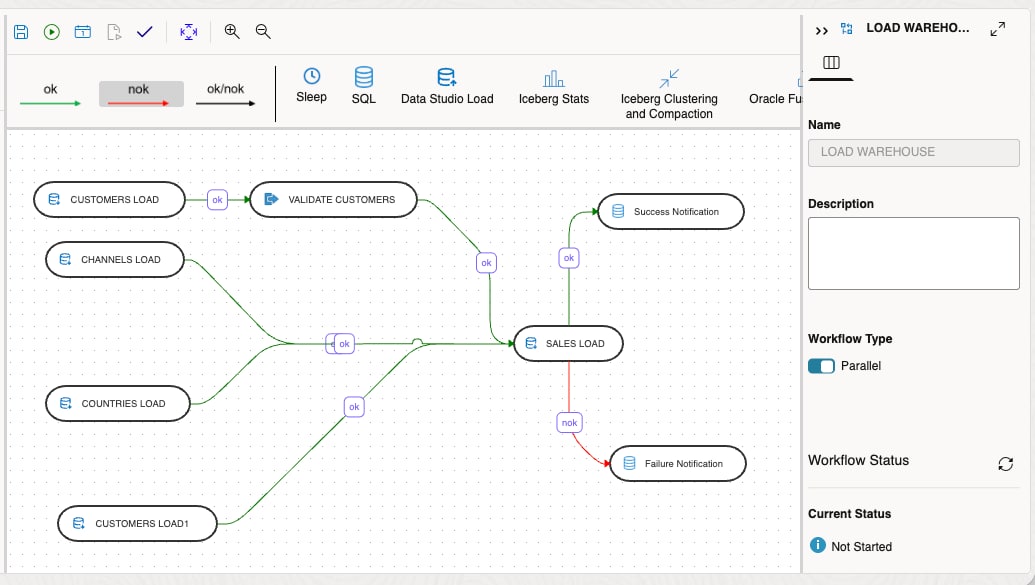
Figure 1. Independent dimension loads run in parallel before the fact-table load starts. A failure branch routes to notification.
OK, NOK, and OK/NOK edges define execution paths
Parallelism does not remove control; the workflow graph makes it explicit. Each edge type specifies how downstream work responds to upstream results.
- OK (green) is the success path. When several OK edges converge, the downstream step waits for all upstream steps to complete successfully.
- NOK (red) is the failure path. When several NOK edges converge, the downstream step can start as soon as any upstream step fails. The workflow as a whole still waits for every upstream step to complete.
- OK/NOK (black) is the unconditional path. It continues whether upstream steps succeed or fail. With a mix of OK and OK/NOK inputs, the downstream step waits for all upstream steps to complete.
To keep results unambiguous, parallel workflows disallow closed loops, disconnected nodes, OK and NOK edges converging on the same target, and OK/NOK and NOK edges converging on the same target.
Sequential and parallel workflows side by side
The example uses a sample schema. Data Transforms loads operational sales history into Autonomous AI Lakehouse so executives can analyze revenue by product, customer, and other dimensions.
The sequential workflow loads each dimension in turn, then loads the sales fact table. The parallel workflow uses the same steps but runs the dimension loads concurrently. In this sample run, the parallel workflow finished almost four times faster.
Sequential workflow: 32 minutes, 4 seconds
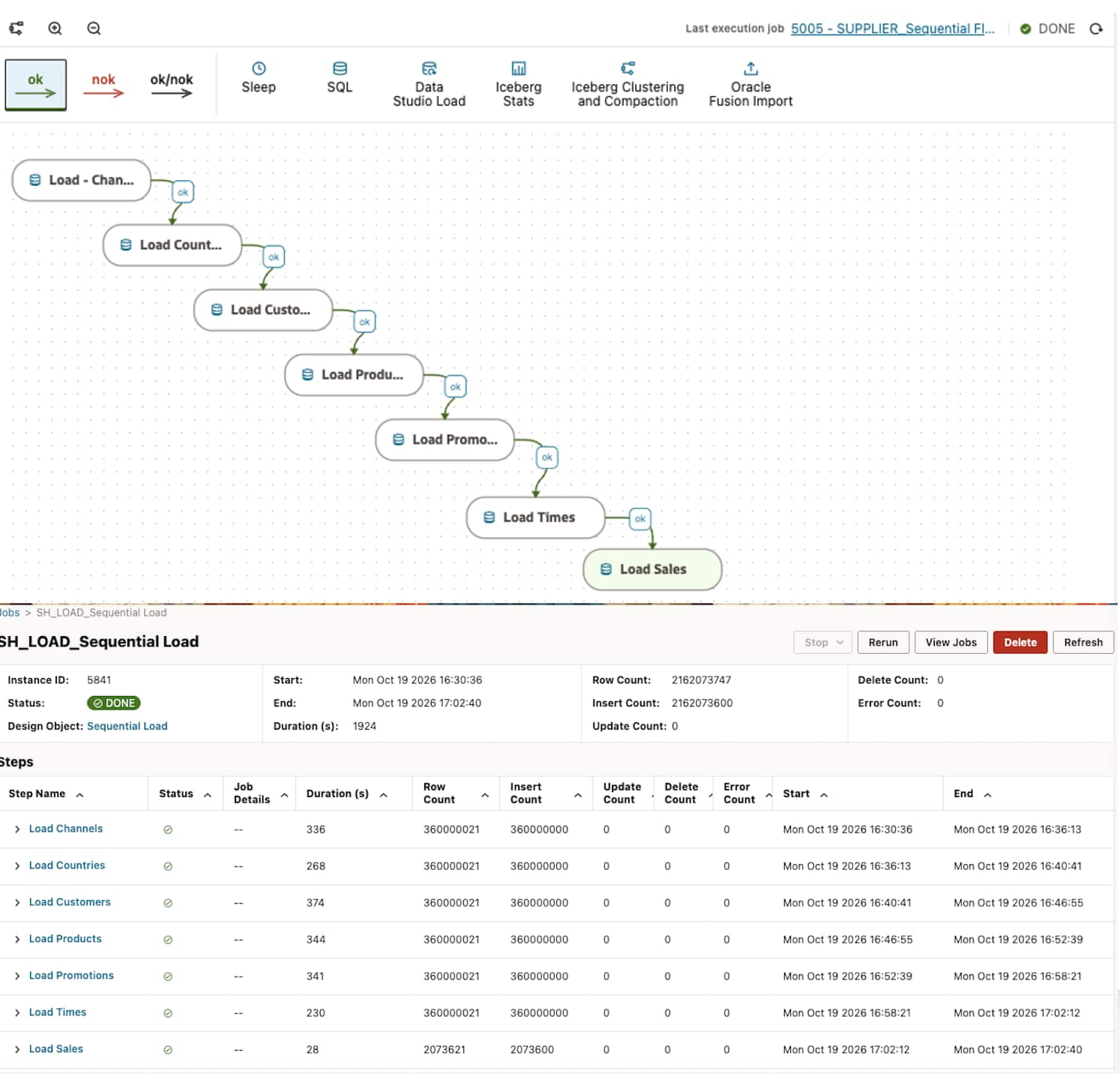
Figure 2. The sequential workflow loads one dimension at a time before loading the Sales fact table.
Parallel workflow: 8 minutes, 50 seconds
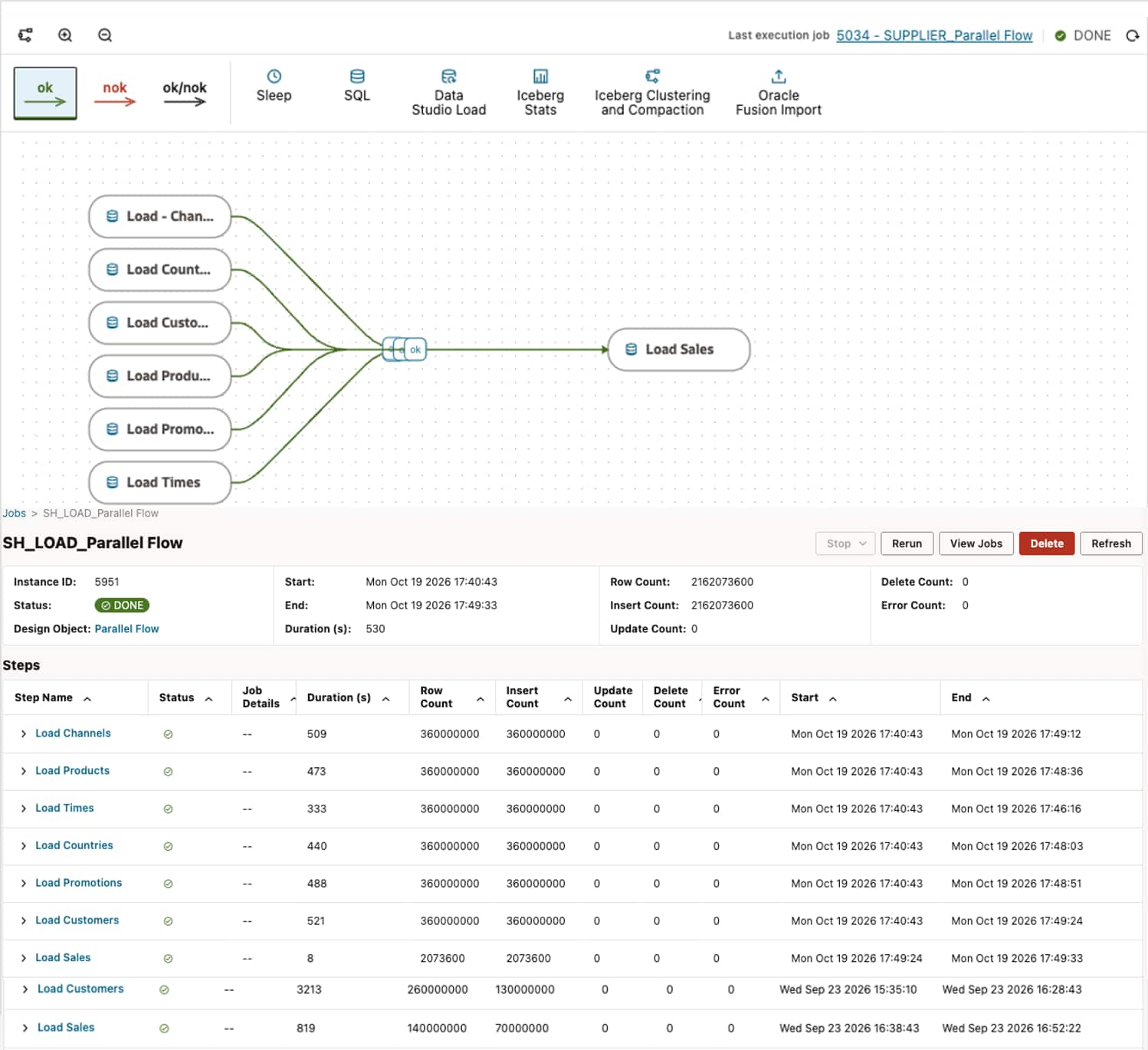
Figure 3. The parallel workflow loads the dimensions concurrently before loading the Sales fact table.
The time savings come from overlapping the dimension loads and starting the fact load as soon as the last dimension finishes. There is no gap or padded schedule, and nobody has to predict when each load will finish; the workflow graph handles it.
Scale the design without giving up recovery
A workflow can combine parallel branches, serial sequences, and nested workflows. A child workflow can serve as a reusable orchestration unit while the parent graph determines when it becomes eligible. Teams can model real dependencies without flattening the design into one long chain.
If a step fails, retry preserves work that has already completed. Restarting from the failed step avoids rerunning successful branches and gives operators a practical recovery path.
Shorter pipelines with controlled execution
Parallel Workflow Execution helps Data Transforms workflows finish sooner by starting independent steps as soon as their dependencies are satisfied. Graph validation, dependency control, OK/NOK handling, step isolation, retry behavior, and correct final workflow status remain in place. The result is a pipeline that completes faster and remains understandable and operable.
Use parallelism where it shortens the critical path, and keep serial ordering where it expresses a real dependency. The workflow stays on one orchestration canvas while the engine spends less time waiting.
Start building pipelines with Oracle Autonomous AI Lakehouse.