
Use annotations, a conversational AI Assistant, and image vectors to build and query data pipelines in Autonomous AI Lakehouse.
Describe the pipeline you want, let AI explain the data it produces, and ask questions about the results in plain English. Each step can make the next one more accurate.
Metadata is the new bottleneck
Generative AI has made it easy to ask a database a question in plain English. It has not made it easy to get the right answer. A model that sees a table called SLS_FCT with columns AMT, QTY, and STAT_CD has to guess what they mean. If it guesses wrong, it can produce SQL that runs and returns numbers that are quietly incorrect. The same is true of an AI that builds data pipelines: it can join, filter, and aggregate correctly only if it understands what the data represents.
The quality of AI-generated SQL and pipelines depends heavily on the metadata available to the model. Oracle Data Transforms, the pipeline builder in Autonomous AI Lakehouse, addresses this with three AI capabilities that reinforce one another:
- Annotations add business meaning to tables and columns, carry it through data flows, and use AI to generate descriptions for tables a flow creates.
- The AI Assistant builds, refines, and runs data flows and workflows from a conversational description.
- Vector embeddings for images and text turn unstructured content into data that can be searched by similarity inside the same pipelines.
This article covers annotations first, because they are the foundation for the other features. It then looks at the AI Assistant, how annotations and the Assistant work together to improve natural-language queries (NL2SQL), and how image vectors bring visual data into the pipeline.
We will use one example throughout. An online retailer wants to understand product returns: which categories are returned most, why, and whether visually similar products share the same problem. The data includes a product catalog with product images, an order lines table, and a returns table with free-text reasons.
Why Data Transforms pipelines
Data Transforms is built into Autonomous AI Lakehouse. There is nothing to install, and one tool covers the whole pipeline: load data from applications, databases, files, and object storage; transform it with a no-code data flow designer or SQL; orchestrate the steps as workflows; schedule them; and monitor every run from one console. Transformations execute inside the Lakehouse, so data is not pulled out to a separate engine and pushed back.
The same tool connects to Oracle Fusion, NetSuite, Salesforce, other SaaS applications, major cloud warehouses and lakehouses, and open formats such as Apache Iceberg. The result is fewer tools and hand-offs, with one place to see what ran, what failed, and why.
The AI features in this article build on that foundation. Because Data Transforms already knows the sources, targets, and lineage of each pipeline, it is a natural place to capture, propagate, and generate business metadata.
1. Annotations: data that explains itself
What annotations are
Annotations are a feature of Oracle AI Database (26ai and 19c starting with Release Update 19.28). An annotation is a name with an optional value attached to a table, column, view, materialized view, or index. Unlike a single free-text comment, an object can carry several annotations, so you can record a display name, description, units, synonyms, or usage notes separately. Annotations live in the database, so every tool that reads the metadata sees the same definitions.
ALTER TABLE order_lines MODIFY (
  amt ANNOTATIONS (
    ADD display     'Net sales amount',
    ADD description 'Line amount after discounts, before tax, in USD'
  )
);
Annotations in Data Transforms
Data Transforms supports metadata enrichment with annotations throughout a pipeline:
- Import them. When you import data entities, you can import table and column annotation definitions along with the structure, so the meaning recorded at the source comes with the data.
- Edit them. Create, edit, or delete annotations from table definitions in Data Transforms, without writing DDL.
- Propagate them. When a data flow maps a source column to a target column, its annotation can travel with it. The description of
AMTin the source can become the description ofNET_SALESin the target. - Generate them with AI. Data Transforms can use AI to generate annotations for target tables.
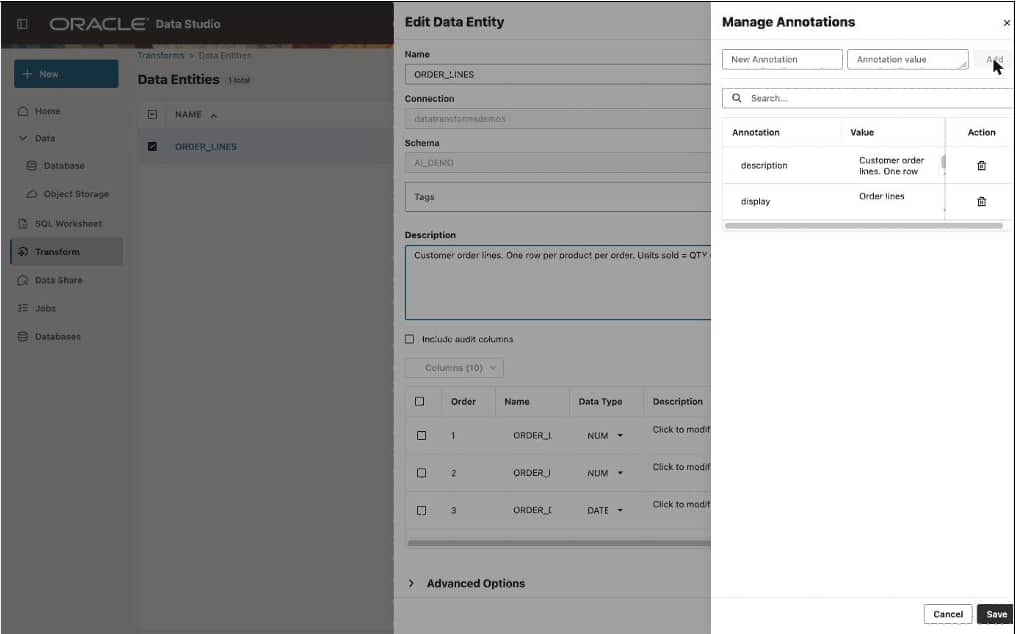
Figure 1. Viewing and editing column annotations on a data entity.
Why AI-generated annotations for targets matter
Target tables are where metadata usually gets lost. A data flow that joins order lines with returns, filters to the last 12 months, and computes a return rate by category produces a new table, RETURNS_BY_CATEGORY, with columns that may exist nowhere in the source: RETURN_RATE, RETURNED_UNITS, and TOP_REASON. Nobody writes descriptions for them, so the tables built for analysis can be the ones with the least metadata.
A data flow already contains the meaning of those columns. It records that RETURN_RATE is returned units divided by sold units, grouped by category over a 12-month window, and that TOP_REASON is the most frequent return reason. Generated annotations can capture how each new column was derived at the moment the table is built, rather than requiring someone to reverse-engineer the pipeline months later.
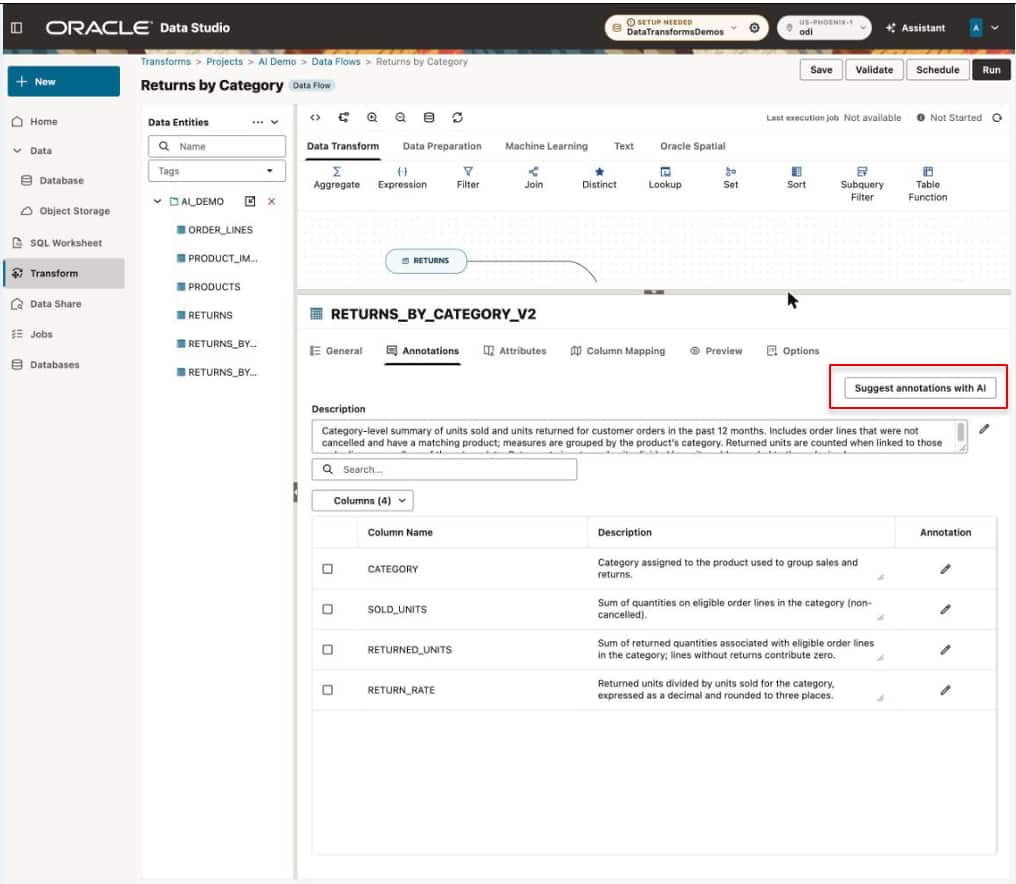
Figure 2. AI-generated annotations on a target table, derived from the data flow.
2. The AI Assistant: describe the pipeline, review the design
What it does
The AI Assistant, part of Oracle AI Database Assistant, brings a natural-language experience to building and running data integration. Describe your goal conversationally, and the Assistant can create design objects such as data flows and workflows, refine the designs as you give feedback, and execute them.
In Data Studio, the Assistant opens in a side panel from the AI Assistant card on the home page, the AI Assistant icon, or the Ask AI box in the header. You can see the generated design on the canvas while you talk to it. Changes are proposed for confirmation rather than applied silently. The Assistant requires an AI Profile, configured under Database Settings, that defines the AI service it uses.
Building the returns pipeline by conversation
For the retailer, a conversation might start like this:
Create a data flow that joins ORDER_LINES and RETURNS on order line ID, keeps the last 12 months, and calculates return rate and returned units by product category. Load it into RETURNS_BY_CATEGORY.
The Assistant produces a data flow with the join, filter, aggregation, and target on the canvas. Review it as you would a colleague’s work, then refine it in the same conversation:
Also add the most common return reason for each category, and exclude orders that were cancelled before shipping.
Put this flow in a workflow that runs nightly after the order load.
The output is an ordinary Data Transforms data flow and workflow: visible, editable, versionable, and schedulable like any other. The Assistant speeds up the first draft and the iterations, while the result remains a transparent pipeline you can inspect and change.
This builds on an existing Data Transforms capability: you can paste a SQL statement and have Data Transforms parse it into an equivalent data flow on the design canvas. The Assistant extends the same idea from SQL to plain English.
3. The interplay: annotations make every AI step better
Annotations and the Assistant are useful separately. Together, they form a loop in which each pipeline you build improves the next one and the queries run against its output.
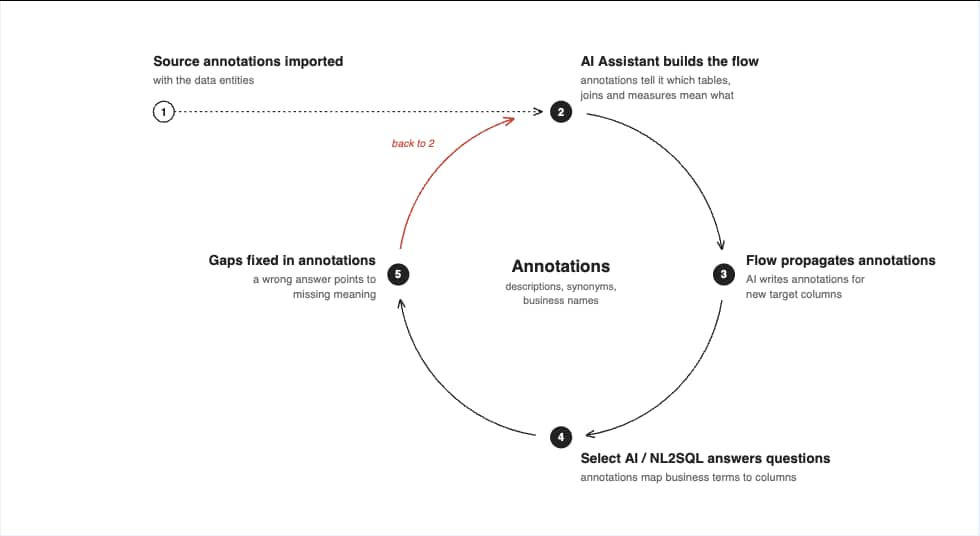
Figure 3. Better metadata produces better flows, and better flows produce better metadata.
Better annotations help the Assistant build better flows
When the Assistant is asked to “calculate net sales by category,” it has to decide which column represents net sales. If AMT is annotated as “Line amount after discounts, before tax, in USD” and GROSS_AMT as “List price times quantity,” the choice is clear. Without annotations, it is a guess. The same applies to which key to join on, which status code means “cancelled,” and which date is the order date rather than the ship date.
Better flows produce better annotations
The loop runs in the other direction too. Every flow, whether built by the Assistant or by hand, can carry source annotations through to its targets and generate annotations for new columns. As a team builds more pipelines, its data estate becomes better described, and derived tables that analysts query are no longer the least documented ones.
Better annotations make NL2SQL accurate
The payoff comes when someone asks a question. Select AI, the natural-language-to-SQL capability in Autonomous AI Lakehouse, builds its prompt to the language model from schema metadata. Its AI profile has three attributes that control what is included: comments, constraints (primary and foreign keys, which tell the model how to join), and annotations. With annotations enabled, the business meaning of each table and column is sent with the question.
BEGIN
  DBMS_CLOUD_AI.CREATE_PROFILE(
    profile_name => 'RETAIL_NL2SQL',
    attributes   => '{"provider": "oci",
                      "credential_name": "OCI_CRED",
                      "object_list": [{"owner": "RETAIL", "name": "RETURNS_BY_CATEGORY"}],
                      "annotations": "true",
                      "comments": "true",
                      "constraints": "true"}');
END;
An analyst can now ask a question in the SQL Worksheet’s Generate SQL with AI dialog or with Select AI:
Which three categories had the highest return rate, and what was the most common reason for each?
Because RETURN_RATE and TOP_REASON were annotated when the flow created them, the model knows that RETURN_RATE is already a ratio and should not be summed, and that TOP_REASON is the reason to report. Oracle published a small example of this effect: with cryptic column names and no annotations, Select AI mislabeled columns, grouped by the wrong dimension, and returned empty results for valid questions. With annotations added, the same questions returned the correct answers.
The main point is that the work done in the pipeline—importing, propagating, and generating annotations—makes the natural-language experience at the end more trustworthy. Annotations are not documentation for its own sake; they are input that AI query tools depend on.
4. Vector embeddings for images
What it is
Not all of the retailer’s data is in rows and columns. The product catalog includes photos, and the returns table has free-text reasons. Vector embeddings turn this content into numeric vectors that capture its meaning, so similar images or text end up close together and can be found with a similarity search.
Data Transforms supports text embeddings in data flows with the Text Embedding Vector operator, and image embeddings with the Image Embedding Vector operator. Both are in the Data Flow editor under Database Functions and Machine Learning, and both call the OCI Generative AI service.
How it works
- Create an OCI Generative AI connection with your OCI credentials and the inference endpoint for the embedding model.
- Add the Image Embedding Vector operator to a data flow after the source that holds the images. Images can be stored as BLOBs, or the source column can point to image files in OCI Object Storage. In the latter case, select an Object Storage connection so Data Transforms can fetch them.
- Choose a model, such as
cohere.embed-v4.0or one of the Cohere image embedding v3 models, and map the image column toinput_image. - Load the target. Each row gets a
VECTOR_EMBEDDINGcolumn of theVECTORdata type (which you can rename) in an Autonomous AI Lakehouse table.
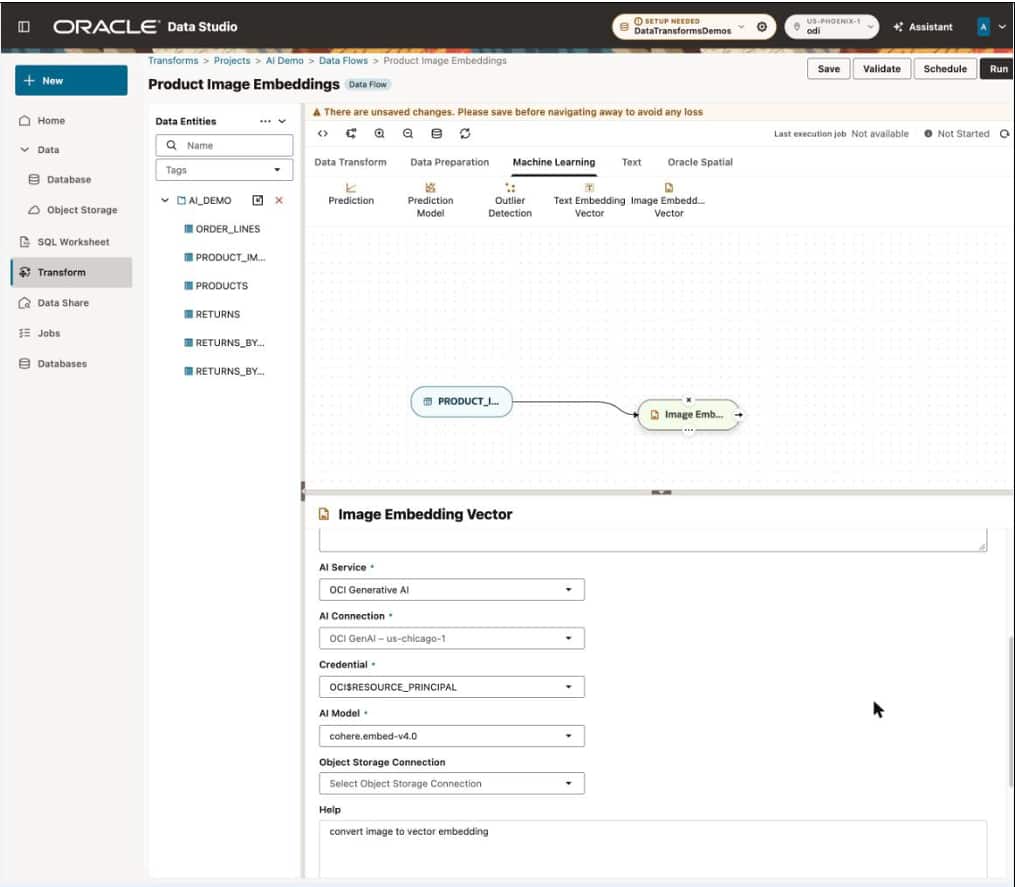
Figure 4. Generating image embeddings in a data flow.
Why it matters
Because embeddings are produced inside the pipeline, they stay in step with the catalog: new products get vectors on the next scheduled run, with no separate ML service to operate. Because the vectors are stored alongside relational data, similarity search can be combined with ordinary SQL. For the retailer, that means finding products that look like those with the highest return rates:
SELECT p.product_name, r.return_rate
FROM   product_image_vectors p
JOIN   returns_by_product r ON r.product_id = p.product_id
ORDER  BY VECTOR_DISTANCE(
         p.vector_embedding,
         (SELECT vector_embedding FROM product_image_vectors
          WHERE product_id = :most_returned_product),
         COSINE)
FETCH FIRST 10 ROWS ONLY;
Visual similarity can explain what structured data cannot: products that look alike may share a supplier, material, or sizing pattern, and therefore the same return problem. Other uses include duplicate detection in product catalogs, visual search, and recommendations. The text embedding operator can do the same for return reasons, grouping “runs small,” “too tight,” and “order a size up” even though they share no words.
Vector columns benefit from annotations too. Recording which model produced a vector, and from which column, helps prevent vectors from different models being compared by mistake and tells AI tools what the column represents.
Bringing it together
Data Transforms pipelines can now use AI at each stage. The AI Assistant turns a description into a working data flow and workflow that you can inspect and change. Annotations carry business meaning from sources through the flow, and AI fills in descriptions for the columns the flow creates. Embedding operators bring images and text into the same pipelines as structured data. Natural-language queries over the result can be more accurate because the metadata they depend on was produced along the way.
This work does not require a separate metadata tool, a separate AI service integration, or a separate vector pipeline: it is all in the pipeline builder that is already part of Autonomous AI Lakehouse.
The practical advice is simple: treat annotations as part of the pipeline, not an afterthought. Import them with your sources, let flows propagate and generate them, and enable annotations in your Select AI profile. Every AI feature downstream benefits from the added context.
Start building pipelines with Oracle Autonomous AI Lakehouse at datastudio.oracle.com.