
When designing data integration pipelines, tracking how and when data is loaded into target systems is essential for troubleshooting, compliance, auditing, and operational monitoring. Oracle Data Transforms provides built-in audit columns that can automatically capture execution details for every row processed during a data load.
These audit columns are added to your target table, enabling you to maintain a complete history of data load activities without implementing custom logging mechanisms.
The following audit columns are available:
- AUDIT$_JOB_ID: Records the unique identifier of the specific data load or workflow execution.
- AUDIT$_OPERATION: Identifies the operation performed on the row, such as INSERT, UPDATE, or DELETE.
- AUDIT$_TIMESTAMP: Captures the exact date and time when the row was processed during the data load.
By leveraging these audit columns, organizations can improve data traceability, simplify debugging, and support governance requirements.
When You Need This
Audit columns are particularly useful in the following scenarios:
- Tracking data lineage and load history.
- Troubleshooting failed or errored out data loads.
- Identifying the workflow execution that modified a specific record.
- Monitoring incremental data loads.
- Supporting regulatory, compliance, and audit requirements.
- Maintaining operational visibility.
- Analysing data load performance and execution trends.
Step-by-Step: Getting Started
Prerequisites :
Before configuring audit columns, ensure that you have:
An active Oracle Data Transforms instance.
Source and target connections configured.
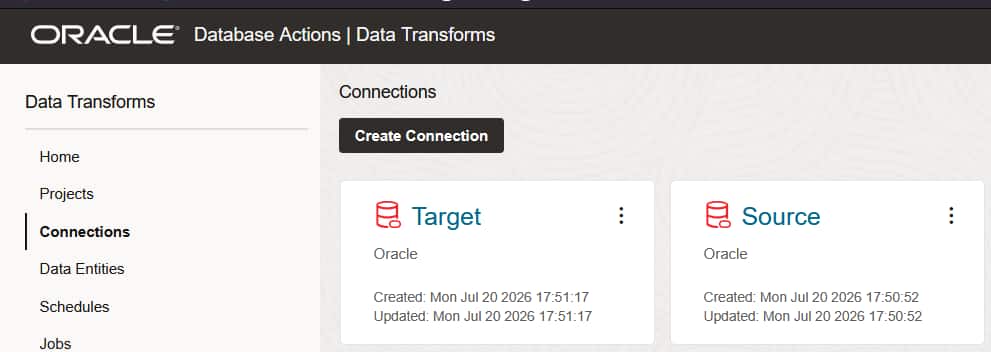
Step 1: Create the Source Connection and Target Connections
1. Navigate to Connections
2. Click Create Connection
3. Select the desired connection type
4. Provide the required connection details
5. Test and save the connection
6. Similarly create a target connection
Step 2: Configure the Source and Target Connection in a Data Load
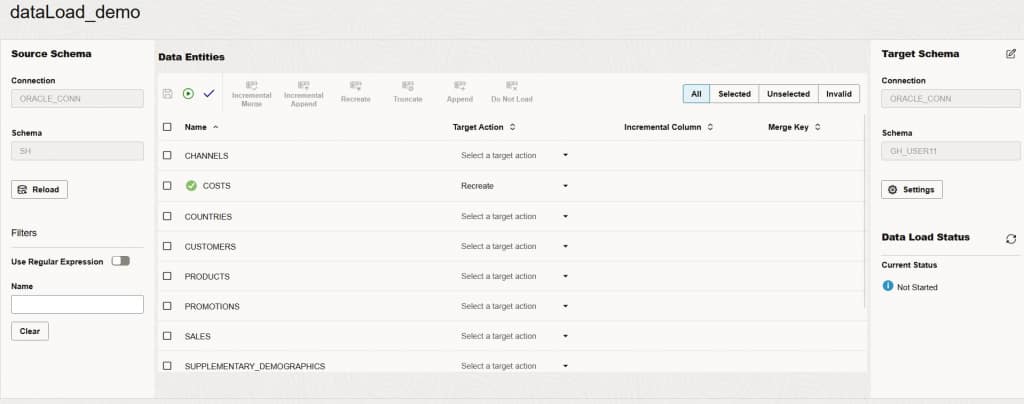
1. Navigate to Data Loads
2. Create a new data load
3. Select the source connection created in Step 1
4. Choose the source schema and data entities
5. Select the target connection
6. Provide the required connection configuration details
7. Select the target schema
8. Click Save
Step 3: Enable Audit Columns
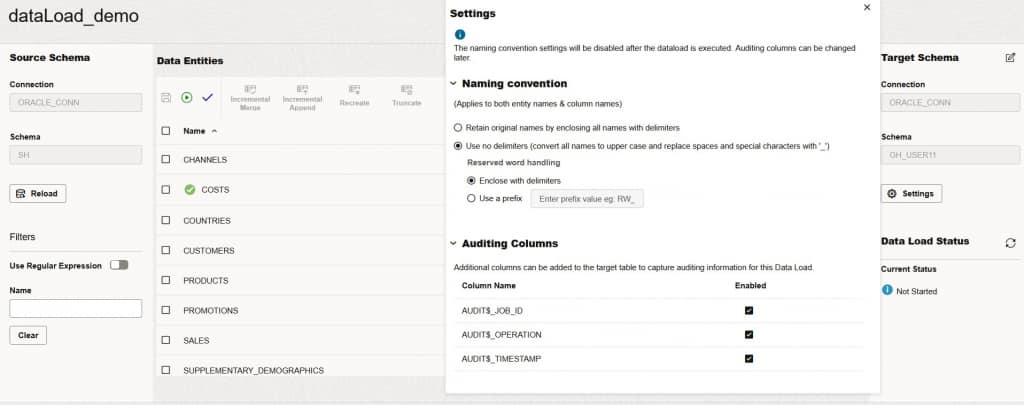
1. Navigate to the Data Loads page and click the data load.
2. Click the Settings option which is on the right side of the Data Load Detail page.
3. In the Auditing Columns section
4. Enable the required audit fields:
- AUDIT$_JOB_ID
- AUDIT$_OPERATION
- AUDIT$_TIMESTAMP
Step 4. Save and Execute the data load.
1. Click Save to apply the configuration
2. Click Start to run the data load
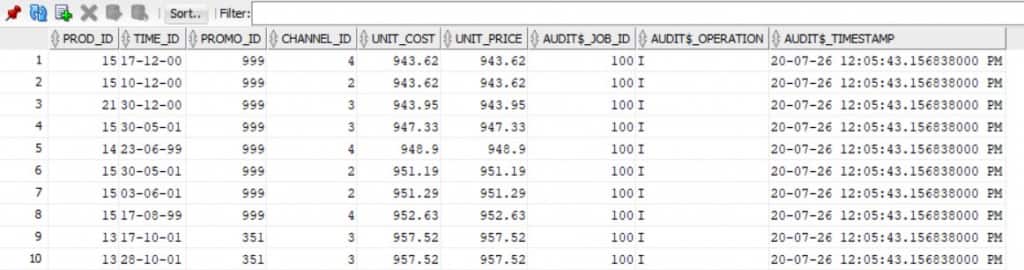
3. Verify that records are successfully loaded into the target table
4. Query the target table to confirm that audit information is populated
5. Please check the last three columns, which contain the audit information
Example:
Understanding the Audit Columns
AUDIT$_JOB_ID
This column stores the unique identifier of the workflow or data load execution. It helps correlate processed records with a specific execution instance.
AUDIT$_OPERATION
This column records the operation performed on the target row.
Possible values may include:
* I -INSERT
* U -UPDATE
* D -DELETE
AUDIT$_TIMESTAMP
This column stores the processing timestamp for each row.
Key Benefits
- Improved data traceability
- Tracking of workflow execution that processed each row and the data and time processing occurred.
- Simplified troubleshooting
- Quick identification of records associated with failed or problematic data load executions.
- Enhanced governance and compliance
- Maintenance of an auditable history of data movement and modifications.
- Better operational monitoring
- Visibility into data load activities without implementing custom audit solutions.
- Reduced development effort
- Built-in audit functionality that removes the need of using custom tracking logic.
Learn More
Oracle Data Transforms Documentation: https://docs.oracle.com/en/database/data-integration/data-transforms/using/run-data-load.html
Oracle Data Transforms Release Note: https://docs.oracle.com/en/database/data-integration/data-transforms/releasenotes
Conclusion
Oracle Data Transforms provides built-in audit columns that simplify tracking and monitoring of data load activities. By enabling **AUDIT$_JOB_ID**, **AUDIT$_OPERATION**, and **AUDIT$_TIMESTAMP**, organizations can gain valuable visibility into their data integration processes, improve troubleshooting capabilities, and support governance and compliance requirements. Incorporating these audit fields into your target tables is a simple yet effective way to enhance the reliability and traceability of your data pipelines.