
As organizations continue to strengthen their security posture, protecting application credentials has become more critical than ever. Storing passwords directly within applications or services increases the risk of credential exposure and makes password rotation operationally challenging.
To address these challenges, Oracle Data Transforms now supports Secret Key Integration, enabling connections to securely retrieve credentials from OCI Vault instead of storing passwords within the service. This provides centralized secret management, seamless password rotation, and improved compliance with enterprise security standards.
Why Use Secret-Based Authentication?
Whenever an application, integration, or service requires access to sensitive credentials, using a secure secret management solution is considered a best practice.
Instead of embedding passwords in application configurations, credentials are stored securely in a vault and accessed only when required.
Benefits include:
- Improved credential security
- Centralized secret management
- Simplified password rotation
- Reduced operational overhead
- Compliance with enterprise security standards
How Secret-Based Authentication Works
With Secret-Based Authentication, Oracle Data Transforms retrieves the required credentials directly from OCI Vault at runtime.
Rather than storing passwords within the connection definition, the connection references the Secret OCID. When the connection is used, Data Transforms securely fetches the latest credential from OCI Vault.
Prerequisites
Before configuring Secret Key Integration, complete the following:
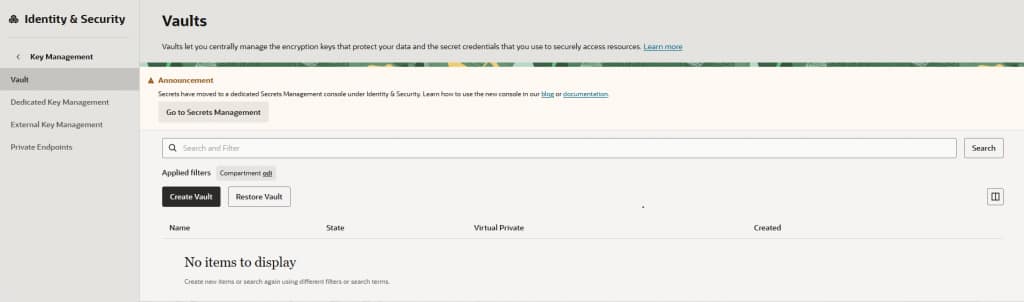
Step 1: Create an OCI Vault
Create an OCI Vault that will securely store your application credentials.
Screenshot : OCI Console → Security → Vaults → Create Vault
Reference link: Create vault
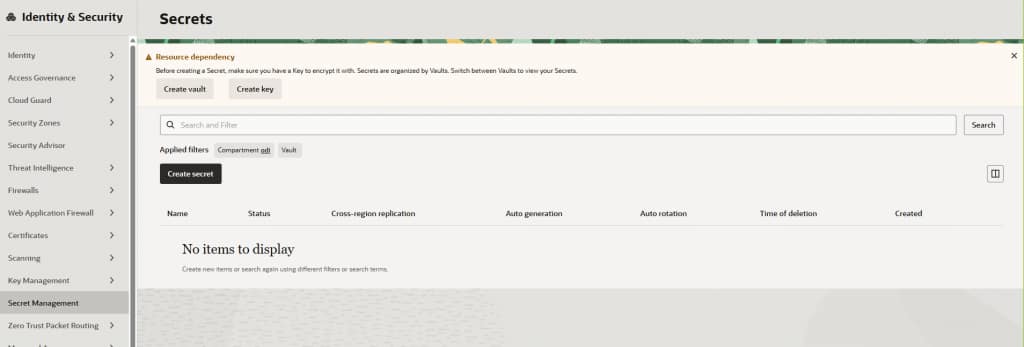
Step 2: Create a Secret
Add a secret to the vault and store the database password or any other sensitive credential.
Screenshot : OCI Vault → Secrets → Create Secret
Reference link: Key Management
Step 3: Grant Access to OCI Vault
Data Transforms must be authorized to read secrets from OCI Vault.
Configure the required:
- Resource Principal
OCI Resource Principal allows cloud resources such as compute instances, functions or database containers to authenticate directly with other Oracle Cloud Infrastructure services. This eliminates the need to hardcode API keys or user credentials directly into your application
- IAM Policies
IAM Policies grant groups of users or dynamic groups access to specific resources within a compartment or tenancy
- Vault permissions
These permissions allow Data Transforms to securely retrieve the stored secret during execution.
Reference
Configuring Resource Principals and IAM Policies for Secret Key Integration
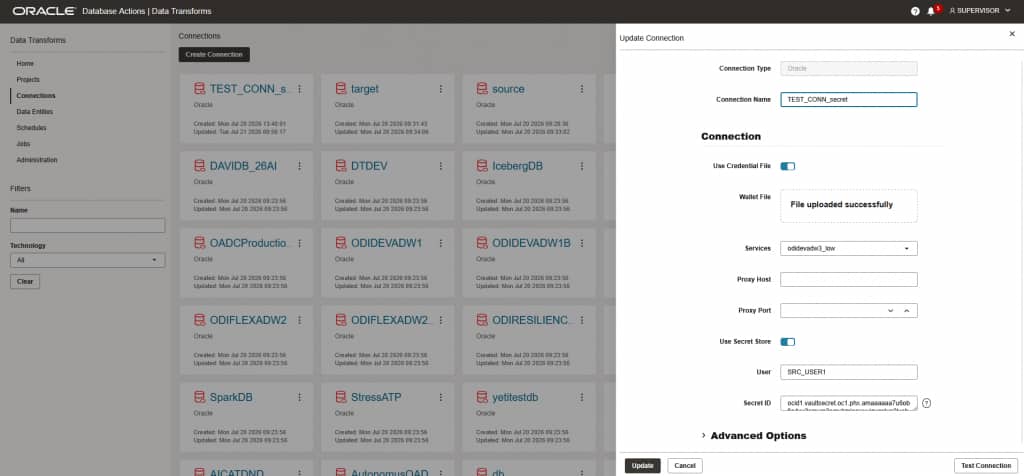
Step 4: Configure the Data Transforms Connection with Secret ID
When creating or editing a Data Transforms connection, provide the Secret OCID instead of entering the password directly.
Data Transforms will use this reference to securely retrieve the credential whenever the connection is used.
Screenshot : Data Transforms Connection page highlighting the Secret OCID field
Step 5: Use the Connection
Once the configuration is complete, no additional password management is required.
Whenever the connection is used:
- Data Transforms requests the secret.
- OCI Vault securely returns the credential.
- The connection is established automatically.
This process is completely transparent to users.
Key Benefits
- No need to replicate passwords across your Oracle Autonomous AI Databases. Store your credentials securely in a secret managed by OCI Vault, and reference the same secret from all your Oracle Autonomous AI Database instances.
- Simplified and efficient password rotation. Rotate credentials directly in your vault or secret manager, and the updated values will be automatically reflected in your Oracle Autonomous AI Databases instances. Note that Oracle Autonomous AI Databases refreshes credential objects every 12 hours, so changes may take up to 12 hours to become effective in the database.
- Enhanced security. Keep your credentials in secrets managed by your preferred cloud provider and protect them using your own encryption keys. This approach improves security while giving you full control over credential storage and key management.
Learn More
- Secret key integration in Data transforms: https://docs.oracle.com/en/database/data-integration/data-transforms/using/use-oci-vault-secret-credentials-connections.html
Conclusion
Integrating secret management with Data Transforms significantly enhances the security and manageability of connection credentials. Sensitive information is securely maintained in a dedicated secret management service such as OCI Vaults