
Oracle Data Transforms now supports Image Vector Embeddings using the Oracle Cloud Infrastructure (OCI) Generative AI service. This feature allows you to convert images into vector embeddings directly within a data flow.
Vector embeddings are numerical representations of image content that help machines understand and compare images based on their visual characteristics. These embeddings can then be used for advanced AI and analytics use cases.
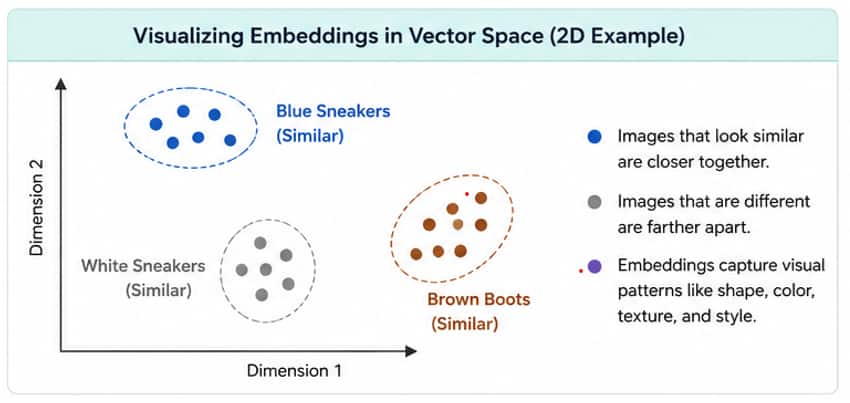
A new Image Embedding Vector operator is available in the Data Flow Editor under the Machine Learning Database Functions category. The operator takes image data stored as a BLOB and generates vector embeddings using OCI Generative AI models.
Note: This feature requires an Oracle Autonomous Database 26ai connection.
When You Need This
You can use Image Vector Embeddings when you want to:
- Perform image similarity searches.
- Build visual search applications.
- Match products using images.
- Support recommendation systems
- Enable downstream machine learning workflows.
- Analyse large collections of images more efficiently.
For example, an online retailer can compare product images and find visually similar products without relying only on text descriptions.
How Image Vector Embeddings in Data Flows Work
Data Transforms integrates with OCI Generative AI to convert image content into vector representations.
The process works as follows:
- Source images are stored in a BLOB column.
- Data Flow reads the image data.
- The Image Embedding Vector operator sends the image to an OCI Generative AI embedding model.
- The model generates a vector representation of the image.
- The generated vector is written to a target vector column in Oracle Database 26ai.
- The vectors can then be used for similarity searches, AI applications, and analytics.
This process helps organizations unlock valuable insights from image data without building complex AI pipelines.
Step-by-Step: Getting Started
Prerequisites
Before using Image Vector Embeddings in Data Flows, ensure that you have:
- Data Transforms access
- An Oracle Autonomous Database 26ai connection
- An OCI Generative AI connection
- A source dataset containing images stored as BLOB data
Step 1: Create an Oracle Database 26ai connection.
Navigate to:
Connections → Create Connection → Oracle Database
Create a connection to your Oracle Autonomous Database 26ai instance.
This database will store the generated vector embeddings.
Step 2: Create an OCI Generative AI Connection
Navigate to:
Connections → Create Connection → Services → Oracle Cloud Infrastructure Generative AI
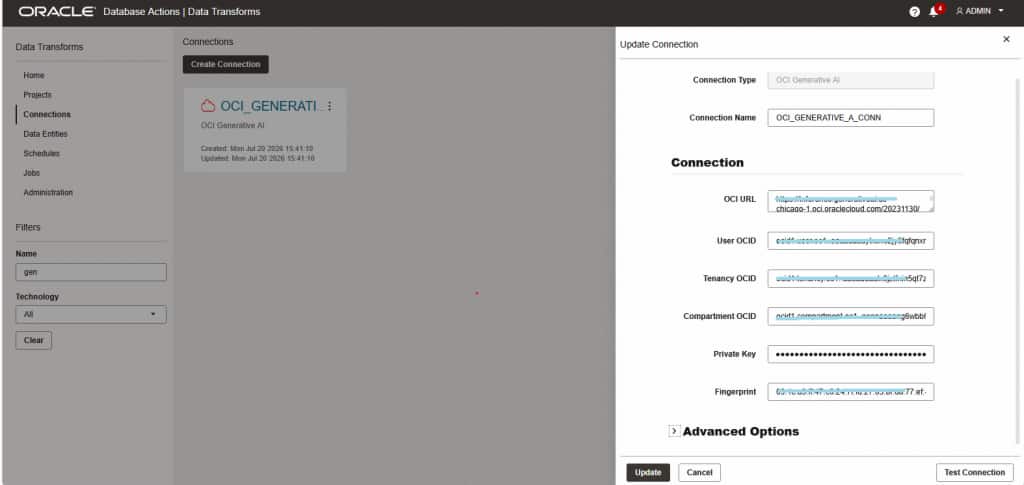
Configure the required OCI credentials and connection details.
This connection allows Data Transforms to access OCI Generative AI embedding models.
Note: Generative AI service URL: Get this from the inference API of any model listed under Pretrained foundational models.
For example:
https://inference.generativeai.us-chicago-1.oci.oraclecloud.com/20231130/actions/embedText
Reference link :
Create and use an Oracle Cloud Infrastructure Generative AI Connection
OCI Generative AI service documentation
Step 3: Create or Open a Data Flow
Navigate to:
Data Flows → Create Data Flow
Select the source dataset that contains image data stored as BLOB columns.
Step 4: Add the Image Embedding Vector Operator
In the Data Flow Editor:
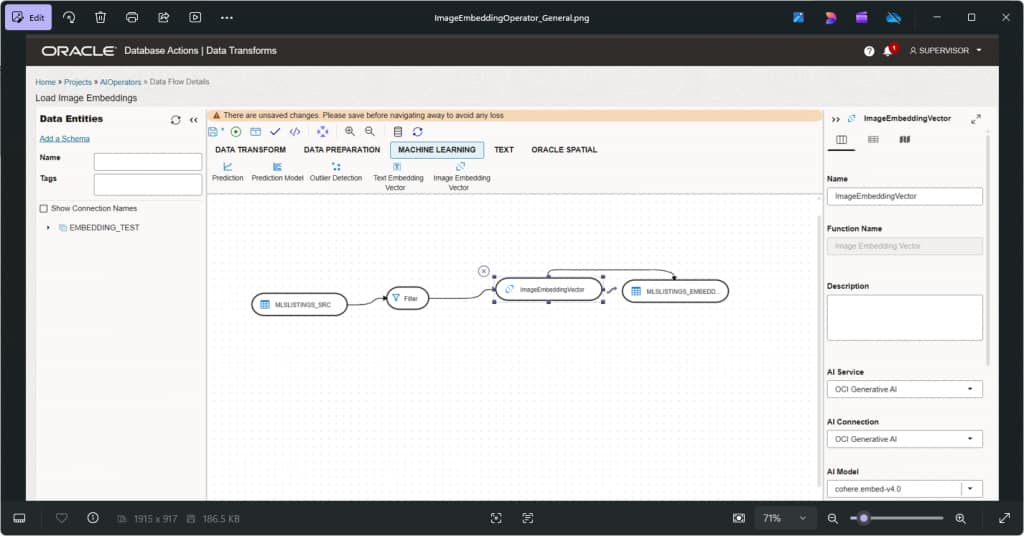
- From the Database Functions toolbar, select Machine Learning Database Functions category.
- Drag and drop the Image Embedding Vector operator into the data flow.
- Connect it to the source dataset.

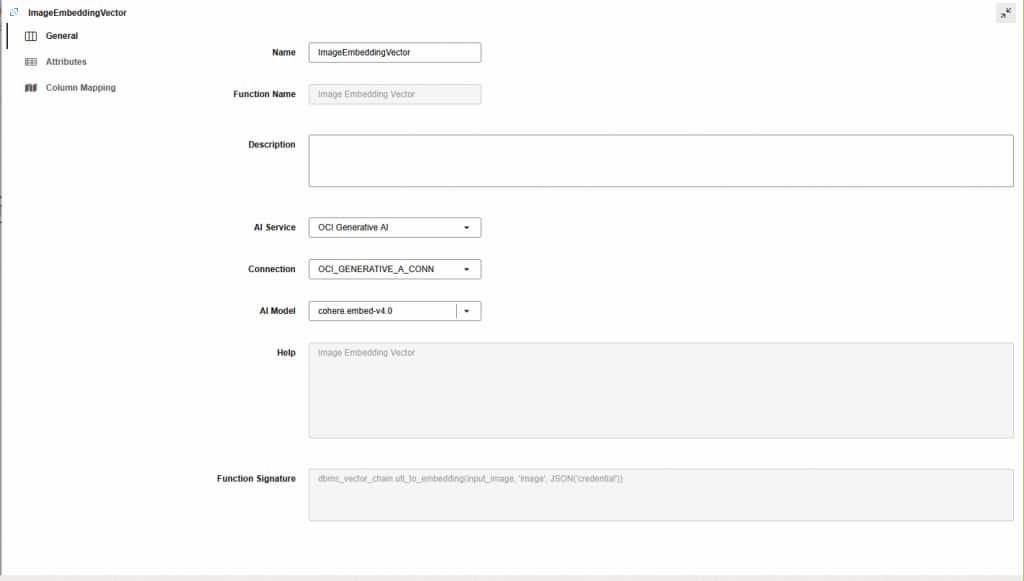
Step 5: Configure the Embedding Model
Select the Image Embedding Vector operator and configure:
- AI Service – Select OCI Generative AI from the drop-down.
- AI Connection – The drop-down lists all the available connections for the selected AI Service. Select the connection that you want to use.
- AI Model – The drop-down lists all the available models for the selected AI Service and Connection. The following models are listed
cohere.embed-v4.0
cohere.embed-english-image-v3.0
cohere.embed-english-light-image-v3.0
cohere.embed-multilingual-image-v3.0
cohere.embed-multilingual-light-image-v3.0
The operator will use the selected model to generate embeddings from the image content.
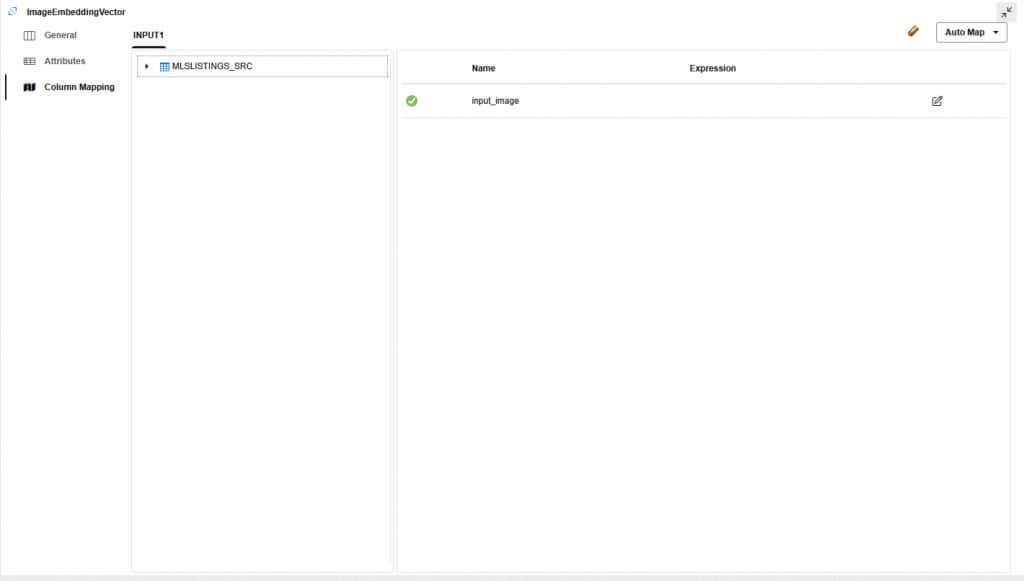
- Source image BLOB column – Drag a text column from the available columns to the Expression column for input_image. This is the data that the vectors will be built on.
- Target vector column – Select the the Image Embedding Vector transformation component and drag the Connector icon, next to it to connect it to the target object.
Step 6: Run the Data Flow
Validate and run the data flow.
During execution:
- Images are processed by OCI Generative AI.
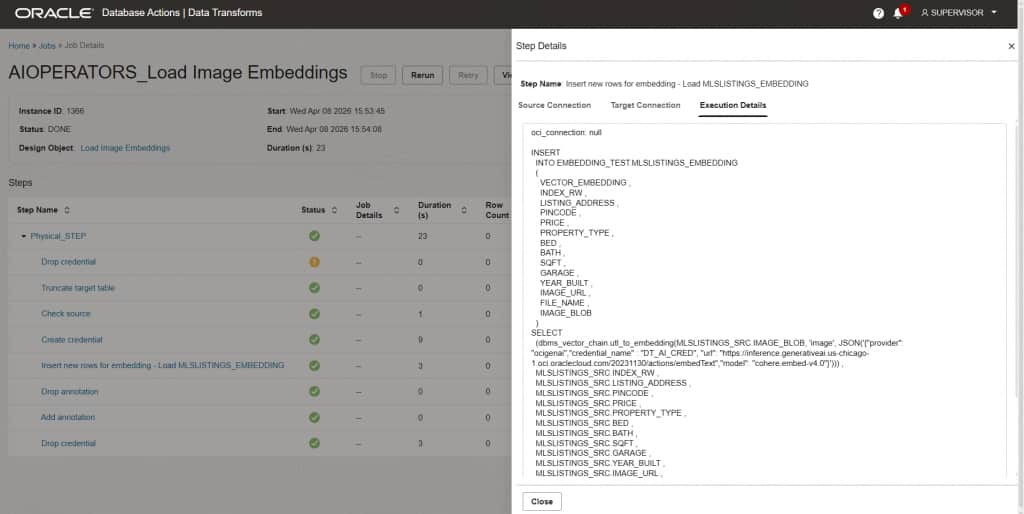
- Vector embeddings are generated.
- Results are stored in the target Oracle Database 26ai table.
You can then use these vectors for similarity searches, AI applications, and advanced analytics.
Reference Link: Image Embedding Vectors
Key Benefits
AI-Powered Image Understanding – Convert images into machine-readable vector representations.
Improved Search Experience – Enable visual similarity search and image-based recommendations.
Simplified AI Integration – Generate embeddings directly within Data Transforms without custom coding.
Scalable Processing – Process large volumes of image data using OCI services.
Better Analytics – Combine image embeddings with structured data for deeper business insights.
By bringing image embedding generation directly into Data Flows, businesses can operationalize AI faster and reduce development effort.
Learn More
- Image Vector Embeddings in a Data Flow: Use Embedding Vectors in a Data Flow
- AI Models – AI Models
Conclusion
Image Vector Embeddings in Oracle Data Transforms extend existing AI capabilities beyond text by enabling vector generation from image content. Using OCI Generative AI and Oracle Database 26ai, organizations can easily create image embeddings within data flows and leverage them for visual search, image similarity analysis, product matching, AI enrichment, and machine learning applications.
With a simple configuration process and no custom coding required, this feature makes it easier than ever to bring AI-powered image intelligence into your data integration workflows.