
Follow Lucía, a data architect in Bogotá, as she connects lakehouse sources and uses an assistant to discover data in Oracle AI Data Catalog.
Lucía supports a sporting goods retailer’s operations across Latin America. Her next analysis needs store sales, online cart activity, and inventory held in different data environments.
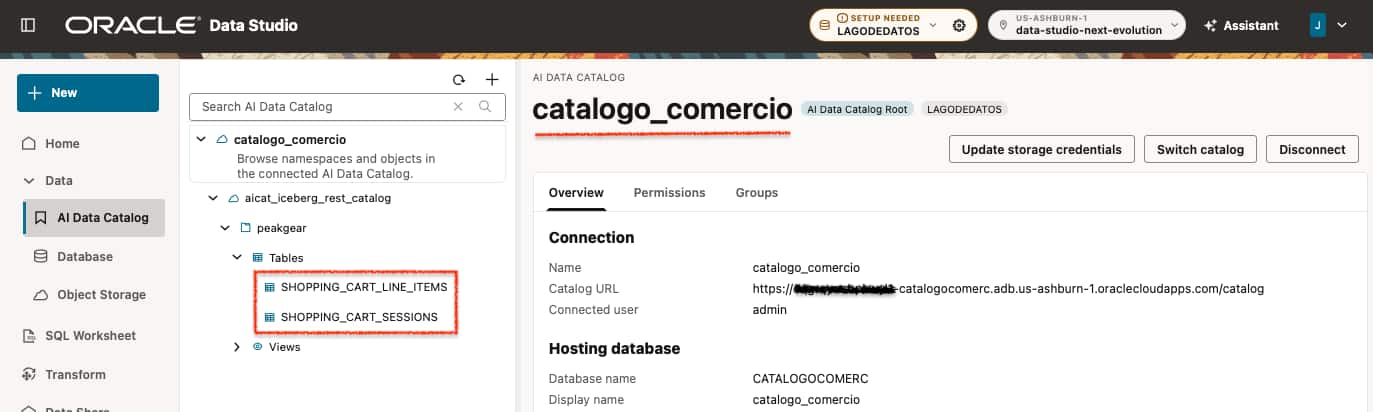
Oracle Data Studio gives Lucía one UI across database instances and connected catalogs. She can expand and manage that footprint through the UI or the Assistant, keeping data discovery, SQL development, and analysis in one workspace. She begins with the cart tables in Oracle AI Data Catalog, catalogo_comercio.

Bring the sources together
The workspace supports connections to Databricks Unity Catalog, Oracle AI Data Catalog, AWS Glue, and OCI Object Storage. Lucía’s example uses the following table layout:
| Source or access path | Example tables | Contribution |
|---|---|---|
| Databricks Unity Catalog | STORE_SALES_TRANSACTIONS, PRODUCTS | Store sales and product reference data. |
Oracle AI Data Catalog: catalogo_comercio | SHOPPING_CART_SESSIONS, SHOPPING_CART_LINE_ITEMS | Iceberg tables for cart activity and the store selected for each session. |
OCI Object Storage bucket: lagodedatos-fuentes | STORE_INVENTORY | Store stock and available-to-promise quantities. |
| AWS Glue Data Catalog | SUPPLIER_STOCK | Registered supplier-stock data for product-level availability. |
| Local database | STORE_LOCATIONS | Store reference data. |
Each connection gives the team access to a different part of the analysis. Catalog connections identify registered tables; access to their underlying storage is also required.
Oracle documents external catalog access, mounting AWS Glue and Oracle AI Data Catalog, and a Unity Catalog example for eligible Databricks tables. Oracle AI Data Catalog supplies Iceberg metadata; its registered tables’ data files remain in the configured storage.
Create your Autonomous AI Lakehouse Database
Lucía needs to connect customer interest with stock availability across her retailer’s data platforms. Autonomous AI Lakehouse gives her team a SQL environment for analyzing supported lakehouse data alongside local business data, using existing catalogs and eligible Iceberg tables. She provisions LAGODEDATOS to develop and run that analysis, with AI assistance for generating SQL her team can review and reuse.
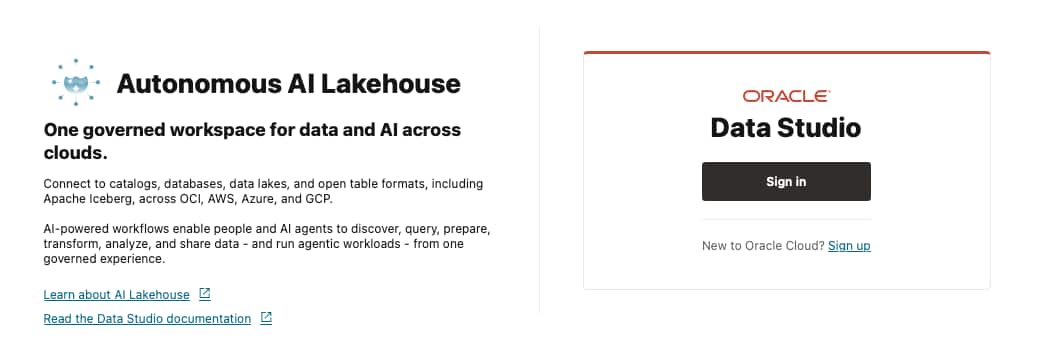
Lucía opens the workspace and signs in.
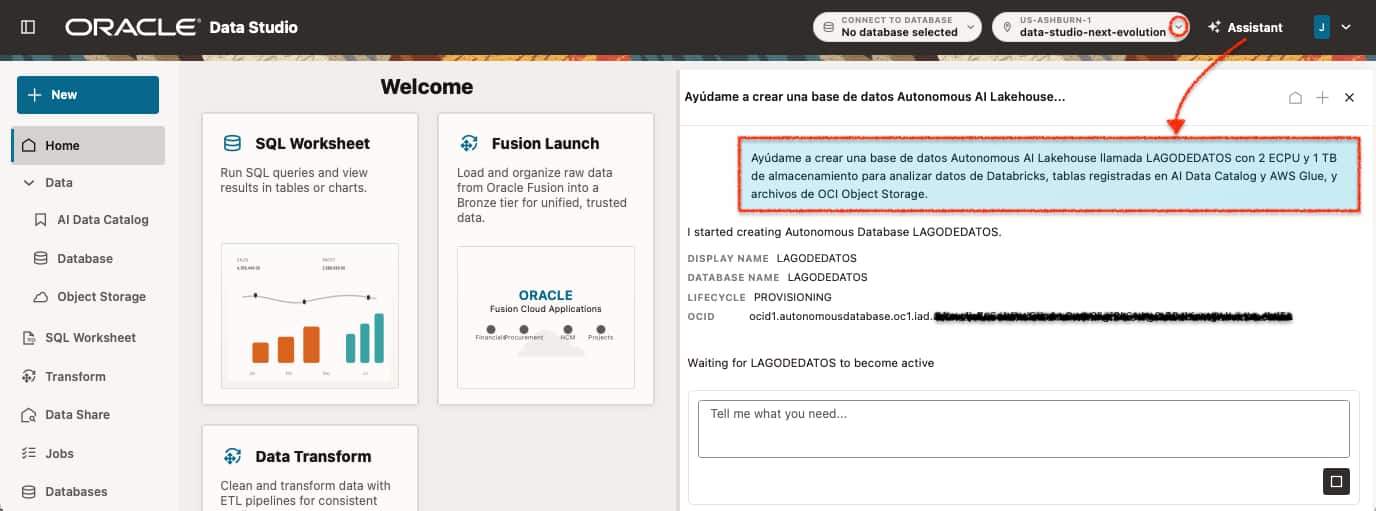
She starts a provisioning request for an Autonomous AI Lakehouse Database:
Help me create an Autonomous AI Lakehouse Database named LAGODEDATOS with 2 ECPUs and 1 TB of storage to analyze Databricks data, tables registered in AI Data Catalog and AWS Glue, and files in OCI Object Storage.
Follow the documented assistant provisioning procedure: review the generated creation form, enter the administrator password, check the settings, and confirm creation. Verify the Lakehouse workload and the requested compute and storage allocation. The two ECPUs and 1 TB used here are example settings supported by the compute model, rather than a sizing assessment of the retailer’s workload.
Once the environment is available, she connects catalogo_comercio and the lagodedatos-fuentes bucket alongside the Databricks and AWS Glue sources, then inspects the tables through the catalog interface. The source names remain visible so the team can identify where each dataset comes from.
Connect to your AI Data Catalog
Connect Data Studio to the existing AI Data Catalog named catalogo_comercio, following Create and Connect to AI Data Catalog. Supply the catalog credentials when required, and verify that the connected database is configured to use that catalog. Within the catalog, users can navigate through the available namespaces and explore registered data objects.
Use the assistant to find data in AI Data Catalog
The assistant can search for entities within Oracle AI Data Catalog. Lucía starts with the cart data in catalogo_comercio:
Search the AI Data Catalog for the entities SHOPPING_CART_SESSIONS and SHOPPING_CART_LINE_ITEMS. Display the matching results and their references in the catalog.
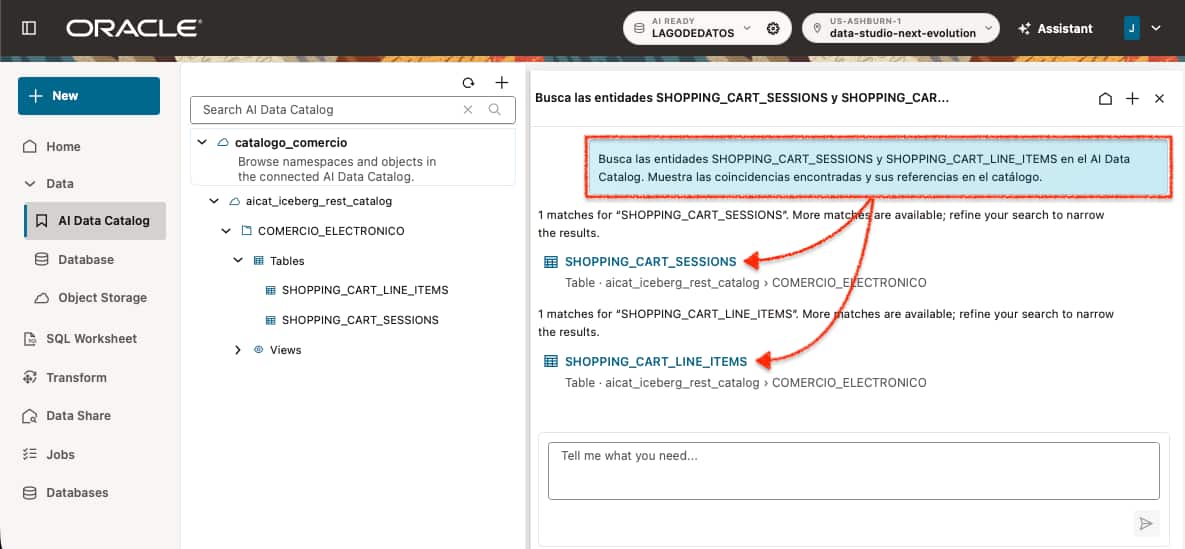
The Assistant returns references to both tables. Open those references and inspect their available metadata before generating SQL. Confirm the catalog, namespace, and table names against the data you intend to analyze.
Generate SQL to query tables in the AI Data Catalog
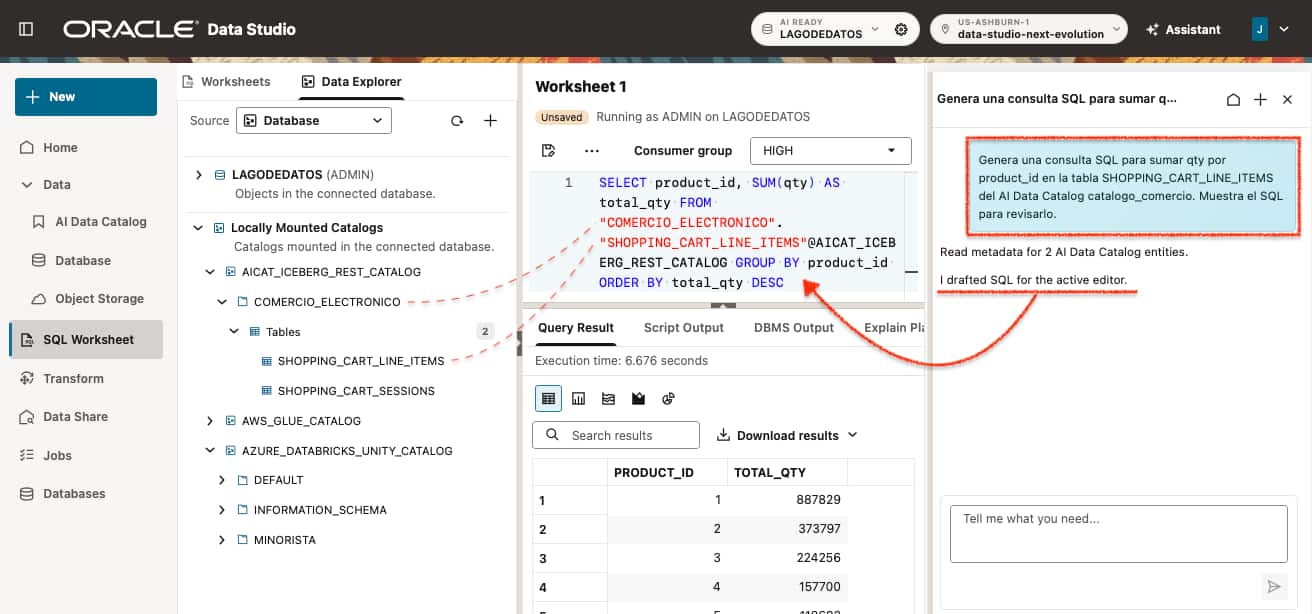
Lucía asks the assistant to generate SQL for the cart line items:
Generate a SQL query that sums qty by product_id in the SHOPPING_CART_LINE_ITEMS table in the AI Data Catalog catalogo_comercio. Show the SQL for review.
The request targets the table in catalogo_comercio. Lucía reviews the generated SQL, confirms that it uses the intended table and aggregation, and keeps it with the analysis so her team can inspect and reuse it.
Load inventory from OCI Object Storage
Lucía also needs inventory data from store_inventory.parquet in the lagodedatos-fuentes bucket. She asks the assistant to prepare a load into a local database table.
Load store_inventory.parquet from the lagodedatos-fuentes bucket into my local database as a table named store_inventory.
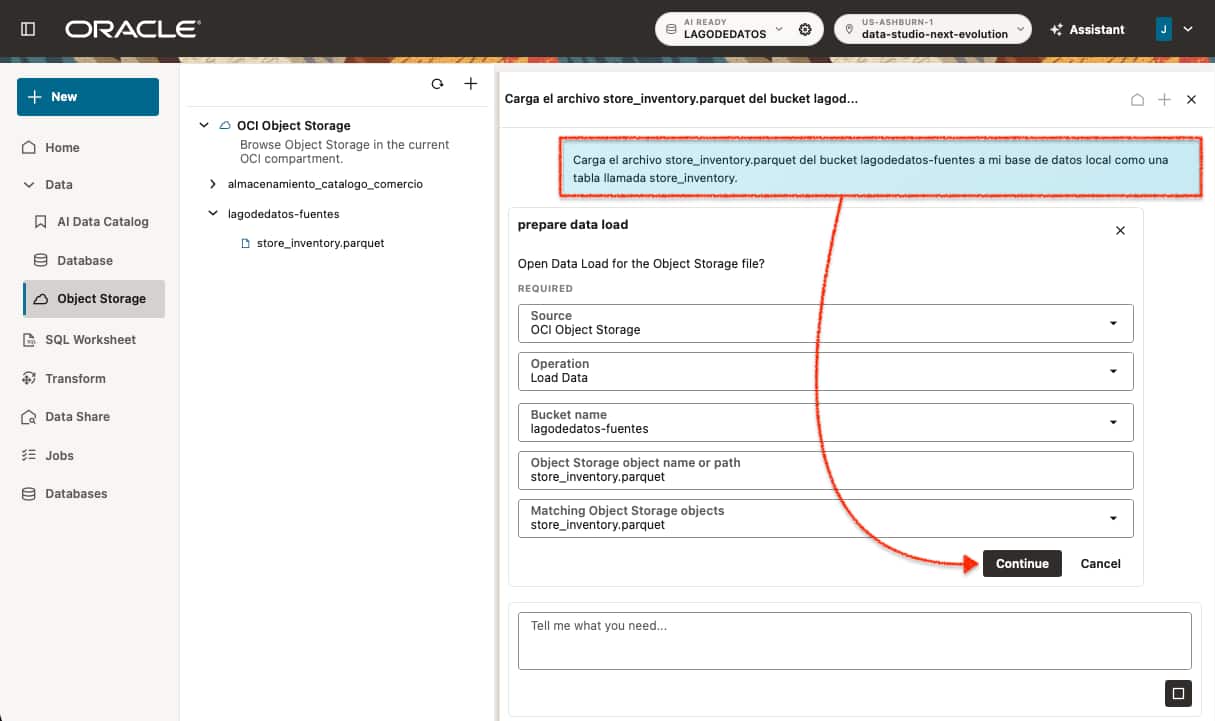
Review the bucket, object path, and selected database before continuing. To complete the load, follow Load, Link, and Feed Data: select the target schema and table action, review the column mappings and data types, preview the data, and inspect the generated SQL before creating the load job. Check its progress and errors on the Jobs page.
A Load data operation copies source data into a database table. A Link data operation references the external source. For this example, confirm that a local inventory copy is the intended choice and decide how it will be refreshed before using it in a continuing analysis.
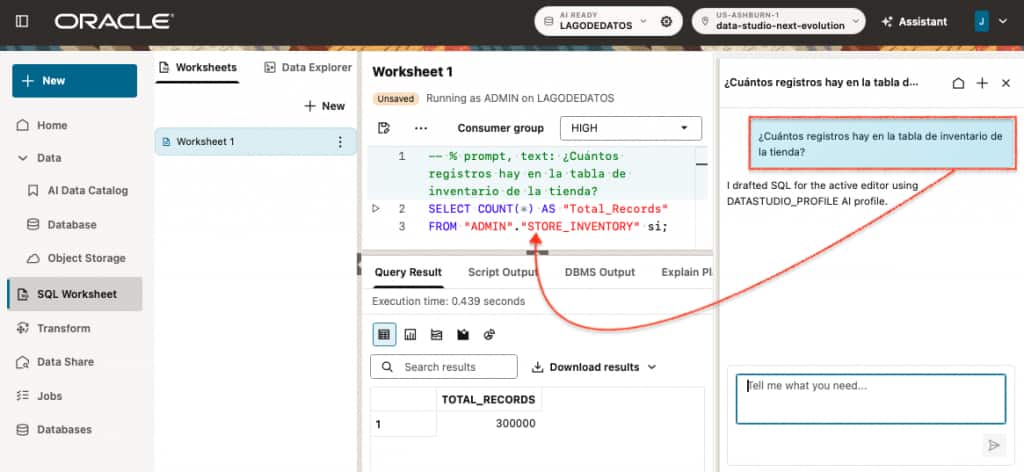
After a successful job, connect as the target table owner and check the loaded row count:
How many records are in the store inventory table?
Keep the source connections and SQL workflow visible
Oracle Data Studio brings the components of an AI Lakehouse together into a single, unified workspace, allowing teams to discover, access, and analyze data across multiple platforms without constantly switching between tools or environments.
The broader analysis relates sales, shopping carts, store inventory, and supplier availability. These datasets may reside in different systems, including Oracle AI Lakehouse Databases, Apache Iceberg catalogs, AWS Glue, Azure Databricks Unity Catalog, and OCI Object Storage.
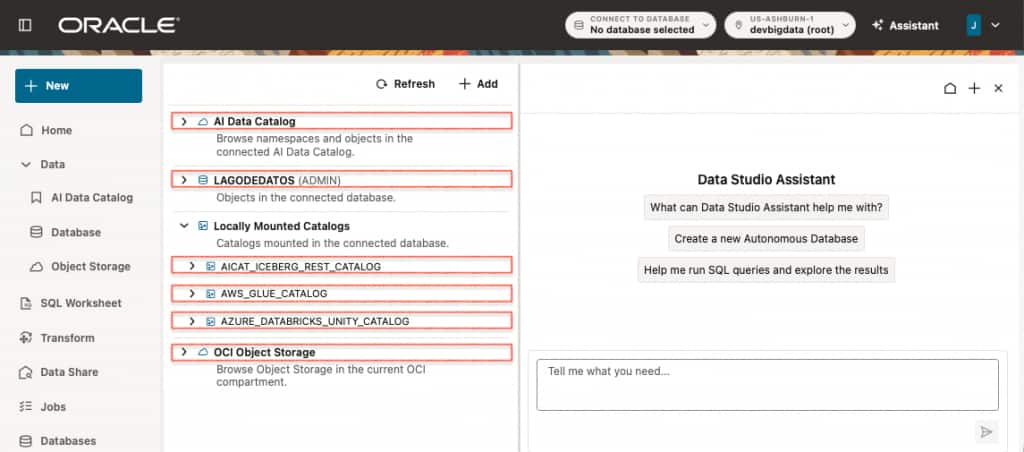
The Data Studio Assistant further simplifies this experience by helping users explore their data and generate SQL using natural language. While the workspace provides a common entry point, queries combining multiple sources still require validation of source references, relationships, aggregation levels, and execution results.
Teams can begin with a single source and progressively expand their analysis across additional catalogs and environments as their requirements evolve.
From cart demand to replenishment decisions
To identify where stock needs attention, Lucía asks the SQL Worksheet AI Assistant:
Which 10 product-store combinations have the largest inventory shortages based on shopping cart demand over the latest seven days of available data?
Compare total cart quantities with available-to-promise inventory for each product and store. Show the product ID, store ID, total cart quantity, available inventory, shortage amount, and last inventory update. Include only combinations where demand exceeds available inventory, ranked by the largest shortage first.
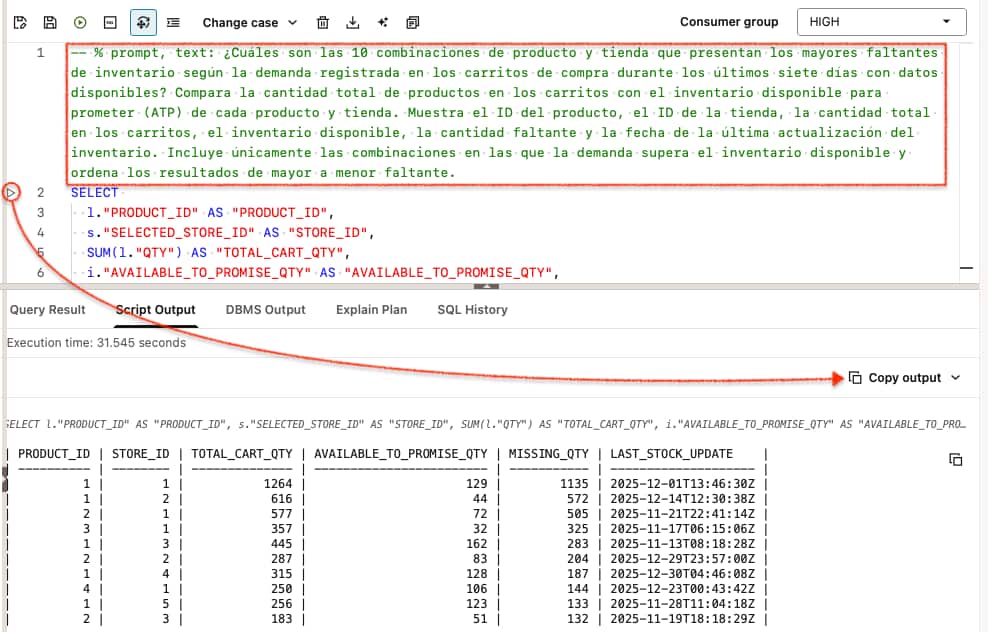
The comparison gives Lucía a prioritized review list. The three largest gaps are:
| Product ID | Store ID | Cart quantity | Available-to-promise quantity | Gap |
|---|---|---|---|---|
| 1 | 1 | 1,264 | 129 | 1,135 |
| 1 | 2 | 616 | 44 | 572 |
| 2 | 1 | 577 | 72 | 505 |
Lucía’s next step is clear: verify stock and prioritize replenishment review, starting with Product 1 at Store 1. A question that spanned the retailer’s data platforms now has a concrete answer and a place to act.
That is the value of Data Studio: one workspace across database instances and connected catalogs, where teams can discover data, develop SQL with AI assistance, and turn results into business decisions. As new questions arise, they can expand and manage their connected sources through the UI or Assistant, bringing more of their data into the same workflow, from discovery to decision.
References
- Workspace access and prerequisites – Access path for continuing into the workflow.
- Oracle external catalog management – Catalog concepts and access requirements.
- Databricks Unity Catalog access example – Discovery and queries over eligible Iceberg-compatible tables.
- Oracle AI Data Catalog – Managed Iceberg REST catalog, metadata, and storage configuration.
- Mount AWS Glue and Iceberg catalogs – Connecting AWS Glue and Oracle AI Data Catalog to the shared catalog view.
- Autonomous AI Database overview – Workload types and region information.
- Activate AI Agents on your entire enterprise data estate with innovations in Oracle Autonomous AI Lakehouse – For broader platform context.