
This post was written in collaboration with the Oracle Autonomous AI Database development team, with special thanks to Ming Yang for his guidance and technical contributions.
In the previous two posts, we showed two ways to query Databricks data from Oracle Autonomous AI Database.
First, we queried a Databricks Delta table through UniForm. That pattern is useful when Databricks remains Delta-first, while Oracle reads Iceberg-compatible metadata generated for the Delta table.
Second, we queried a native Apache Iceberg table created in Databricks. That pattern is useful when the table is Iceberg from day one.
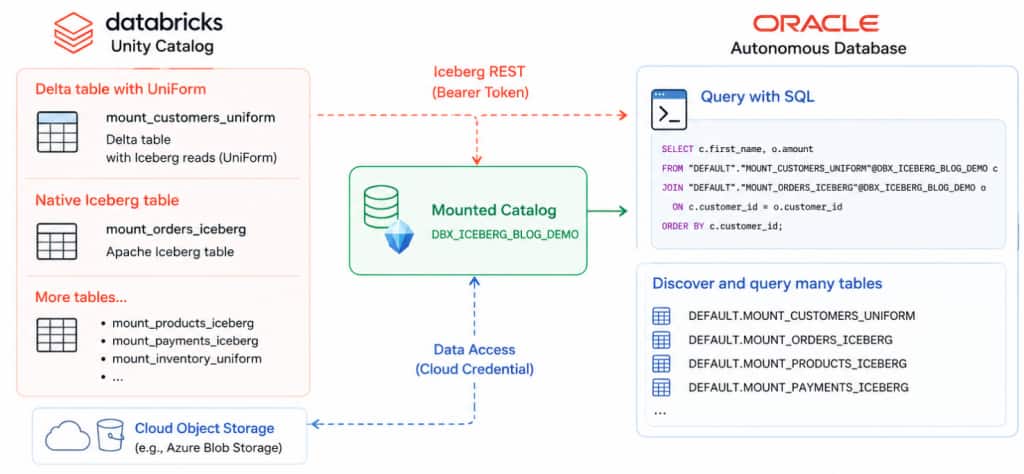
In this post, we take the next step. Instead of creating one Oracle external table for every Databricks table, we mount the Databricks Unity Catalog Iceberg REST catalog once. After that, Oracle users can discover and query multiple Databricks tables through the mounted catalog.
This is the natural model for real lakehouse environments. Users do not want to manage a separate Oracle external table definition every time a Databricks team publishes a new data product. They want to see the catalog, find the tables they can access, and query them with SQL.
Databricks Unity Catalog exposes eligible tables through the Iceberg REST catalog endpoint, including managed Iceberg tables and Delta tables with Iceberg reads enabled through UniForm. Oracle Autonomous AI Database supports mounted catalogs through DBMS_CATALOG, including Iceberg REST catalogs, and lets users list tables through ALL_TABLES@catalog and query data using schema.table@catalog.
Use case
A data engineering team manages several curated tables in Databricks.
Some tables are Delta tables with UniForm enabled. Other tables are native Apache Iceberg tables. From the Databricks side, both are governed by Unity Catalog and exposed through the Iceberg REST interface.
An Oracle application team wants to query all approved Databricks data products from Oracle Autonomous AI Database.
The old approach is workable, but operationally heavy:
CREATE_EXTERNAL_TABLE for customers
CREATE_EXTERNAL_TABLE for orders
CREATE_EXTERNAL_TABLE for products
...
The mounted catalog approach is simpler:
Mount Databricks Unity Catalog once
List available tables
Query any authorized table through @catalog
When new eligible tables are added in Databricks and the service principal has access, they become discoverable through the mounted catalog. Oracle may cache catalog metadata, so users can refresh the catalog cache when they want new tables to appear immediately.
What we build
In Databricks, we create two tables:
mount_customers_uniform, a Delta table with UniForm Iceberg reads enabled.mount_orders_iceberg, a native Apache Iceberg table.
In Oracle Autonomous Database, we mount the Databricks Unity Catalog Iceberg REST endpoint once as DBX_ICEBERG_BLOG_DEMO
Then we list and query both tables from Oracle without creating Oracle external tables for each one.
Databricks setup
Step 1. Create a Delta table with UniForm enabled
CREATE TABLE data_lake_pm.default.mount_customers_uniform (
  customer_id BIGINT,
  first_name  STRING,
  last_name   STRING,
  email       STRING,
  city        STRING,
  state       STRING,
  country     STRING,
  signup_date DATE,
  spend       DECIMAL(10,2)
)
TBLPROPERTIES (
  'delta.columnMapping.mode' = 'id',
  'delta.enableIcebergCompatV2' = 'true',
  'delta.universalFormat.enabledFormats' = 'iceberg'
);

INSERT INTO data_lake_pm.default.mount_customers_uniform VALUES
  (1, 'John', 'Smith', 'john.smith@example.com', 'Seattle', 'WA', 'US', DATE '2026-06-01', 100.25),
  (2, 'Mary', 'Johnson', 'mary.johnson@example.com', 'San Francisco', 'CA', 'US', DATE '2026-06-02', 250.00),
  (3, 'Alex', 'Brown', 'alex.brown@example.com', 'Austin', 'TX', 'US', DATE '2026-06-03', 175.50);
UniForm enables Iceberg reads by generating Iceberg metadata for a Delta table, without rewriting the data files. Databricks documents the required table properties delta.enableIcebergCompatV2=true and delta.universalFormat.enabledFormats=iceberg.
Step 2. Create a native Iceberg table
CREATE TABLE data_lake_pm.default.mount_orders_iceberg (
  order_id    BIGINT,
  customer_id BIGINT,
  order_date  DATE,
  amount      DECIMAL(10,2)
)
USING ICEBERG;

INSERT INTO data_lake_pm.default.mount_orders_iceberg VALUES
  (101, 1, DATE '2026-06-04', 120.00),
  (102, 2, DATE '2026-06-05', 250.50),
  (103, 3, DATE '2026-06-06', 75.25);
Now the Databricks catalog contains both types of tables: a Delta table exposed through UniForm and a native Iceberg table.
Step 3. Grant access to the service principal
Oracle will connect to Databricks using a Databricks service principal. Grant access at the schema level so the service principal can see current and future tables in the schema.
GRANT USE CATALOG ON CATALOG data_lake_pm
TO `databricks-service-principal-application-id`;

GRANT USE SCHEMA ON SCHEMA data_lake_pm.default
TO `databricks-service-principal-application-id`;

GRANT SELECT ON SCHEMA data_lake_pm.default
TO `databricks-service-principal-application-id`;

GRANT EXTERNAL USE SCHEMA ON SCHEMA data_lake_pm.default
TO `databricks-service-principal-application-id`;

GRANT BROWSE ON CATALOG data_lake_pm
TO `databricks-service-principal-application-id`;
Databricks requires External data access to be enabled, EXTERNAL USE SCHEMA on the schema, and authentication using a Databricks personal access token or OAuth for Iceberg REST catalog clients.
Oracle Autonomous Database setup
Oracle needs two credentials:
UNITY_BEARER_CRED, used to authenticate to Databricks Unity Catalog Iceberg REST.AZURE_BLOB_CRED, used to access the cloud object storage files behind the Databricks tables.
AZURE_BLOB_CRED is the same storage credential used in the previous posts.
Step 1. Create the Databricks bearer credential
BEGIN
  BEGIN
    DBMS_CLOUD.DROP_CREDENTIAL('UNITY_BEARER_CRED');
  EXCEPTION
    WHEN OTHERS THEN NULL;
  END;

  DBMS_SHARE.CREATE_BEARER_TOKEN_CREDENTIAL(
    credential_name => 'UNITY_BEARER_CRED',
    token_endpoint  => 'https://databricks-workspace-host/oidc/v1/token',
    client_id       => 'databricks-service-principal-application-id',
    client_secret   => 'databricks-oauth-client-secret',
    token_scope     => 'all-apis',
    grant_type      => 'client_credentials'
  );
END;
/
Step 2. Mount the Databricks Unity Catalog Iceberg REST catalog
The key detail is the endpoint. For Databricks Unity Catalog, include the Unity Catalog name in the Iceberg REST path:
/api/2.1/unity-catalog/iceberg-rest/v1/catalogs/<uc-catalog-name>BEGIN
DBMS_CATALOG.UNMOUNT('DBX_ICEBERG_BLOG_DEMO');
EXCEPTION
WHEN OTHERS THEN NULL;
END;
/
BEGIN
DBMS_CATALOG.MOUNT_ICEBERG(
catalog_name => 'DBX_ICEBERG_BLOG_DEMO',
endpoint => 'https://databricks-workspace-host/api/2.1/unity-catalog/iceberg-rest/v1/catalogs/data_lake_pm',
catalog_credential => 'UNITY_BEARER_CRED',
data_storage_credential => 'AZURE_BLOB_CRED',
enabled => TRUE,
catalog_type => 'ICEBERG_UNITY'
);
END;
/Step 3. Refresh catalog metadata
BEGIN
  DBMS_CATALOG.FLUSH_CATALOG_CACHE('DBX_ICEBERG_BLOG_DEMO');
  DBMS_CATALOG.PREFILL_CATALOG_CACHE('DBX_ICEBERG_BLOG_DEMO', 'DEFAULT');
END;
/
Step 4. List tables
SELECT owner, table_name
FROM all_tables@DBX_ICEBERG_BLOG_DEMO
ORDER BY owner, table_name;
Example result:
OWNER    TABLE_NAME
DEFAULT  MOUNT_CUSTOMERS_UNIFORM
DEFAULT  MOUNT_ORDERS_ICEBERG
Use the exact OWNER and TABLE_NAME values returned by ALL_TABLES@catalog. Oracle’s remote catalog examples use quoted schema and table names, for example "SH"."SALES"@catalogname.
Step 5. Query the UniForm Delta table
SELECT customer_id, first_name, last_name, city, state, spend
FROM "DEFAULT"."MOUNT_CUSTOMERS_UNIFORM"@DBX_ICEBERG_BLOG_DEMO
ORDER BY customer_id;
Step 6. Query the native Iceberg table
SELECT order_id, customer_id, order_date, amount
FROM "DEFAULT"."MOUNT_ORDERS_ICEBERG"@DBX_ICEBERG_BLOG_DEMO
ORDER BY order_id;
Step 7. Join both Databricks tables from Oracle
SELECT c.customer_id,
       c.first_name,
       c.last_name,
       SUM(o.amount) AS total_amount
FROM "DEFAULT"."MOUNT_CUSTOMERS_UNIFORM"@DBX_ICEBERG_BLOG_DEMO c
JOIN "DEFAULT"."MOUNT_ORDERS_ICEBERG"@DBX_ICEBERG_BLOG_DEMO o
  ON c.customer_id = o.customer_id
GROUP BY c.customer_id, c.first_name, c.last_name
ORDER BY c.customer_id;
From the Oracle user’s point of view, both tables are just SQL-accessible catalog objects. One is a Delta table exposed through UniForm. The other is native Iceberg. The access pattern is the same.
Add a new table in Databricks
Now create a third table in Databricks.
CREATE TABLE data_lake_pm.default.mount_products_iceberg (
  product_id BIGINT,
  name       STRING,
  category   STRING
)
USING ICEBERG;

INSERT INTO data_lake_pm.default.mount_products_iceberg VALUES
  (1, 'Laptop', 'Electronics'),
  (2, 'Desk',   'Furniture');
No Oracle external table is required.
Refresh the mounted catalog metadata if you want Oracle to see the table immediately (or wait for configured auto-refresh interval):
BEGIN
  DBMS_CATALOG.FLUSH_CATALOG_CACHE('DBX_ICEBERG_BLOG_DEMO');
  DBMS_CATALOG.PREFILL_CATALOG_CACHE('DBX_ICEBERG_BLOG_DEMO', 'DEFAULT');
END;
/
Then query the new table:
SELECT product_id, name, category
FROM "DEFAULT"."MOUNT_PRODUCTS_ICEBERG"@DBX_ICEBERG_BLOG_DEMO
ORDER BY product_id;
This is the main benefit of the mounted catalog pattern: when Databricks teams publish new authorized data products, Oracle users do not need a new CREATE_EXTERNAL_TABLE for each table. They query through the mounted catalog.
Why this matters
The first two posts focused on table-level access:
| Blog | Pattern | Best for |
|---|---|---|
| Part 1 | Delta + UniForm | Databricks teams that remain Delta-first |
| Part 2 | Native Iceberg | Teams creating Iceberg tables directly in Databricks |
| Part 3 | Mounted catalog | Oracle users who want to discover and query many Databricks tables |
The mounted catalog pattern changes the operating model.
Instead of treating each table as a separate integration task, Oracle Autonomous AI Database treats Databricks Unity Catalog as a catalog. Users can list available tables, query multiple tables, and pick up new authorized tables through catalog discovery.
This is especially useful when Databricks is the publishing platform for data products and Oracle Autonomous AI Database is one of the consuming SQL engines.
Conclusion
Delta UniForm and native Iceberg solve the table-format interoperability problem. Mounted catalogs solve the operational problem.
With DBMS_CATALOG.MOUNT_ICEBERG, Oracle Autonomous AI Database can mount a Databricks Unity Catalog Iceberg REST endpoint once and use it as a governed metadata layer. Oracle users can then query both UniForm-enabled Delta tables and native Iceberg tables through the same @catalog syntax.
For customers building multi-engine lakehouse architectures, this is the cleanest pattern: Databricks owns and governs the data products, Unity Catalog exposes the metadata, and Oracle Autonomous Database queries the authorized tables without copying data or creating one external table per table.