
In Part 1, we connected Oracle Autonomous Database (ADB) to a Snowflake-generated Iceberg table by pointing Oracle directly to a specific Iceberg metadata.json file. That was simple and worked great, but it had one drawback: when the table changes, Iceberg creates a new metadata file, so you must update the external table definition in Oracle to see the latest data.
In this post, we’ll make the integration easier to operate.
What we’ll build
- Configure Snowflake to use Polaris (Snowflake Open Catalog) as the Iceberg REST catalog.
- Create an Iceberg table directly in Polaris (no “sync metadata later” step) using a catalog-linked database.
- Create an ADB external table that reads through Polaris, so Oracle can always discover the current snapshot via the catalog.
Why this approach is better
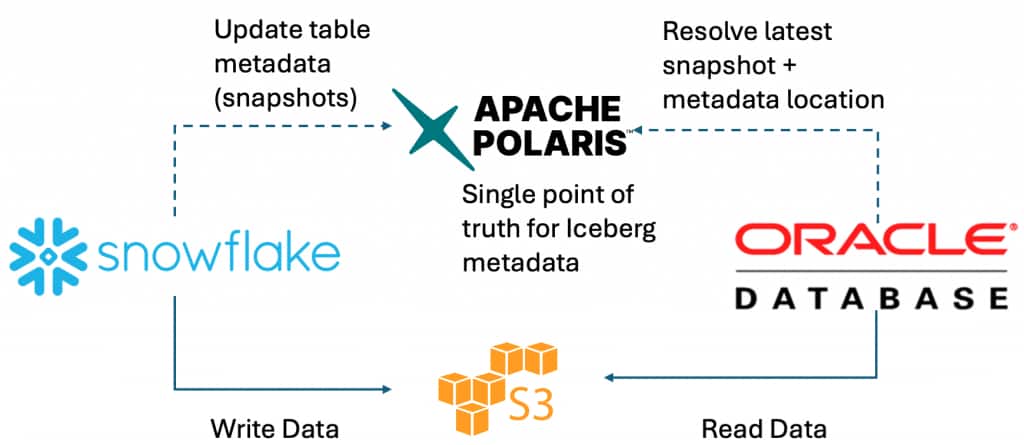
When you use a REST catalog (Polaris), Oracle doesn’t need a hardcoded metadata.json path. Instead:
- Oracle asks the catalog: “What is the latest snapshot for this table?”
- The catalog returns the current metadata location.
- Oracle reads the data and metadata files from the object store (S3 / ADLS).
This is the catalog-managed pattern: central metadata + consistent governance + always current.
Flow at a glance
- Snowflake (compute + DML)
- Writes Iceberg data/metadata files to cloud storage (S3 / ADLS)
- Registers and updates table metadata in Polaris (REST catalog)
- Oracle ADB
- Calls Polaris REST to resolve the latest snapshot
- Reads the required files from cloud storage
Step 1 – Use Polaris vended credentials
In this post, we use Polaris credential vending, which means Snowflake obtains short‑lived, scoped cloud‑storage credentials from Polaris at query time. Practically, this lets Snowflake access the Iceberg table’s data in cloud storage without configuring a Snowflake External Volume.
Step 2 – Create the Polaris catalog integration in Snowflake
Snowflake connects to Polaris through a catalog integration configured for vended credentials (REST + OAuth).
Conceptually, this integration answers two questions:
- Where is the catalog? (CATALOG_URI, CATALOG_NAME)
- How does Snowflake authenticate? (OAuth client id/secret and allowed scopes)
Once this is in place, Snowflake can resolve Iceberg metadata through Polaris and request vended storage credentials when it needs to read or write data files. Example:
CREATE OR REPLACE CATALOG INTEGRATION POLARIS_INT
  CATALOG_SOURCE = POLARIS
  TABLE_FORMAT   = ICEBERG
  REST_CONFIG = (
    CATALOG_URI  = 'https://<ORG>-<ACCOUNT>.snowflakecomputing.com/polaris/api/catalog'
    CATALOG_NAME = '<cat_name>'
    ACCESS_DELEGATION_MODE = VENDED_CREDENTIALS
  )
  REST_AUTHENTICATION = (
    TYPE = OAUTH
    OAUTH_CLIENT_ID       = '<client_id>'
    OAUTH_CLIENT_SECRET   = '<client_secret>'
    OAUTH_ALLOWED_SCOPES  = ('PRINCIPAL_ROLE:ALL')
  )
  ENABLED = TRUE;
Step 3 – Create a catalog-linked database
A catalog-linked database is Snowflake’s way to connect to a remote catalog and create namespaces/tables there. We’ll use it to create a namespace and table directly in Polaris using familiar Snowflake SQL.
Think of it like a “window” into the catalog: Snowflake SQL statements create and update objects in Polaris, not in Snowflake’s internal catalog.
CREATE OR REPLACE DATABASE POLARIS_LINKED_DB
  LINKED_CATALOG = (
    CATALOG = 'POLARIS_INT'
    NAMESPACE_MODE = IGNORE_NESTED_NAMESPACE
    SYNC_INTERVAL_SECONDS = 30);
Step 4 – Create a namespace and Iceberg table in Polaris
Inside the catalog-linked database, CREATE SCHEMA maps to a namespace in Polaris. A quick mental model:
- Namespace ≈ a logical container (like a schema) for tables
- Iceberg table ≈ metadata in Polaris + data/metadata files in object storage
When you run CREATE ICEBERG TABLE, Snowflake writes the necessary files to storage and registers the table metadata in Polaris.
USE DATABASE POLARIS_LINKED_DB;
-- Create namespace
CREATE SCHEMA SALES_NS;
USE SCHEMA SALES_NS;
-- Create table
CREATE ICEBERG TABLE SALES (
  SALE_ID     INT,
  CUSTOMER_ID INT,
  PRODUCT     STRING,
  QUANTITY    INT,
  AMOUNT      NUMBER(10,2),
  SALE_TS     TIMESTAMP_NTZ,
  REGION      STRING
);

-- Insert sample data
INSERT INTO SALES VALUES
  (1, 101, 'Laptop', 1, 999.99, CURRENT_TIMESTAMP(), 'US-WEST'),
  (2, 102, 'Mouse',  2,  49.98, CURRENT_TIMESTAMP(), 'US-WEST');
At this point, the table exists in Polaris and points to the files Snowflake wrote in cloud storage. If you open the Polaris UI, you should see the namespace and table.
Step 5 – Use @catalog at Oracle database
5a) ADB prerequisites (network + privileges)
Before mounting the catalog, make sure:
- Your ADB can reach (HTTPS outbound):
- the Polaris REST endpoints
- your object store endpoints (S3 / ADLS)
- Your user has the required privileges/role to use DBMS_CATALOG.
5b) Create the Polaris OAuth credential (token auto-refresh)
Create a credential that ADB can use to obtain/refresh an OAuth token.
BEGIN
  dbms_share.create_bearer_token_credential(
      credential_name     => 'POLARIS_OAUTH',
      bearer_token        => '<OPTIONAL_INITIAL_TOKEN>',
      token_endpoint      => 'https://<ORG>-<ACCOUNT>.snowflakecomputing.com/polaris/api/catalog/v1/oauth/tokens',
      client_id           => '<OAUTH_CLIENT_ID>',
      client_secret       => '<OAUTH_CLIENT_SECRET>',
      token_refresh_rate  => 3600,
      token_scope         => 'PRINCIPAL_ROLE:ALL',
      grant_type          => 'client_credentials'
  );
END;
5c) Create (or reuse) the object store credential (S3)
ADB still needs a cloud credential to read the Iceberg data + metadata files from S3.
BEGIN
  DBMS_CLOUD.CREATE_CREDENTIAL(
    credential_name => 'AWS_S3_CONN',
    username        => '<AWS_ACCESS_KEY_ID>',
    password        => '<AWS_SECRET_ACCESS_KEY>'
  );
END;
5d) Mount the Polaris catalog in ADB
Mount Polaris once, then query objects using @MY_POLARIS.
BEGIN
  DBMS_CATALOG.MOUNT_ICEBERG(
    catalog_name            => 'MY_POLARIS',
    endpoint                => 'https://<ORG>-<ACCOUNT>.snowflakecomputing.com/polaris/api/catalog/v1/main',
    catalog_credential      => 'POLARIS_OAUTH',
    data_storage_credential => 'AWS_S3_CONN',
    catalog_type            => 'ICEBERG_POLARIS'
  );
END;
DBMS_CATALOG is the documented way to manage/mount catalogs in ADB.
5e) Query it with @catalog
Now you can discover and query tables directly through the mounted catalog using the schema.object@catalog syntax.
List tables:
SELECT owner, table_name FROM all_tables@MY_POLARIS;(Oracle shows this exact pattern for listing tables in a catalog.)
Query a table:
SELECT COUNT(*) FROM "SALES_NS"."SALES"@MY_POLARIS;Conclusion
With this setup, you get a clean and practical Iceberg integration across platforms:
- Snowflake writes to Iceberg and updates the table’s metadata in Polaris.
- Polaris becomes the single point of truth for the table’s current snapshot.
- Oracle Autonomous Database queries the table by resolving the latest snapshot through Polaris and then reading the files from S3.
- No need to create multiple External Tables, just one catalog integration and then all tables under this catalog is quriable
Compared to the “point to a specific metadata.json file” approach, this is much easier to operate over time. You don’t have to chase new metadata file names after every change. Instead, the catalog always points to the right snapshot.
Key takeaways
- Less manual work
You set up the catalog once, and both engines can follow the catalog to the current metadata. - Clear separation of responsibilities
- Polaris manages metadata and governance
- Object storage holds the files
- Each engine brings its own compute
- Better for multi-engine teams
This pattern scales well when different teams (or tools) want to query the same Iceberg data with different engines.