

Oracle APEX has long made it straightforward to build data-centric, workflow-driven enterprise applications. With the introduction of AI Agents, APEX takes a significant step forward: enabling developers to build applications where users can not only ask questions in natural language, but also have the application reason over context, retrieve business data, and execute actions through tools.
This is a significant evolution from basic chat-based AI experiences. Instead of limiting Generative AI to text generation or static question answering, AI Agents in APEX enable a richer interaction model, one where the assistant participates directly in real application workflows.
In this post, we explore what AI Agents are, how the underlying concepts of agentic AI, function calling, and the agent loop fit together, and how Oracle APEX makes these capabilities practical for everyday developers. Throughout, we will use a concrete CRM scenario: a sales rep asking, What should I do next?
From AI Assistants to AI Agents
A traditional AI assistant is primarily designed to respond to prompts. It can summarize content, rewrite text, classify input, or answer questions based on information already available to it. That is useful, but is also limited.
An AI Agent goes further.
Rather than simply answering a question, an agent works toward a goal. A typical agent workflow looks like this:
- Understand the user’s intent
- Determine what information is needed
- Retrieve context from the application
- Execute one or more actions
- Observe the results
- Continue until it can deliver a useful outcome
This broader pattern is often described as agentic AI.
In practical terms, agentic AI is what allows an application to move from:
Here is some information.
To:
Here is what is going on, what is blocked, and what I recommend doing next.
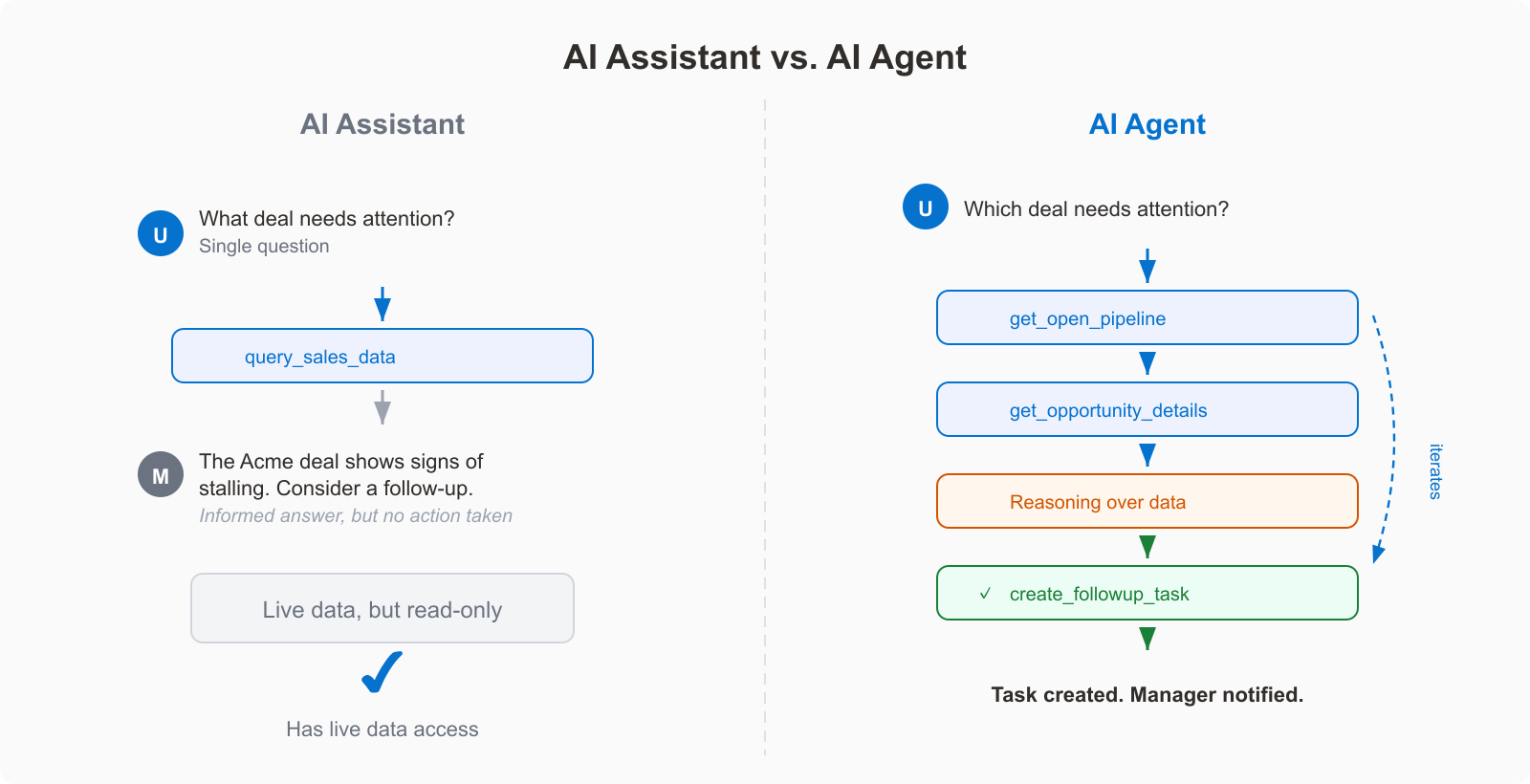
In enterprise applications, that distinction is everything. Users rarely want only an answer. They want progress on a task.
What makes an AI system “agentic”?
An agentic system combines three core capabilities.
1. Reasoning over user intent
The AI model interprets the request and determines what the user is actually trying to accomplish, even when the request is ambiguous or high-level.
2. Access to external capabilities
The model can invoke application-defined functions or tools to retrieve data or perform actions on behalf of the user.
3. Iterative execution
The system can work in a loop: ask for context, call a tool, inspect the result, and continue until the task is complete.
This is where modern AI application design starts to become interesting. The model is no longer treated as an isolated text engine. It becomes an orchestrator sitting on top of your application logic.
Function calling: The Foundation of AI Agents
The core building block behind AI Agents is function calling, also referred to as tools.
Large language models do not natively know your application data, customer records, approval rules, or business processes. They need a safe and structured mechanism to interact with those things. Function calling provides exactly that.
Oracle APEX introduces this capability through Tools. A developer can define tools under an AI Agent, and those tools can be executed either on the server side or on the client side. They can also be configured to run on demand, when the model decides they are needed, or to augment the system prompt upfront, injecting fresh context every time the user sends a prompt.
The key design principle: The model does not directly query your tables or run arbitrary code. Instead, it works from a curated list of capabilities you expose declaratively. This gives developers precise control over what the model is allowed to do, while keeping the integration natural and easy to extend.
The Agent Loop in Oracle APEX
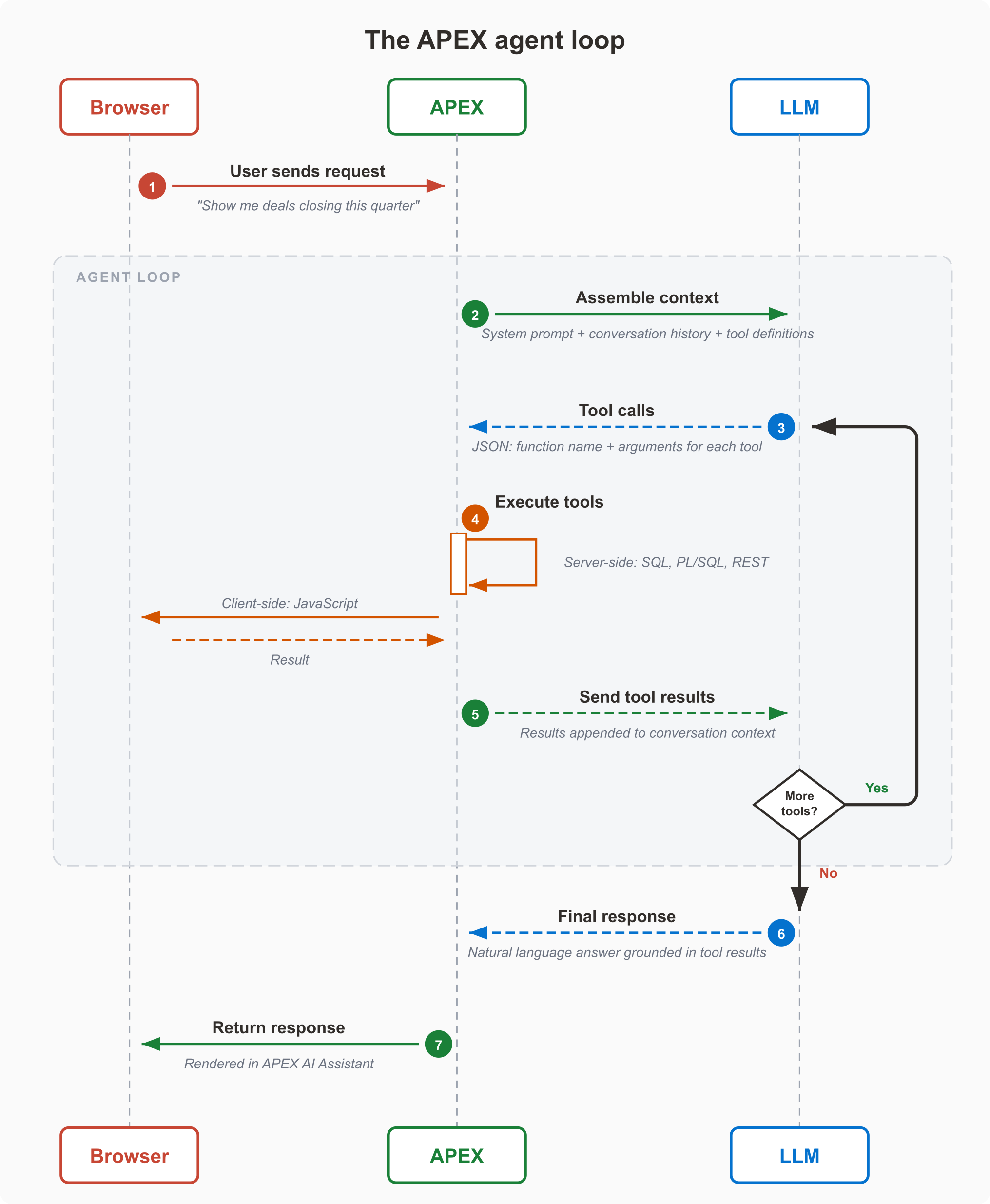
Once tools are defined, the interaction becomes a loop rather than a single request-response exchange.
Here is how it works:
- The user sends a message.
- APEX includes the conversation context, the system prompt, and the available tools.
- The model decides whether it can answer directly or whether it needs to call one or more tools.
- APEX executes those tools.
- Tool results are added back into the conversation.
- The model continues, either by making further tool calls or by producing the final response.
That loop is what makes the feature agentic rather than merely conversational.
AI Agents in Oracle APEX
Oracle APEX brings AI Agents into the platform with the same declarative approach developers already know. You create an AI Agent as a Shared Component, attach it to an AI Assistant chat experience, define your tools, configure parameters — and the agent is ready. The business logic stays in PL/SQL. The data stays in Oracle Database. The tools run where they naturally belong: server-side code in the database, client-side code in the browser.
That means a developer can go from idea to working agent without leaving the APEX builder:
- Define tools declaratively — SQL queries, PL/SQL blocks, JavaScript snippets
- Configure execution points — Augment System Prompt for context, On Demand for actions
- Set parameters with types and validation — APEX handles the JSON Schema
- Attach the agent to an AI Assistant component
Note: AI Configurations from previous releases are now called AI Agents. Your existing configurations carry over automatically — the rename reflects the expanded capabilities, including tools and multi-step orchestration.
Understanding the Tool Model
A useful way to think about AI Agents in APEX is that they bring together two kinds of capabilities.
Augment System Prompt
Augment System Prompt tools are executed for each new message. Their results are injected into the conversation history as system messages. These tools can be used to include context information like the current user’s name, or current date and time. RAG (Retrieval-Augmented Generation) can be achieved by programmatically analyzing the current user prompt, or the whole chat history, and including any data as needed.
Note: If you used RAG Sources in a previous release, they are automatically migrated to Augment System Prompt tools. The behavior is the same — your existing RAG integrations continue to work, now as part of the unified tool model.
On-demand
On Demand tools are executed only when the AI Service invokes them during response generation. They can have parameters, and can return data to the AI Service or simply execute a task. RAG (Retrieval-Augmented Generation) is achieved more naturally as the AI Service only requests data when needed.
APEX exposes the following built-in tool types:
- Retrieve Data
- Execute Server-side Code
- Execute Client-side Code
While Execute Server-side Code and Execute Client-side Code are generic tools that can be used to achieve most tasks, you can also create custom and reusable Generative AI Tool plug-ins under Shared Components. These plug-ins then appear in the tool type list alongside the built-in options, making it easy to standardize and share tool implementations across agents and applications.
That combination is powerful because it covers the most common enterprise patterns:
- Get contextual business data
- Execute application logic
- Interact with the browser when needed
Tool types in detail
Let’s look at each tool type and what it is designed for.
Retrieve Data
Returns results from a SQL query to the model. This is the most common tool type — it gives the agent access to your application data through scoped, read-only queries.
As an Augment System Prompt tool, a Retrieve Data tool might return the current user’s profile on every message:
select u.username,
       u.email,
       r.description as role
  from app_users u
  join app_roles r on r.role_id = u.role_id
 where u.user_id = :APP_USER
As an On Demand tool, it might return search results when the model decides it needs them. Here the model passes a SEARCH_TERM parameter, and APEX validates it before binding:
select product_id,
       product_name,
       category,
       list_price,
       in_stock_flag
  from products
 where lower(product_name) like ‘%’ || lower(:SEARCH_TERM) || ‘%’
 order by list_price
 fetch first 20 rows only
Parameters like SEARCH_TERM are defined declaratively in the tool instance. APEX compiles them into a JSON Schema, sends them to the model as part of the tool definition, and validates the returned values before binding them into the query. The developer does not write any parameter-handling code.
Execute Server-side Code
Runs a PL/SQL block in the database. Use this when the agent needs to take action — create a record, update a status, send a notification — not just read data.
For example, an IT helpdesk agent might escalate a support ticket:
begin
    support_pkg.escalate_ticket(
        p_ticket_id => :TICKET_ID,
        p_reason    => :REASON,
        p_user_id   => :APP_USER
    );

    apex_ai.set_tool_result(
        p_result               => ‘Ticket ‘ || :TICKET_ID || ‘ escalated.’,
        p_notification_message => ‘Ticket escalated’,
        p_notification_type    => ‘success’
    );
end;
The business logic lives in a PL/SQL package. The tool calls the procedure and returns a confirmation. apex_ai.set_tool_result overrides the default tool response and pushes a visible notification to the user in the chat widget.
Execute Client-side Code
Runs JavaScript in the user’s browser. Use this for capabilities that only the client has — reading browser state, showing confirmation dialogs, or triggering UI actions.
As an Augment System Prompt tool, a client-side snippet might capture the user’s timezone on every message:
return Intl.DateTimeFormat().resolvedOptions().timeZone;The return value — for example, America/Chicago — is added to the model’s context automatically. Later, when the model calls a server-side tool that needs to schedule something, it already has the user’s timezone without asking.
As an On Demand tool, client-side code can perform any browser-side operation the model needs — showing or hiding regions, opening dialogs, or requesting user input. For example, it can display a confirmation dialog before sending an email to preview the email content.
return new Promise((resolve) => {
    apex.items.P0_EMAIL_CONTENT.value = this.data.EMAIL_CONTENT;
    apex.theme.openRegion("show-email-content");
    emailConfirmed = false;

    const waitForConfirmation = () => {
        if (emailConfirmed) {
            emailConfirmed = false;
            resolve(`Email Content Confirmed: ${apex.items.P0_EMAIL_CONTENT.value}`);
            return;
        }

        setTimeout(waitForConfirmation, 200);
    };

    waitForConfirmation();
});Promise. The code opens the show-email-content inline drawer in Page 0, populates it with the generated email content, and then waits for the user to confirm the action. APEX waits for the Promise to settle before returning the result to the model, meaning the agent loop pauses until the user responds through the UI. Once confirmed, the Promise resolves with the final email content, allowing the model to decide whether to proceed with the next step.
For common approval checkpoints, Oracle APEX also provides a declarative user approval option. In the tool configuration, developers can enable Requires Confirmation and define the confirmation title, message, approve label, and cancel label directly in Page Designer. This allows an AI Agent tool to pause for explicit user consent before continuing, without requiring custom client-side confirmation code for simple approval flows.
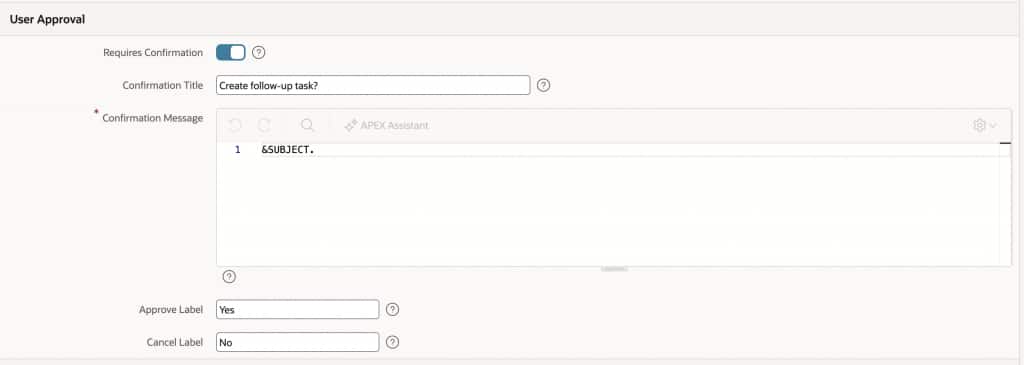
This introduces an important pattern: a human checkpoint inside an agent workflow. The model can reason, retrieve data, and prepare actions autonomously — but when an action crosses a boundary (notifying a colleague, sending an email, updating a shared record), the application can require explicit user consent before proceeding.
Putting it all together
To see all three tool types, both execution points, and the full agent loop working together in a complete scenario — from analysis to user confirmation to action in a single conversation — read the companion post: Building a CRM AI Agent with Oracle APEX.
Why This Matters for APEX developers
What makes this especially compelling for APEX developers is that it builds directly on the strengths of the platform. APEX applications already centralize:
- Business data in Oracle Database
- Rules in PL/SQL
- UI behavior in declarative components and JavaScript
- Security in application-level authorization schemes and conditions
AI Agents give developers a structured way to expose those existing assets to an AI model, without rebuilding anything. You don’t need to redesign your data model or move your business logic. You incrementally enable AI-native workflows on top of what already exists.
And that is really the promise of AI Agents in Oracle APEX: not just AI that talks, but AI that helps users move work forward.
A natural progression from RAG to tools
The APEX blog on AI Agents and RAG Sources explained how developers can enrich AI interactions with business-specific context using shared configuration, server-side conditions, and retrieval logic. That model is excellent for grounding responses in data.
AI Agents extend that foundation.
Instead of only asking:
“What information should the model see?”
You can now ask:
“What capabilities should the model have?”
That is the leap from retrieval-enhanced chat to action-capable application agents.
Summary
AI Agents in Oracle APEX introduce a powerful new capability for enterprise application development. They enable developers to build conversational experiences where the application can:
- Understand user intent
- Retrieve context dynamically
- Invoke tools safely
- Execute business logic
- Continue iterating until a task is resolved
That is the essence of agentic AI in an application platform.
The CRM example illustrates why this matters. In real business workflows, users are rarely looking for a paragraph of generated text. They want help making progress. They want the application to tell them what matters, what is blocked, and what to do next.
With AI Agents in Oracle APEX, that becomes a native design pattern rather than a custom integration.