

In Move from Insights to Action with AI Agents in Oracle APEX, we explored the building blocks of AI Agents: the agent loop, function calling, tool types, and execution points. Now it’s time to see them in action.
This blog walks through a complete CRM scenario that puts all of those concepts to work: multiple tool types, both execution points, and a natural progression from analysis to action — all within a single conversation.
CRM AI Agent in action
Before we break down the tools and implementation, here is the finished CRM AI Agent in action.
The scenario
Imagine a sales rep opening their pipeline dashboard and asking:
Which of my deals needs attention this week, and help me get it moving?
The user is not pointing at a specific record. The agent has to find the right opportunity, explain the situation, and take action. That requires all three tool types working together.
Augment System Prompt tools: always included, always current
Every time the user sends a message, APEX runs any tools configured as Augment System Prompt and includes their results in the call to the model. The model does not request this context — it receives it automatically.
Get User Context — Retrieve Data (Augment System Prompt) A server-side query returns the logged-in user’s name, role, region, branch, and manager. The model knows who it is talking to with every prompt.
Get Browser Timezone — Execute Client-side Code (Augment System Prompt) A client-side snippet reads the browser’s timezone using Intl.DateTimeFormat. The model receives the user’s local timezone — for example, America/Chicago — so any dates or times it generates later are meaningful to the user without requiring a follow-up question.
These two Augment System Prompt tools are lightweight but important. One provides organizational context from the database; the other provides environmental context from the browser. Because their results are included in every call to the model, the agent always knows who it is talking to and what timezone to use — without having to ask. Between tool-call roundtrips, the results are cached to avoid redundant overhead within a single turn.
The agent loop: retrieve, reason, act
When the rep sends the message, APEX collects the Augment System Prompt context, includes it in the call to the model, and the agent loop kicks in. Here is what happens inside that loop.
Step 1: Understand the user’s intent
The model reads the question and determines the user wants two things: identify the deal that most urgently needs attention, and take concrete steps to advance it.
Step 2: Retrieve the pipeline
The model calls the Get Open Pipeline Summary tool on demand, which returns the rep’s open opportunities with key fields: deal name, stage, days in stage, next action date, and last activity date. Using this data, the model reasons across signals such as days in stage, overdue next actions, and time since last activity. It identifies the most at-risk deal — say, Acme Corp – Platform Renewal, which has been in the Negotiation stage for 28 days with no logged activity in the past 12 days and an overdue follow-up.
Step 3: Retrieve deeper context on demand
Now the model needs details that were not included in the pipeline summary. It calls additional tools as needed.
Get Opportunity Details — Retrieve Data (on-demand) Returns the full opportunity record: contacts, deal value, competitors, quote status, and related notes. The model learns that a revised quote was sent two weeks ago but the customer has not responded.
Get Recent Activities — Retrieve Data (on-demand) Returns the activity history for this opportunity. The model confirms that the last touchpoint was the quote email, and no call or meeting has been logged since.
Step 4: Reason over the combined picture
With Augment System Prompt and on-demand data now assembled, the model can form a clear assessment:
- The deal has stalled in Negotiation for nearly a month.
- The last action was sending a revised quote, with no customer response.
- The next action date passed five days ago.
- There is no scheduled follow-up.
This is the kind of inference that makes agentic AI valuable. The model is not just reading one table. It is connecting multiple signals to identify a gap in the sales process.
Step 5: Present the analysis
The agent delivers a grounded response:
Your most urgent deal this week is Acme Corp – Platform Renewal ($340K). It has been in Negotiation for 28 days, and the last activity was a revised quote sent 12 days ago with no response. The next action date was five days ago, and there is no follow-up scheduled. I would recommend reaching out to the Acme Corp team to discuss the quote.
That is not a generated paragraph. It is a response grounded in live application data — pipeline summary, opportunity details, and activity history — assembled across multiple tool calls. The agent has done the analysis. The decision on what to do next stays with the user.
Step 6: The user decides to act
The rep reads the assessment and responds:
Create a follow-up task for tomorrow at 9 AM to call them about the quote. And let my manager know this one has been stalled.
Now the agent moves from analysis to execution.
Create Follow-up Task — Execute Server-side Code (on-demand) A PL/SQL procedure creates a task assigned to the rep: “Call Acme Corp to discuss revised quote,” due tomorrow at 9:00 AM. Because the Augment System Prompt client-side tool already captured the browser timezone (America/Chicago), the model passes a timezone-aware timestamp and the procedure converts it to UTC for storage. The rep sees the task in their local time without having to think about it.
Preview Email Content — Execute Client-side Code (on-demand) Before sending the manager email, the agent opens an email preview drawer in the UI. The drawer is populated with the generated email content so the sales rep can review the message and make any final edits.
Send Notification to Sales Manager — Execute Server-side Code (on-demand) With confirmation in hand, the agent sends the notification. A PL/SQL procedure creates an in-app notification to the rep’s manager flagging that the Acme Corp renewal has been stalled for 28 days and now has a scheduled follow-up.
Step 7: Confirm the actions
The agent responds:
Done. I have created a follow-up task for tomorrow at 9:00 AM your time to call the Acme Corp team about the revised quote. I also notified your manager that this deal has been stalled for 28 days.
The conversation started with a broad question from a dashboard. The agent found the answer, presented it, and waited for the user to decide. When the user asked for action, the agent executed it — with timezone-accurate scheduling and a manager notification — and confirmed the result — but only after asking the rep to approve the notification first. Eight tools, three types, two execution points — analysis, confirmation, and action working together across a multi-turn conversation.
Building the CRM agent: how the tools are created
Now that we have seen the agent in action, let’s look at how a developer builds it.
A quick aside: the CRM AI Agent below was vibe-coded entirely using AI coding agent tools like Codex or Claude Code. You do not have to write all of this by hand — more on that in an upcoming post.
Each tool in the scenario above is created under an AI Agent in Oracle APEX. A tool has a name, a type (Retrieve Data, Execute Server-side Code, or Execute Client-side Code), an execution point (Augment System Prompt or On Demand), a description that tells the model when and how to use it, and optional parameters that the model passes in when calling it.
The CRM application in this example is backed by Oracle Database tables such as CRM_OPPORTUNITIES, CRM_ACCOUNTS, CRM_CONTACTS, CRM_ACTIVITIES, and CRM_QUOTES. The tools do not expose these tables directly to the model. Instead, each tool provides a curated, scoped view of the data or a controlled action.
Here is how each tool from the scenario is defined.
get_user_context — Retrieve Data (Augment System Prompt)
This tool runs automatically every time the user sends a prompt. It tells the model who the logged-in user is — their name, role, region, branch, and manager — so responses always have current user context.
| Type | Retrieve Data |
| Execution Point | Augment System Prompt |
| Parameters | None |
select u.username,
       u.email,
       r.description    as role,
       reg.description  as region,
       b.description    as branch,
       mgr.username     as manager
  from crm_users    u
  join crm_roles    r   on r.role_id     = u.role_id
  left join crm_regions  reg on reg.region_id = u.region_id
  left join crm_branches b   on b.branch_id  = u.branch_id
  left join crm_users    mgr on mgr.user_id  = u.supervisor_user_id
 where u.user_id = :APP_USER
Because this is an Augment System Prompt tool, APEX runs it on every user prompt and includes the result in the call to the model automatically. The model knows who it is talking to without the user having to introduce themselves — and that context is always current, not a stale snapshot from the start of the conversation.
get_browser_timezone — Execute Client-side Code (Augment System Prompt)
This Augment System Prompt tool runs on the client side every time the user sends a prompt. It reads the user’s browser timezone and returns it to the model. This is important whenever the agent needs to create or display dates and times that make sense to the user.
| Type | Execute Client-side Code |
| Execution Point | Augment System Prompt |
| Parameters | None |
return Intl.DateTimeFormat().resolvedOptions().timeZone;The return value — for example, America/Chicago — is added to the model’s context alongside the server-side Augment System Prompt data. Later, when the model calls create_followup_task and passes a due date and time, the server-side code can convert it accurately using this timezone. One line of JavaScript, executed on every user prompt, included in every call to the model.
get_open_pipeline — Retrieve Data (On Demand)
When the user asks about their pipeline, the model calls this tool. It returns a summary of all open opportunities for the logged-in rep.
| Type | Retrieve Data |
| Execution Point | On Demand |
| Parameters | None |
| Description | Returns a summary of open opportunities for the current user, including deal name, stage, value, days in stage, next action date, and last activity date. |
select o.opportunity_id,
       o.opportunity_name,
       a.name                as account_name,
       s.description         as stage,
       o.value_amt,
       o.probability_pct,
       o.expected_close_date,
       o.current_stage_date,
       round(sysdate - o.current_stage_date) as days_in_stage,
       o.next_action_date,
       ( select max(act.created_on)
           from crm_activities        act
           join crm_activity_relations rel
             on rel.activity_id         = act.activity_id
          where rel.related_entity_type = 'OPPORTUNITY'
            and rel.related_entity_id   = o.opportunity_id
       ) as last_activity_date
  from crm_opportunities     o
  join crm_opportunity_stages s on s.opportunity_stage_id = o.opportunity_stage_id
  join crm_accounts           a on a.account_id           = o.account_id
 where o.user_owner_id = :APP_USER
   and o.closed_date is null
 order by o.next_action_date nulls first
This tool has no parameters — APEX uses :APP_USER from the session context to scope the query to the current user. The model decides when to call it based on the user’s question.
get_opportunity_details — Retrieve Data (On Demand)
When the model identifies a deal that needs deeper analysis, it calls this tool by passing the opportunity ID. APEX executes the query with the parameter value as a bind variable.
| Type | Retrieve Data |
| Execution Point | On Demand |
| Parameters | OPPORTUNITY_ID (NUMBER, required) |
| Description | Returns the full opportunity record including account, primary contact, latest quote status, and deal details for the given OPPORTUNITY_ID. |
select o.opportunity_name,
       o.value_amt,
       o.probability_pct,
       o.expected_close_date,
       o.next_action_date,
       o.next_review_date,
       o.details,
       s.description         as stage,
       a.name                as account_name,
       a.industry_id,
       c.name                as primary_contact,
       c.email               as contact_email,
       c.phone               as contact_phone,
       ch.description        as preferred_channel,
       q.quote_no,
       q.total_amt           as quote_amount,
       qs.description        as quote_status,
       aps.description       as quote_approval_status
  from crm_opportunities      o
  join crm_opportunity_stages  s   on s.opportunity_stage_id = o.opportunity_stage_id
  join crm_accounts            a   on a.account_id           = o.account_id
  left join crm_contacts       c   on c.contact_id           = o.primary_contact_id
  left join crm_contact_channels ch on ch.contact_channel_id = c.preferred_channel_id
  left join crm_quotes         q   on q.opportunity_id       = o.opportunity_id
                                   and q.quote_date = ( select max(q2.quote_date)
                                                          from crm_quotes q2
                                                         where q2.opportunity_id = o.opportunity_id )
  left join crm_quote_statuses qs  on qs.quote_status_id     = q.quote_status_id
  left join crm_approval_statuses aps on aps.approval_status_id = q.approval_status_id
 where o.opportunity_id = :OPPORTUNITY_ID
The parameter OPPORTUNITY_ID is defined declaratively in the tool instance. APEX compiles it into a JSON Schema, sends it to the model as part of the tool definition, and validates the value the model returns before binding it into the query. The developer does not write any parameter-handling code.
get_recent_activities — Retrieve Data (On Demand)
This tool returns the activity history for a given opportunity, so the model can see what has happened and what is overdue.
| Type | Retrieve Data |
| Execution Point | Retrieve Data |
| Parameters | OPPORTUNITY_ID (NUMBER, required) |
| Description | Returns recent activities linked to the given OPPORTUNITY_ID, including type, status, subject, and dates. |
select act.activity_id,
       typ.description   as activity_type,
       sts.description   as activity_status,
       act.subject,
       act.detail,
       act.scheduled_start_on,
       act.due_on,
       act.completed_on,
       u.username         as assigned_to
  from crm_activities          act
  join crm_activity_relations  rel on rel.activity_id       = act.activity_id
  join crm_activity_types      typ on typ.activity_type_id  = act.activity_type_id
  join crm_activity_statuses   sts on sts.activity_status_id = act.activity_status_id
  left join crm_users          u   on u.user_id              = act.assigned_user_id
 where rel.related_entity_type = 'OPPORTUNITY'
   and rel.related_entity_id   = :OPPORTUNITY_ID
 order by act.created_on desc
 fetch first 20 rows only
create_followup_task — Execute Server-side Code (On Demand)
This is where the agent moves from analysis to action. The model calls this tool to create a follow-up task and link it to the opportunity. Notice the TIMEZONE parameter — the model passes the value it received earlier from the Augment System Prompt get_browser_timezone tool, and the PL/SQL code uses it to convert the due time to UTC for storage.
| Type | Execute Server-side Code |
| Execution Point | On Demand |
| Parameters | OPPORTUNITY_ID (NUMBER, required), SUBJECT (VARCHAR2, required), DUE_ON (VARCHAR2, required), TIMEZONE (VARCHAR2, required) |
| Description | Creates a follow-up task for the given opportunity. Pass the OPPORTUNITY_ID, a SUBJECT line, a DUE_ON timestamp in YYYY-MM-DD HH24:MI format in the user’s local time, and the user’s TIMEZONE (e.g. America/Chicago). |
begin

    crm_activity_pkg.create_followup_task(
        p_opportunity_id => :OPPORTUNITY_ID,
        p_subject        => :SUBJECT,
        p_due_on         => :DUE_ON,
        p_timezone       => :TIMEZONE,
        p_user_id        => :APP_USER
    );

    apex_ai.set_tool_result(
        p_result               => 'Task created: ' || :SUBJECT || ' (due ' || :DUE_ON || ' ' || :TIMEZONE || ')',
        p_notification_message => 'Follow-up task created',
        p_notification_type    => 'success'
    );
end;
The business logic — timezone conversion with FROM_TZ, the insert into crm_activities, linking the task to the opportunity — lives in crm_activity_pkg. The tool just calls the procedure and returns a confirmation. apex_ai.set_tool_result overrides the default tool response and pushes a visible notification to the rep in the chat widget. The timezone conversion is the payoff of the Augment System Prompt client-side tool — the model passes “tomorrow 9:00 AM” in the user’s local time, and the package stores it correctly in UTC.
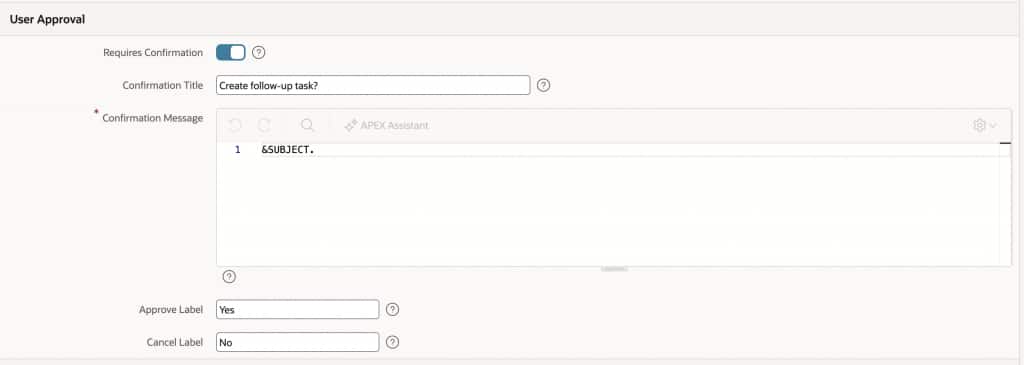
Because this tool creates a follow-up task, it is also a good candidate for a user approval checkpoint. For common approval flows, Oracle APEX provides a declarative option directly in the tool configuration: enable Requires Confirmation and define the confirmation title, message, approve label, and cancel label in Page Designer. This lets the AI Agent pause for explicit user consent before running the server-side code.
confirm_email_content — Execute Client-side Code (On Demand)
Before sending a notification to the manager, the agent asks the user to confirm. This client-side tool triggers a confirmation dialog in the browser.
| Type | Execute Client-side Code |
| Execution Point | On Demand |
| Parameters | EMAIL_CONTENT (VARCHAR2, required) |
| Description | Opens an email preview drawer with the generated EMAIL_CONTENT, waits for the user to confirm, and returns the final confirmed email content. |
return new Promise((resolve) => {
    apex.item("P0_EMAIL_CONTENT").setValue(this.data.EMAIL_CONTENT);
    apex.theme.openRegion("show-email-content");
    emailConfirmed = false;

    const waitForConfirmation = () => {
        if (emailConfirmed) {
            emailConfirmed = false;
            resolve(`Email Content Confirmed: ${apex.item("P0_EMAIL_CONTENT").getValue()}`);
            return;
        }

        setTimeout(waitForConfirmation, 200);
    };

    waitForConfirmation();
});
This tool expects a small Page 0 setup: create an inline drawer region with the Static ID show-email-content, add the P0_EMAIL_CONTENT item inside it, and include a Send Email button that sets the global emailConfirmed variable to true. This gives the agent a place to show the generated email content and a clear signal when the sales rep has approved it.
This client-side tool introduces an important pattern: a human checkpoint inside an agent workflow. The model can reason, retrieve data, and prepare actions autonomously — but when an action crosses a boundary (notifying a colleague, sending an email, updating a shared record), the application can require explicit user consent before proceeding. The agent checks the returned value and only calls send_manager_notification if the rep confirmed.
send_manager_notification — Execute Server-side Code (On Demand)
A lightweight tool that sends an in-app notification to the rep’s manager.
| Type | Execute Server-side Code |
| Execution Point | On Demand |
| Parameters | MESSAGE (VARCHAR2, required) |
| Description | Sends a notification to the opportunity owner’s manager with the given MESSAGE about the specified OPPORTUNITY_ID. |
BEGIN

    apex_mail.send(
        p_to => (
            SELECT mgr.email
              FROM crm_users mgr
              JOIN crm_users rep
                ON rep.supervisor_user_id = mgr.user_id
             WHERE rep.user_id = :APP_USER
        ),
        p_from => 'noreply@company.com',
        p_subj => 'Manager Notification',
        p_body => :MESSAGE
    );

    apex_ai.set_tool_result(
        p_result               => 'Manager notified via email.',
        p_notification_message => 'Manager emailed',
        p_notification_type    => 'success'
    );

END;
What ties it all together
Eight tools. Three types. Two execution points. All defined declaratively under a single AI Agent, backed by the CRM tables that already exist in the database.
The Augment System Prompt tools — get_user_context on the server, get_browser_timezone in the browser — run on every user prompt, and their results are included in every call to the model (cached during tool-call roundtrips within a turn). The on-demand tools — get_open_pipeline, get_opportunity_details, get_recent_activities, create_followup_task, confirm_email_content, send_manager_notification — give the model the ability to retrieve data, get user confirmation, take action, and report back with grounded results.
The model never sees raw table structures. It sees a curated list of named capabilities, each with a description and typed parameters. APEX handles the execution, parameter validation, and result routing. The developer controls every boundary: which data is exposed, which actions are allowed, which conditions must pass, and what the user sees.
That is the tool model in practice. Not a framework to learn, but a set of declarations to configure.
What this demonstrates
The CRM scenario exercises the full surface of AI Agents in Oracle APEX, but the patterns it demonstrates aren’t CRM-specific. Augment System Prompt tools for per-message context, On Demand tools for retrieval and action, human checkpoints before sensitive operations, timezone-aware scheduling — these translate directly to any domain.
Building an IT helpdesk agent, a project management assistant, an HR onboarding workflow: the model is the same. Define what the agent can see, what it can do, and what requires human confirmation. APEX handles the rest.
Interested in how this CRM agent was built using AI? A follow-up blog on building AI Agents in APEX with agentic development tools is in the pipeline — stay tuned.