

Business users have always had to wait. A report request gets raised, a developer picks it up, SQL gets written, the page gets built, it goes through review, and finally it deploys, often days or weeks after the original need was identified. By then, the question the report was supposed to answer may have already moved on.
Oracle APEX Data Reporter is designed to break that cycle.
Introduced as a dedicated reporting module alongside App Builder and SQL Workshop, Data Reporter gives business users the ability to create and explore reports directly, without writing SQL, and without opening Page Designer. Developers and administrators remain essential, but their role shifts from building individual reports to building the governed environment in which reports are created.
Oracle APEX Data Reporter Series
- Part 1: Putting Self-Service Reporting Back in the Hands of Business Users ← You are here
- Part 2: Setting Up Your Oracle APEX Data Reporter Environment
- Part 3: Managing, Updating, and Moving Your Oracle APEX Data Reporter Environment
Introduced as a dedicated reporting module alongside App Builder and SQL Workshop, Data Reporter gives business users the ability to create and explore reports directly, without writing SQL, and without opening Page Designer. Developers and administrators remain essential, but their role shifts from building individual reports to building the governed environment in which reports are created.
Why Reporting Has Always Been a Developer’s Problem; and how Data Reporter Changes that
The traditional reporting loop in Oracle APEX is well-understood. A business team identifies a need, a developer builds the page, the SQL is written and reviewed, and the report is deployed. The data is usually available, the bottleneck is always the process.
This creates a few persistent challenges. Reports are often out of date by the time they go live. Small changes require a full development cycle. Business users have no visibility or agency. And developer time, an expensive, finite resource, gets consumed by work that arguably doesn’t require deep technical expertise.
Data Reporter addresses this by separating two concerns that have historically been bundled together: report authoring and application development. Business users now own the former; developers and administrators own the latter.
Developers and administrators still play an essential role, but their role shifts toward defining the right foundations: authentication, datasets, access, governance, and deployment. Business users gain speed and independence. Teams gain better control over how reporting scales.
For Oracle APEX customers who want reporting to be faster, safer, and more accessible, Data Reporter is more than a convenience feature. It is a new reporting pillar within the platform.
What Data Reporter Actually is
APEX Data Reporter is a dedicated Oracle APEX reporting module available alongside App Builder and SQL Workshop. It is designed for business-led reporting, not full application development.
At its core, it allows users to create reports through a simplified flow — selecting a data source, configuring columns, applying filters, and choosing a layout — without ever touching Page Designer or writing a line of SQL. Reports can be kept private while in progress, then published to a wider audience when ready.
Data Reporter is not only a report builder. It is also a discovery layer for business users.
Generative AI support helps improve natural-language interactions. Descriptions, titles, and tags help users find the right reports more easily. Search quality improves when report metadata is clear and business-friendly. Spotlight integration further improves discoverability by helping users find reporting applications and common actions quickly.
What Data Reporter Unlocks for You
- Create and edit reports through a simplified flow, no Page Designer, no SQL required
- Keep work in progress private; publish only when ready
- Control data access through datasets, which are curated collections of tables and views defined at the workspace level
- Improve natural-language query quality by limiting the AI to a focused, relevant set of tables
- Move reporting applications across environments using export and import
- Let viewers explore published reports without ever touching development tooling
Three Report Types, Built for Different Needs
Data Reporter supports three distinct report formats, each suited to a different kind of data exploration:
- Interactive Report: A fully customizable tabular view with sorting, filtering, drill-down, and AI-assisted column hints. Best for data-heavy analysis where users need to explore and slice the data themselves.
- Faceted Search with Table: A search-driven report with a guided filter panel and results displayed as a structured table. Ideal for browsing large datasets where the user benefits from guided navigation.
- Faceted Search with List: The same search-driven approach but with results rendered as visual cards. Well-suited to product catalogues, media libraries, or any content that benefits from a visual layout.
Note: Filtering and AI Hint / Column Context are exclusive to the Interactive Report type. Both Faceted Search types support Facet navigation instead.
Two Ways to Build a Report
Users creating a report have two starting points, depending on how well they know the underlying data
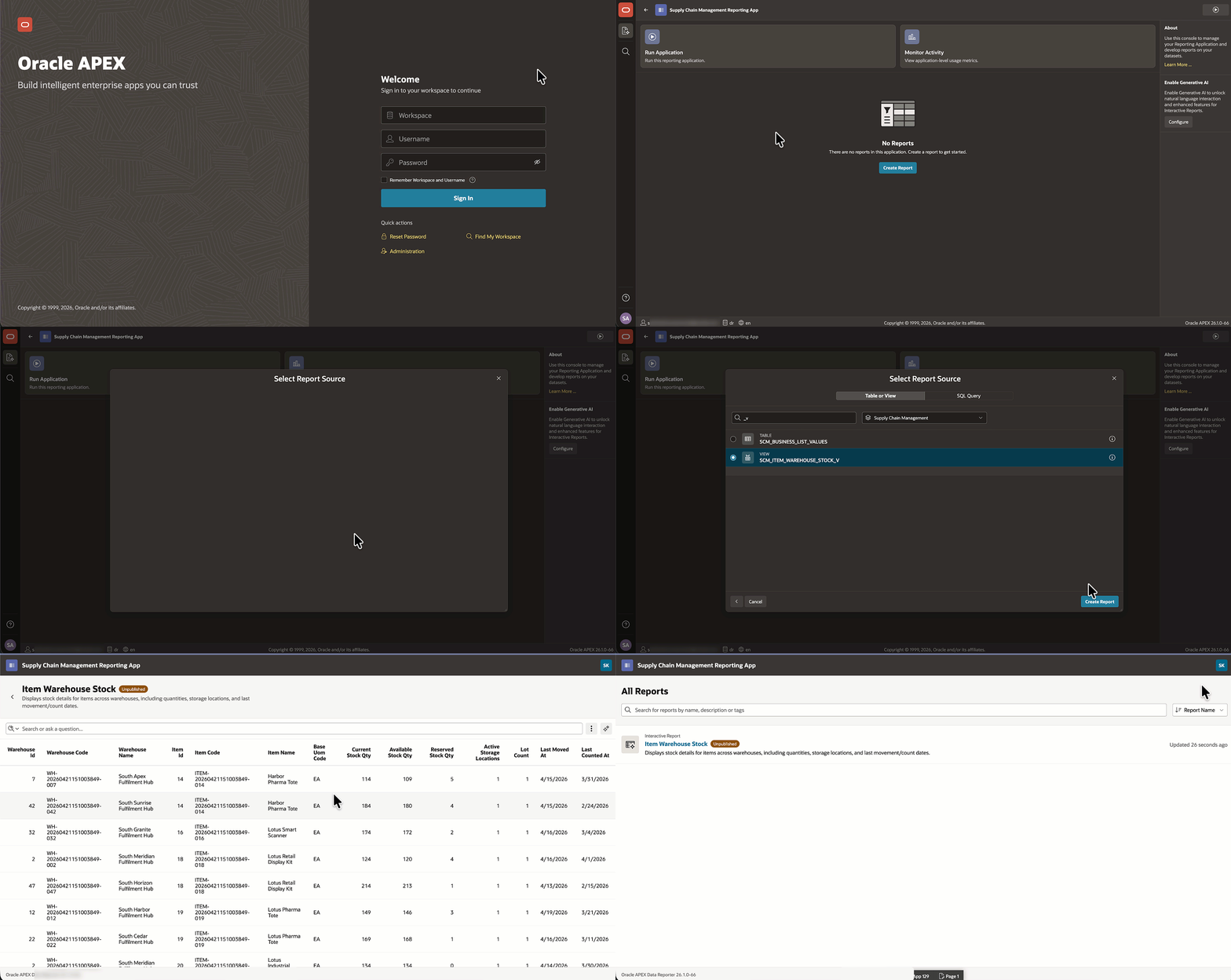
Scenario 1 — When the user knows the table
A business user building a report on Item Warehouse Stock can navigate directly to the relevant table or view and generate the report. No SQL required.
Scenario 2 — When the user does not know the tables
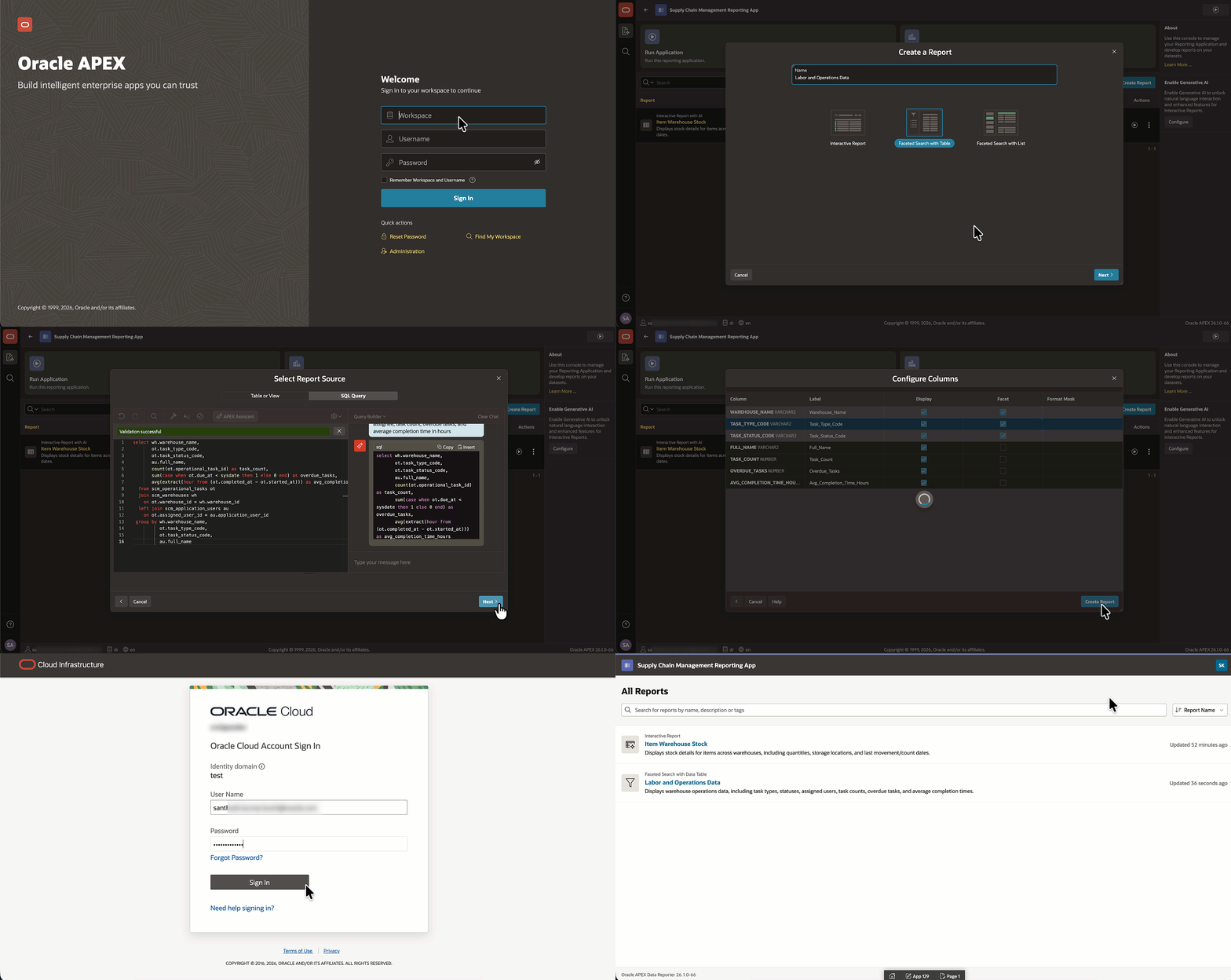
Most business users aren’t aware of the underlying database structure. Tables are managed by DBAs, and many reports require joins across several of them. In this case, the user can describe what they need in plain English using APEX Assistant, which generates the SQL automatically. For example, a report spanning Labor and Operations data across multiple tables can be created without the user knowing any of those table names.
Governance Without the Complexity
One of the more important aspects of Data Reporter is that self-service doesn’t mean uncontrolled access. Governance operates at two levels:
Data-Level Governance: Datasets
Administrators define datasets, curated collections of tables and views, at the workspace level. When a business user works within a reporting application, they can only access the data included in that dataset, not the full schema. This keeps data exposure appropriate and bounded without requiring any changes at the database layer.
User-Level Governance: Roles
Within each reporting application, access is managed through two roles:
- Editors can create, edit, and manage reports.
- Viewers can only see and interact with published reports. They have no access to the authoring experience.
Crucially, having an Editor role in one reporting application grants no access to any other. Administrators explicitly control access per application, giving teams precise control over who can do what, and where.
The Shift in Developer Responsibility
Data Reporter doesn’t remove developers from the reporting picture, but it repositions them. Instead of building individual reports on demand, their focus shifts to for example:
- Setting up and configuring authentication
- Designing well-structured datasets
- Creating and maintaining reporting applications
- Managing user access and roles
- Handling deployment across environments via export and import
This is a better use of developer expertise. The foundational work they do once enables business users to self-serve indefinitely. Reports that used to take days can now take minutes!
This is Part 1 of a 3-part series on Oracle APEX Data Reporter. Now that you know what Data Reporter is and why it exists, Part 2 — Setting Up Your Oracle APEX Data Reporter Environment , is coming soon and will walk through the full setup; from enabling authentication to getting your first reporting application live. And Part 3 — Managing, Updating, and Moving Your Oracle APEX Data Reporter Environment, is also coming soon and will cover how to keep your environment running smoothly by updating published reports, managing datasets, maintaining your reporting application, and moving everything across instances using export and import.