

When using AI for generative development, and spec-driven development (SDD) in particular, application scaffolding is a powerful starting point. Scaffolding establishes the baseline structure and foundational components needed to implement your application’s core capabilities. It is not a complete implementation, but a solid deterministic foundation you can build on incrementally. Oracle APEX 26.1 introduces the ability to define this high-level scaffolding as a blueprint, and to deterministically generate a full application from it.
What Is an APEX Blueprint?
An APEX blueprint is an importable application design artifact that describes exactly what APEX should build: pages, navigation, regions, reports, forms, charts, filters, actions, and page behavior. In this workflow, the blueprint is generated from source documents. This makes it inspectable before the application is created, useful for traceability, and easy to regenerate when specifications change. The blueprint is not the durable source of truth, however. Lasting changes belong in the functional requirements or schema metadata, from which a fresh blueprint is then generated.
How to Leverage Scaffolding to Speed APEX App Development
A functional specification defines what an application should do. An Oracle database schema defines the data it works with. Together, these two inputs give an AI coding agent enough context to generate an Oracle APEX blueprint. In APEX 26.1, a blueprint is a structured Markdown document that can be validated, converted to APEXlang, and imported directly into APEX, generating a working application scaffold complete with pages and components like forms, reports, dashboards, calendars, and maps.
In some situations blueprint scaffolding can be faster and more token efficient than generating APEXlang directly, because they encode common APEX page patterns into reusable structures. The result is a solid starting point that can be refined through conversational development or tweaked hands-on in the APEX Application Builder.
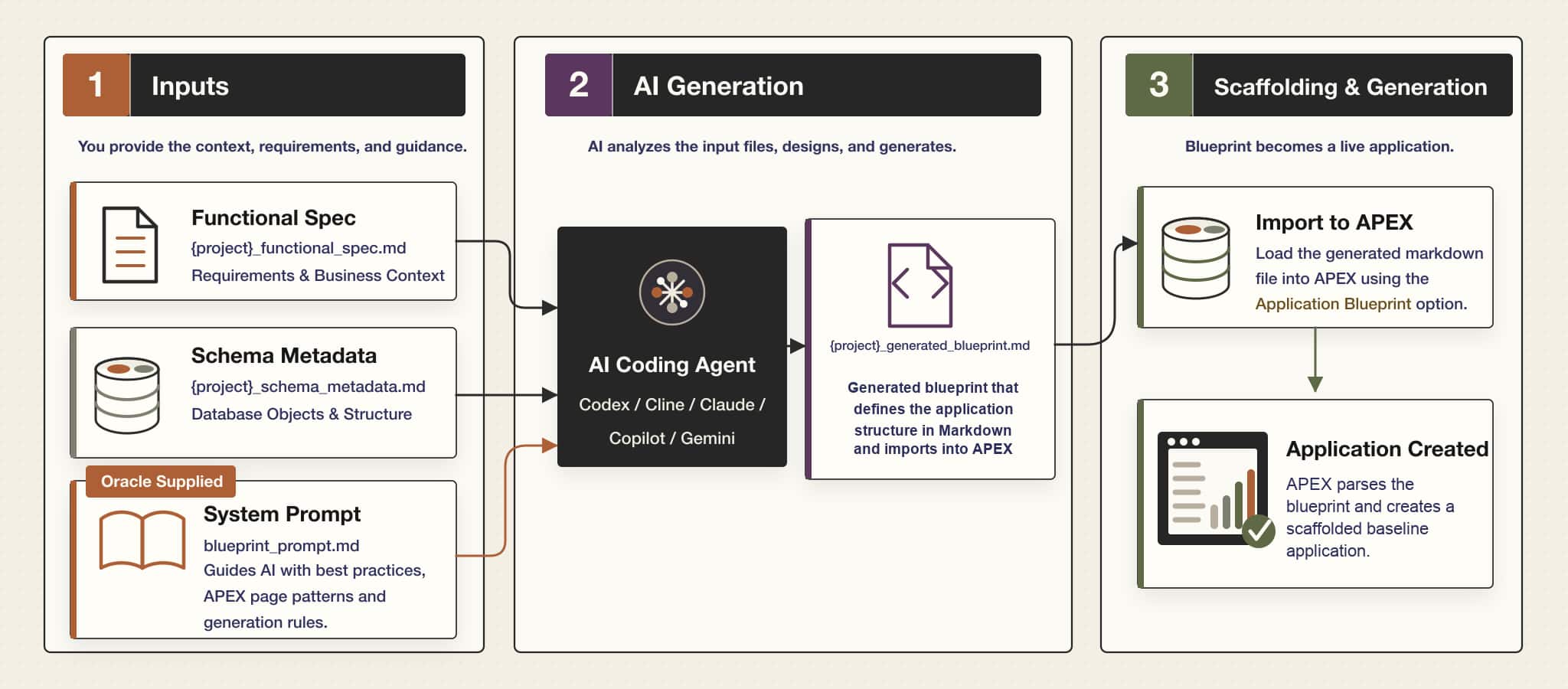
The flow diagram below illustrates this process in three phases, beginning with human intent, followed by AI-generated blueprint creation, and ending with a bootstrapped application. This represents a high level of abstraction, by concealing the underlying implementation complexity from the user. A later section explains this flow in detail with an illustrative example.
Potential Benefits of using Application Scaffolding
- Faster generation: By targeting a structured intermediate simplified format rather than generating a APEXlang directly, the LLM may take less time and consume fewer tokens.
- More consistent page generation: APEX blueprints rely on deterministic logic in the APEX engine to convert blueprint markdown into APEXlang. The generated APEXlang is then imported resulting in a consistent first draft of your application.
- Incremental enhancement: If the initial application does not meet expectations, developers can regenerate or refine the blueprint and import it again to produce improved results.
Blueprint scaffolding establishes a structured baseline, not a finished application. Blueprints cover the most commonly used APEX components such as pages, navigation, regions, reports, and forms. Application functionality beyond core scaffolding such as advanced page behaviour, dynamic actions, complex process logic, or custom plugins, is addressed in a second phase of enhancement
Getting Started with Blueprint Based Scaffolding in Oracle APEX
We will use a Supply Chain Management (SCM) usecase focused on inventory and warehouse operations as an illustrative example. Its core capabilities will evolve across each phase, from definition to blueprint to a working, bootstrapped application.
Prerequisites
Before getting started with blueprint based scaffolding, ensure your local environment includes a supported code editor and an AI coding assistant/agent.
Note: In this walkthrough we will be using VS Code with the Codex Chat extension with GPT-5.5 model (xHigh reasoning).
You’ll also need access to a running Oracle APEX environment (version 26.1), where the generated blueprint will be imported in Phase 3.
Phase 1: Inputs
Every spec-driven development lifecycle starts with defining intent, which means describing how you want the application to work. In the SCM example, this means capturing how inventory and warehouse operations behave, including stock visibility, storage, movements, fulfilment, and control processes, how these elements relate to one another, and how users are expected to work with the application. Together, these three inputs form a complete picture: the functional spec defines what to build, the schema metadata defines the data it works with, and the system prompt ensures the AI produces output in the exact format Oracle APEX expects.
- Developing a Functional Spec: Everything the application needs to become starts from here, in plain text files authored before a single page is created. The more detailed and structured your functional spec, the better the AI can interpret intent and generate a blueprint that closely reflects your vision. Think of it as the contract between your requirements and the generated application. In this example, you author requirements in a Markdown file, describing inventory and warehouse management flows such as goods receipt, storage, stock movements, fulfilment, and returns in a format that is easy to review and collaborate on. These requirements can be handcrafted or AI-generated, iterated over and refined.
- Documenting Your Database Schema: This example assumes you have already created a database schema, ideally with annotated tables and columns.
Follow these steps to export your database schema definition:- Create your database schema and annotate your tables and columns with comments.
- Export the schema from APEX by navigating to SQL Workshop → Utilities → Describe Tables. Shuttle across the tables and views needed for your application, click Describe, then Download the generated file.
- System Prompt: Generating a blueprint requires a system prompt that instructs the LLM on how to produce a properly structured output.
Note: It is useful to include annotations on tables and columns so that when AI reads the metadata, it understands the purpose of each entity and how it maps to the functional requirements.
Illustrative Example
At this stage, we begin by collecting the requirements and defining the data model. Requirement generation can leverage industry knowledge, augment your vision, and be socialized and iterated on before the spec is locked in. You can use any file format. The example below shows Markdown files.
| Artifact | Description |
|---|---|
| User Provided | |
| scm_functional_requirement.md | A detailed functional requirements specification for building an SCM application in Oracle APEX, describing inventory and warehouse management flows such as goods receipt, storage, stock movements, fulfilment, and returns, along with dashboards, approvals, and audit trails. |
| scm_schema_metadata.md | The complete Oracle database schema metadata for the SCM application, including tables, columns, data types, keys, constraints, indexes, and views used by the data layer. |
| Oracle Provided | |
| blueprint_prompt.md | A deterministic system prompt that instructs an LLM to generate Oracle APEX application blueprints from functional requirements and schema metadata. |
Note: For this demo, we have used the attached SCM data model, which includes a complete SCM database setup package with the data model, seed data, and installation and uninstallation scripts.
To install the data model, use the SQL Scripts feature in your APEX environment.
Navigation :SQL Workshop > SQL Scripts > Upload > Run the Script.
Phase 2: Generation – AI Transformation
With the SCM requirements and schema metadata defined, the next step is to translate that intent into a structured blueprint.
In this phase, your coding agent reads the SCM functional spec and schema metadata along with the Oracle-supplied system prompt. The result is a blueprint that defines the SCM flows, entities, and relationships in the exact format APEX expects.
- AI-Driven Compilation:The agent processes both SCM input files alongside
blueprint_prompt.md, using the prompt’s rules to generate output that matches the APEX import format.
Context options:
Using @ mentions: Type@in the prompt and select specific files to include as context.
Using a folder path: Place all SCM files in a folder and pass the folder path so the agent can read them together.
- Deterministic Translation: Because the system prompt enforces strict structure, the generated SCM blueprint aligns closely with the original specification, avoiding unintended additions or drift.
Illustrative Example
The generated blueprint follows a structured Markdown that the APEX import engine understands. It uses defined section headings and field conventions to describe pages, regions, items, and navigation — the same method you would use to configure manually in App Builder. Because the format is deterministic, the same blueprint will always produce the same application structure.
| Artifact | Description |
|---|---|
| scm_generated_blueprint.md | The generated blueprint for the SCM application, created by passing the SCM spec and schema through a coding agent with the Oracle system prompt. |
Note: Since the blueprint is in Markdown, you can review it before import to understand how the SCM structure will be translated into the application.
Phase 3: Scaffolding & Generation
With the SCM blueprint validated and ready, the APEX import wizard takes over by reading the structured Markdown and scaffolding the application from the structured blueprint, converting it into application metadata inside your workspace.
This phase is where the scaffolding becomes concrete: every section of the blueprint maps to an application component, and the result is a fully structured baseline application ready for enhancement.
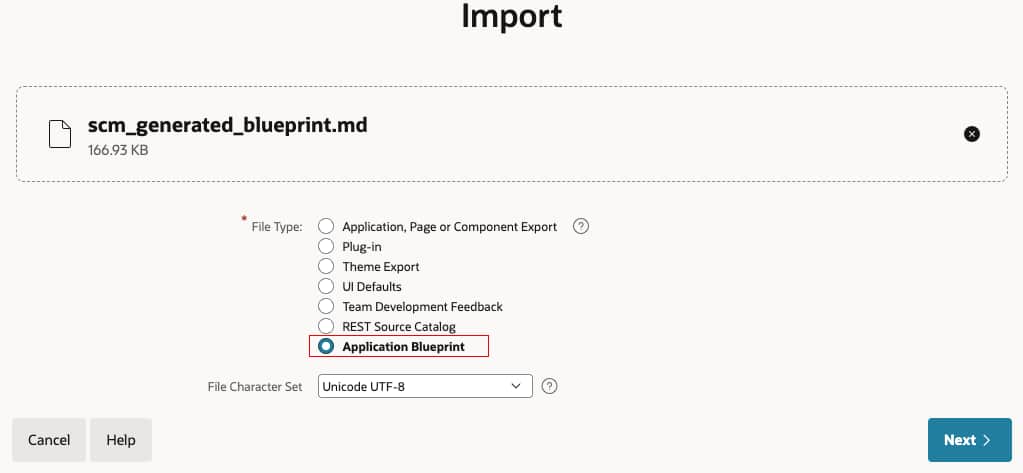
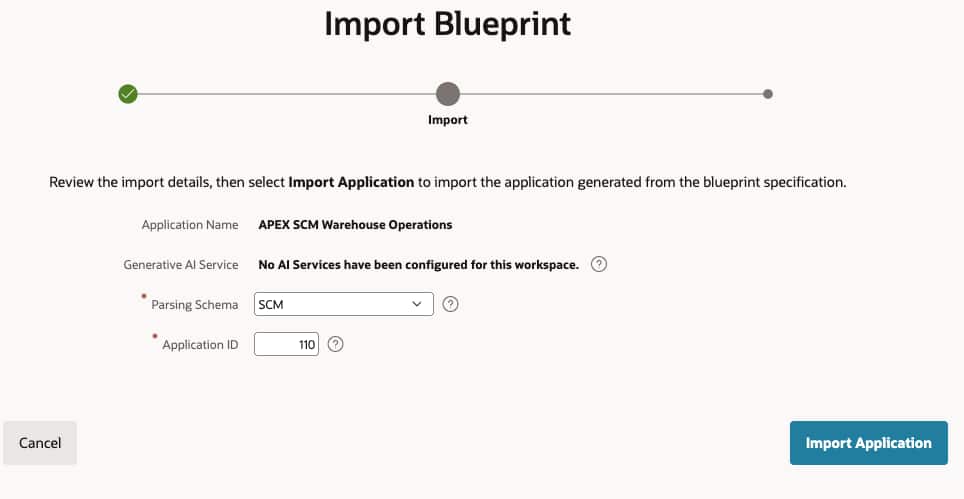
- Blueprint Integration: Navigate to your APEX workspace and import
scm_generated_blueprint.mdusing the import wizard. APEX reads the blueprint structure and maps each section to the corresponding application component.
Note: Make sure your schema is REST enabled to import the generated application blueprint. See the FAQ section for more information.
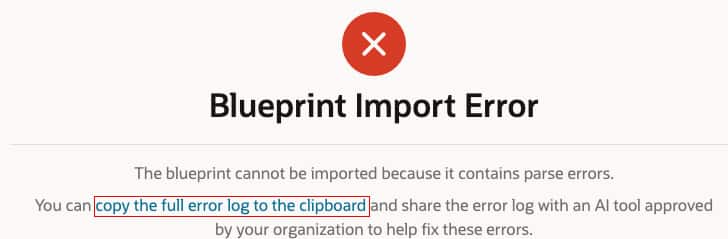
- Automated Validation Gate: Before generation, APEX validates the blueprint against its expected schema. If any section is malformed or a reference is unresolved, the engine raises an error. You can send that error back to your coding agent, correct it, and reimport, keeping the entire process within the same workflow.
- Final Generation: Once validated, the APEX import engine deterministically converts the generated blueprint into an APEXlang application, abstracting away the entire implementation process and delivering a fully scaffolded application that reflects the original specification authored in Phase 1.
Illustrative Example
Importing the SCM blueprint into your APEX environment deterministically generates the SCM application that reflects the original specification.

From here, development can continue inside App Builder, alternatively you can also use APEXlang skills to add new features using AI. You refine SCM workflows, add PL/SQL business logic, enhance UI themes, introduce validations, and extend the application with more advanced features as needed.
Summary
Spec-Driven Development with Oracle APEX blueprint scaffolding provides a structured, repeatable path from business intent to working application. Rather than starting in App Builder, development begins with functional requirements and schema metadata , plain text artifacts that serve as the single source of truth and drive every step downstream. From these inputs, an AI coding agent generates an APEX blueprint: a structured, importable markdown document that defines the application’s pages, navigation, regions, and components in the exact format APEX expects. Oracle APEX then imports the blueprint and deterministically generates a scaffolded application, one that directly reflects the original specification.
Scaffolding through blueprints accelerates proof of concept, reduces token consumption, and improves generation quality by constraining the AI to a well-defined intermediate format. Built-in validation ensures conformance at import time, and any errors are surfaced immediately so the agent can self-correct. The scaffolded application is a foundation, not a finished product. From there, teams can focus on higher-value work : UX refinement, business logic, integrations, and incremental enhancement through conversational development or directly in the Application Builder IDE. The result is a faster, more consistent, and more reliable path from specification to production.
FAQs
Q1. Do I need a specific code editor to generate the application blueprint?
No. You can use any supported code editor with a compatible coding agent extension. Alternatively, a CLI-based agent lets you work directly from the terminal with no editor dependency at all.
Q2. What’s the difference between a coding agent extension and a CLI? Which AI coding agents can I use?
A code editor extension runs directly inside your editor. It typically provides a sidebar chat, inline suggestions, and full awareness of your workspace.
A CLI (Command Line Interface) agent, on the other hand, runs in your terminal and operates on a specified folder. It is editor-agnostic, meaning it works independently of any code editor.
Available Options
| Type | Tools |
|---|---|
| Editor Extensions | Cline / Codex / Claude Code / Google Gemini / GitHub CoPilot |
| CLI Agents | Codex CLI / Claude Code CLI / Gemini CLI. |
Q3. Why is a REST-enabled schema required to import blueprints?
The generated application blueprint is parsed by the APEX import engine through an API and converted into an APEXlang file. In the builder, APEXlang is compiled through ORDS. REST-enabling the schema provides access to the ORDS APIs required, and the application is then installed in the workspace.