
Introduction
Oracle Fusion Data Intelligence (FDI) is a family of prebuilt, cloud-native analytics applications for Oracle Fusion Cloud Applications that provide ready-to-use insights to help you improve decision-making. It‘s extensible and customizable, allowing your organization to ingest data and expand the base semantic model with additional content.
Oracle Fusion Applications Cloud serves as the source for Fusion Data Intelligence prebuilt content and offers built-in disaster recovery capabilities. However, Fusion Data Intelligence does not currently provide a dedicated disaster recovery SKU to address major disasters. As customers increasingly rely on Fusion Data Intelligence for real-time analytics and reporting, having a backup instance becomes critical—not just as a technical safeguard, but as a foundation for uninterrupted business operations.
If organizations maintain a backup environment, they can swiftly switch over if the primary system encounters issues, minimizing downtime. This approach ensures uninterrupted access to vital insights, maintains stakeholder confidence, and enhances resilience against unexpected events such as system failures or regional outages. Implementing an active-active configuration is essential to achieve reliable RPO (Recovery Point Objective) and RTO (Recovery Time Objective) targets for mission-critical workloads, supporting a robust disaster recovery strategy.
This article outlines the steps for rapid recovery operations for Fusion Data Intelligence by leveraging a well-defined disaster recovery framework.
Note: This article addresses scenarios where the Fusion Data Intelligence instance is unavailable but assumes that the Fusion Applications remain accessible in the same region, and all users retain access.
The strategy involves four steps:
- Complete the initial setup
- Maintain a backup instance
- Promote the backup instance
- Restore normal operations
1. Complete the initial setup
a. Consider your subscription options
There are two approaches to consider based on your disaster recovery requirements:
- Duplicate FDI Subscription: Procure to duplicate the Fusion Data Intelligence subscription and environment,and establish a fully active-active secondary setup
- Additional Test Environment (ATE): Procure an ATE as a more cost-effective backup option.
Choose the option that best aligns with your disaster recovery needs and budget.
b. Create a backup instance
- Provision the backup instance in a geographically separate region from the primary Fusion Data Intelligence production instance.
- Check your OCI Region. For non-OC1 (non-commercial) realms, an additional configuration is required. Perform the additional step outlined in the About Disaster Recovery documentation.
- Configure the production and backup Fusion Data Intelligence instances to use the same Fusion Production Instance URL.
c. Review your configuration and parity
- Activate all required the modules in the backup instance to mirror the production environment.
- Set up incremental data refresh schedules (for example, start approximately two hours after production or run daily or weekly as appropriate while the instance remains idle).
2. Maintain the backup instance
We recommend that any changes to your production instance also be applied to your backup instance.
a. Confirm which backup instance setting works best for your stakeholders:
- Idle mode: Backup instance is idle (no reporting or integrations) under normal operations.
- Promotion: Backup instance is promoted as primary
b. Set ongoing data synchronization
- Maintain weekly or daily refreshes for the backup instance in Idle Mode.
- Enable frequent refreshes and load processes only when the disaster recovery is promoted to primary or keep it running, depending on your requirements.
c. Align instance versioning and patching
- Upgrade and patch the backup instance and production instance around the same time.
d. Synchronize your custom content
- Migrate all custom content including Data Augmentations, Security, SMEs, reports, other extensions, and configurations to the backup instance.
- Provide guidance to users when they create artifacts in their personal folders.
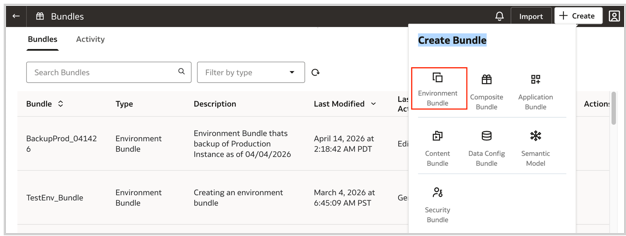
e. Migrate additional customizations
- Review and plan to migrate all customizations you want to save in the Oracle Autonomous AI Datalake layer or any related upstream process, so that the backup instance 100% mirrors the production instance.
3. Promote the backup instance to primary
During a disaster incident, the backup instance is promoted to primary:
- Synchronize data
- Verify that the data synchronization pipeline is healthy and matches the production strategy.
- Consider usage and resource scaling
- ,Choose one of following approaches (based on the usage policy):
- Allow access to a select group of consumers to view reports
- Enable full production-like usage
- Adjust the backup instance sizing and resources to suit workload requirements.
- Update endpoints and Connections
- Update all connection endpoints (URLs, OCI buckets, and stream endpoints) to align with the backup environment.
- Notify users of any endpoint changes and new connection instructions.
- Update downstream integrations to point to the backup instance, as needed.
- Notify users
- Announce disaster recovery activation and share new access details with all relevant stakeholders.
- Communicate with Oracle
- For any incidents or support needs, prefix service requests with “[Backup Instance-Primary]”.
4. Restore normal operations
a. Data Synchronization on Production
- Verify that the data pipeline is healthy on production after recovery
b. Custom Content Sync
- Migrate any custom reports, extensions, and configurations that were added in the Backup instance
c. User Communication
- Announce Production availability with all relevant stakeholders and confirm they are redirected to use production.
d. Revert the backup instance to idle mode
Revert the data pipeline schedule and any other configurations to the original idle mode setting.
Summary
By implementing a dedicated backup instance in a geographically separate region—fully aligned with production configurations, data pipelines, and business processes—this runbook establishes a resilient disaster recovery posture. It minimizes downtime, preserves data consistency, and enables rapid, predictable failover during disruptions, ensuring continuity of critical reporting and business operations.
This approach provides a strong and reliable option for disaster recovery—supporting compliance, maintaining user trust, and enabling informed decision-making even during unexpected outages.
Reference
About Disaster Recovery documentation
Call to Action
We want your feedback! If you have a suggestion or discover an issue while working with these instructions, connect with your Center of Excellence counterpart to let them know. We’ll make every effort to incorporate your request. Look for our posts in the Oracle Analytics Community, where you can also ask questions and share your comments