

Oracle Fusion Data Intelligence (FDI) uses AI to make more administration work self-service. With AI Concierge, administrators can ask operational and configuration questions in plain English, inspect tenant-specific setup, and move into guided tasks without first hunting through console pages. For new administrators, it shortens the learning curve; for experienced administrators, it reduces the time between question and action.
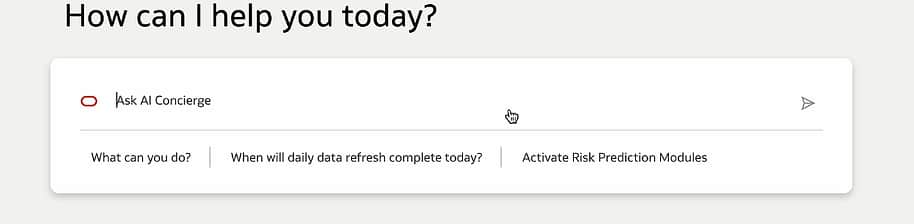
FDI AI Concierge home page experience is a simple prompt with natural language interaction.
Quickly understand activated functional areas
A common first question is:
User prompt: < Which functional areas or modules are currently activated? >
AI Concierge responds with a list of currently activated functional areas in the environment. Administrators can continue the conversation with follow-up questions, such as asking which of those areas belong to the ERP pillar. In the demo, AI Concierge narrows the response to ERP-related areas, including Accounts Payable, Accounts Receivable, Employee Expense, General Ledger, GL Budgets Analysis, Purchasing, and Security Configuration Option.
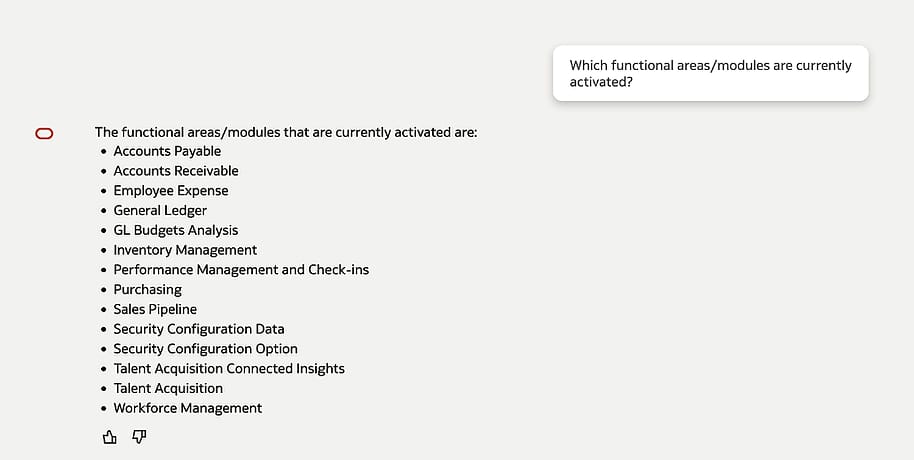
Administrators can ask which functional areas or modules are currently activated.
Check activated data applications
AI Concierge can also help administrators understand active data applications easily.
User prompt: <Which data applications are activated?>
AI Concierge responds that the activated data application for the Fusion Applications data source is Descriptive Flex Fields. This is a simple but important administration shortcut; AI Concierge can determine whether the data applications in FDI are active, deployed, inactive, failed, or in progress. The page itself might include multiple data applications with different statuses, such as inactive application definitions and completed deployed applications. Instead of scanning the table manually, the administrator can ask AI Concierge for the currently activated application and receive a direct answer in the side panel.
This scenario also shows how AI Concierge works alongside the existing administration page rather than replacing it. The administrator can keep the Data Applications list visible, review status details such as version, updated date, updated by, and latest status, and use AI Concierge to summarize the active configuration.
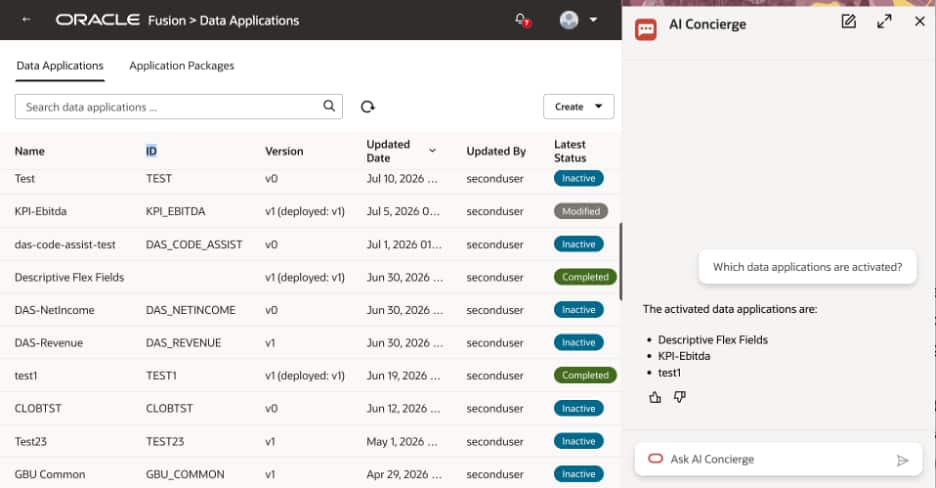
AI Concierge can summarize active data applications directly from the Data Applications page.
Discover data applications available to create
AI Concierge can help administrators understand what they can create from the Data Applications experience. In the demonstrated scenario, the administrator asks this question and AI Concierge responds with available data application options:
User prompt: <What data applications are available for me to create? >
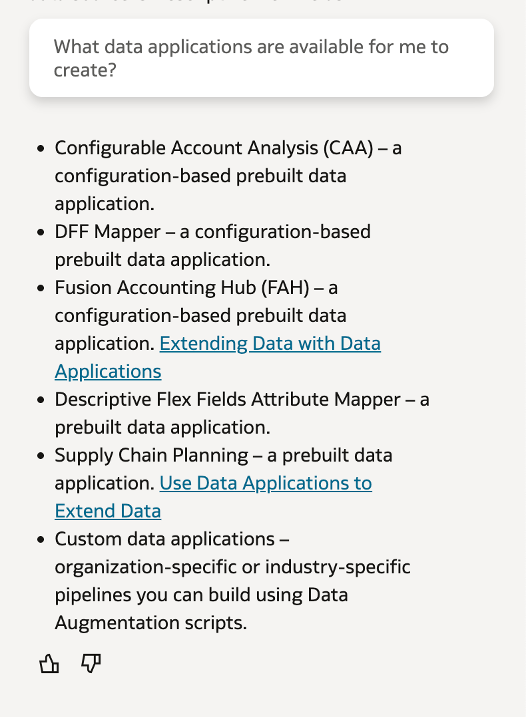
AI Concierge can list prebuilt and custom data application options for administrators.
Get data refresh information
Refresh visibility is another useful administration scenario. AI Concierge can answer questions such as “When was the last data refresh completed?”, “When is the next refresh?”, and “What is the progress of my data refresh?”
It can also help review Fusion Applications data source pipeline parameters, including the Initial Extract Date used when FDI first extracted data.
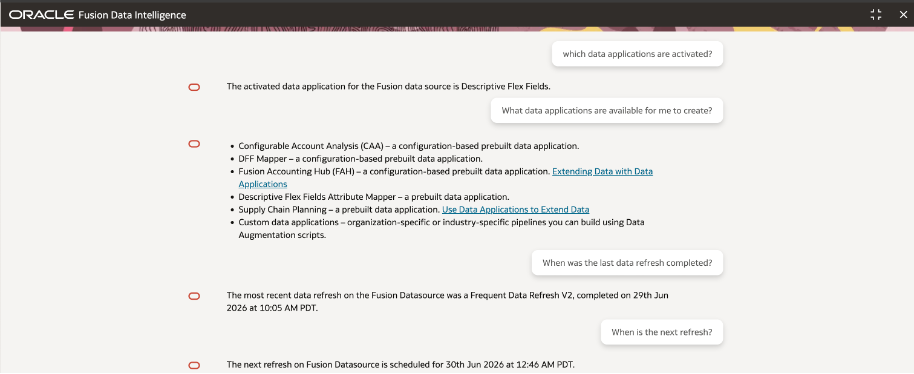
A conversation in AI Concierge can move from data application questions into refresh timing questions.
Review Fusion Applications data source pipeline parameters
AI Concierge can also help administrators inspect pipeline configuration for the Fusion Applications data source. This is useful when teams need to validate how data extraction has been configured or confirm the date boundary used for initial ingestion.
- What pipeline parameters are configured for the Fusion Applications data source?
- What is the IED (Initial Extract Date) used for my data?
Inspect active data augmentations
AI Concierge can also answer questions about data augmentation configuration. For example:
User prompt: <Give me a list of all activated data augmentations for Fusion data source>
The response includes activated data augmentations for the Fusion Applications data source, along with technical details such as target table, source table, and type. This is especially valuable for administrators who need to review extension work without manually opening each configuration area.
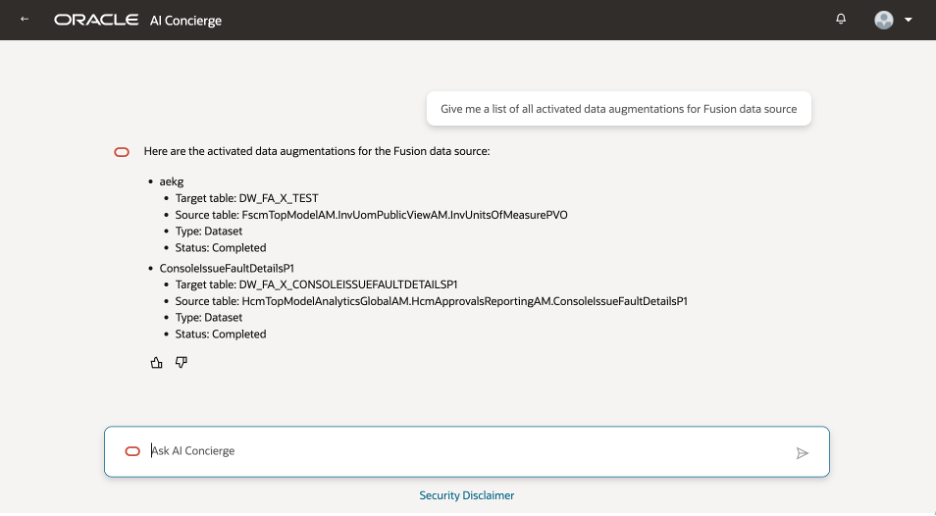
AI Concierge can summarize activated data augmentations, including target tables and source tables.
Get guided help for creating a data augmentation
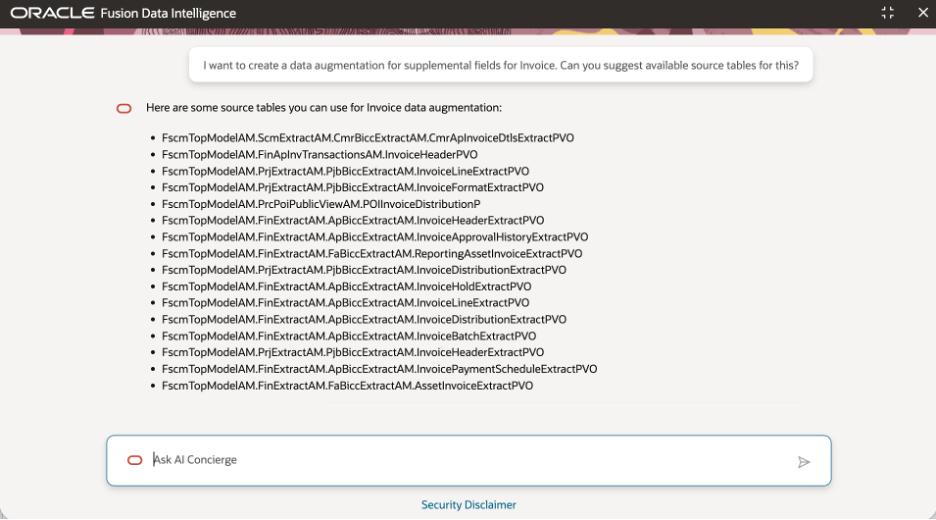
An administrator can ask AI Concierge to help create a data augmentation for supplemental invoice fields, and AI Concierge responds with suggested source tables for the Fusion Applications data source.
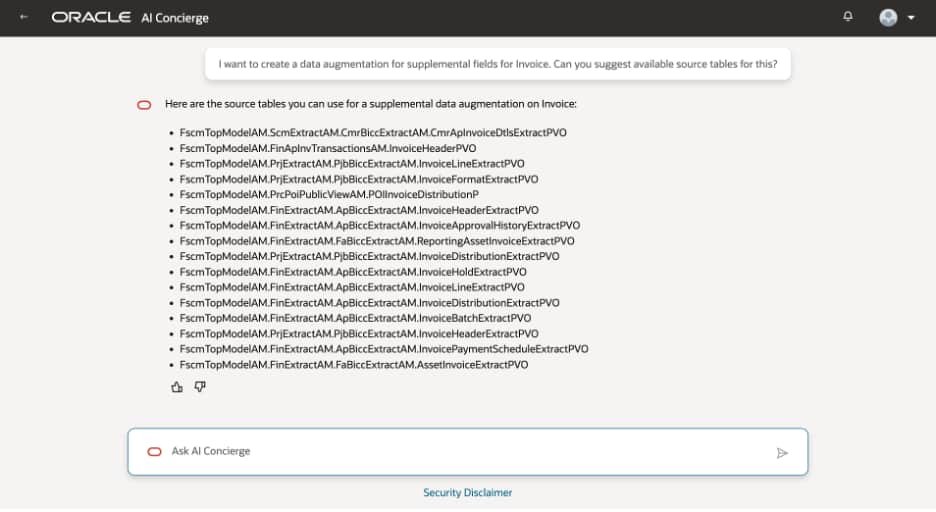
AI Concierge can suggest candidate source tables from the Fusion data source.
The administrator then asks:
User prompt: <What are the steps to create a data augmentation?>
AI Concierge provides a guided path through the Oracle Fusion Data Intelligence Console. This experience turns product knowledge into an in-context assistant experience. The administrator can ask what to do next, request candidate source tables, inspect available columns, and then use those answers while completing the actual configuration.
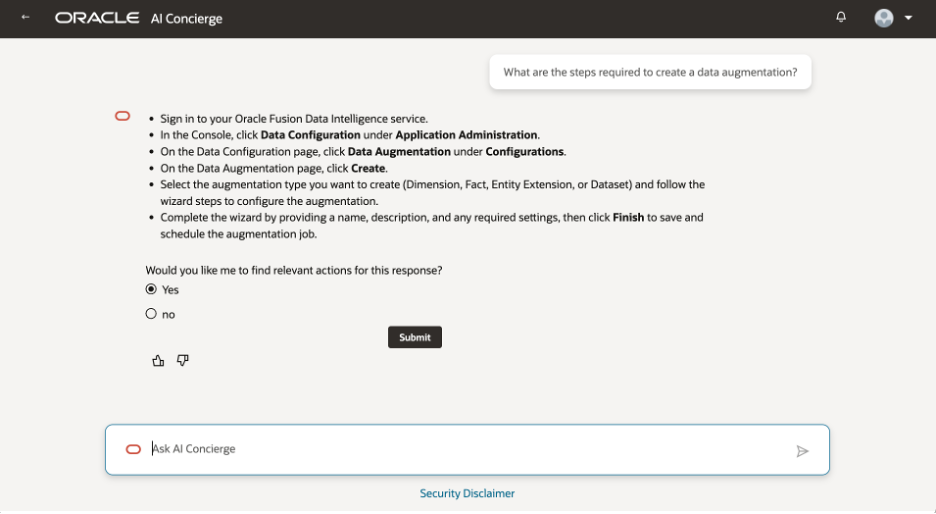
AI Concierge can provide step-by-step guidance for creating a data augmentation.
Explore source tables and columns
In the invoice example above, AI Concierge suggests multiple available source tables for supplemental invoice fields. The administrator then asks what columns are available for a specific invoice header table. AI Concierge responds with a column list, including fields such as approval status, invoice amount, invoice date, document sequence, exchange rate, fund status, invoice accounting date, invoice currency, and other invoice attributes.
This helps administrators validate whether a candidate source table contains the data needed before they create or adjust the augmentation. It also reduces the back-and-forth of opening metadata pages, copying object names, and separately checking column availability.
Administrators can inspect available columns before deciding how to configure the augmentation.
Summary: What FDI Administrators can do with AI Concierge
AI Concierge can help system administrators to:
- Check activated functional areas and modules.
- Check activated data applications, such as Descriptive Flex Fields.
- Discover data applications that are available to create, including prebuilt and custom options.
- Map functional areas to a pillar such as ERP.
- Review activated data augmentations.
- Find candidate source tables for a use case.
- Inspect available columns for selected tables.
- Get step-by-step guidance for creating a data augmentation.
- Ask operational questions about data refresh completion, next refresh timing, and refresh progress.
- Review Fusion Applications data source pipeline parameters, including the Initial Extract Date.
- Start activation workflows, such as Risk Prediction Modules.
Call to action
Start with a low-risk operational question, such as daily refresh timing or activated functional areas. Then try a guided task, review the proposed steps, and share feedback with the AI Concierge user group in the Oracle Analytics and AI Community.
References
- Oracle Help Center: AI Concierge for Administrators
- Example1: Activate a Functional Area with AI Concierge
- Example 2: AI Concierge: Add Custom Attributes to Fusion Data Intelligence