
It’s a familiar story: data is everywhere, yet getting answers is hard work. Imagine a customer service manager confronting a surge in escalated cases. They suspect product defects, but clues are scattered across CX, ERP, and SCM applications. Each system holds pieces of the puzzle—never the full picture. Siloed reports, disparate dashboards, and endless manual reconciliation waste time, delay action, and frustrate teams who need to work together across the business.
AI Assistant to the Rescue
While there’s no single cure-all for data complexity, Oracle’s new conversational AI Assistant for Oracle Fusion AI Data Platform offers a breakthrough. Powered by generative AI and Oracle’s unified business data model, the Assistant lets you converse with your data—iteratively, intelligently, and intuitively.
The AI Assistant spans all major Fusion application pillars—ERP, HCM, SCM, and CX—and can also work with third-party sources that are indexed in Oracle Fusion AI Data Platform. Whether you’re in finance, supply chain, HR, or customer experience, you can ask questions in natural language and receive visual, actionable insights—with commentary to help you interpret results. No manual dashboard building needed, and no SQL expertise required.
How It Works
Getting started is straightforward. Administrators enable the AI Assistant and index selected datasets or subject areas. Indexing is the mechanism that makes approved data available to the Assistant across the business—so it can “see” and retrieve relevant information from multiple sources when users ask questions.
A subject area is a curated collection of data focused on a business domain (for example: procure-to-pay in ERP, workforce metrics in HCM, order-to-fulfillment in SCM, or service performance in CX). By indexing the right subject areas, organizations can support cross-functional questions—without forcing teams to manually stitch data together.
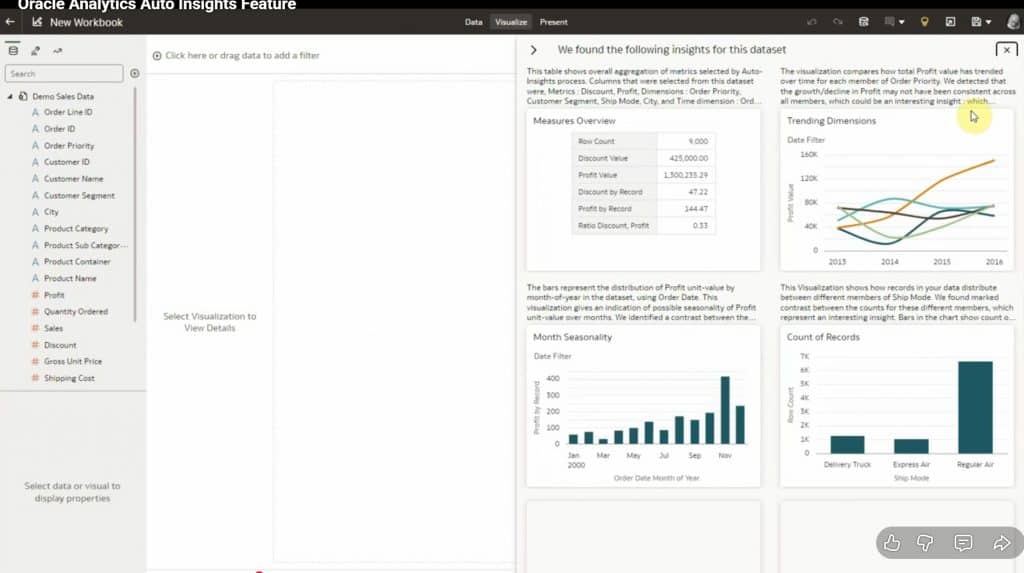
Once enabled and indexed, users open Auto Insights in an Oracle Analytics workbook and select the Assistant. (Auto Insights, an Oracle Analytics capability, guides data exploration, surfaces patterns, and generates visuals—now enhanced with conversational AI in supported environments.) Then, ask questions as you would a colleague—for example, to analyze maverick spend in procurement:
“What’s our maverick spend? Break it down by region, top reasons, trends by month, and top products involved.”
In response, the AI Assistant generates a comprehensive dashboard:
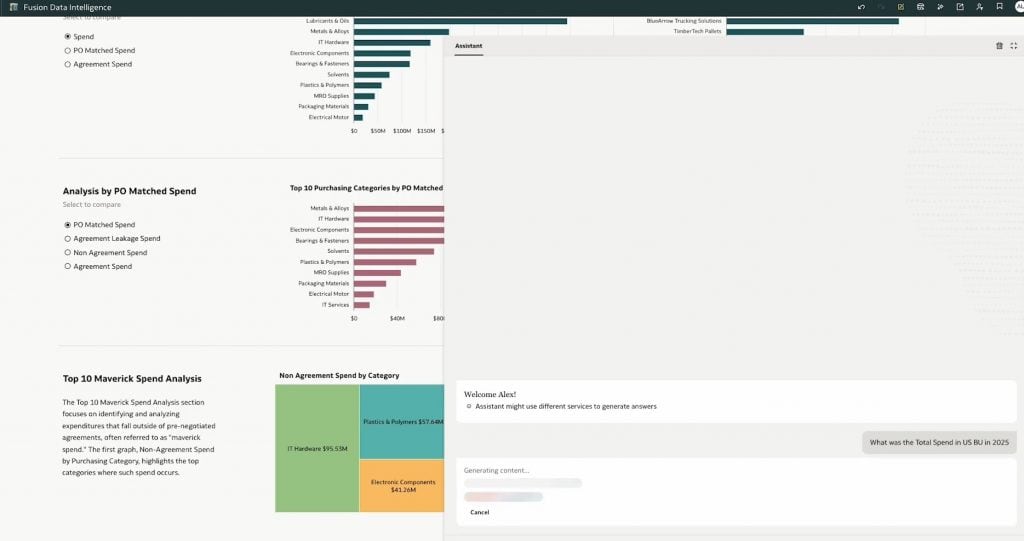
The Assistant analyzes the indexed data, surfaces visualizations and key trends, and can recommend follow-up queries. Authorized users with the appropriate permissions can access and share these insights, supporting collaboration across functions while respecting governance and access controls.
Watch the Demo: Procurement in Action
Want to see how the Assistant works in practice?
Our demo shows a procurement leader using natural language queries to analyze spend across cost centers and categories, uncovering maverick spend, supplier leakage, and savings opportunities after just a conversational prompt. The process is quick, simple, and representative of what’s possible across finance, HR, or customer operations.
Here’s the demo in action:
How Everyone Benefits Across the Business
IT: Spend less time building and maintaining dashboards or responding to ad hoc reporting requests—by enabling governed, self-service access to insights for the business.
Business users: Get fast, relevant insights without needing technical expertise, improving speed and agility in every department.
Analysts: Spend less time on routine data wrangling and more time interpreting results, advising stakeholders, and recommending next best actions based on what the data is signaling.
A Trusted, Secure Foundation
Oracle Fusion AI Data Platform’s AI Assistant operates within Oracle Cloud Infrastructure (OCI), keeping data secure, governed, and compliant. The Assistant is designed to help you get answers based on your organization’s indexed business data and the permissions in place—so it can reflect the context of your business while maintaining enterprise controls and trust. Only the information you explicitly select and index is available to the Assistant—user access to insights is governed by authorization.
As with any analytics workflow, teams should review outputs—especially before acting on critical business decisions.
Getting Started
Set-Up Permissions: Ask your admin for the “Use Assistant in Workbooks” permission if you don’t see the Assistant.
Index Subject Areas and Datasets: Your admin selects and indexes the right business domains and sources (across ERP, HCM, SCM, CX, and approved third-party data) to enable enterprise-wide insights.
Ask Away: Open Auto Insights and start exploring your business in plain language.
See how this translates into real insights for teams:
For a step-by-step guide, see the Oracle Analytics AI Assistant Documentation.
In Conclusion
Oracle’s Fusion AI Data Platform AI Assistant marks a new era in enterprise analytics. By introducing an intuitive, conversational interface, it empowers users across departments to extract insights from information scattered throughout the business—faster and more efficiently than ever. The result: quicker answers, reduced reporting burden on IT, and stronger collaboration across your cloud applications.
Ready to explore Fusion AI Data Platform? Learn more here.