


Financial reporting changes as statutory classifications, management views, and budget structures evolve. The challenge is to enable the Finance teams to regroup general ledger (GL) balances without modifying delivered tables or repeating classification logic in each Oracle Analytics workbook.
This article explains a reusable design for custom financial statement reports in Oracle Fusion Data Intelligence (FDI). Finance users maintain mapping rules in an Oracle Fusion Cloud Applications custom object. The rules are augmented into FDI, resolved to GL code combinations, and exposed as a reporting dimension for GL Balance subject area.
| The outcome: Finance teams can update report labels and segment-selection rules through governed mapping records. Workbook authors use a stable, reusable reporting dimension. |
Why financial statements need custom mappings
A custom financial statement needs two things that aren’t always available in a delivered reporting hierarchy: a business-defined report layout and flexible qualification rules across multiple chart of accounts (COA) segments. For example, an income statement line might use a natural account range together with product, location, and intercompany segments.
Keeping those rules in the report itself makes change management difficult. Keeping them in a custom object creates a controlled business configuration layer that’s separate from the operational COA and the delivered FDI facts.
How custom mappings become a reporting dimension
The design has five stages: configure a custom object in Oracle Fusion Cloud Applications, load its data into FDI, resolve the rules to code combinations, expose the result in the FDI semantic model, and build reports using the new dimension.
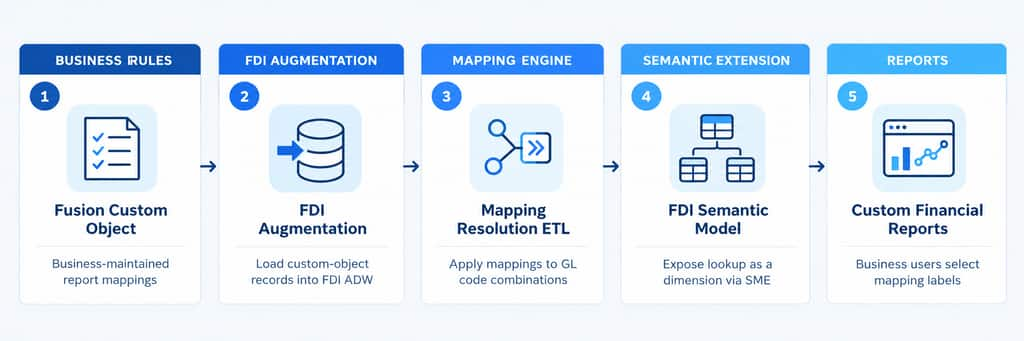
Five stages connect business-maintained mappings to financial statement reports in FDI
The flow moves from custom-object configuration through data augmentation, mapping resolution, semantic model extension, and reporting
Configure financial statement mappings in Oracle Fusion Coud Applications
Create a custom object in Oracle Fusion Cloud Applications through Application Composer. Each record represents one reporting rule or report-line mapping. Finance users maintain the records in a controlled page in Oracle Fusion Cloud Applications, rather than editing the semantic model or workbook calculations.
A practical custom-object structure includes the following attributes:
- RPT_NAME identifies the report.
- CATEGORY_LVL1_SEQ through CATEGORY_LVLn_SEQ to control display order.
- CATEGORY_LVL1_LABEL through CATEGORY_LVLn_LABEL define the reporting hierarchy.
- From and To fields define ranges for natural account, entity, cost center, and other COA segments in the customer configuration.
- ENABLED_FLG, START_DT, and END_DT control operational status and effective dates.
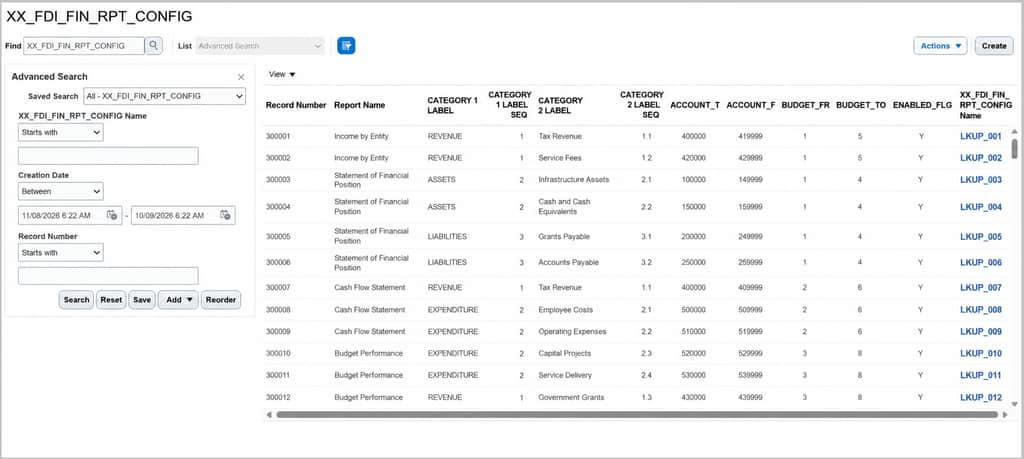
Sample custom-object records define report labels, segment ranges, and enabled status.
For information on how custom object can be configured in Oracle Fusion Cloud Applications, see the article – “Augmenting Custom Objects in Oracle Fusion Cloud Applications with FDI” – https://blogs.oracle.com/analytics/augmenting-custom-objects-in-oracle-fusion-with-fdi
Load custom-object data into FDI
After testing and publishing the custom object, identify its view object. In FDI, create a data augmentation to load the custom-object data into the warehouse. Verify the generated table name; this example uses the DW_FA_X_<CUSTOM_OBJECT> naming pattern.
See this topic for buildng an augmentation in FDI – https://docs.oracle.com/en/cloud/saas/analytics/26r3/fawag/augment-your-data.html
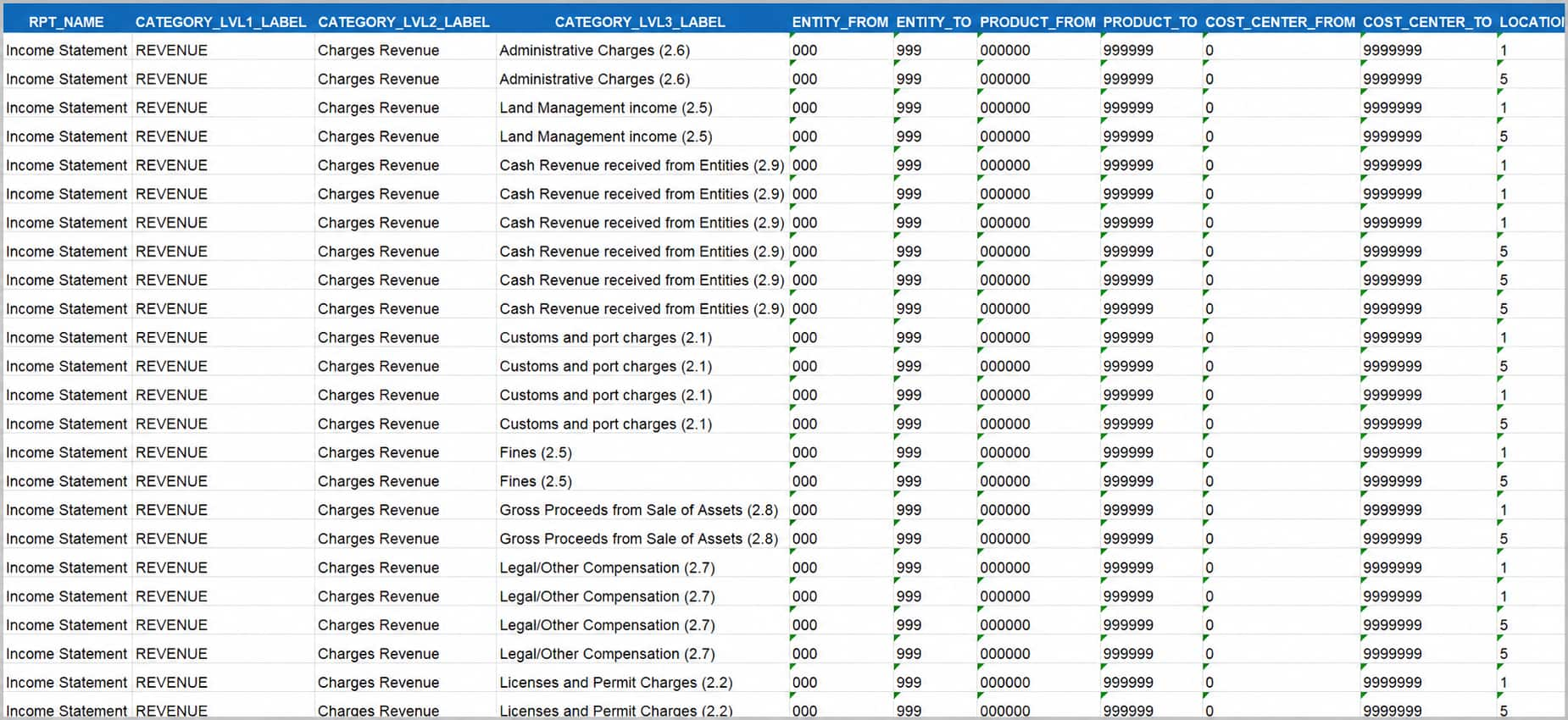
Sample source mapping rules combine reporting labels with chart of accounts segment ranges
Resolve mapping rules to GL code combinations
The augmented table contains rules, not balances. Join the rules to DW_GL_CODE_COMBINATION_D and evaluate each applicable COA segment against its From and To criteria. Retain code combinations that satisfy the active mapping rule and its effective-date conditions.
Note : The implementation team must maintain a custom ETL process that runs after each successful data augmentation refresh to rebuild the resolved mapping table; this is custom solution logic, and the table and column names shown must be verified in your environment.
What the resolved mapping table contains
Each row represents a code combination mapped to a report line within a report. The output carries the reporting hierarchy and supports joins to the relevant balance facts.
| RPT_NAME | Identifies the report |
| CATEGORY_LVL1_LABEL | Top-level financial statement label. |
| CATEGORY_LVL2_LABEL | Second-level report grouping. |
| CATEGORY_LVL3_LABEL | Third-level report grouping. |
| CATEGORY_LVL4_LABEL | Fourth-level report grouping. |
| CATEGORY_LVL5_LABEL | Fifth-level report grouping. |
| CATEGORY_LVL1_SEQ | Top-level financial statement label sequence. |
| CATEGORY_LVL2_SEQ | Second-level report grouping sequence. |
| CATEGORY_LVL3_SEQ | Third-level report grouping sequence. |
| CATEGORY_LVL4_SEQ | Fourth-level report grouping sequence. |
| CATEGORY_LVL5_SEQ | Fifth-level report grouping sequence. |
| CODE_COMBINATION_ID | Key that joins to the GL Balance facts. |
The sample resolved mapping table contains reporting labels, sort sequences, and code-combination identifiers
Extend the GL Balance subject area
Add the code-combination lookup table as a reporting dimension in a semantic model extension. Join CODE_COMBINATION_ID to the corresponding key in each applicable fact. Expose RPT_NAME, category-level labels, and category-level sequence fields for filtering, layout, and sorting.
Validate the joins and aggregation behavior to ensure that multiple mapping rows don’t repeat balances unintentionally.
Build a financial statement report
After you publish the semantic model extension, use the mapping attributes with the applicable GL Balance measures. Filter by RPT_NAME. Use category-level labels for the row hierarchy and category-level sequence fields for sorting. Add the required balance measures.
To add a report view, create its mapping records in Oracle Fusion Cloud Applications. Refresh the augmentation and the resolved mapping table. Validate the results, then select the new RPT_NAME in the workbook.
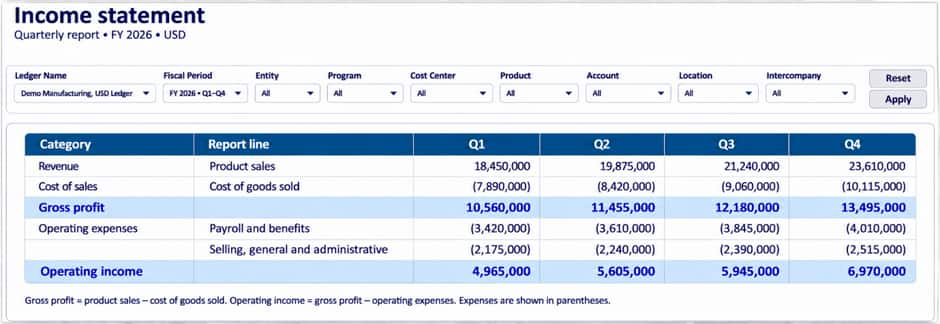
Sample quarterly financial report using custom mapping labels and demonstration data
Note: This article focuses on GL Balances. You can adapt the approach to extend the Budgetary Control Balances subject area, but Budgetary Control segments may not align with GL segments. Confirm whether both use the same code combinations and validate the segment mappings and join keys before reusing the reporting dimension.
When to use custom objects instead of hierarchies or lookups
Choose the configuration approach based on the reporting requirement. Alternate reporting hierarchies support parent-child rollups within individual COA segments. Lookups in Oracle Fusion Cloud Applications suit small reference lists and simple code-to-label mappings.
Consider custom objects when financial statement rules depend on combinations of segments, such as natural account, entity, cost center, and product. Finance users can maintain these report-specific mappings together through dedicated data-entry pages.
How the pattern supports governed reporting
- Business agility: Finance owns mapping maintenance without changing delivered facts or rebuilding report logic.
- Governance: Enablement and effective dates provide a controlled lifecycle for mappings.
- Traceability: Source identifiers, report types, sequences, and dates can be retained for audit and reconciliation.
- Extensibility: Additional report types or segment rules can be added through the custom-object lifecycle.
Conclusion
Custom objects in Oracle Fusion Cloud Applications provide a practical configuration layer for custom financial statements in FDI. They make report mappings visible and maintainable to the business, while FDI provides the augmentation, warehouse, semantic-model, and analytics capabilities needed to apply those mappings consistently to financial facts.
Call to action
- Review the Oracle Fusion Data Intelligence documentation in Oracle Help Center before implementing the pattern.
- Share your results or questions in the Oracle Analytics Community, where you can also post ideas.