

A practical implementation guide for ingesting REST API data into Oracle Fusion Data Intelligence without writing extraction code.
Key Contributor: Vidya Meenakshi, Lead Principal Data Engineer, Fusion Data Intelligence
Introduction
Oracle Fusion Data Intelligence (FDI) is Oracle’s analytics solution for Oracle Fusion Cloud Applications. It brings trusted data, prebuilt analytics, packaged KPIs, and embedded AI into a governed analytics foundation so finance, people, supply chain, and revenue leaders can move from insight to action faster.
FDI is also extensible. In addition to the prebuilt data model and analytics content delivered for Oracle Fusion Cloud Applications, organizations can enrich the model with external data that is critical to how their business operates. That external data may come from a scheduling application, a billing platform, a partner system, or a custom operational application.
This is where the Custom Extractor Framework becomes important. It gives administrators a self-service path to bring unique or unsupported data sources into FDI while keeping the same downstream analytics experience. This article focuses on the REST connector, the no-code option for sources that expose REST APIs returning JSON data.
In this article: You will learn how to choose the right deployment model, prepare REST metadata, configure authentication, create the connection in the FDI Administration Console, and understand how extraction behaves once the connector is active.
The use case: unify HR and workforce scheduling
Imagine you are the FDI administrator at a mid-size professional services firm. The company runs Oracle Fusion HCM and has recently rolled out UKG Ready for workforce scheduling. HR leaders value both systems, but they are still looking at two separate dashboards. Headcount and worker details are in FDI. Shift schedules and time-off balances are in UKG Ready. No one has a single operational view.
UKG Ready exposes a REST API. The data exists, but the question is how to bring it into the FDI warehouse so the analytics team can build the unified workforce dashboard HR has been asking for.
The REST connector is designed for exactly this kind of requirement. Instead of writing custom extraction code, you describe the API through metadata, provide authentication details, and let FDI manage the extraction lifecycle.
What is the REST connector, and why does it matter?
The REST connector connects FDI to an external data source that exposes a REST API returning bulk data in JSON format. It handles the full extract lifecycle: connecting to the API, authenticating, retrieving data for each entity, and uploading the extracted data into the FDI warehouse where the standard pipeline can take over.
The most important design principle is simplicity. The REST connector is a no-code connector. You do not build extraction logic. You describe the source. A metadata JSON file tells FDI which entities exist, where their endpoints are, which fields to extract, how to paginate results, and how to track changes for incremental loads.
From an analyst’s perspective, data ingested through the REST connector can be modeled and consumed alongside Fusion Applications data, allowing the business to work with a more complete view without creating a separate analytics stack.
Key Capabilities
| Capability | Details |
|---|---|
| Full data extraction | Pulls all records for an entity on the first load or when a full reload is scheduled. |
| Incremental extraction | Retrieves only new or changed records on subsequent loads by using a timestamp or sequence field. |
| Chunked extraction | Splits large extractions into manageable pages or chunks to reduce API timeout and memory risks. |
| Nested entity support | Maps nested JSON structures, such as parent records with child arrays, into separate warehouse tables. |
| Filters | Supports query-time filters so the connector can scope extraction to relevant subsets of data. |
| Authentication | Supports OAuth 2.0 Client Credentials, OAuth 2.0 Resource Owner Password, API key, and Basic Auth. |
| Metadata generation | Metadata can be generated from Swagger/OpenAPI, generated from OData, or authored manually in JSON. |
| Deployment flexibility | Runs as a managed connector for public REST endpoints or through Remote Agent for private endpoints. |
Choose your deployment model
Before configuring the connector, decide where it should run. The right choice depends on whether the REST endpoint is publicly reachable from Oracle Cloud Infrastructure or available only inside a private network.
Managed connector for public REST endpoints
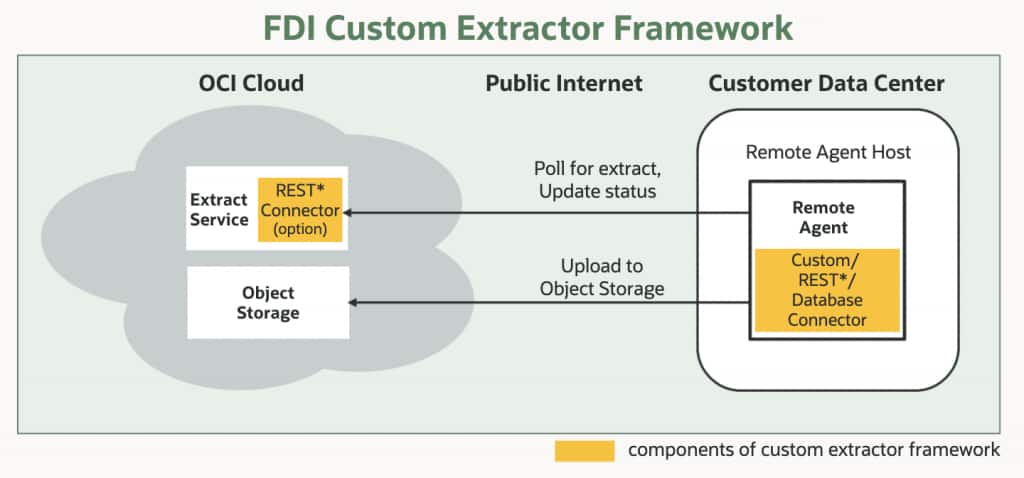
Use a managed connector when the REST API is publicly accessible over the internet, as is common for SaaS applications. In this model, the FDI Extract Service calls the API endpoint directly from Oracle Cloud Infrastructure. No Remote Agent is required.
This is the simpler deployment model and is typically the right fit for cloud-based sources such as Sage Intacct, UKG Ready, Salesforce, or any SaaS platform whose API is reachable from the public internet.
Remote Agent connector for private REST endpoints
Use a Remote Agent connector when the REST API runs behind a firewall, inside a VPN, or in a customer data center. The Remote Agent runs in the customer network, polls FDI for extract tasks, calls the private API locally, and uploads the extracted data to Oracle Object Storage over an encrypted connection.
This model is the right choice for internal APIs, on-premises applications, and any REST endpoint that should not be exposed to the public internet.
Deployment decision: If the API URL is publicly reachable, use the managed connector in FDI. If it requires a VPN or is behind a firewall, use the Remote Agent connector.
Step 1: Prepare metadata
Metadata is the descriptor that tells FDI what the source looks like. It defines the entities to extract, the API endpoints to call, the fields to bring in, the response paths to read, the pagination pattern to follow, and the field used to track incremental changes.
You have three metadata options. Choose the approach that best matches the documentation your source system provides.
Option A: Auto-generate from Swagger or OpenAPI
If the REST API provides a Swagger or OpenAPI specification, this is usually the fastest path. Oracle provides a metadata generation utility in the Custom Extractor Framework GitHub repository. You point the utility to the API specification, review the generated metadata JSON, and adjust entity definitions, filters, or incremental fields as needed before uploading it to FDI.
Utility: github.com/oracle-samples/fdi-custom-extractors
Option B: Generate from OData
If the source exposes an OData metadata endpoint, FDI can use the endpoint to generate entity definitions. This is useful for systems that already publish structured service metadata through OData.
Option C: Author metadata manually
If the API does not provide Swagger, OpenAPI, or OData metadata, you can author the metadata JSON manually. This requires more effort but gives you full control over the entity list, field mappings, filters, pagination configuration, nested entity paths, and incremental tracking fields.
Best practice: Always review generated metadata before uploading. Pay close attention to the incremental tracking field. A generated field name may look correct, but you should verify that it truly reflects the source system’s last-modified timestamp or change sequence.
Step 2: Configure authentication
The REST connector supports four authentication mechanisms. Match the connector configuration to the security model of the source API.
| Authentication Type | When to use it |
|---|---|
| OAuth 2.0 Client Credentials | Recommended for server-to-server integrations. Provide the Client ID, Client Secret, token endpoint, and any required token attributes. FDI obtains and refreshes bearer tokens for extraction sessions. |
| OAuth 2.0 Resource Owner Password | Useful for legacy OAuth implementations that require a username and password along with client credentials and a token endpoint. |
| API key | Use when the source system issues a static key that must be passed in a header or query parameter, such as X-API-Key or Authorization. |
| Basic Auth | Use only when the API does not support a stronger mechanism. The endpoint must be served over HTTPS because credentials are sent with each request. |
For modern SaaS integrations, OAuth 2.0 Client Credentials is typically the best fit because it is designed for application-to-application access and avoids embedding a named user account in the integration flow.
Step 3: Create the connection in FDI
With metadata and credentials ready, create the connection from the FDI Administration Console.
- Open Data Configuration, select Connections, and choose Create Connection.
- Select REST Connector from the available custom connector types.
- Provide a connection name and description that clearly identify the source system.
- Enter the base URL for the REST API.
- Select the authentication type and provide the required credentials. Credentials are stored as encrypted properties.
- Upload the metadata JSON file or choose the OData option if the API supports OData metadata generation.
- Review the parsed entity list to confirm that all expected objects are present.
- For Remote Agent deployments, select the Remote Agent instance that will service the connection.
- Save and test the connection before activating the pipeline.
After the connection is saved, navigate to Functional Areas in the Administration Console, locate the relevant subject area, map it to the new connection, and activate the data flow. FDI then includes the source in its standard pipeline runs.
Step 4: Understand extraction behavior
Once the connection is active, the administrator should understand how the REST connector handles initial loads, incremental refreshes, large volumes, and nested JSON. These behaviors are controlled primarily by metadata.
Full and incremental extraction
The first run is a full extraction. FDI retrieves all records for each entity based on the endpoint and filters defined in metadata. Subsequent runs can be incremental when the metadata identifies a reliable timestamp or sequence field. FDI sends the last successful value as a filter parameter, and the API returns only records changed since that point.
For most APIs, the incremental field is a last-modified timestamp. If the source does not expose a trustworthy change field, plan a scheduled full reload strategy instead of assuming incremental logic will be accurate.
Chunked extraction for large entities
For entities with large record counts, the REST connector supports chunked extraction. FDI sends paginated requests using the pagination pattern defined in metadata, such as offset/limit or cursor-based pagination, and assembles the full dataset before upload.
Set the chunk size to align with the source API limits. If the API enforces a maximum page size, keep the metadata page size at or below that limit.
Nested entity handling
Many REST APIs return nested child objects inside a parent response. For example, an invoice record may include an array of line items. The REST connector supports this pattern by defining child entities in metadata and pointing them to the appropriate JSON path.
FDI can extract parent and child data from the same API response and load them into separate warehouse tables with the right relationship context for downstream modeling.
Putting it together: UKG Ready example
Lets’s now go back to the professional services firm and its use case described in the opening section of this article. Here is how the UKG Ready connector implementation comes together in practice.
| Area | Implementation Choice |
|---|---|
| Source | UKG Ready HCM platform: cloud-based SaaS, public REST API, OAuth 2.0 Client Credentials authentication. |
| Deployment model | Managed connector in FDI because the endpoint is publicly reachable and does not require Remote Agent. |
| Metadata generation | Generate metadata from the available Swagger/OpenAPI specification, then review employees, timesheets, schedules, and leave-balance entities. |
| Authentication | Enter the Client ID, Client Secret, token endpoint, and required token attributes as encrypted connection properties. |
| Incremental field | Confirm the last-modified field for each entity against source documentation before setting it as the tracking field. |
| Outcome | Workforce scheduling, shift, and time-off data can flow into FDI on the same pipeline schedule as native HCM data, enabling a unified workforce dashboard. |
Implementation result: When API documentation, credentials, and entity scope are ready, the REST connector path keeps implementation focused on metadata review, connection setup, authentication, testing, and activation rather than custom code development.
Quick implementation checklist
Use this checklist before and during a REST connector implementation.
| Before you start | |
| □ | Confirm the source API returns bulk data in JSON format. |
| □ | Determine whether the endpoint is public or private. |
| □ | Identify the authentication mechanism required by the API. |
| □ | Obtain API credentials and token endpoint details where applicable. |
| □ | Locate the Swagger/OpenAPI or OData metadata source if available. |
| □ | Identify a reliable last-modified timestamp or sequence field for each entity. |
| Metadata generation and review | |
| □ | Generate metadata from Swagger/OpenAPI, generate from OData, or author JSON manually. |
| □ | Review endpoint URLs, field lists, data types, filters, and response paths. |
| □ | Confirm incremental tracking fields for every entity. |
| □ | Set page size or chunk size to align with API limits. |
| □ | Define child entity paths for nested JSON arrays. |
| Connection setup and activation | |
| □ | Create the REST connection in the FDI Data Configuration UI. |
| □ | Upload metadata and verify the parsed entity list. |
| □ | Configure authentication and confirm credentials are stored as encrypted properties. |
| □ | Test the connection before pipeline activation. |
| □ | Map the connection to the appropriate functional area and activate the data flow. |
Summary
The REST connector gives FDI administrators a practical path to extend analytics with data from any REST API that returns JSON. It reduces the need for custom extraction code, keeps data movement inside the FDI pipeline model, and enables business users to analyze external operational data alongside Fusion Applications data.
The key to a successful implementation is preparation: choose the right deployment model, validate the metadata, use the strongest supported authentication method, confirm incremental tracking fields, and test the connection before activation. When those steps are handled carefully, the REST connector can turn disconnected application data into governed, reusable insight within FDI.
Call to Action
Start with one high-value REST source that already has strong API documentation and a clear business outcome. Generate the metadata, validate the entities, and test the connection in a controlled environment. Then share implementation patterns, questions, and lessons learned through your Oracle Analytics Community or Center of Excellence channels so other teams can benefit from the experience.
Related resources
- Custom Extractor Framework GitHub repository: https://github.com/oracle-samples/fdi-custom-extractors
- Oracle Fusion Data Intelligence: https://www.oracle.com/fusion-data-intelligence/
- Oracle Fusion Data Intelligence documentation: https://docs.oracle.com/en/cloud/saas/analytics/
- Oracle Analytics Community: https://community.oracle.com/products/oracleanalytics/
What’s next in this series
| Edition | Focus |
|---|---|
| Edition 1: Using Custom Extractor Framework for extensibility in FDI | The foundation: why extensibility was gated, what the Custom Extractor Framework is, and how to choose the right connector type for your use case. |
| Edition 2: Building a REST connector in FDI | *this article* |
| Edition 3: Building a JDBC Connector in FDI | A step-by-step guide for connecting on-premises relational databases, including driver setup, metadata queries, Remote Agent deployment, and connection registration. |
| Edition 4: Building a Custom Connector in FDI Using the SDK | A developer-focused walkthrough of the Custom Extractor Client SDK for sources that require code, proprietary protocols, or advanced extraction logic. |