

 | Key Contributor: Vidya Meenakshi Consulting Member of Technical Staff, Fusion Data Intelligence Engineering Lead |
Oracle Fusion Data Intelligence (FDI) is a family of prebuilt, cloud-native analytics applications for Oracle Fusion Cloud Applications that provide ready-to-use insights to help improve decision-making. It’s extensible and customizable, allowing customers to ingest data and expand the base semantic model with additional content.
The data pipeline for Fusion Data Intelligence provides a powerful framework with advanced features designed to streamline and optimize data workflows. By harnessing its capabilities, you can boost operational efficiency, gain precise completion estimates, and expedite the availability of critical data for informed decision-making.
Customers currently depend on Oracle to build and maintain connectors for each data source they want to integrate. As enterprise environments become more diverse and fast-changing, customers expect faster onboarding, broader compatibility, and greater flexibility than vendor-managed integrations alone can provide.
Enabling a self-service framework helps Oracle scale integrations efficiently, improve customer satisfaction, and stay competitive in a multi-cloud, heterogeneous data ecosystem.
Let’s look through a use case using this self-service framework..
A tale from the shop floor
Meridian Manufacturing — a fictional company inspired by real customer conversations — operates five high-efficiency plants across the American Midwest. Like many mid-sized manufacturers, they rely on Oracle Fusion Cloud for financials and supply chain operations, while their analytics team uses Fusion Data Intelligence to power dashboards and operational reporting.
However, one critical system remained disconnected: a homegrown production scheduling application built internally years ago. Because this system couldn’t integrate directly with FDI, the operations director had to manually reconcile information every morning by comparing the FDI dashboard with data from the legacy application in spreadsheets. The process was time-consuming, error-prone, and inconsistent with the modern analytics experience that the company expected.
Priya, the FDI administrator, understood the solution immediately — a custom connector that could bring scheduling data into the warehouse for FDI alongside Oracle Fusion Applications data. She submitted a request to Oracle, but the connector still needed to move through the standard development, prioritization, and security review processes, leaving the delivery timeline outside her direct control.
Then, in March 2026, Priya read a release note that changed her morning.
“Customers can now ingest any unique or unsupported data source in FDI. They won’t have to depend on remote agent releases to access new data sources through FDI managed extractors.”
Within a week, Priya had connected the legacy scheduling system to FDI using the new Custom Extractor Framework’s JDBC connector. By supplying the JDBC driver, configuring the metadata queries, and defining the extraction logic, she brought production scheduling data directly into the warehouse alongside Oracle Fusion Applications data for the very first time.
The impact was immediate. The spreadsheets disappeared, manual reconciliation was eliminated, and the operations director could finally rely on a single unified dashboard to make real-time decisions.
This is the story of how the Custom Extractor Framework was created, the challenges it was designed to solve, and how customers can use it to extend FDI with virtually any data source.
What is a data extractor, and why does it matter?
Before diving into the new connector framework, it’s important to understand the role an extractor in an analytics platform like FDI.
An extractor is the mechanism that moves data from a source system (such as a database, cloud application, REST API, or flat file) into the analytics warehouse where reporting and AI-driven insights are generated. Beyond simply copying data, an extractor is responsible for securely connecting to the source, identifying and retrieving only new or changed records through incremental extraction, transforming and standardizing the data, and loading it into the warehouse in a format optimized for analytics.
FDI has traditionally provided a rich set of managed extractors — Oracle-built and Oracle-maintained connectors for Oracle Fusion Applications as well as an expanding set of third-party systems. By early 2026, the platform supported 52 managed connectors, covering many common enterprise use cases.
However, enterprise data environments are rarely uniform. Many organizations depend on custom-built applications, industry-specific systems, legacy platforms, and internally developed tools that fall outside the scope of standard managed integrations.
The bottleneck: why extensibility was gated
The customer’s experience
Previously, when a customer needed a new connector, the only path was to file a request and wait. Oracle would evaluate the connector, scope the engineering work, conduct security and legal review, develop and test it, and ship it in a future release. For common third-party systems, this process made sense; the connector, once built, would serve many customers. But for a customer with a homegrown ERP, a niche industry system, or a legacy database with no broad market relevance, this process was time-consuming.
| Extensibility bottlenecks: Limited choice — Only the connectors Oracle had already built and released were available. Any source outside that list requires a new development cycle. Long development cycle — Customers have to coordinate with Oracle product and engineering teams for each new connector. |
The result was a platform that was powerful within its defined perimeter — but for customers whose analytics value depended on combining Fusion data with non-Fusion sources, that perimeter was a real constraint.
The deeper problem: every connector is unique
Building a data connector isn’t a trivial task, but neither is it uniformly complex. A simple REST API with well-documented endpoints might take a competent developer a few days to connect. A mainframe legacy system with custom binary protocols is a different matter entirely. Wouldn’t it be amazing if customers (who have the technical capability to build connectors) could do it on their own schedule, for their own sources?
The solution: Custom Extractor Framework
With the introduction of the Custom Extractor Framework, Oracle has significantly expanded the extensibility model for FDI, enabling customers to build and deploy their own connectors through three self-service integration mechanisms.
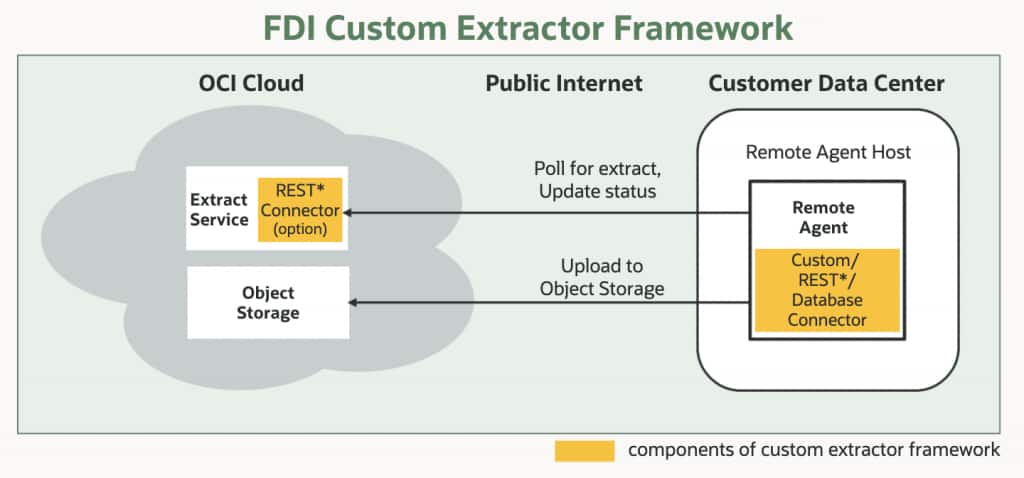
The framework slots into the existing FDI architecture cleanly.
- FDI already uses a Remote Agent model for on-premises connectivity: a lightweight agent deployed in the customer’s data center that polls for extract tasks, communicates securely with the FDI cloud over SSL using private/public key pairs, and uploads extracted data to Oracle Object Storage.
- The Custom Extractor Framework extends this model by allowing custom connector code — in the form of driver jars, metadata configurations, or SDK-built extractors — to run inside the Remote Agent alongside or instead of the managed extractors.
For data sources with public REST endpoints, a connector can even be deployed directly in FDI without involving the Remote Agent at all.
A simplified architecture
Customer-built connector code runs in the Remote Agent (or optionally in FDI for public REST sources), receives extract tasks from the FDI Extract Service, pulls data from the source system, and uploads it to Object Storage — from where FDI’s standard pipeline takes over.
The result: the data warehouse, the semantic model, the subject areas, and all downstream analytics work exactly as they do for managed connector data.
From an analyst’s perspective, data from a custom connector is indistinguishable from data that came through a native Fusion extractor.
Three connector types: choose your complexity
The framework offers three distinct connector types, calibrated to different levels of technical complexity and source system characteristics. Here is what each one is and when to use it.
REST connector
The REST connector is for any data source that exposes a REST API returning bulk data in JSON format. It is the easiest connector to set up — no code required. The customer provides a metadata JSON file describing the API endpoints and entities, and FDI handles the extraction.
Key capabilities include full and incremental data extraction, chunked extract for large data volumes, support for nested entities, and multiple authentication types including OAuth 2.0 (client credentials and resource owner password grant), API key, and Basic Auth. Metadata can be generated automatically from Swagger or OpenAPI documentation using a utility available on Oracle’s GitHub.
The REST connector can be deployed in two ways: as a managed connector for public REST endpoints (running directly in FDI without the Remote Agent) or as a Remote Agent connector for private REST endpoints behind a firewall.
Best for: SaaS applications with REST APIs, cloud-based ERP or HCM systems not natively supported by FDI, any JSON-over-HTTP data source. Examples already in progress include Sage Intacct and UKG Ready.
JDBC (database) connector
The JDBC connector is for any on-premises source system that manages data in a relational database and exposes a JDBC interface. The customer provides the JDBC driver jar for their specific database, and FDI uses it to connect, extract, and load data.
The connector supports full and incremental extraction, chunked extract for large tables, additional JDBC properties for fine-grained connection control, and authentication via JDBC Basic Auth or Oracle Wallet. Metadata can be generated using standard JDBC metadata introspection or custom queries — useful when the default introspection does not capture the schema accurately.
Best for: On-premises relational databases — any system with a JDBC driver. Already validated against DB2 and PostgreSQL. Ideal for the homegrown ERP scenario described in the opening.
Custom (SDK) connector
The Custom connector is for data sources that don’t fit the REST or JDBC patterns — systems with proprietary protocols, advanced extraction logic, complex change-tracking requirements, or anything that needs code to handle correctly. The customer builds the connector using Oracle’s Custom Extractor Client SDK, available on Oracle GitHub.
The SDK provides a clean interface with three required implementations: connection management, metadata retrieval for each entity, and data retrieval as a ResultSet. A sample implementation and a testing utility are included. Once built, the connector is compiled into a jar file and placed in a predefined location in the Remote Agent. The modular architecture discovers new jars dynamically at runtime — no restart scripts required beyond the standard Remote Agent restart.
Best for: Proprietary systems, legacy platforms, sources requiring custom extraction logic, or any source where the REST and JDBC connectors cannot express the required connection or retrieval behavior.
Choosing the right connector: a decision guide
The three connector types are complementary, not competing. Most implementations will use one type per source based on the source’s characteristics. The table below summarizes the key dimensions to consider when making the choice.
| Dimension | REST connector | JDBC connector | Custom (SDK) connector |
| Technical skill required | Low — metadata configuration only | Medium — JDBC driver setup and query configuration | High — Java development required |
| Coding required? | No | No | Yes (Java/SDK) |
| Source type | REST APIs returning JSON | Relational databases with JDBC driver | Any source — proprietary, legacy, complex |
| Deployment location | FDI (public) or Remote Agent (private) | Remote Agent only | Remote Agent only |
| Authentication support | OAuth 2.0, API key, Basic Auth | JDBC Basic Auth, Oracle Wallet | Custom — implemented in code |
| Metadata generation | JSON file or auto generated from Swagger/OpenAPI | JDBC introspection or custom queries | Implemented in SDK interface |
| Incremental extraction | Yes | Yes | Yes (custom logic) |
| Chunked extract (large volumes) | Yes | Yes | Custom — implementor’s responsibility |
| Time to implement | Hours to days | Days | Days to weeks |
| Real-world examples | Sage Intacct, UKG Ready (in progress) | DB2, PostgreSQL (validated) | Any unsupported homegrown system |
A practical heuristic: start by asking whether your source has a REST API. If yes, the REST connector is almost always the right choice — it is the fastest path from zero to data. If your source is a relational database, the JDBC connector gets you there with minimal configuration. Reserve the Custom SDK connector for sources that genuinely cannot be reached by the other two.
What this means for your FDI implementation
The Custom Extractor Framework is more than a feature addition. It represents a shift in Oracle’s extensibility philosophy for FDI — from a platform that ships connectors to a platform that ships the ability to build connectors.
The practical implications are significant:
- Any data source is now a potential input to FDI — homegrown ERPs, niche industry systems, legacy databases, internal APIs, and data sources that are not visible to Oracle. Implementation timelines are controlled by the customer, not by Oracle’s release cycle. A customer with the technical capability can go from requirement to working connector in days.
- The framework coexists cleanly with all existing FDI capabilities — managed extractors, data augmentations, semantic model extensions, and the full analytics layer all continue to work as before.
- The Remote Agent’s modular architecture means new custom connectors can be added and discovered at runtime without rebuilding the agent from scratch.
Back at Meridian Manufacturing, Priya has already started scoping a second connector — this time for the quality management system that tracks defect rates across production lines. She estimates two days of work. The operations director asked whether she could have it ready by the end of the month.
She has already said yes.
What’s next: the deep-dive series
While this article has given you the full picture — the problem, the solution, the three connector types, and how to choose between them, the following editions go deep on each connector type with step-by-step implementation guidance:
| Edition 2 — Building a REST Connector in FDI– A complete implementation walkthrough for connecting any JSON REST API to FDI. Covers metadata configuration, authentication setup, deployment options, and the Data Config UI experience. Edition 3 — Building a JDBC Connector in FDI– Step-by-step guide for connecting on-premises relational databases. Covers driver setup, metadata query configuration, Remote Agent deployment, and connection registration — with examples from DB2 and PostgreSQL. Edition 4 — Building a Custom Connector in FDI Using the SDK– A developer-focused walkthrough of the Custom Extractor Client SDK. Covers project setup, interface implementation, testing, jar deployment, and runtime connector registration. |
Call to Action
Ready to extend your Fusion Data Intelligence pipelines? Try the Custom Extractor Framework with your next high-value data use case, and share your questions, implementation patterns, or success stories with the Oracle Communities so others can learn from your experience.
Related Resources
The Oracle GitHub repository for the Custom Extractor Framework — including the SDK, sample implementation, and testing utilities — is available at github.com/oracle-samples/fdi-custom-extractors.