

Introduction
Extending Oracle’s Fusion Workforce data model has traditionally meant navigating menus, writing Data Augmentation scripts by hand, and carefully mapping every flex field attribute. Oracle’s AI Concierge changes that calculus entirely- turning a plain-English request into a production-ready Data Augmentation Script through a guided, conversational flow.
A Problem Worth Solving
Oracle Fusion HCM stores workforce data across tightly structured entities. When an organization needs non-standard attributes — a retained-grade pay plan, a work-from-home flag, People Group Flex fields for skill codes or health issue types — those extensions must be declared precisely in the underlying data model before any reporting layer can consume them.
Historically, a functional consultant or a data developer would open the DA Scripts editor in Oracle Fusion’s Data Configuration module, author hundreds of lines of HRF syntax, define every DATASET, ROWSOURCE, PUBLISH, and MAPPING block, then manually trigger a build. One missed field mapping means silent data gaps in downstream analytics. The blast radius of a small error can reach OTBI reports, HCM Extracts, and Publisher templates alike.
Enter AI Concierge
The AI Concierge is an assistant that doesn’t just suggest what to configure; it generates, validates, and builds the scripts in the same conversation thread.
It’s a persistent chat interface where users interact in natural language; it interprets intent, confirms scope, and orchestrates the underlying platform actions — all without the user leaving the screen.
In the use case in this article, an admin user of Oracle Fusion Data Intelligence (FDI) wants to extend the Workforce Assignment entity with a set of EFF (Extensible Flexfield) and KFF (Key Flexfield) attributes that are common requirements in large enterprises (normal hours, work-at-home flag, retained grade, pay plan, and similar) and a suite of People Group Flexfields carrying HR-coded values such as skill code, health issue type, management potential, and degree grade.
User Interaction and Actions Taken by AI Concierge
- Natural language request
The user types a single sentence describing the attributes needed for the Workforce Assignment extension — no syntax, no object names, no module codes. The AI Concierge confirms the intent and asks one clarifying question: should it extend the Workforce Assignment entity?
- Attribute selection UI
The AI Concierge surfaces a prepopulated checklist of relevant attributes drawn from the existing EFF/KFF configuration — AssignmentPEONormalHours, GRG_NP_SG_WRCTHNFLG, retained grade step, pay plan, PeopleGroupId, and all relevant People Group Flexfields. The user reviews and clicks Select All.
- Duplicate check
Before generating anything, the AI Concierge silently queries whether an FA_CONCIERGE DA Scripts Custom Data Configuration already exists — preventing duplicate script collisions that would require manual cleanup.
- Script generation
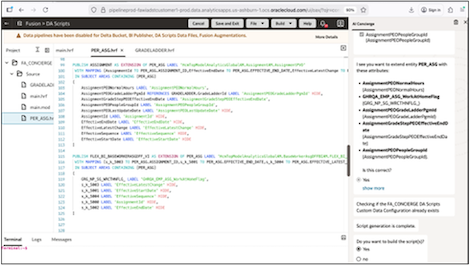
The HRF script file (PER_ASG.hrf) is generated live in the editor. The AI Concierge writes 650+ lines covering multiple DEFINE DATASET blocks, versioned ROWSOURCE declarations, field-level LABEL and HIDE annotations, and complete PUBLISH/MAPPING sections for each attribute group — including the complex KFF dimension for People Group Flexfields.
- Build confirmation and execution
With the script complete, the AI Concierge asks whether to proceed with a build. The user confirms, and the build is triggered from within the conversation, with no manual context-switching to the Build menu.
- Plain-English explanation on demand
After the build, the user types “explain” — and the AI Concierge delivers a concise, structured summary of every dataset, extension, dimension, and mapping the script created, making it immediately reviewable by a non-developer stakeholder.
A Glimpse at the Generated Code
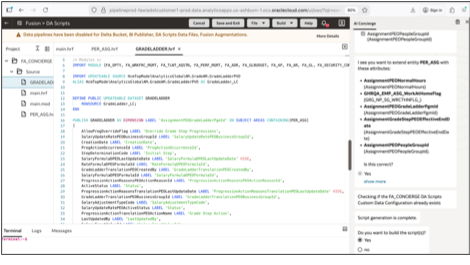
The AI Concierge doesn’t produce boilerplate stubs; it generates fully-formed HRF syntax. See the snapshot of the partial code (2 hrf files) generated by AI Concierge. You can view the full code in the recorded demo video embedded later in this article.
PER_ASG.hrf code snapshot
GRADELADDER.hrf code snapshot
Key Takeaways
Using the AI Concierge to implement technical tasks (such as adding external attributes to an entity) offers the following benefits to an admin user:
- Eliminates the need for deep HRF syntax knowledge to extend common HCM entities.
- Built-in duplicate checking prevents configuration drift and rebuild errors.
- Conversational confirmation loops keep the admin user in control without requiring developer intervention.
- On-demand plain English explanation makes scripts reviewable by project managers and auditors, not just technical staff.
- All actions stay within the secure OCI environment- no data leaves Oracle Cloud.
- Reduces a multi-hour scripting task to a less than 5-minute guided conversation.
The Broader Trajectory
This demo is one signal in a larger pattern: enterprise platforms are increasingly moving the interface for configuration complexity from GUIs and code editors into natural language. The AI Concierge doesn’t replace the Data Configuration module; it wraps it in a conversational layer that dramatically lowers the skill threshold for routine extension tasks while preserving full auditability of what was generated and why.
For Oracle Fusion customers managing large, attribute-rich HCM datasets — especially those with extensive People Group Flex field usage — this capability represents a genuine reduction in implementation effort at a phase of the project that is traditionally both time-consuming and error-prone.
Your Turn
Have you tried using AI Concierge in your Oracle Fusion Data Intelligence implementation yet?
Watch this video showcasing this use case in Oracle Fusion Data Intelligence.
Call to Action
Check these related resources: