
Need to share an approved Oracle Analytics Cloud workbook, analysis, or dashboard with people who don’t have an account? Public links can help, but first you must decide whether the content is safe for anyone with the link to view. This article explains the benefits, publishing controls, and where to find the setup steps.
The public links feature in Oracle Analytics Cloud solves this problem directly, letting authorized users share approved workbooks, analyses, and dashboards through a link that opens without any sign-in required.
Extending the reach of trusted analytics
Public links let teams share relevant, curated information with a much broader audience — customer-facing performance dashboards, operational scorecards, product metrics, event reporting — all without requiring every viewer to hold an Oracle Analytics Cloud (OAC) account.
This expands visibility while still preserving a single source of truth. Instead of exporting data into static slides or screenshots that go stale the moment they’re sent, teams can point users to a live, interactive view of the same content everyone else is working from.
Reducing manual reporting effort
A lot of team time goes into producing recurring reports for audiences outside the platform. Public links cut into that overhead by enabling self-service access to approved content.
Once a workbook or dashboard is published, users can return to the same link whenever they need the latest numbers. That means fewer repetitive requests, shorter email distribution lists, and more time for the team to spend on analysis instead of report administration.
Sharing a view of current data
Unlike a static PDF, spreadsheet export, or slide deck, a publicly shared dashboard displays the published content and its available data, subject to the data refresh schedule.
Public links can help schools, universities, government departments, and international organizations share approved information in the public interest. Examples of Reports and Dashboards available online include Alaska’s fish stocks of concern, the University of Texas at Arlington’s campus sustainability dashboards, Maine State Early Childhood Education Data Dashboard, and the UN Food and Agriculture Organization’s programme, budget, and workforce dashboard. OAC public links offer a simpler way to publish similar content once it’s been reviewed and approved for public access.
Bringing analytics into a website or portal
You can embed public links directly into web pages and portals — customer portals, partner sites, intranets, or other digital experiences. That makes data part of the user journey itself, rather than something users have to leave their workflow to go find in a separate analytics application.
Maintaining controlled publishing
Public access should always be intentional, and OAC is built with that in mind:
- An administrator must first enable public access from the Console by selecting Advanced System Settings, then Security.
- The Publish Content Publicly permission must be granted to specific users or groups (administrators have it by default).
- Content must live in Shared Folders and be made accessible to the BIPublicRole (search for the role name without spaces).
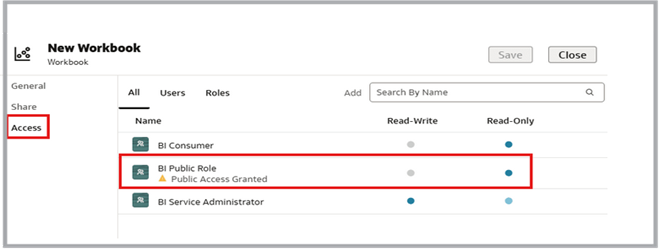
The workbook’s Access settings show BI Public Role with read-only access.
- For Data Visualization workbooks, BIPublicRole access must also be granted at the workbook level.
- From there, the item’s Sharing menu — or, for classic dashboards, the Settings menu — generates the public link, which is copied straight to the clipboard.

The Public dashboard compares James Bond films by box-office return and ratings, with a breakdown of fatalities across the actors who played Bond.
These controls exist so organizations can clearly define who’s allowed to publish externally and what content is appropriate for an unauthenticated audience. Teams should treat this as a governance decision, not just a technical toggle — public dashboards should contain only data intended for public consumption, in line with their organization’s security and privacy policies.
Conclusion
Public links turn Oracle Analytics Cloud dashboards into a more accessible, reusable business asset. By securely publishing selected workbooks, analyses, and dashboards, teams can expand their reach, cut down on manual reporting, keep information current, and embed insights directly into the experiences customers and partners already use.
Used thoughtfully, this feature brings trusted analytics closer to the people who need it — without asking them to log in first.
Call to Action
Ready to share approved content? Follow Oracle’s Make Content Available on a Public Link guide, then validate the link as a public viewer before you distribute it. Also refer Video Public Links in Oracle Analytics Cloud
If you encounter issues, check folder access, and if you have any questions or need further assistance, feel free to reach out to us.
To learn more about Oracle Analytics Cloud, visit us at Oracle.com/analytics, try our free Analytics product, and follow and connect with us on twitter@OracleAnalytics and LinkedIn.