

With inputs from Divya Mathur (Principal Product Manager) and Anurag Sinha (Senior Director, Platform Software Engineering)
Introduction
The MCP Server in Oracle Fusion Data Intelligence (FDI) securely connects AI assistants to FDI’s semantic models, KPIs, workbooks, and analytics content. Users can ask business questions, find reports, and analyze trends in natural language while existing role-based security and data access policies remain enforced.
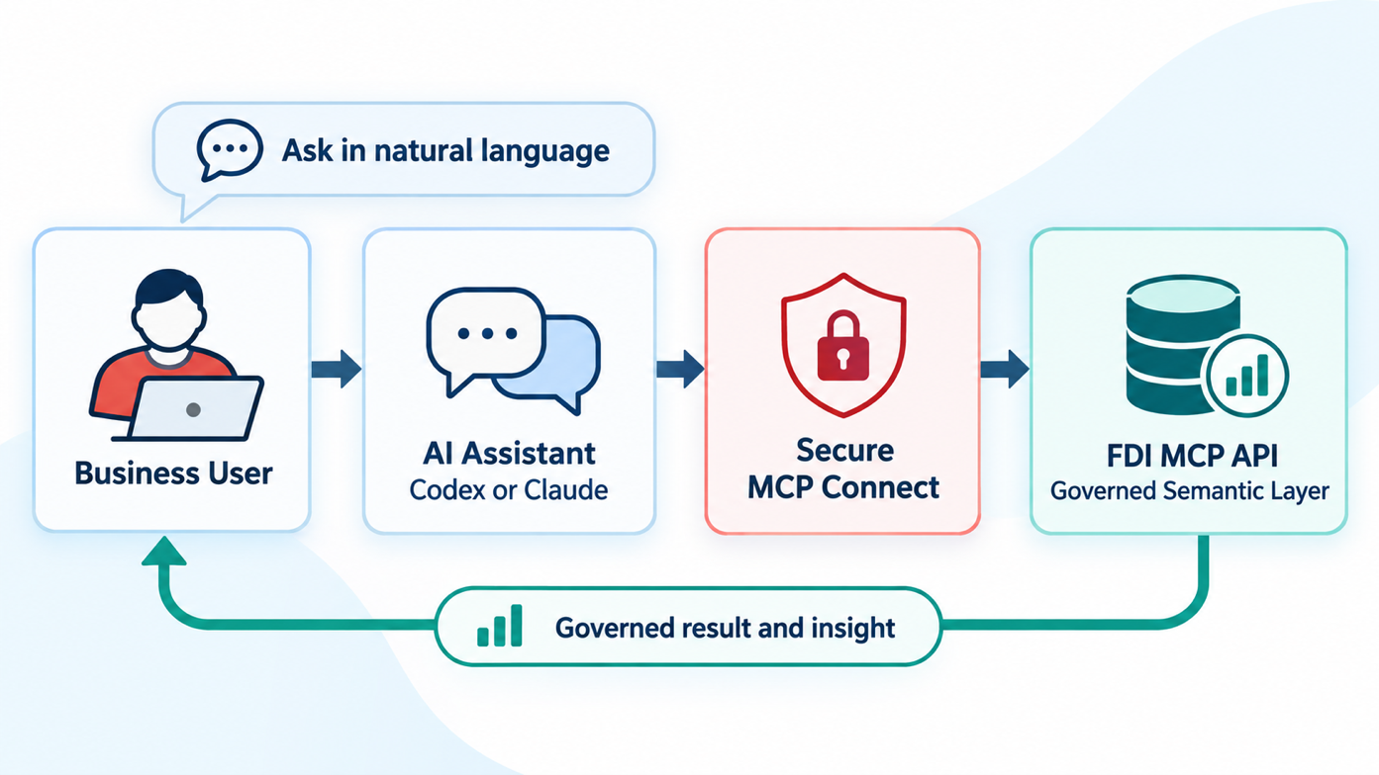
Asking questions with the FDI MCP Server
Using the FDI MCP server, users can:
- Search and discover FDI workbooks.
- Retrieve business KPIs and metrics.
- Query semantic models using conversational language.
- Analyze trends and business performance.
- Generate summaries and insights from governed enterprise data.
- Access analytics across Oracle Fusion applications such as HCM, ERP, SCM, CX, and EPM (based on licensed modules)
Start with a Business Decision
Let’s look at some business questions tied to a decision your team needs to make.
Human Capital Management (HCM)
HR professionals often spend considerable time searching for workforce reports and analyzing employee trends, such as:
- “How many employees were hired this quarter?”
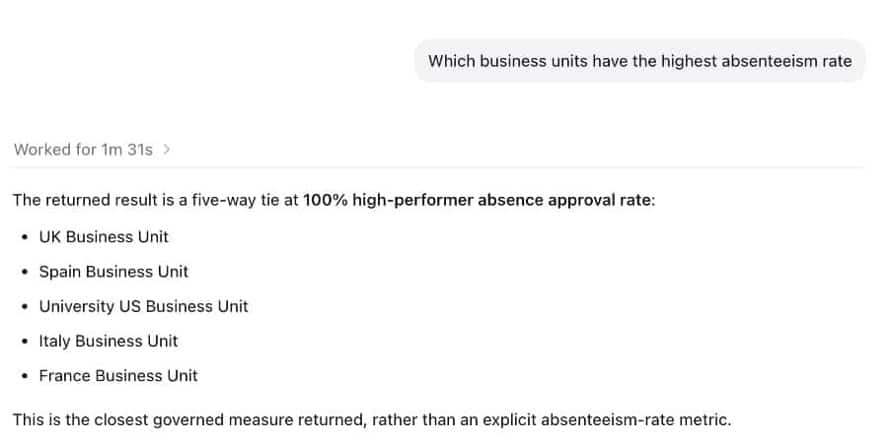
- “Which business units have the highest absenteeism rate?”
As the following example shows, users can use the FDI MCP server to get the results and drill into the specifics without leaving their AI workspace:
Enterprise Resource Planning (ERP)
Finance teams can use AI to accelerate financial analysis without manually navigating reports. For example, users can ask:
- “Show outstanding invoices over 90 days.”
- “Which cost centers exceeded their budget this month?”
- “Summarize monthly operating expenses.”
Supply Chain Management (SCM)
Supply chain managers can quickly monitor inventory and procurement performance through conversational queries.
Typical requests include:
- “Which items are below safety stock?”
- “Show suppliers with delayed deliveries.”
- “What is the highest inventory carrying costs?”
Supported AI Clients and Architecture
One of the strengths of the FDI MCP server is its ability to work seamlessly with modern AI assistants. It uses the open Model Context Protocol to connect with compatible AI clients, allowing users to ask questions about enterprise analytics and receive conversational answers in their preferred AI workspace.
ChatGPT/Codex
- ChatGPT/Codex is one of the most popular AI assistants for business users and developers alike. By configuring the FDI MCP server in ChatGPT, users can access governed enterprise analytics directly within their conversations.
Claude Desktop
- Claude Desktop also supports the Model Context Protocol, allowing organizations to connect it with Oracle FDI.
Other MCP-Compatible Clients
- Because MCP is an open protocol, any AI application or agent framework that supports the standard can integrate with the FDI MCP server. As the MCP ecosystem continues to grow, organizations can adopt new AI tools without redesigning their analytics integration.
MCP Architecture
The FDI MCP server acts as a secure intermediary between AI clients and Oracle FDI. Instead of allowing AI applications to connect directly to databases, the MCP server exposes governed analytics tools and semantic models through standardized MCP interfaces.
Request flows in the following pattern
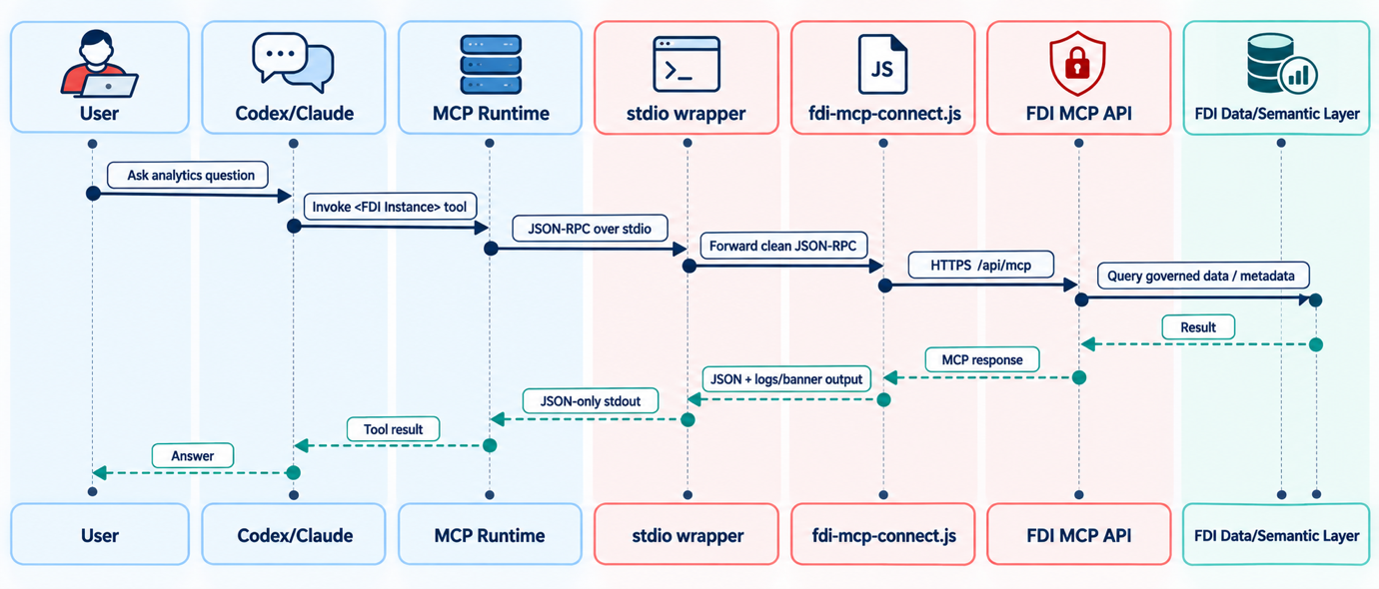
FDI MCP Server Tools
After you sign in, the AI client calls tools through the FDI MCP server. These tools support data discovery and analysis, including Logical SQL queries and result summaries. To see the list of available MCP tools and functionality, see FDI MCP Server Tools
Authentication and Security Considerations
The FDI MCP server uses OAuth 2.0 for authentication. When an AI client, such as ChatGPT Desktop or Claude Desktop, connects to the FDI MCP server, the user is redirected to Oracle Identity Cloud Service (IDCS) or Oracle Identity and Access Management (IAM) to sign in.
After successful authentication, Oracle issues an access token that the AI client includes in subsequent requests to the FDI MCP server. This token verifies the user’s identity and allows the server to process requests securely without requiring users to repeatedly enter their credentials.
This standards-based approach provides several benefits:
- Secure user authentication.
- Token-based access instead of password sharing.
- Support for enterprise Single Sign-On (SSO).
- Seamless integration with existing Oracle Cloud identity services.
Security Considerations
The FDI MCP server allows AI clients direct access and interaction with Oracle Analytics data and functionality. This introduces security risks because you might inadvertently expose unintended data. To mitigate this risk, MCP tools are authenticated with an OAuth 2.0 access token and run with the same permissions as the user who obtains the access token. Ensure that any users who use the FDI MCP server have access only to data that can be shared with LLMs.
The FDI MCP server doesn’t define its own authorization rules. Instead, it inherits the permissions already configured in FDI. This means that all existing role-based access controls (RBAC), duty roles, licensed roles, and data security policies continue to govern access to analytics content.
For example:
- An HR analyst can retrieve workforce metrics, but they can’t access financial analytics unless they have the appropriate permissions.
- A Finance user can query financial KPIs, but they can’t view HCM reports if their role doesn’t permit it.
- An executive with broader access can retrieve cross-functional insights spanning multiple business domains.
Recommendations
To maximize the value of the FDI MCP server while maintaining security and governance, consider the following recommendations.
- Use governed semantic models.
- Promote natural language queries.
- Reuse existing analytics content.
- Monitor usage and security.
- Keep environments consistent.
Configuration Steps and Prerequisites
Configuring the FDI MCP Server
The next step is configuring the FDI MCP server so that AI clients can securely communicate with your analytics environment.
Prerequisites
Before configuring the FDI MCP server, ensure that:
- Your environment is running a supported version of Oracle FDI (26R2 or later).
- Oracle Identity and Access Management (IAM) or Identity Cloud Service (IDCS) is configured for your environment.
- Users have been assigned the appropriate licensed roles and data access permissions.
- The AI client you intend to use supports the Model Context Protocol (MCP).
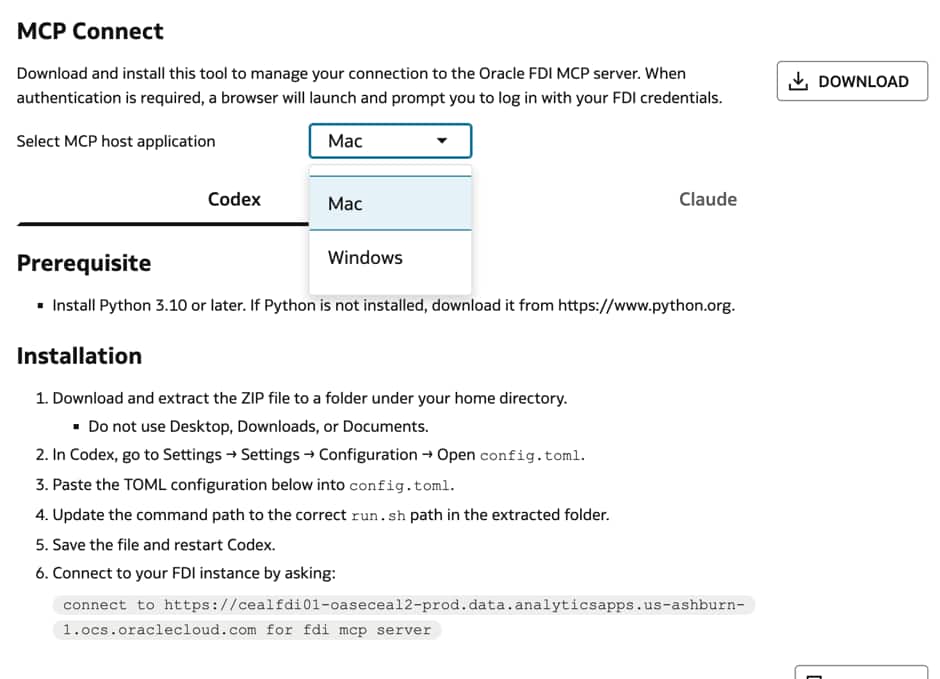
- You have installed Python 3.10 or later version
- You have downloaded the MCP Connect tool for Claude/ChatGPT/Codex
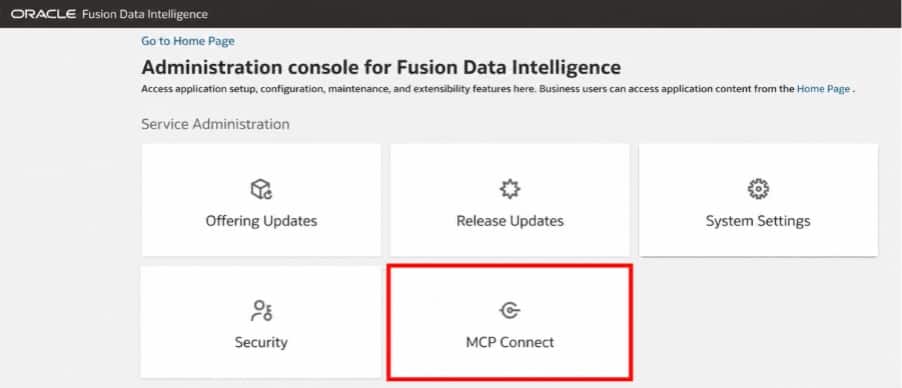
Note: For Windows, use a folder directly on the C drive for easier configuration.
Connecting the AI Clients
Once enabled, the server exposes a secure MCP endpoint that AI clients use to communicate with FDI. The endpoint provides access to supported tools such as semantic model queries, workbook discovery, KPI retrieval, and analytics exploration.
Next, configure your MCP-compatible AI client (such as Codex or Claude Desktop) with the required connection details:
- Server Name – A friendly name for the connection (for example, Oracle FDI MCP Server).
- MCP Server Endpoint – The endpoint exposed by the FDI MCP server.
- Authentication Method – OAuth 2.0.
- Client Credentials – If required by your organization’s authentication configuration.
Once the connection is saved, the AI client establishes a secure connection to the FDI MCP server.
Call to Action
For more information see the documentation on FDI MCP Server
Now that you’ve read this article, try it yourself and let us know your results in the Oracle Analytics Community, where you can also ask questions and post ideas.