

Introduction
In modern analytics implementations, data is often stored in file-based formats such as Parquet because it’s compact, columnar, and efficient for analytical workloads. Oracle Object Storage is commonly used as a landing zone for these files, while Autonomous AI Database is used to query, transform, and expose data for downstream analytics.
Oracle Analytics Cloud (OAC) connects to Autonomous AI Database and accesses database objects such as tables, views, and SQL query results. This means Parquet files stored in Oracle Object Storage can be analyzed in OAC by first exposing them in Autonomous AI Database using an external table.
This article walks you through how to access Parquet files stored in Oracle Object Storage from Autonomous AI Database, create an external table over the Parquet files, and then connect OAC to Autonomous AI Database to validate whether the Parquet-backed data can be used for analysis.
Prerequisites
Oracle Cloud Infrastructure Side
- An active OCI tenancy.
- An Object Storage bucket containing Parquet files.
- An OCI user with access to the Object Storage bucket.
- An OCI Auth Token generated for the user.
Oracle Autonomous AI Database Side
- Access to Autonomous AI Database.
- SQL worksheet or SQL Developer access to run PL/SQL commands.
- Required privileges to create credentials and external tables.
Oracle Analytics Cloud Side
- Access to Oracle Analytics Cloud.
- Permission to create a connection to Autonomous AI Database.
Step-by-Step: Access Parquet Files from Oracle Object Storage Using Autonomous AI Database
1. Log in to Oracle Cloud Infrastructure Console and navigate to the Object Storage bucket where the Parquet files are stored.
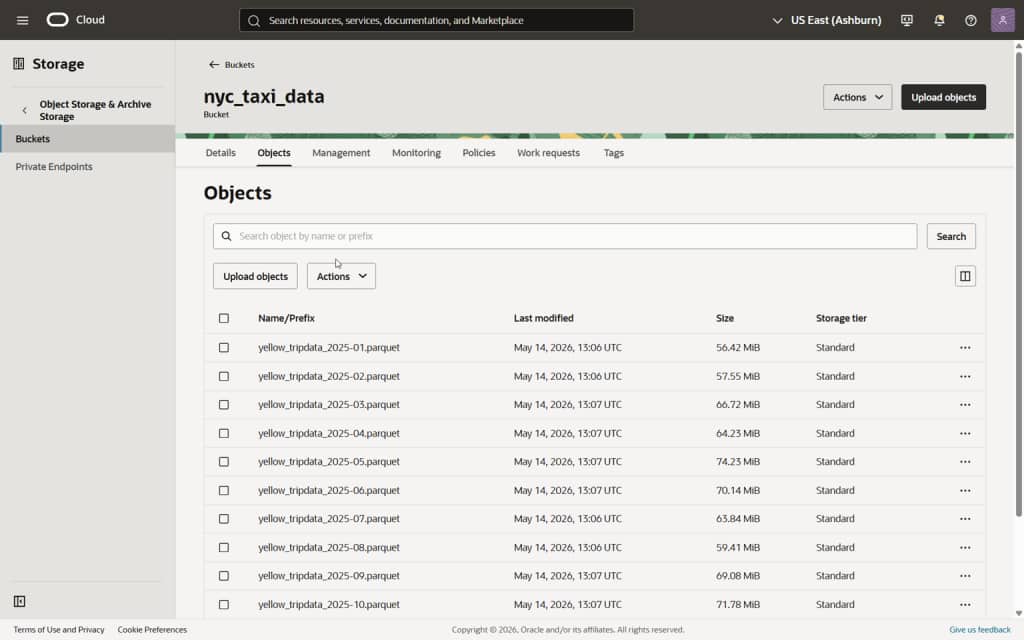
Figure 1 Object Storage bucket containing Parquet files
2. Verify the folder path and Parquet file names that need to be accessed from Autonomous AI Database.
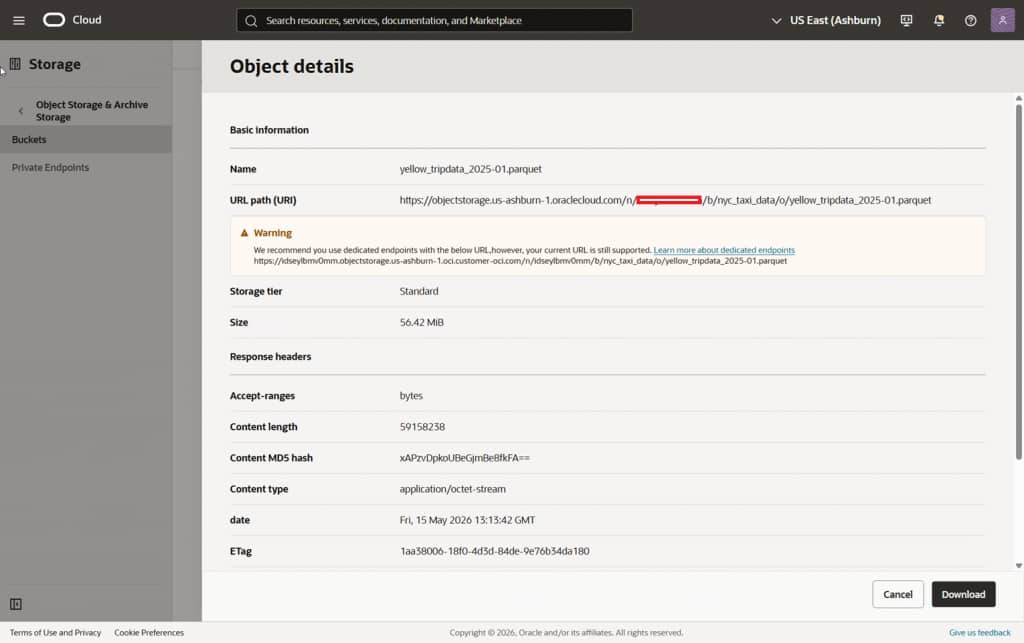
Figure 2 Parquet files in Object Storage folder
3. In Autonomous AI Database, create a credential using DBMS_CLOUD.CREATE_CREDENTIAL. This credential allows Autonomous AI Database to authenticate with Oracle Object Storage.
BEGIN
  DBMS_CLOUD.CREATE_CREDENTIAL(
    credential_name => 'OCI_CRED',
    username        => 'OracleIdentityCloudService/<username>',
    password        => '<your_auth_token>'
  );
END;
/

Figure 3 Create credential in Autonomous AI Database
4. Create an external table in Autonomous AI Database over the Parquet files stored in Oracle Object Storage. Replace the Object Storage URI with the correct namespace, bucket, folder, and file path.
BEGIN
  DBMS_CLOUD.CREATE_EXTERNAL_TABLE(
    table_name      => 'NYC_TAXI_DATA',
    credential_name => 'OCI_CRED',
    file_uri_list   => 'https://objectstorage.<region>.oraclecloud.com/n/<namespace>/b/<bucket_name>/o/*.parquet',
    format          => json_object('type' value 'parquet')
  );
END;
/
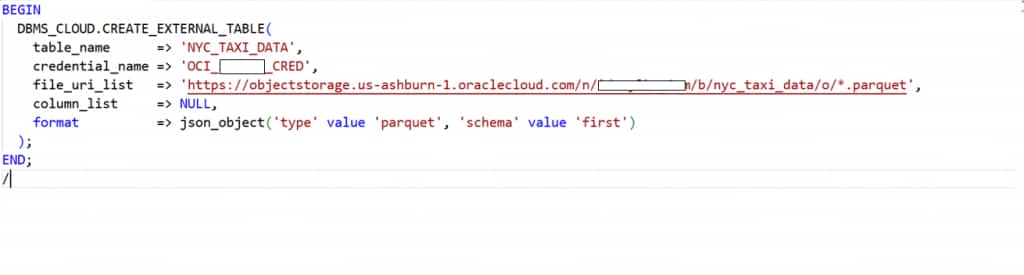
Figure 4 Create external table for Parquet files
5. Validate the external table by querying a few rows from Autonomous AI Database.
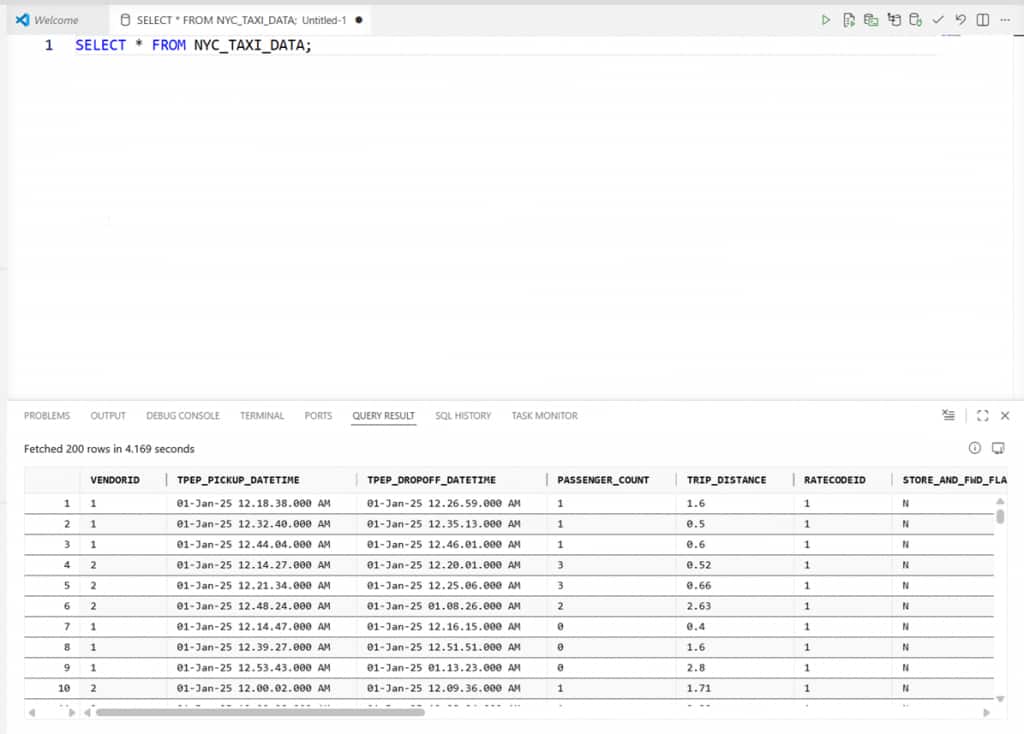
Figure 5 Query Parquet external table from Autonomous AI Database
Connect Oracle Analytics Cloud to Autonomous AI Database
1. Log in to Oracle Analytics Cloud and navigate to the connection creation page.
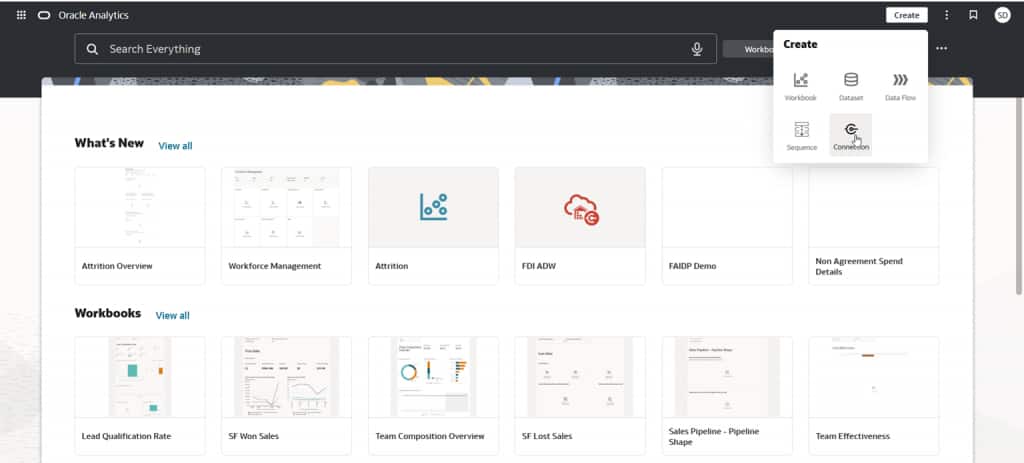
Figure 6 Oracle Analytics Cloud create connection page
2. Create a connection to Autonomous AI Database using the required connection details.
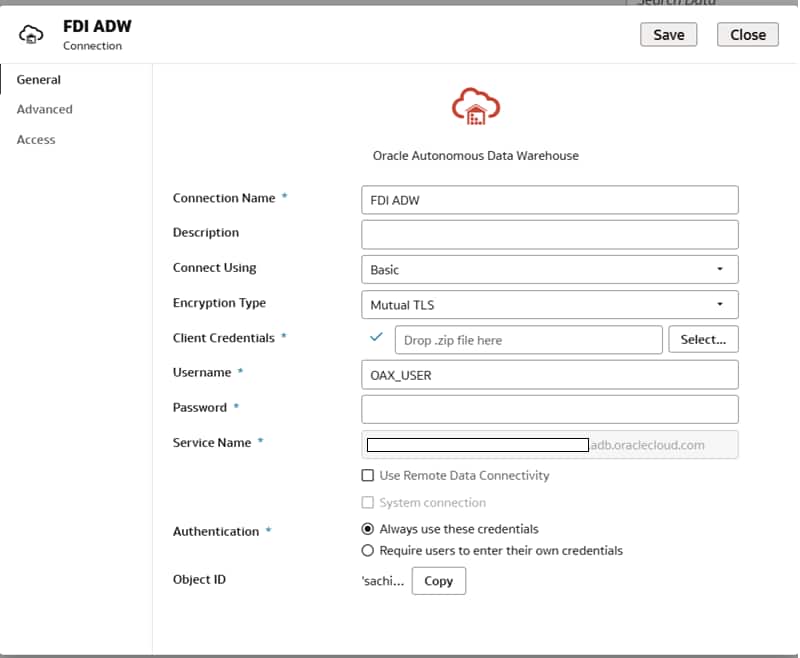
Figure 7 Create Autonomous AI Database connection in OAC
3. After the connection is created, browse the Autonomous AI Database schema and select the external table created over the Parquet files.
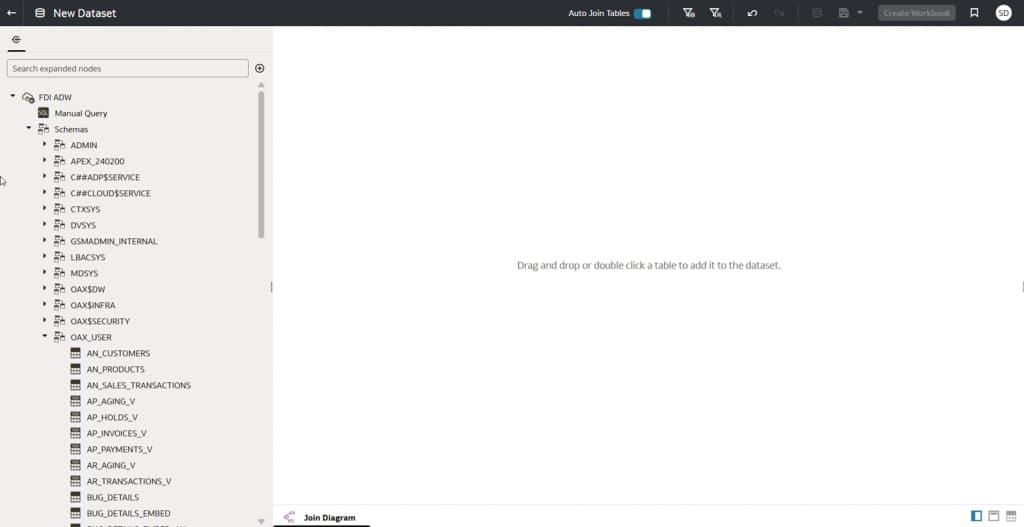
Figure 8 Browse Autonomous AI Database schema from OAC
4. Create a dataset using the external table and preview the data in OAC.
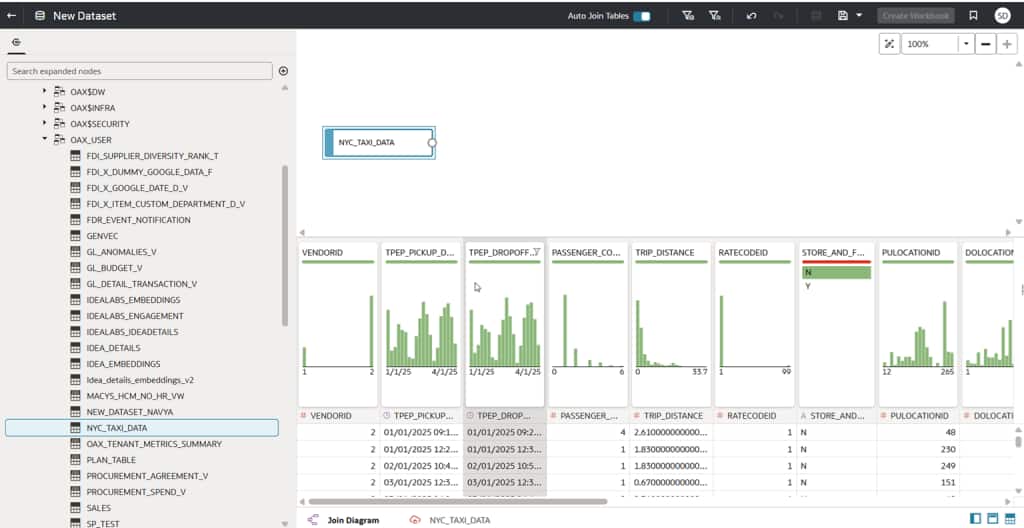
Figure 9 Preview Parquet data in OAC dataset
5. Create a workbook or visualization using the dataset to confirm that the Parquet-backed data can be analyzed from OAC through Autonomous AI Database.
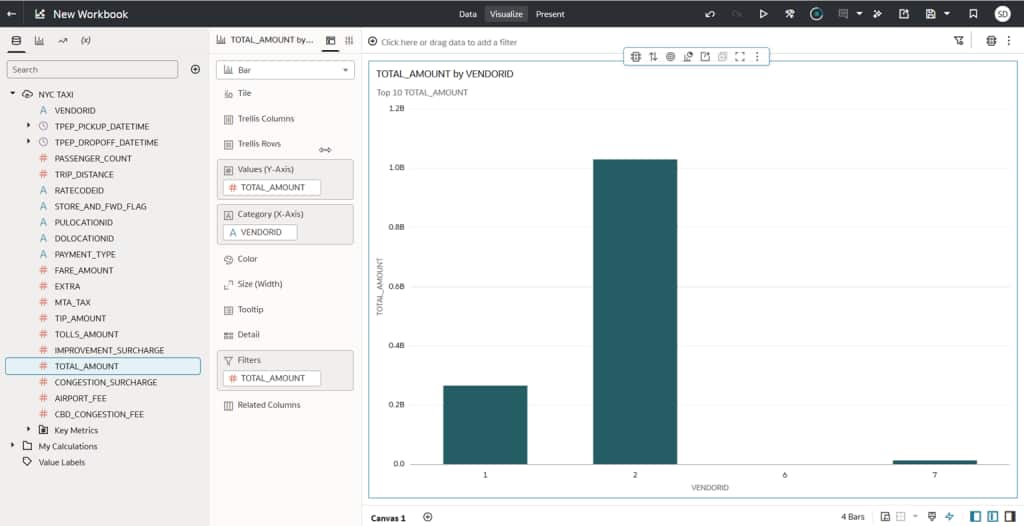
Figure 10 Analyze Parquet data in OAC workbook
Key Takeaway
Oracle Analytics Cloud connects to Autonomous AI Database and accesses database objects. In this approach, the Parquet files remain in Oracle Object Storage, Autonomous AI Database exposes them through an external table, and OAC analyzes the data through the Autonomous AI Database connection.
This pattern is useful when you want to keep file-based data in Object Storage while still making it available for governed SQL access and self-service analytics.
Call to Action
Follow the steps in this article to expose Parquet files stored in Oracle Object Storage through Autonomous AI Database and analyze the data from Oracle Analytics Cloud. If you have questions, post them in the Oracle Analytics Community and we’ll follow up with answers.
