

Why part II?
The INDEXCOL function plays an integral role in improving the performance of reports. The INDEXCOL function is processed before anything else. As such, the logic reduces the navigation, query execution and compilation times of the report, as well as reduces the time to create totals or subtotals.
The rule of thumb for the INDEXCOL function is anytime you have a case statement that references a constant, such as a parameter, then use INDEXCOL in conjunction with the case statement to streamline the SQL generated by Oracle Analytics and improve query performance.
Since our first blog article on INDEXCOL, Oracle Analytics Best Practices for Indexcol, we have used the function to simplify many complex calculations. The purpose of this article is to illustrate some of these complex calculations and give readers an idea on other ways the INDEXCOL function can be used.
IN versus OR
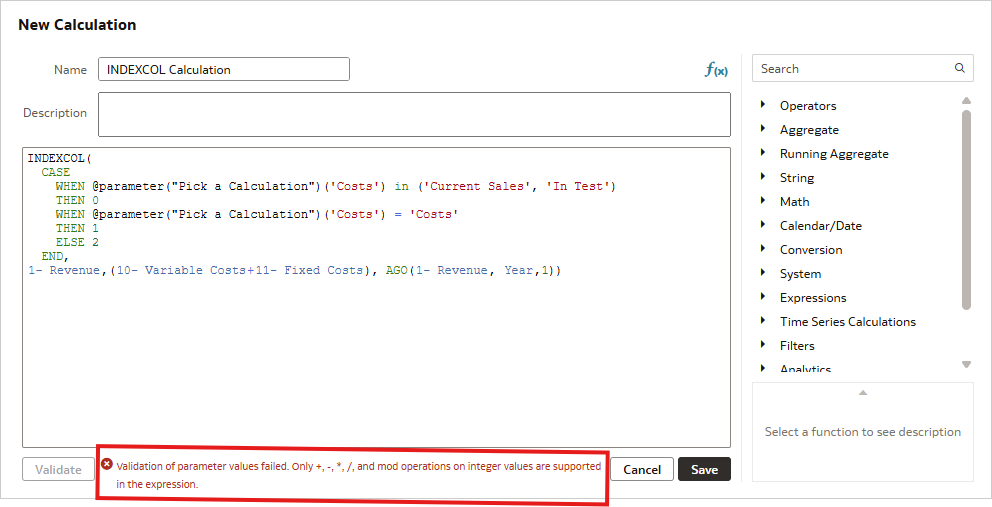
Most of the time, the INDEXCOL function is performed on a single value, however, it can be used with multiple values. But, there’s a catch, the INDEXCOL function throws an error if you are trying to use an ‘IN’ clause. The way around this is to change the ‘IN’ to an ‘OR’.
The INDEXCOL calculation is created like this:
INDEXCOL(
  CASE
    WHEN @parameter("Pick a Calculation")('Costs') in ('Current Sales', 'In Test')
    THEN 0
    WHEN @parameter("Pick a Calculation")('Costs') = 'Costs'
    THEN 1
    ELSE 2
  END,
"A - Sample Sales"."Base Facts"."1- Revenue",("A - Sample Sales"."Base Facts"."10- Variable Costs"+"A - Sample Sales"."Base Facts"."11- Fixed Costs"), AGO("A - Sample Sales"."Base Facts"."1- Revenue", "A - Sample Sales"."Time"."Time Hierarchy"."Year",1))
This throws an error:
Simply replacing the ‘IN’ clause with an ‘OR’ clause resolves the error:
INDEXCOL(
  CASE
    WHEN @parameter("Pick a Calculation")('Costs') = 'Current Sales' or
         @parameter("Pick a Calculation")('Costs') = 'In Test'
    THEN 0
    WHEN @parameter("Pick a Calculation")('Costs') = 'Costs'
    THEN 1
    ELSE 2
  END,
"A - Sample Sales"."Base Facts"."1- Revenue",("A - Sample Sales"."Base Facts"."10- Variable Costs"+"A - Sample Sales"."Base Facts"."11- Fixed Costs"), AGO("A - Sample Sales"."Base Facts"."1- Revenue", "A - Sample Sales"."Time"."Time Hierarchy"."Year",1))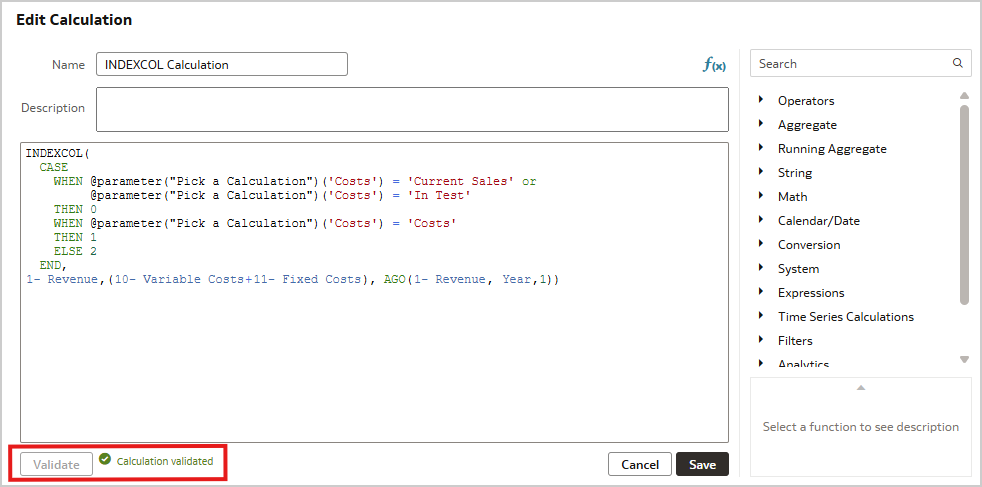
We talked about how using INDEXCOL will streamline the generated SQL. This is how it works.
The equivalent CASE statement of our INDEXCOL function is:
CASE
  WHEN @parameter("Pick a Calculation")('Costs') in ('Current Sales' ,'In Test')
  THEN "A - Sample Sales"."Base Facts"."1- Revenue"
  WHEN @parameter("Pick a Calculation")('Costs') = 'Costs'
  THEN "A - Sample Sales"."Base Facts"."10- Variable Costs" + "A - Sample Sales"."Base Facts"."11- Fixed Costs"
  ELSE AGO("A - Sample Sales"."Base Facts"."1- Revenue", "A - Sample Sales"."Time"."Time Hierarchy"."Year",1)
END
The SQL sent to the database is:
WITH
SAWITH0 AS (select T5207.Per_Name_Month as c1,
     T5207.Per_Name_Year as c2,
     T5207.Per_Name_Half as c3,
     T5207.Per_Name_Qtr as c4
from
     BISAMPLE.SAMP_TIME_MTH_D T5207 /* D02 Time Month Grain */ ),
SAWITH1 AS (select D1.c1 as c5,
     D1.c2 as c6,
     ROW_NUMBER() OVER (PARTITION BY D1.c2 ORDER BY D1.c2 DESC) as c7,
     D1.c3 as c8,
     ROW_NUMBER() OVER (PARTITION BY D1.c2, D1.c3 ORDER BY D1.c2 DESC, D1.c3 DESC) as c9,
     D1.c4 as c10,
     ROW_NUMBER() OVER (PARTITION BY D1.c3, D1.c4 ORDER BY D1.c3 DESC, D1.c4 DESC) as c11,
     ROW_NUMBER() OVER (PARTITION BY D1.c4, D1.c1 ORDER BY D1.c4 DESC, D1.c1 DESC) as c12
from
     SAWITH0 D1),
SAWITH2 AS (select Case when case D1.c7 when 1 then D1.c5 else NULL end  is not null then Rank() OVER ( ORDER BY case D1.c7 when 1 then D1.c5 else NULL end ) end as c1,
     Case when case D1.c9 when 1 then D1.c5 else NULL end  is not null then Rank() OVER ( PARTITION BY D1.c6 ORDER BY case D1.c9 when 1 then D1.c5 else NULL end ) end as c2,
     Case when case D1.c11 when 1 then D1.c5 else NULL end  is not null then Rank() OVER ( PARTITION BY D1.c8 ORDER BY case D1.c11 when 1 then D1.c5 else NULL end ) end as c3,
     Case when case D1.c12 when 1 then D1.c5 else NULL end  is not null then Rank() OVER ( PARTITION BY D1.c10 ORDER BY case D1.c12 when 1 then D1.c5 else NULL end ) end as c4,
     D1.c5 as c5,
     D1.c6 as c6,
     D1.c8 as c7,
     D1.c10 as c8
from
     SAWITH1 D1),
SAWITH3 AS (select distinct min(D1.c1) over (partition by D1.c6)  as c1,
     min(D1.c2) over (partition by D1.c6, D1.c7)  as c2,
     min(D1.c3) over (partition by D1.c7, D1.c8)  as c3,
     min(D1.c4) over (partition by D1.c8, D1.c5)  as c4,
     D1.c5 as c5
from
     SAWITH2 D1),
SAWITH4 AS (select T5207.Per_Name_Month as c1,
     T5207.Per_Name_Year as c2,
     T5207.Per_Name_Half as c3,
     T5207.Per_Name_Qtr as c4,
     T5207.Mth_Key as c5
from
     BISAMPLE.SAMP_TIME_MTH_D T5207 /* D02 Time Month Grain */ ),
SAWITH5 AS (select D1.c5 as c5,
     D1.c1 as c6,
     D1.c2 as c7,
     ROW_NUMBER() OVER (PARTITION BY D1.c2 ORDER BY D1.c2 DESC) as c8,
     D1.c3 as c9,
     ROW_NUMBER() OVER (PARTITION BY D1.c2, D1.c3 ORDER BY D1.c2 DESC, D1.c3 DESC) as c10,
     D1.c4 as c11,
     ROW_NUMBER() OVER (PARTITION BY D1.c3, D1.c4 ORDER BY D1.c3 DESC, D1.c4 DESC) as c12,
     ROW_NUMBER() OVER (PARTITION BY D1.c4, D1.c1 ORDER BY D1.c4 DESC, D1.c1 DESC) as c13
from
     SAWITH4 D1),
SAWITH6 AS (select Case when case D1.c8 when 1 then D1.c6 else NULL end  is not null then Rank() OVER ( ORDER BY case D1.c8 when 1 then D1.c6 else NULL end ) end as c1,
     Case when case D1.c10 when 1 then D1.c6 else NULL end  is not null then Rank() OVER ( PARTITION BY D1.c7 ORDER BY case D1.c10 when 1 then D1.c6 else NULL end ) end as c2,
     Case when case D1.c12 when 1 then D1.c6 else NULL end  is not null then Rank() OVER ( PARTITION BY D1.c9 ORDER BY case D1.c12 when 1 then D1.c6 else NULL end ) end as c3,
     Case when case D1.c13 when 1 then D1.c6 else NULL end  is not null then Rank() OVER ( PARTITION BY D1.c11 ORDER BY case D1.c13 when 1 then D1.c6 else NULL end ) end as c4,
     D1.c5 as c5,
     D1.c7 as c6,
     D1.c9 as c7,
     D1.c11 as c8,
     D1.c6 as c9
from
     SAWITH5 D1),
SAWITH7 AS (select min(D1.c1) over (partition by D1.c6)  as c1,
     min(D1.c2) over (partition by D1.c6, D1.c7)  as c2,
     min(D1.c3) over (partition by D1.c7, D1.c8)  as c3,
     min(D1.c4) over (partition by D1.c8, D1.c9)  as c4,
     D1.c5 as c5
from
     SAWITH6 D1),
SAWITH8 AS (select D1.c1 + 1 as c1,
     D1.c2 as c2,
     D1.c3 as c3,
     D1.c4 as c4,
     D1.c5 as c5
from
     SAWITH7 D1),
SAWITH9 AS (select  /*+ no_merge */  D1.c1 as c1,
     D1.c2 as c2,
     D1.c3 as c3,
     D1.c4 as c4,
     D1.c5 as c5,
     D4.c1 as c6,
     D4.c2 as c7,
     D4.c3 as c8,
     D4.c4 as c9,
     D4.c5 as c10
from
     SAWITH3 D1,
     SAWITH8 D4
where  ( D1.c1 = D4.c1 and D1.c2 = D4.c2 and D1.c3 = D4.c3 and D1.c4 = D4.c4 and D1.c5 = '2011 / 09' ) ),
SAWITH10 AS (select sum(T5398.Revenue) as c1,
     T5257.Office_Dsc as c2,
     D3.c5 as c3,
     T5257.Office_Key as c4
from
     BISAMPLE.SAMP_OFFICES_D T5257 /* D30 Offices */ ,
     BISAMPLE.SAMP_REVENUE_F T5398 /* F10 Billed Rev */ ,
     SAWITH9 D3
where  ( T5257.Office_Key = T5398.Office_Key and T5398.Bill_Mth_Key = D3.c10 )
group by T5257.Office_Dsc, T5257.Office_Key, D3.c5),
SAWITH11 AS (select sum(T5398.Cost_Fixed) as c1,
     sum(T5398.Cost_Variable) as c2,
     sum(T5398.Revenue) as c3,
     T5257.Office_Dsc as c4,
     T5207.Per_Name_Month as c5,
     T5257.Office_Key as c6
from
     BISAMPLE.SAMP_OFFICES_D T5257 /* D30 Offices */ ,
     BISAMPLE.SAMP_TIME_MTH_D T5207 /* D02 Time Month Grain */ ,
     BISAMPLE.SAMP_REVENUE_F T5398 /* F10 Billed Rev */
where  ( T5207.Per_Name_Month = '2011 / 09' and T5207.Mth_Key = T5398.Bill_Mth_Key and T5257.Office_Key = T5398.Office_Key )
group by T5207.Per_Name_Month, T5257.Office_Dsc, T5257.Office_Key),
SAWITH12 AS (select D1.c1 as c1,
     D1.c2 as c2,
     D1.c3 as c3,
     D1.c4 as c4,
     D1.c6 as c6,
     D1.c7 as c7,
     D1.c8 as c8,
     D1.c9 as c9,
     D1.c10 as c10
from
     (select 0 as c1,
               coalesce( D1.c2, D2.c4) as c2,
               coalesce( D1.c3, D2.c5) as c3,
               case  when 'Current Sales' in ('Current Sales', 'In Test') then D2.c3 when 'Costs' = 'Current Sales' then D2.c2 + D2.c1 else D1.c1 end  as c4,
               coalesce( D1.c4, D2.c6) as c6,
               D1.c1 as c7,
               D2.c3 as c8,
               D2.c2 as c9,
               D2.c1 as c10,
               ROW_NUMBER() OVER (PARTITION BY coalesce( D1.c2, D2.c4), coalesce( D1.c3, D2.c5), coalesce( D1.c4, D2.c6) ORDER BY coalesce( D1.c2, D2.c4) ASC, coalesce( D1.c3, D2.c5) ASC, coalesce( D1.c4, D2.c6) ASC) as c11
          from
               SAWITH10 D1 full outer join SAWITH11 D2 On D1.c2 = D2.c4 and D1.c3 = D2.c5 and D1.c4 = D2.c6
     ) D1
where  ( D1.c11 = 1 ) ),
SAWITH13 AS (select D1.c1 as c1,
     D1.c2 as c2,
     D1.c3 as c3,
     D1.c4 as c4,
     D1.c7 as c11,
     D1.c6 as c12,
     ROW_NUMBER() OVER (PARTITION BY D1.c6, D1.c3, D1.c2 ORDER BY D1.c6 DESC, D1.c3 DESC, D1.c2 DESC) as c13,
     D1.c8 as c14,
     D1.c9 as c15,
     D1.c10 as c16
from
     SAWITH12 D1),
SAWITH14 AS (select D1.c1 as c1,
     D1.c2 as c2,
     D1.c3 as c3,
     D1.c4 as c4,
     sum(case D1.c13 when 1 then D1.c11 else NULL end ) over ()  as c7,
     sum(case D1.c13 when 1 then D1.c14 else NULL end ) over ()  as c8,
     sum(case D1.c13 when 1 then D1.c15 else NULL end ) over ()  as c9,
     sum(case D1.c13 when 1 then D1.c16 else NULL end ) over ()  as c10
from
     SAWITH13 D1)
select D1.c1 as c1, D1.c2 as c2, D1.c3 as c3, D1.c4 as c4, D1.c5 as c5 from ( select D1.c1 as c1,
     D1.c2 as c2,
     D1.c3 as c3,
     D1.c4 as c4,
     case  when 'Current Sales' in ('Current Sales', 'In Test') then D1.c8 when 'Costs' = 'Current Sales' then D1.c9 + D1.c10 else D1.c7 end  as c5
from
     SAWITH14 D1
order by c3, c2 ) D1 where rownum <= 500001
Using the INDEXCOL function instead of the CASE statement generates this SQL:
WITH
SAWITH0 AS (select sum(T5398.Revenue) as c1,
     T5257.Office_Dsc as c2,
     T5207.Per_Name_Month as c3,
     T5257.Office_Key as c4
from
     BISAMPLE.SAMP_OFFICES_D T5257 /* D30 Offices */ ,
     BISAMPLE.SAMP_TIME_MTH_D T5207 /* D02 Time Month Grain */ ,
     BISAMPLE.SAMP_REVENUE_F T5398 /* F10 Billed Rev */
where  ( T5207.Per_Name_Month = '2011 / 09' and T5207.Mth_Key = T5398.Bill_Mth_Key and T5257.Office_Key = T5398.Office_Key )
group by T5207.Per_Name_Month, T5257.Office_Dsc, T5257.Office_Key),
SAWITH1 AS (select 0 as c1,
     D1.c2 as c2,
     D1.c3 as c3,
     D1.c1 as c4,
     D1.c4 as c6
from
     SAWITH0 D1)
select D1.c1 as c1, D1.c2 as c2, D1.c3 as c3, D1.c4 as c4, D1.c5 as c5 from ( select D1.c1 as c1,
     D1.c2 as c2,
     D1.c3 as c3,
     D1.c4 as c4,
     sum(D1.c4) over ()  as c5
from
     SAWITH1 D1
order by c3, c2 ) D1 where rownum <= 500001
When using the CASE statement, all possible measures from the prompt are selected. Then the CASE logic is executed to determine which measure to use in the report. When using the INDEXCOL function, only the measure selected in the prompt is used in the query, greatly simplifying the generated SQL.
Here’s a comparison of the logical query summary statistics:
| CASE Statement Report | INDEXCOL Report | |
| Total time in BI Server | 0.188 seconds | 0.179 seconds |
| Execution time | 0.186 seconds | 0.172 seconds |
| Response time | 0.186 seconds | 0.173 seconds |
| Compilation time | 0.045 seconds | 0.014 seconds |
This is a small test database, but the INDEXCOL function outperforms the CASE statement in all aspects of the query.
Multiple TargetsUsing the INDEXCOL function to point to multiple targets is similar to our previous use case in that it uses an ‘OR’ clause to determine the target. This time though, instead of each ‘OR’ clause pointing to it’s own target, we have multiple ‘OR’ clauses pointing to the same target. The use case is that certain users will see revenue filtered by one brand, while others will see revenue filtered by a different brand.
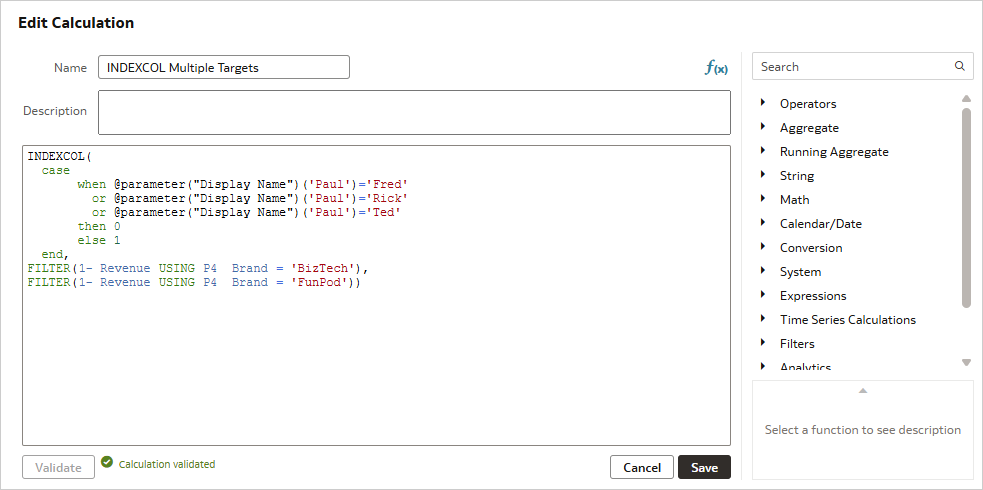
The calculation we are using is:
INDEXCOL(
  case
       when @parameter("Display Name")('Paul')='Fred'
         or @parameter("Display Name")('Paul')='Rick'
         or @parameter("Display Name")('Paul')='Ted'
       then 0
       else 1
  end,
FILTER("A - Sample Sales"."Base Facts"."1- Revenue" USING "A - Sample Sales"."Products"."P4  Brand" = 'BizTech'),
FILTER("A - Sample Sales"."Base Facts"."1- Revenue" USING "A - Sample Sales"."Products"."P4  Brand" = 'FunPod'))
The logical SQL for a simple report is:
SET VARIABLE OBIS_REFRESH_CACHE=1,QUERY_SRC_CD='Visual Analyzer', ENABLE_DIMENSIONALITY=1;SELECT
   0 s_0,
   "A - Sample Sales"."Products"."P4  Brand" s_1,
   INDEXCOL( case when ‘Fred’='Fred' or 'Fred’='Rick' or 'Fred'='Ted' then 0 else 1 end,FILTER("A - Sample Sales"."Base Facts"."1- Revenue" USING "A - Sample Sales"."Products"."P4  Brand" ='BizTech'),FILTER("A - Sample Sales"."Base Facts"."1- Revenue" USING "A - Sample Sales"."Products"."P4  Brand" ='FunPod')) s_2
FROM "A - Sample Sales"
ORDER BY 2 ASC NULLS LAST
The corresponding generated SQL is:
WITH
SAWITH0 AS (select sum(T5482.Revenue) as c1,
     T5245.Brand as c2
from
     BISAMPLE.SAMP_PRODUCTS_D T5245 /* D10 Product (Dynamic Table) */ ,
     BISAMPLE.SAMP_REVENUE_FA2 T5482 /* F21 Rev. (Aggregate 2) */
where  ( T5245.Brand = 'BizTech' and T5245.Prod_Key = T5482.Prod_Key )
group by T5245.Brand)
select D1.c1 as c1, D1.c2 as c2, D1.c3 as c3 from ( select 0 as c1,
     D1.c2 as c2,
     D1.c1 as c3
from
     SAWITH0 D1
order by c2 ) D1
Since ‘Fred’ = ’Fred’, the query is being filtered by Brand = ‘BizTech’.
Similarly, when none of the targets match, the query is filtered by Brand = ‘FunPod’.
Logical SQL:
SET VARIABLE QUERY_SRC_CD='Visual Analyzer', ENABLE_DIMENSIONALITY=1;SELECT
   0 s_0,
   "A - Sample Sales"."Products"."P4  Brand" s_1,
   INDEXCOL( case when ‘Janice’='Fred' or 'Janice'='Rick' or 'Janice'='Ted' then 0 else 1 end,FILTER("A - Sample Sales"."Base Facts"."1- Revenue" USING "A - Sample Sales"."Products"."P4  Brand" ='BizTech'),FILTER("A - Sample Sales"."Base Facts"."1- Revenue" USING "A - Sample Sales"."Products"."P4  Brand" ='FunPod')) s_2
FROM "A - Sample Sales"
ORDER BY 2 ASC NULLS LAST
Generated SQL:
WITH
SAWITH0 AS (select sum(T5482.Revenue) as c1,
     T5245.Brand as c2
from
     BISAMPLE.SAMP_PRODUCTS_D T5245 /* D10 Product (Dynamic Table) */ ,
     BISAMPLE.SAMP_REVENUE_FA2 T5482 /* F21 Rev. (Aggregate 2) */
where  ( T5245.Brand = 'FunPod' and T5245.Prod_Key = T5482.Prod_Key )
group by T5245.Brand)
select D1.c1 as c1, D1.c2 as c2, D1.c3 as c3 from ( select 0 as c1,
     D1.c2 as c2,
     D1.c1 as c3
from
     SAWITH0 D1
order by c2 ) D1
An equivalent case statement is:
case
   when @parameter("Display Name")('Paul')='Fred'
     or @parameter("Display Name")('Paul')='Rick'
     or @parameter("Display Name")('Paul')='Ted'
   then FILTER("A - Sample Sales"."Base Facts"."1- Revenue" USING "A - Sample Sales"."Products"."P4  Brand" = 'BizTech')
   else FILTER("A - Sample Sales"."Base Facts"."1- Revenue" USING "A - Sample Sales"."Products"."P4  Brand" = 'FunPod')
end
The logical SQL is similar:
SET VARIABLE QUERY_SRC_CD='Visual Analyzer',SAW_SRC_PATH='{"viewID":"view!1","currentCanvas":"canvas!1","scenarioID":null,"path":"/@Catalog/shared/BIPublisher/INDEXCOL/Indexcol_Multiple_Targets"}',ENABLE_DIMENSIONALITY=1;SELECT
   0 s_0,
   "A - Sample Sales"."Products"."P4  Brand" s_1,
   case when ‘Fred’='Fred' or 'Fred'='Rick' or 'Fred'='Ted' then FILTER("A - Sample Sales"."Base Facts"."1- Revenue" USING "A - Sample Sales"."Products"."P4  Brand" ='BizTech') else FILTER("A - Sample Sales"."Base Facts"."1- Revenue" USING "A - Sample Sales"."Products"."P4  Brand" ='FunPod')
end s_2
FROM "A - Sample Sales"
ORDER BY 2 ASC NULLS LAST
But the generated SQL is much different. Both brand filters are applied in the main SQL block, but the filter for the display name isn’t applied until a later query block. The result is that the filter is being applied to a larger result set than if the filter were applied earlier:
WITH
SAWITH0 AS (select T5245.Brand as c1,
     sum(T5482.Revenue) as c2
from
     BISAMPLE.SAMP_PRODUCTS_D T5245 /* D10 Product (Dynamic Table) */ ,
     BISAMPLE.SAMP_REVENUE_FA2 T5482 /* F21 Rev. (Aggregate 2) */
where  ( T5245.Prod_Key = T5482.Prod_Key and (T5245.Brand in ('BizTech', 'FunPod')) )
group by T5245.Brand),
SAWITH1 AS (select sum(case  when D1.c1 = 'FunPod' then D1.c2 end ) as c1,
     sum(case  when D1.c1 = 'BizTech' then D1.c2 end ) as c2,
     D1.c1 as c3
from
     SAWITH0 D1
group by D1.c1)
select D1.c1 as c1, D1.c2 as c2, D1.c3 as c3 from ( select distinct 0 as c1,
     D1.c3 as c2,
     case  when 'Fred' = 'Fred' then D1.c2 else D1.c1 end  as c3
from
     SAWITH1 D1
order by c2 ) D1
The comparative runtimes are as follows:
| CASE Statement Report | INDEXCOL Report | |
| Total time in BI Server | 0.370 | 0.178 |
| Execution time | 0.366 | 0.178 |
| Response time | 0.367 | 0.179 |
| Compilation time | 0.011 | 0.010 |
Nesting
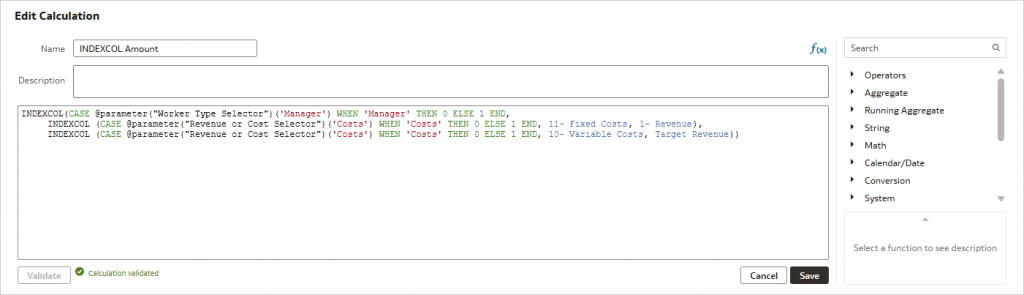
INDEXCOL functions can be nested for complex calculations involving multiple case statements that all utilize constants. In the below example, we are nesting three INDEXCOL functions. The arguments of the first INDEXCOL function are both INDEXCOL functions.
INDEXCOL
    (
        CASE @parameter("Worker Type Selector")('Manager') WHEN 'Manager' THEN 0 ELSE 1 END,
     	    INDEXCOL (CASE @parameter("Revenue or Cost Selector")('Costs') WHEN 'Costs' THEN 0 ELSE 1 END, “11- Fixed Costs", “1- Revenue"),
     	    INDEXCOL (CASE @parameter("Revenue or Cost Selector")('Costs') WHEN 'Costs' THEN 0 ELSE 1 END, “10- Variable Costs",@calculation("TargetRevenue")
    )
The @calculation syntax denotes a custom calculation created in the workbook.
In this case, the equivalent CASE statement is:
CASE

   WHEN @parameter("Worker Type Selector")('Manager') = 'Manager' AND @parameter("Revenue or Cost Selector")('Costs') = 'Costs'
   THEN  "A - Sample Sales"."Base Facts"."11- Fixed Costs"

   WHEN @parameter("Worker Type Selector")('Manager') = 'Manager' AND @parameter("Revenue or Cost Selector")('Costs') = 'Revenue'
   THEN "A - Sample Sales"."Base Facts"."1- Revenue"

   WHEN @parameter("Worker Type Selector")('Manager') = 'Sales Rep' AND @parameter("Revenue or Cost Selector")('Costs') = 'Costs'
   THEN  "A - Sample Sales"."Base Facts"."10- Variable Costs"

   WHEN @parameter("Worker Type Selector")('Manager') = 'Sales Rep' AND @parameter("Revenue or Cost Selector")('Costs') = 'Revenue'
   THEN "A - Sample Sales"."Base Facts"."5- Target Revenue"

END
Using the CASE statement, the SQL sent to the database is:
WITH
SAWITH0 AS (select sum(T5398.Cost_Variable) as c1,
     sum(T5398.Revenue) as c2,
     sum(T5398.Cost_Fixed) as c3,
     case  when T7437.Postn_Level = 'Level 2' then 'Manager' when T7437.Postn_Level = 'Level 3' then 'Sales Rep' else NULL end  as c4
from
     BISAMPLE.SAMP_EMPL_D_VH T5294 /* D50 Sales Rep (Parent Child Hierarchy) */ ,
     BISAMPLE.SAMP_EMPL_PARENT_CHILD_MAP T5300 /* D51 Closure Table Sales Rep Parent Child */ ,
     BISAMPLE.SAMP_EMPL_POSTN_D T7437 /* D52 Sales Rep Position */ ,
     BISAMPLE.SAMP_REVENUE_F T5398 /* F10 Billed Rev */
where  (
T5294.Employee_Key = T5300.Ancestor_Key and
T5294.Postn_Key = T7437.Postn_Key and
T5300.Member_Key = T5398.Empl_Key and
case  when 'Costs' = 'Revenue' then 'Costs' when 'Revenue' = 'Revenue' then 'Revenue' end  = 'Revenue' and
case  when T7437.Postn_Level = 'Level 2' then 'Manager' when T7437.Postn_Level = 'Level 3' then 'Sales Rep' else NULL end  = 'Manager' )
group by case  when T7437.Postn_Level = 'Level 2' then 'Manager' when T7437.Postn_Level = 'Level 3' then 'Sales Rep' else NULL end ),
SAWITH1 AS (select sum(T5490.Revenue) as c1
from
     BISAMPLE.SAMP_TARGETS_F T5490 /* F40 Facts Targets */
where  ( case  when 'Costs' = 'Revenue' then 'Costs' when 'Revenue' = 'Revenue' then 'Revenue' end  = 'Revenue' ) )
select D1.c1 as c1, D1.c2 as c2, D1.c3 as c3, D1.c4 as c4 from ( select D1.c1 as c1,
     D1.c2 as c2,
     D1.c3 as c3,
     D1.c4 as c4
from
     (select 0 as c1,
               case  when 'Costs' = 'Revenue' then 'Costs' when 'Revenue' = 'Revenue' then 'Revenue' end  as c2,
               D1.c4 as c3,
               case  when 'Costs' = 'Revenue' then D1.c3 when 'Manager' = 'Manager' then D1.c2 when 'Manager' = 'Sales Rep' then D1.c1 when 'Manager' = 'Sales Rep' then D2.c1 end  as c4,
               ROW_NUMBER() OVER (PARTITION BY D1.c4 ORDER BY D1.c4 ASC) as c5
          from
               SAWITH0 D1,
               SAWITH1 D2
     ) D1
where  ( D1.c5 = 1 )
order by c3 ) D1 where rownum <= 500001
Using the INDEXCOL function, the SQL sent to the database is:
WITH
SAWITH0 AS (select sum(T5472.Revenue) as c1,
     case  when T7437.Postn_Level = 'Level 2' then 'Manager' when T7437.Postn_Level = 'Level 3' then 'Sales Rep' else NULL end  as c2
from
     BISAMPLE.SAMP_EMPL_D_VH T5294 /* D50 Sales Rep (Parent Child Hierarchy) */ ,
     BISAMPLE.SAMP_EMPL_PARENT_CHILD_MAP T5300 /* D51 Closure Table Sales Rep Parent Child */ ,
     BISAMPLE.SAMP_EMPL_POSTN_D T7437 /* D52 Sales Rep Position */ ,
     BISAMPLE.SAMP_REVENUE_FA1 T5472 /* F20 Rev. (Aggregate 1) */
where  (
T5294.Employee_Key = T5300.Ancestor_Key and
T5294.Postn_Key = T7437.Postn_Key and
T5300.Member_Key = T5472.Empl_Key and
case  when 'Costs' = 'Revenue' then 'Costs' when 'Revenue' = 'Revenue' then 'Revenue' end  = 'Revenue' and
case  when T7437.Postn_Level = 'Level 2' then 'Manager' when T7437.Postn_Level = 'Level 3' then 'Sales Rep' else NULL end  = 'Manager' )
group by case  when T7437.Postn_Level = 'Level 2' then 'Manager' when T7437.Postn_Level = 'Level 3' then 'Sales Rep' else NULL end )
select D1.c1 as c1, D1.c2 as c2, D1.c3 as c3, D1.c4 as c4 from ( select 0 as c1,
     case  when 'Costs' = 'Revenue' then 'Costs' when 'Revenue' = 'Revenue' then 'Revenue' end  as c2,
     D1.c2 as c3,
     D1.c1 as c4
from
     SAWITH0 D1
order by c3 ) D1 where rownum <= 500001
Again, the INDEXCOL query is much simpler. It’s only retrieving the measure involved in the query, dropping the subqueries where it determines which measure to select. As a bonus, it’s navigating to an aggregate fact table.
For comparison, here are the logical query summary statistics:
| CASE Statement Report | INDEXCOL Report | |
| Total time in BI Server | 0.170 seconds | 0.155 seconds |
| Execution time | 0.170 seconds | 0.155 seconds |
| Response time | 0.322 seconds | 0.295 seconds |
| Compilation time | 0.020 seconds | 0.014 seconds |
Again, the report using INDEXCOL shows better performance.
Comparisons
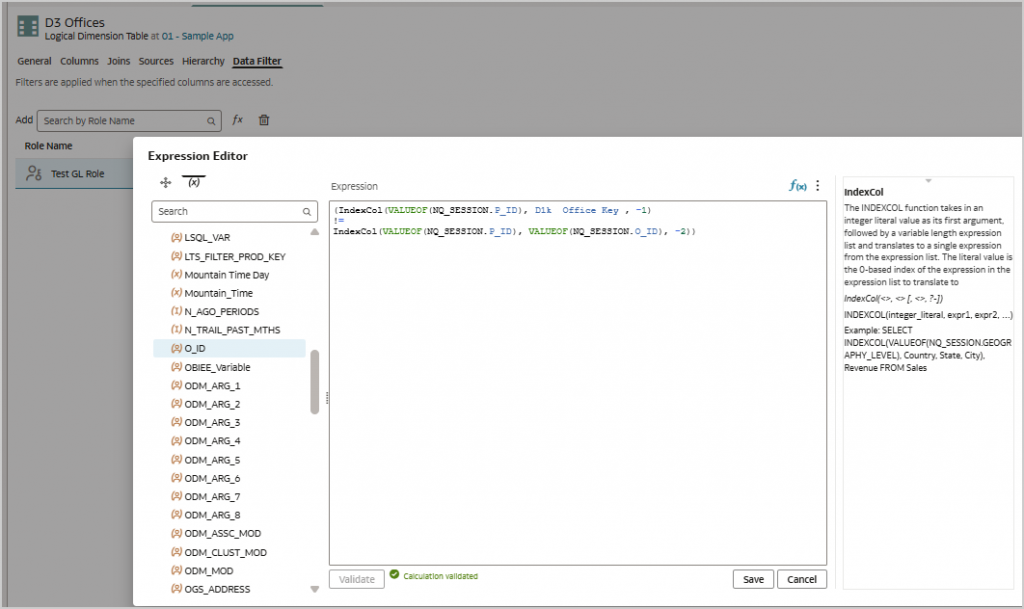
INDEXCOL functions can be used on both sides of an expression and are especially useful to simplify a query by dropping a table from the generated SQL. This is most often used in setting up row level security where different security rules apply to different people or roles and is based on the values set in a session variable. This iteration of the INDEXCOL function isn’t set at the report level, but as a data filter in the semantic model or repository, and is assigned to a group or application role.
(IndexCol(VALUEOF(NQ_SESSION."variable":"INDEXCOL_Testing_1_of_2"."P_ID"), "logicalColumn":"01 - Sample App"."D3 Offices"."D1k  Office Key" , -1)
!=
IndexCol(VALUEOF(NQ_SESSION."variable":"INDEXCOL_Testing_1_of_2"."P_ID"), VALUEOF(NQ_SESSION."variable":"INDEXCOL_Testing_2_of_2"."O_ID"), -2))
In this example, calculations that are always true, for example -1 != -2, will be dropped from the generated SQL. If the expression uses AND, always true will be dropped. If the expression is applied with an OR, then never true, such as -1 = -2, will be dropped.
Generated SQL when the expression is not true:
WITH
SAWITH0 AS (select sum(T5398.Cost_Fixed) as c1,
     sum(T5398.Cost_Variable) as c2,
     sum(T5398.Revenue) as c3,
     T5257.Office_Dsc as c4,
     T5257.Office_Key as c5
from
     BISAMPLE.SAMP_OFFICES_D T5257 /* D30 Offices */ ,
     BISAMPLE.SAMP_REVENUE_F T5398 /* F10 Billed Rev */
where  ( T5257.Office_Key = T5398.Office_Key and -2 != -1 )
group by T5257.Office_Dsc, T5257.Office_Key)
select D1.c1 as c1, D1.c2 as c2, D1.c3 as c3, D1.c4 as c4, D1.c5 as c5, D1.c6 as c6 from ( select 0 as c1,
     D1.c4 as c2,
     D1.c3 as c3,
     D1.c2 as c4,
     D1.c1 as c5,
     D1.c5 as c6
from
     SAWITH0 D1
order by c2 ) D1
Generated SQL when the expression is true:
WITH
SAWITH0 AS (select sum(T5398.Cost_Fixed) as c1,
     sum(T5398.Cost_Variable) as c2,
     sum(T5398.Revenue) as c3,
     T5257.Office_Dsc as c4,
     T5257.Office_Key as c5
from
     BISAMPLE.SAMP_OFFICES_D T5257 /* D30 Offices */ ,
     BISAMPLE.SAMP_REVENUE_F T5398 /* F10 Billed Rev */
where  ( T5257.Office_Key = T5398.Office_Key )
group by T5257.Office_Dsc, T5257.Office_Key)
select D1.c1 as c1, D1.c2 as c2, D1.c3 as c3, D1.c4 as c4, D1.c5 as c5, D1.c6 as c6 from ( select 0 as c1,
     D1.c4 as c2,
     D1.c3 as c3,
     D1.c2 as c4,
     D1.c1 as c5,
     D1.c5 as c6
from
     SAWITH0 D1
order by c2 ) D1
The clause -2 != -1 has been dropped from the query.
For a more in-depth discussion on the use of the INDEXCOL function with row level security, see our blog article on the topic, Best Practices For Implementing Row-Level Security In Oracle Analytics.
Call to Action
The INDEXCOL function is a valuable tool for streamlining SQL generation in Oracle Analytics and improving query performance.
As seen in our examples, INDEXCOL functions can be created either as custom calculations in data visualization or Classic or they can be created in the semantic model or repository.
They are also equally effective when used with datasets.
For more information on the INDEXCOL function, see Building Semantic Models in Oracle Analytics Cloud, Building Semantic Models in Oracle Analytics Server, or Managing Metadata Repositories for Oracle Analytics Server. Another valuable reference is the Fusion Middleware Logical SQL Reference Guide for Oracle Business Intelligence Enterprise Edition, which contains a reference for functions supported by Oracle Analytics, as well as tips for using logical SQL.
Now that you’ve read this article, try it yourself, and let us know your results in the Oracle Analytics Community where you can also ask questions and post ideas.