


Oracle database teams use synonyms to give applications a stable name for a table, view, or materialized view. The target can change while consuming queries continue to use the same object name.
Oracle AI Data Platform (AIDP) external catalogs can discover and query supported synonyms from Oracle Autonomous AI Lakehouse sources. Synonyms appear in the AIDP Catalog with their columns. SQL notebooks reference them with the same three-part naming pattern as other catalog objects, while AI agent SQL tools select the catalog and schema in the tool configuration. AI Data Platform synchronizes metadata and queries the source without creating another persistent copy of the rows.
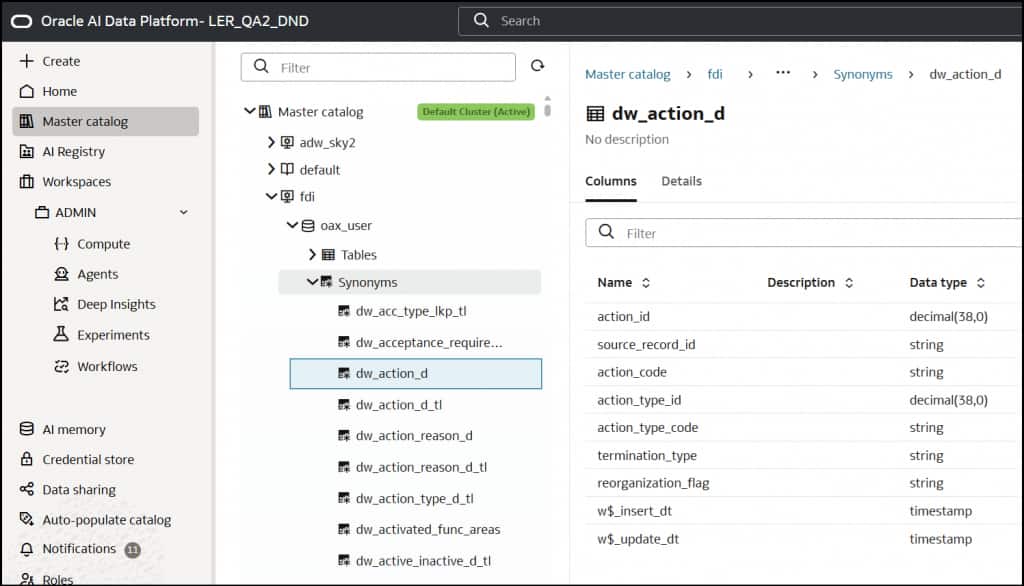
Figure 1. AIDP Catalog displays a discovered private synonym under the OAX_USER schema, including its columns and data types.
Why synonym support matters
Without synonym support, an external catalog may expose the target table or view but omit the stable name database users and applications already know. Synonym support preserves that database contract: AI Data Platform records the object as a synonym, retrieves its columns for query planning, and reads source data from Autonomous AI Lakehouse using the synonym name.
Fusion Data Intelligence
Synonym support makes Fusion Data Intelligence data available for analytical and agentic workloads in AI Data Platform without requiring teams to stage another persistent copy or replace the familiar business object names exposed through OAX_USER. Analysts can explore available customer, financial, procurement, and workforce data in SQL notebooks. Data engineers can also combine that data with other enterprise sources to investigate trends, exceptions, and operational performance.
Agent developers can use the same supported synonyms in predefined, parameterized SQL tools. These tools provide read-only access to the supported synonyms to answer business questions or provide context for a workflow. For example, a tool can find customer billing locations by country using DW_CUSTOMER_LOCATION_D. The agent supplies runtime parameter values for a developer-defined SQL query rather than generating the SQL for this tool.
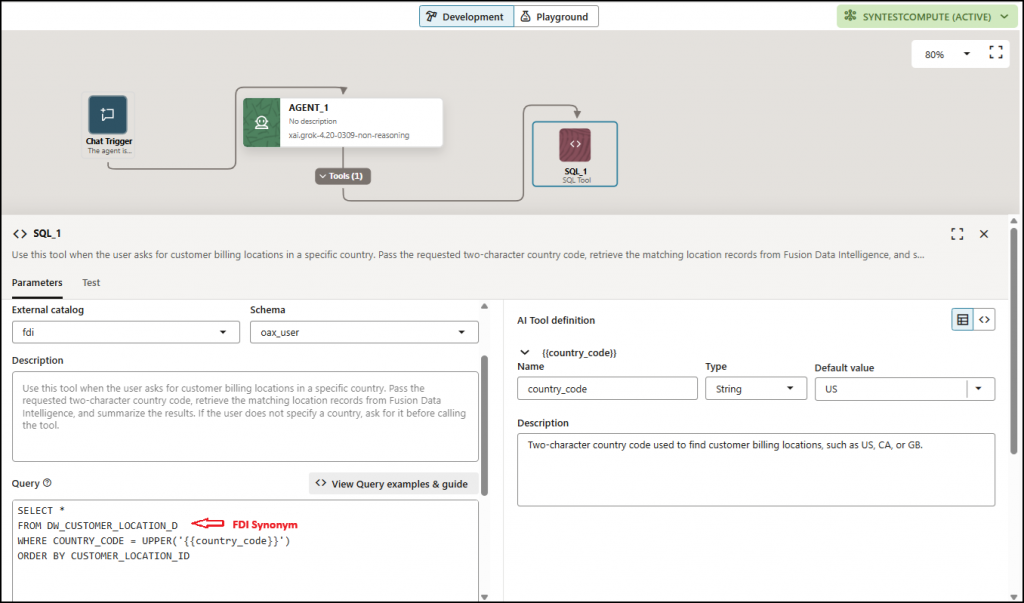
Figure 2. An AI agent SQL tool is configured to query the Fusion Data Intelligence synonym DW_CUSTOMER_LOCATION_D using a country_code runtime parameter.
In the SQL tool, select the Fusion Data Intelligence external catalog and the OAX_USER schema, then reference the synonym in the predefined Oracle SQL query. The same prebuilt synonym can support interactive analysis in a Spark SQL notebook by using its catalog-qualified name. Replace fdi_catalog with your external catalog name:
SELECT *
FROM fdi_catalog.OAX_USER.DW_CUSTOMER_LOCATION_D
WHERE COUNTRY_CODE = ‘US’
ORDER BY CUSTOMER_LOCATION_ID
LIMIT 10;
The supported objects available to each workload depend on the Fusion Data Intelligence content enabled in the environment and the privileges granted to OAX_USER.
How AI Data Platform handles synonyms
During external catalog creation and subsequent metadata refreshes, AI Data Platform discovers supported synonyms in the connected Autonomous AI Lakehouse and retrieves the metadata needed to display their column names and data types in the AIDP Catalog. AI Data Platform preserves each object’s type as a synonym. When a user queries the synonym, AI Data Platform reads source data using the synonym name. Autonomous AI Lakehouse resolves the synonym to its underlying table, view, or materialized view, executes the source read, and returns the results to AI Data Platform.
Synonym access through AI Data Platform is read-only. Oracle Database synonyms can normally be used for data modification when database privileges allow it, but AI Data Platform blocks writes and deletes through catalog objects identified as synonyms. The synonym itself grants no privileges. Autonomous AI Lakehouse evaluates access through the database account configured for the external catalog.
Query private and public synonyms
SQL notebook queries use a three-part name in the form catalog.schema.object. Private and public synonyms appear in different catalog schemas.
| Synonym type | Catalog schema | Query example |
| Private | Owning schema | demo_catalog.ANALYTICS.ORDERS_READ |
| Public | Default | demo_catalog.default.PUBLIC_ORDERS_READ |
The AIDP Catalog displays eligible public synonyms under Default. In notebook SQL, use catalog.default.synonym_name (Figure 3). For Oracle synonym resolution, this virtual namespace maps to the PUBLIC owner, not a renamed database schema. The connector recognizes default case-insensitively in this context; the capital D in the UI label is not required in SQL. This rule does not apply to quoted identifiers.
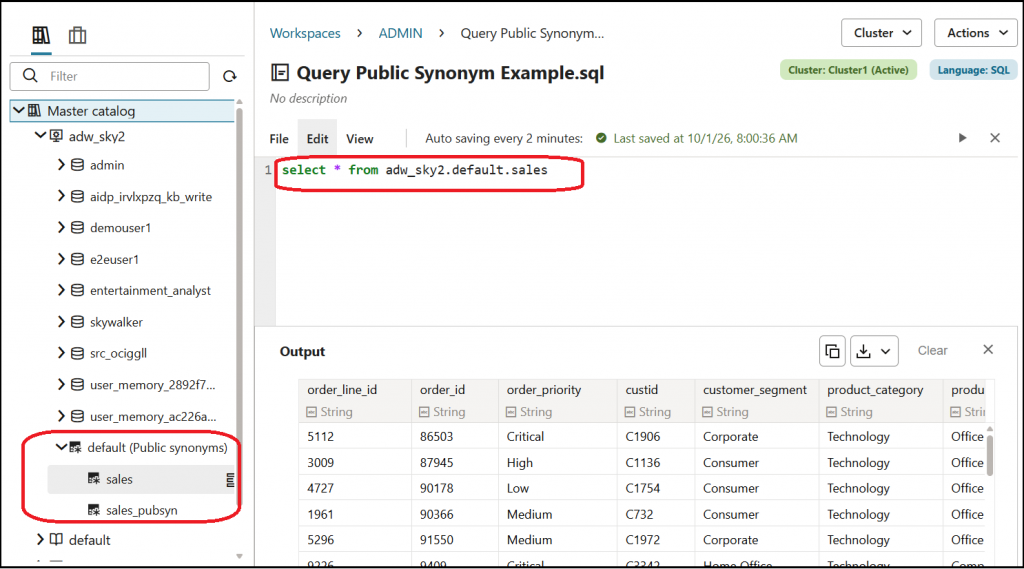
Figure 3. AIDP Catalog labels the public-synonym namespace Default; the SQL notebook references the synonym using catalog.default.synonym_name.
A short walkthrough
This standalone example uses a disposable ANALYTICS schema, separate from the Fusion Data Intelligence example. Use a supported AI Data Platform environment with synonym support enabled, permission to create or refresh an external catalog, and compute for a SQL notebook. The source account needs CREATE TABLE and CREATE SYNONYM privileges plus a tablespace quota. The catalog connection account must be able to read the target table.
- Connect to Autonomous AI Lakehouse as ANALYTICS and run the following Oracle SQL to create and verify the source synonym. Use a clean test schema where these object names are not already in use.
CREATE TABLE SALES_ORDERS (
ORDER_ID NUMBER PRIMARY KEY,
ORDER_TOTAL NUMBER(12, 2)
);
INSERT INTO SALES_ORDERS (ORDER_ID, ORDER_TOTAL)
VALUES (1001, 149.95);
COMMIT;
CREATE SYNONYM ORDERS_READ FOR SALES_ORDERS;
SELECT ORDER_ID, ORDER_TOTAL FROM ORDERS_READ;
- Create an Autonomous AI Lakehouse external catalog named demo_catalog, or refresh an existing catalog that includes ANALYTICS. Catalog creation and metadata harvesting are separate operations, so wait for the refresh job to finish.
- Confirm that ORDERS_READ appears under ANALYTICS in the AIDP Catalog, then run this query in a Spark SQL notebook. Substitute your actual catalog and schema names if they differ.
SELECT ORDER_ID, ORDER_TOTAL
FROM demo_catalog.ANALYTICS.ORDERS_READ;
Both SELECT statements should return one row with ORDER_ID 1001 and ORDER_TOTAL 149.95. This is the expected result for the sample data inserted above.
Supported behavior and limitations
- Supported use cases include the AIDP Catalog discovery, SQL notebook queries, and predefined Oracle SQL tools attached to AI agents.
- Supported targets include direct, local synonyms over tables, views, and materialized views.
- Database-link synonyms, synonym chains, and non-tabular targets are outside the supported discovery scope.
- Private synonyms appear under their owning schema. Eligible public synonyms appear under Default.
- Refresh the catalog to discover new synonyms and synchronize changed metadata.
- Queries remain subject to the source privileges of the external catalog connection account.
- AI Data Platform treats discovered synonyms as read-only catalog objects.
The takeaway
Oracle database synonym support lets customers use stable Oracle object names in the AIDP Catalog, SQL notebooks, and predefined AI agent SQL tools without staging another copy of the data. Use the owning schema for private synonyms and default for eligible public synonyms in three-part notebook names. AI Data Platform preserves each object as a synonym, honors source privileges, and blocks writes through catalog objects identified as synonyms.
Further reading
AI Data Platform external catalogs • AI Data Platform agent tools • Configure the Fusion Data Intelligence OAX_USER connection • Oracle Database CREATE SYNONYM reference