
A notebook often begins as a local piece of work. It is written for a single date, a single table, or a single use case. That is usually enough at the start. But as soon as the same logic needs to run again under a different context, the limits of that approach become clear. A notebook that depends on edited values inside the code is difficult to reuse, difficult to operationalize, and difficult to place in a workflow.
Parameterization addresses that problem.
In Oracle AI Data Platform, parameterization provides a structured way to separate notebook logic from run-time context. The workflow carries the context of execution. Individual tasks receive the inputs they need. And when one notebook produces an output needed by another, that value can move forward through the workflow without being hard coded into the next step.
Let’s understand parameterization in AI Data Platform through three related concepts: job parameters, task parameters, and notebook-side parameter access through oidlUtils.parameters.
Job parameters
Job parameters define the execution context for a workflow run.
Configured at the job level, job parameters are intended for values that should remain consistent across tasks within the same workflow. In this example, RUN_DATE = 2026-04-01 is a job parameter, and it establishes the date context for all tasks in the workflow.
The role of job parameters is to establish shared runtime context once at the workflow level, so that common inputs do not need to be repeated across tasks.
Typical examples include RUN_DATE, MARKET, ENVIRONMENT, REQUEST_ID, and MODEL_VERSION.
These are best suited to values that define the run and are expected to be interpreted consistently across the workflow.
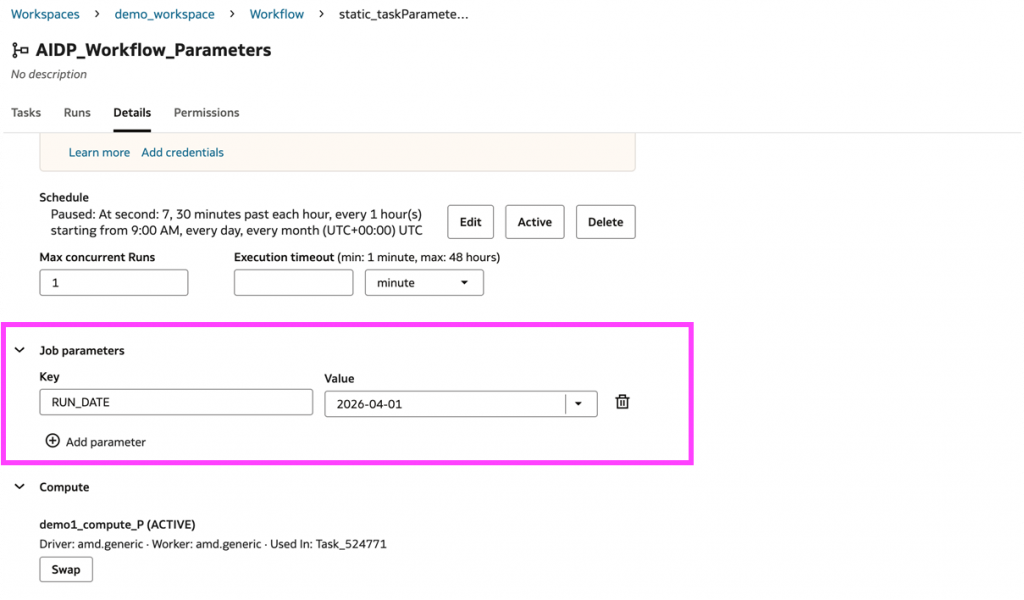
Job parameters define shared workflow context
Task parameters
Task parameters define the inputs for a specific task.
These are configured at the task level and are used for values that shape the behavior of one notebook or one step rather than the workflow as a whole. In the notebook task shown in the task details view, SOURCE_TABLE = orders_raw is a task parameter. That value belongs at the task level because it determines how that notebook reads its input. Another task in the same workflow may legitimately require a different source table, a different output location, or a different execution mode.
That distinction is important. Job parameters establish shared workflow context. Task parameters refine the behavior of an individual step within that context.
Task parameters can be passed in two ways.
- Static task parameters:
The first is as a direct value in the task definition. In the SOURCE_TABLE = orders_raw example, the notebook receives a parameter that is specified explicitly as part of the task configuration.
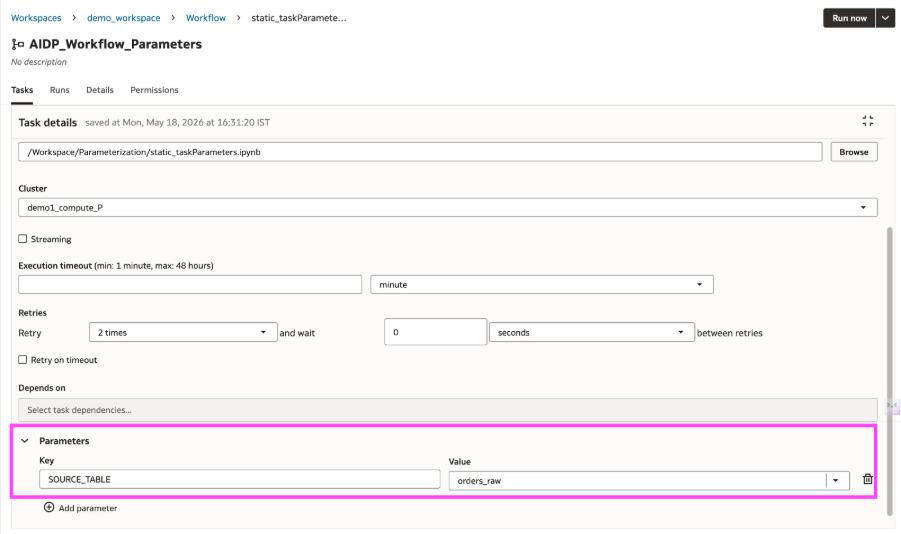
A static task parameter defined as a specific task input
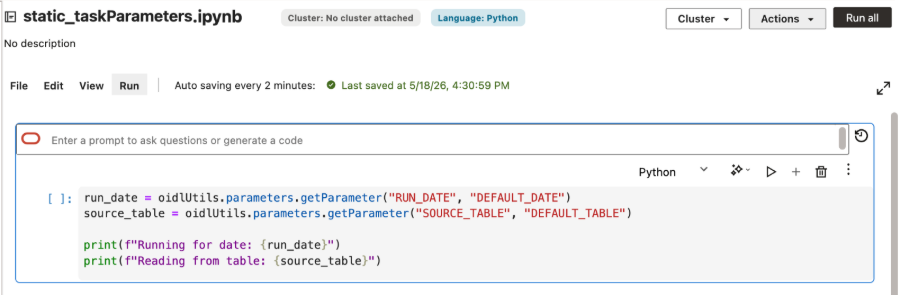
Notebook code reads job and task parameters
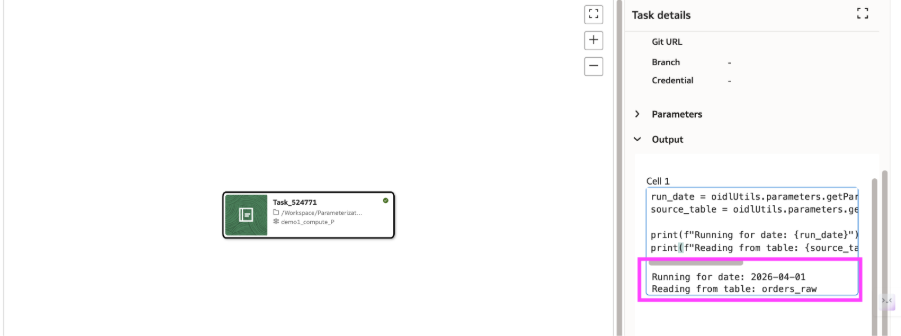
Workflow output resolving job and task parameters
- Dynamic task parameters
- Pass the value in the task definition
In the first pattern, the downstream task receives its input through the workflow configuration itself. As shown earlier, source_table is not entered as a fixed literal. Instead, it is populated from the output of an earlier task using: task.TableCreation.values.supplierparts
This keeps the handoff explicit in the workflow definition. The downstream notebook still receives a task parameter, but the value is supplied from an earlier step rather than entered manually.
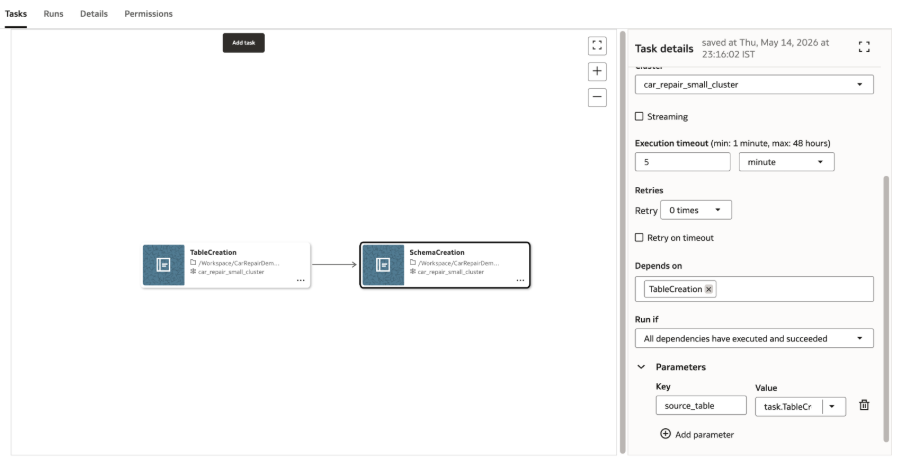
A Workflow using dynamic task parameter
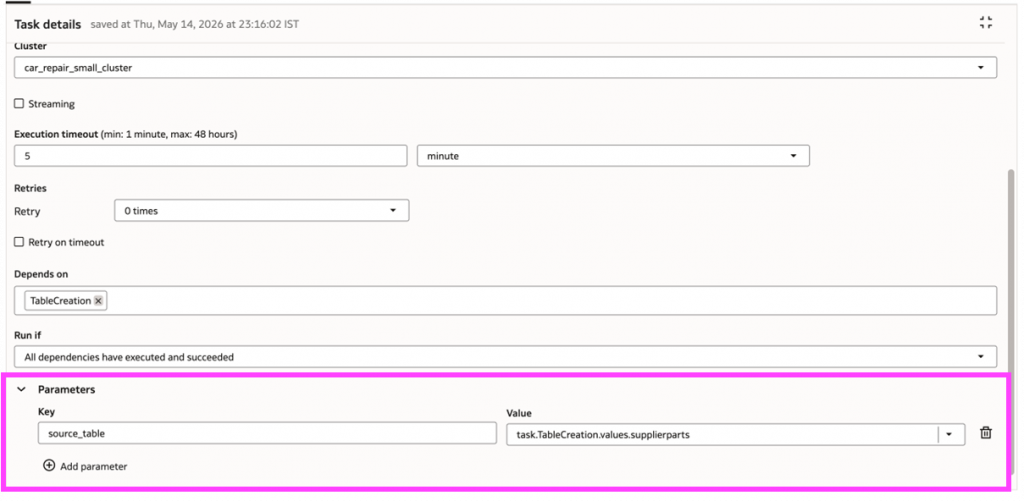
A dynamic task parameter is resolved from an earlier task
- Read the value directly in notebook code
In the second pattern, the downstream notebook reads the output of an earlier notebook directly in code by using getTaskValue.
This is useful when the downstream notebook needs access to a runtime value produced by an upstream notebook, but the value does not need to be mapped into the task definition first. Instead, the notebook reads it directly from the earlier task by name.
In the example shown in your screenshots, the first notebook reads RUN_DATE and SOURCE_TABLE, processes the data, and publishes row_count as a task value. The downstream notebook then reads row_count from the upstream notebook using:
Now the workflow has a second notebook task. Instead of repeating the same logic or relying on a hardcoded assumption, Notebook 2 reads the output from Notebook 1 using the upstream task name.
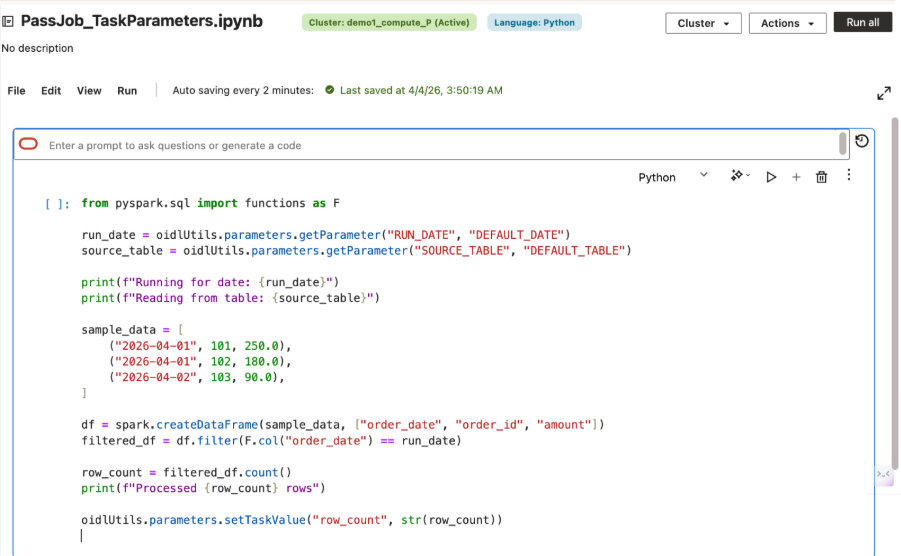
An upstream task publishes a task value for downstream use
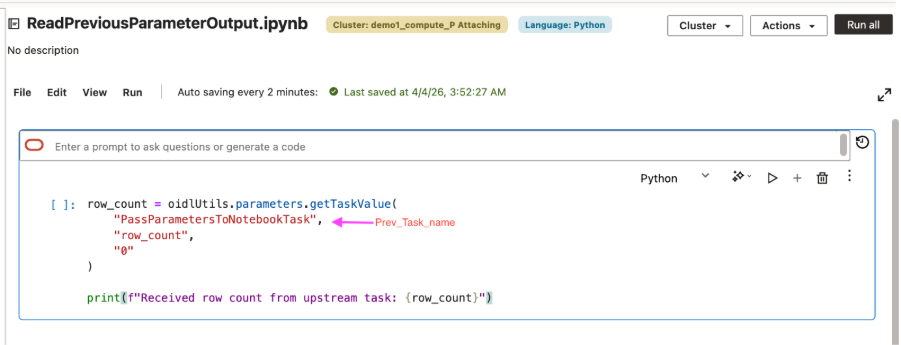
A downstream notebook reads a task value from an earlier task
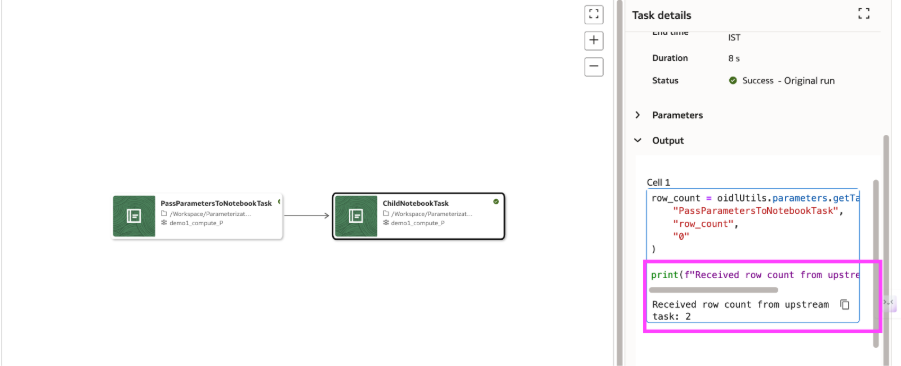
Workflow run view showing task-to-notebook parameter handoff
This pattern is especially useful in multi-step notebook workflows, where one notebook produces runtime context that the next notebook needs immediately. Rather than hard-coding assumptions or duplicating logic, the downstream notebook reads the resolved output of the upstream notebook at run time.
Task parameters have an important degree of flexibility. A task can receive a value that is known when the workflow is defined, or it can receive a value that is produced only after an earlier task has executed.
Reading and setting task inputs in notebook code
Inside notebook code, parameters are read and set through oidlUtils.parameters.
This is the notebook-side interface that connects workflow configuration to notebook execution. It gives notebook authors a consistent way to read inputs passed by the workflow and to publish values for use by downstream notebooks.
A notebook can read values passed into the run:

A notebook can also publish a value for a later notebook to consume:

This pattern keeps the contract clear. The workflow supplies the context. The notebook reads what it needs. When the notebook produces an output that matters beyond its own execution, it can publish that value explicitly.
Parameter passing for notebook-to-notebook execution
A common use case is reusing an existing utility notebook for a small, repeatable task, such as converting a CSV file to Parquet. Instead of copying that logic into every notebook, a parent’s notebook can call the utility notebook, pass the input and output paths as parameters, and wait for the result.
In AI Data Platform, this can be done with oidlUtils.notebook.run(…), which allows one notebook to invoke another and pass inputs as a key-value map. This makes it easier to break larger notebook logic into smaller reusable units while keeping parameter passing explicit and simple.
For example, a parent notebook can call a child utility notebook like this:
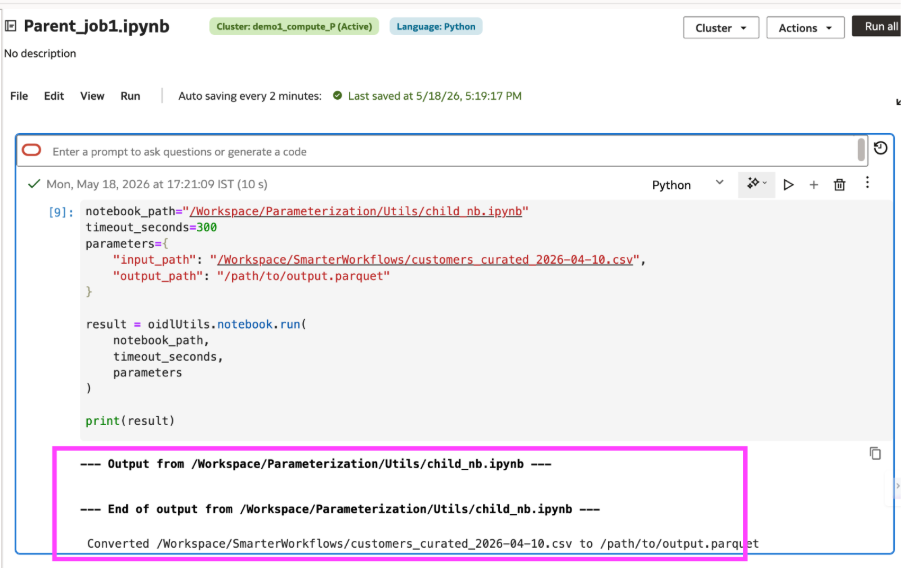
A notebook running another notebook (notebook B) using parameters
Inside the called notebook, parameters can be read with oidlUtils.notebook.get_parameters() and the called notebook can then return a value back to the caller using oidlUtils.notebook.exit(…):
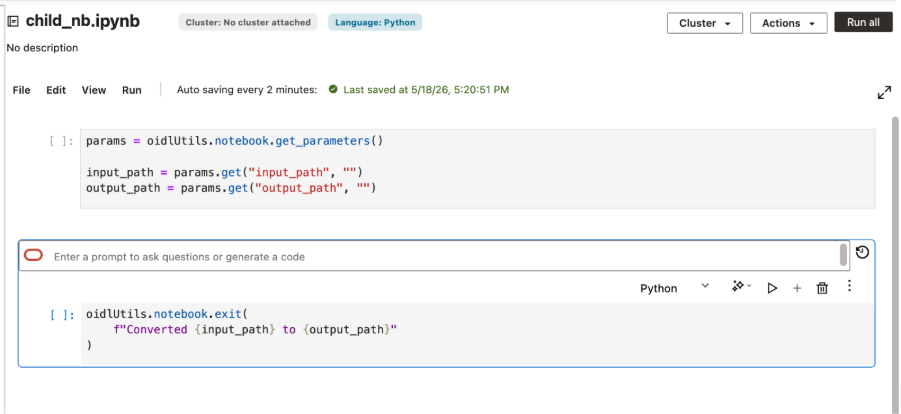
notebook B
This model keeps notebook-to-notebook parameters passing simple. Inputs are passed as strings, including JSON serialized as a string when needed. If no parameters are passed, the called notebook should still run successfully. And if the child notebook does not explicitly call exit(), the parent notebook receives an empty string by default.
Passing structured JSON between tasks
Parameterization in AI Data Platform is not limited to simple scalar values. A common workflow use case is when one task produces more than a single status flag and a downstream task needs to consume that result in a structured way.
For example, an upstream notebook might finish a validation or preparation step and return a small payload describing what happened, such as whether the task succeeded and how many rows were processed. Instead of splitting those values across multiple separate parameters, the task can package them into a single JSON string and pass that payload downstream.
For example, an upstream notebook task can serialize a payload as a JSON string and publish it as a task value:
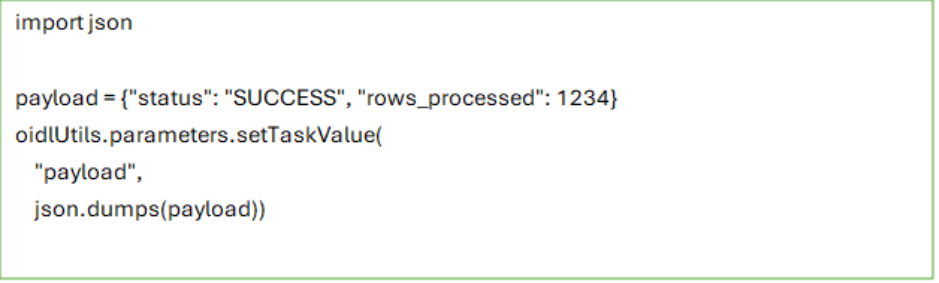
A downstream task can then reference that output directly in the job configuration

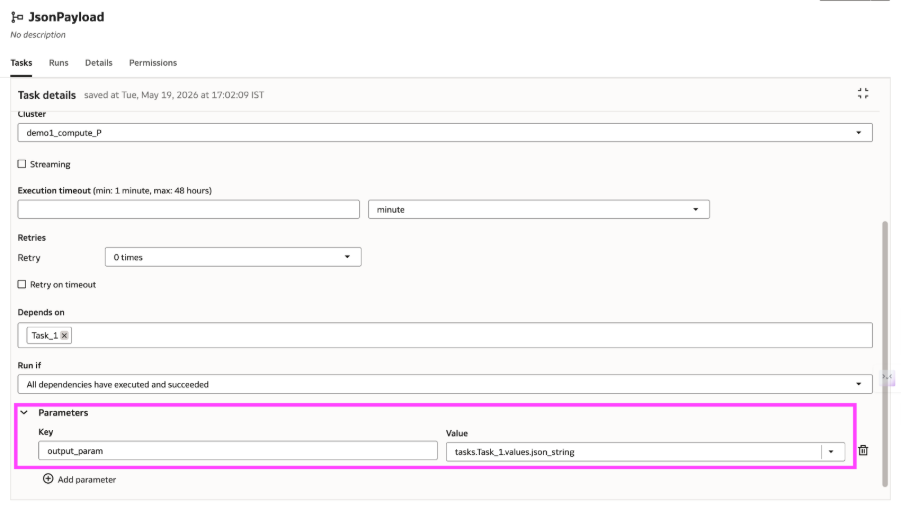
Reading Json input from previous task
That referenced value can be passed into the downstream notebook as an input parameter, where it can be parsed and used like any other structured payload:
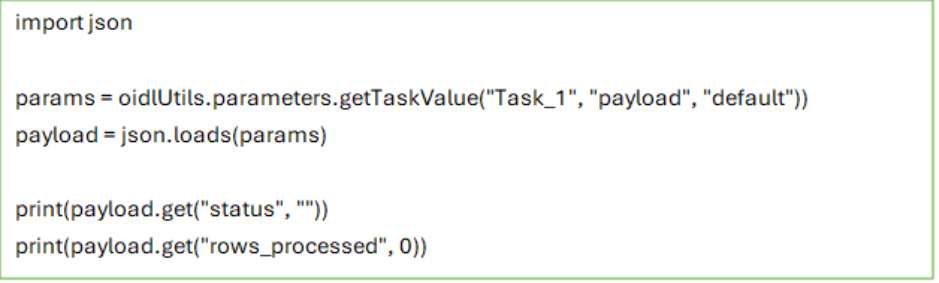
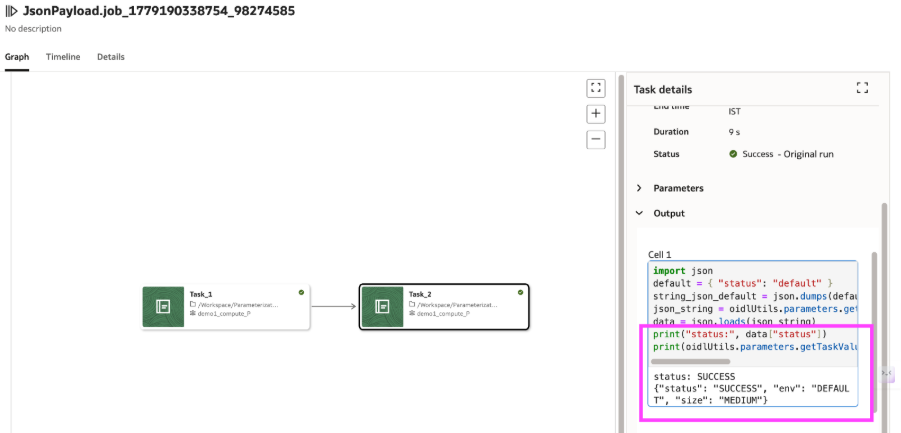
A workflow publishing Json output from previous task
The same pattern also applies when users define parameters directly in the Job or Task UI. A parameter such as input_payload can be entered as a JSON string and passed into the notebook without changing the notebook code structure.

This makes parameterization more flexible for real workflows. Simple inputs can still be passed as key-value pairs, while richer structured values can be passed as JSON strings and parsed inside the notebook when needed.
Why Parameterization matters for real workflows
This model gives teams two useful levels of flexibility. In the simple case, parameters remove hardcoded values and make a notebook reusable. In the more advanced case, task values let notebook tasks exchange runtime information without breaking the consistency of the workflow model.
AI Data Platform also supports system parameters such as {{job.id}}, {{job.name}}, {{task.name}}, and many more for workflows that need system-provided context or dynamic references. Those become especially useful as workflows grow more sophisticated.
Parameterization in Oracle AI Data Platform is more than a convenience feature. It is one of the key capabilities that makes notebooks work well inside production workflows. Job parameters provide shared defaults. Task parameters tailor individual notebook behavior. Task values let notebooks pass information downstream when the workflow needs to adapt at runtime. That combination gives teams a practical path from interactive notebook development to repeatable, workflow-driven execution, without losing the flexibility that made notebooks valuable in the first place.
For more information
To explore more, check out these resources below.