
AI adoption continues to accelerate across industries, yet many organizations remain in the early stages of realizing its full value. Nearly nine out of ten AI proof-of-concepts never make it to production, according to IDC’s CIO Playbook 2025 survey. Top inhibitors include inconsistent data quality, integration complexity, and limited operational readiness.
At the core of these challenges is an architectural disconnect. In many organizations, data and AI efforts still operate in silos. Data must be moved between those silos and pipelines must be recreated. This fragmentation makes it difficult to move from successful experimentation to scalable and repeatable production workflows. Infrastructure complexities also increase with scale, which in turn increases management overhead.
AI Data Platform addresses these challenges by unifying data and AI within a single platform with unfragmented data, integrated workflows, and built-in governance. It enables organizations to take work that begins in a notebook and systematically evolve it into a fully operational, production-grade workflow without introducing additional complexity or requiring data movement.
Start with Notebooks as Foundation
AI begins with data. Every data exploration idea begins with a notebook.
Data scientists and engineers live and breathe notebooks. They use notebooks to explore data, engineer features, and build models iteratively. This is where they collaborate. This is where they test and validate ideas.
However, notebooks alone are not sufficient for production. While notebooks are inherently interactive by design, they need additional built-in capabilities for automation, orchestration, and monitoring.
The challenge is not building the model. It is turning that notebook into something that runs reliably every day.
AI Data Platform extends the role of notebooks beyond exploration. It enables teams to use notebooks as the foundation for production workflows, adding the capabilities required for operational execution on top of existing work.
Key takeaway: Notebooks are the starting point, not the end state. Maintain continuity from development to production without rewriting code or changing tools.
Evolve Notebooks into Workflows: From Single Step to End-to-End Pipeline
Once a notebook is validated, it is ready to go to production as a single unit of execution, or as a building block for a broader end to end pipeline.
AI Data Platform allows notebooks to be embedded directly into workflows alongside other tasks. These workflows define how data moves from raw inputs to business outcomes.
A typical pipeline may include:
- Data preparation
- Feature engineering
- Model scoring
- Downstream actions
Each step is defined as a task within a workflow.
This transforms isolated notebook execution into structured, repeatable Workflow jobs.
Automate Execution with Scheduling
A defining characteristic of production systems is their ability to run consistently without manual intervention or interaction.
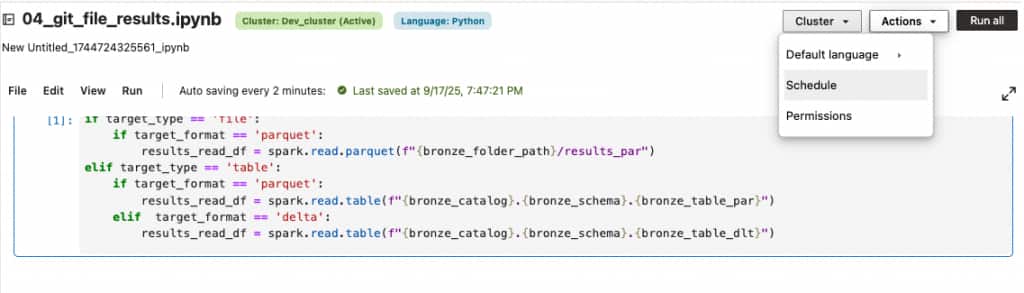
AI Data Platform enables users to schedule both notebooks and workflows using flexible configuration options. Teams can define execution patterns based on business requirements, including time-based schedules or ‘cron’ expressions.
Scheduling ensures that pipelines are executed at the right time, with the appropriate frequency, and in alignment with operational needs.
For example, a churn prediction workflow can be scheduled to run each morning, so that business stakeholders can receive updated insights at the start of the day.
Key takeaway: Scheduling replaces manual execution.
Use Triggers for conditional execution
AI Data Platform supports triggers that allow workflows to initiate based on specific conditions. These conditions may include the completion of upstream jobs or predefined criteria.
Triggers enable more dynamic and adaptive pipelines, ensuring that processes run when needed rather than strictly on a fixed schedule.
Triggers allow tasks to start when:
- A specific time is reached
- One or more prerequisite job completes
- One or more condition is satisfied
Key takeaway: Trigger enables more dynamic and responsive data pipelines.
Ensure Sequencing with Dependencies
Reliable execution requires clear control over task sequencing.
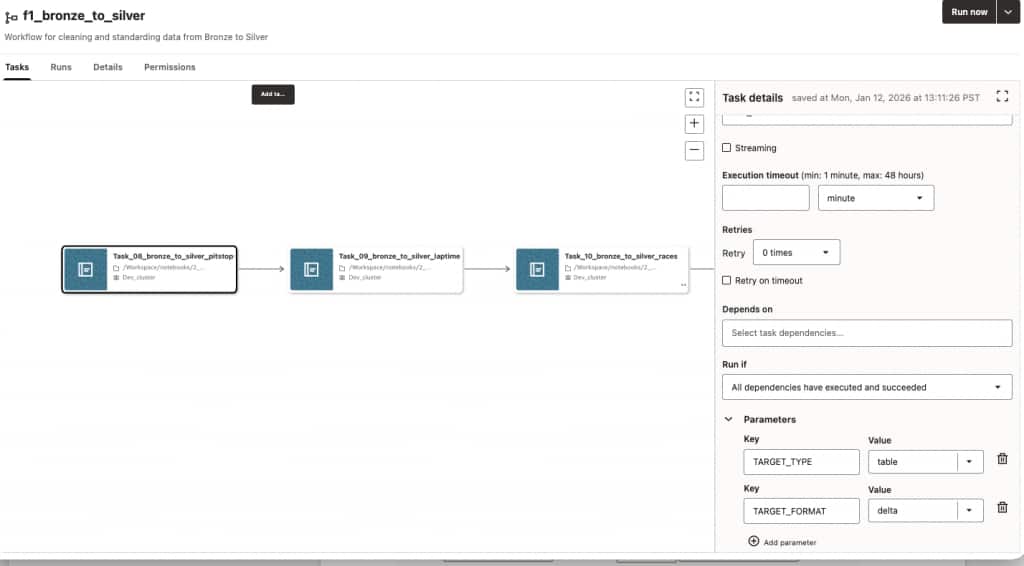
Within AI Data Platform workflows, dependencies define the relationships between tasks. These dependencies ensure that each step is executed only after its prerequisites have been successfully completed.
This capability is critical for maintaining data integrity and ensuring that downstream processes operate on valid inputs.
For example, feature engineering must complete successfully before model scoring begins. Dependencies enforce this order and prevent inconsistencies.
Key takeaway: Establish deterministic execution paths for consistent outcomes.
Improve Resilience with Retries
Production environments are inherently dynamic. Temporary failures can occur due to data availability, network conditions, or system constraints.
AI Data Platform incorporates retry mechanisms that automatically reattempt failed tasks based on defined retry policies. This reduces the need for manual intervention and improves overall system resilience.
In cases where failures require investigation, teams can selectively rerun only the affected tasks rather than restarting the entire workflow.
Key takeaway: Minimize preventable disruptions in production pipelines with Workflow retries.

Monitor Execution with Job History
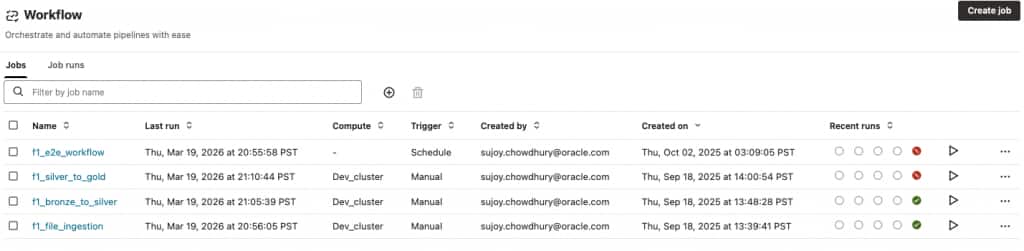
As workflows scale, visibility into execution becomes increasingly important. AI Data Platform provides a centralized at-a-glance view of job history. This enables teams to track past executions, monitor performance trends, and identify recurring issues. Recurring failures may be a lagging indicator of issues in the notebook code, or some regression.
This historical perspective can inform both operational management and governance requirements by providing a clear record of pipeline activity.
Key takeaway: Job history can help identify workflows that require more testing.
Accelerate Troubleshooting with Logs
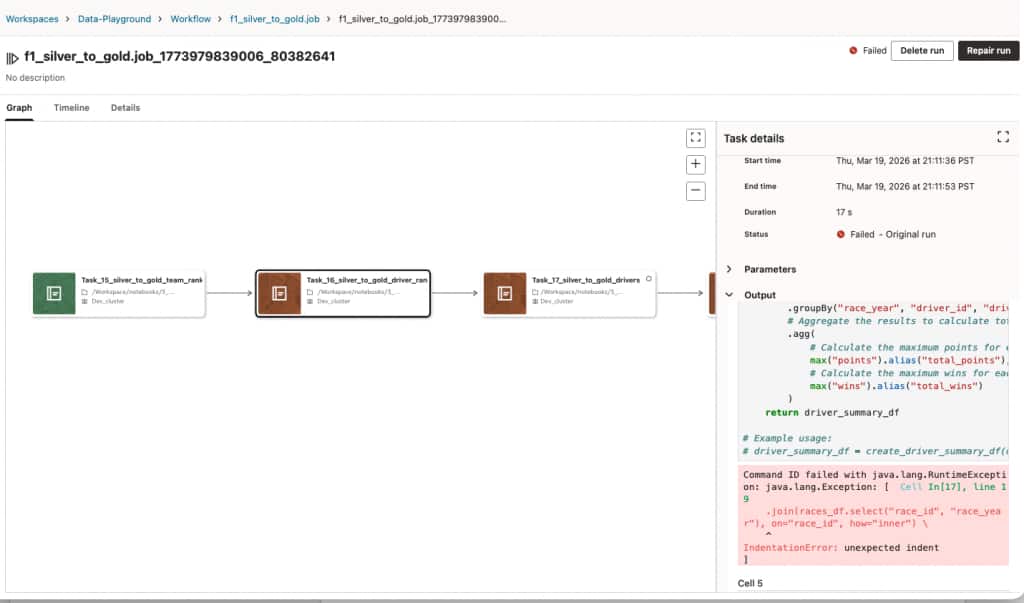
When workflow jobs fail, fast access to detailed diagnostics is essential for expedient troubleshooting.
AI Data Platform provides quick access to both errors in the output section, and also via detailed cluster logs that are filtered to the task level. These logs offer insights into execution behavior, error conditions, and system performance.
By enabling rapid diagnosis and resolution, logs reduce downtime and improve the reliability of production systems.
Key takeaway: Shorten resolution times and improve operational efficiency with logs.
Optimize Performance with Flexible Compute options
Rightsizing and proper management of the Compute play a critical role in both development and production. There can be trade-offs of cost vs performance, flexibility vs predictability, autoscaling vs fixed sizing etc.
AI Data Platform supports flexible All Purpose Compute options both for CPU and GPU. These clusters can be auto-scaling for bursty workloads, or fixed sized for less varying workloads. Customers can pre-install cluster scoped libraries that will apply to all notebooks and workflows running in that cluster. There are also options for notebook scoped libraries for dynamically loading the frequently changing dependent libraries. Users can:
- Start quickly in a notebook using predefined quickstart clusters
- Configure custom clusters tailored to specific workloads
- Assign different compute environments to individual tasks within a workflow
- Separate compute resources across development, test, and production environments
This flexibility enables teams to optimize both performance and cost while maintaining consistency across environments.
Key takeaway: Pick the Compute that aligns with workload demands, lifecycle stages and price-performance trade-off.
Unify Data and AI: Process Data Where It Resides
One of the most significant barriers to operationalization is data movement.
In traditional architectures, data must be transferred from data platforms into separate AI environments. This introduces latency, increases cost, and creates additional governance challenges.
AI Data Platform reduces this barrier by enabling in-place data processing. Workflows operate directly on data where it resides, supporting established data architectures such as the medallion architecture.
- Bronze layers capture raw data
- Silver layers refine and standardize data
- Gold layers provide curated, business-ready outputs
By processing data across these layers without movement, organizations can reduce complexity and improve efficiency.
Key takeaway: Break down data silos, reduce duplication, and enable faster time to value.
Bringing It All Together: Notebooks to Workflows
AI Data Platform provides a comprehensive framework for operationalizing data and AI workloads via Notebooks and Workflows. Organizations can have multiple teams collaborating on the AI Data Platform. Teams can:
- Start with Notebooks as Foundation
- Evolve Notebooks into Workflows
- Automate Execution with Scheduling
- Use Triggers for conditional execution
- Ensure Sequencing with Dependencies
- Improve Resilience with Retries
- Monitor execution with Job History
- Accelerate Troubleshooting with Logs
- Optimize performance through flexible compute assignment
- Unify Data and AI: Process Data Where It Resides
Final Takeaway: The essential capabilities for productionizing notebooks to workflows are designed and delivered within the single pane of glass at AI Data Platform. Leverage them and reduce the need for data movement and reduce architectural complexity, move from experimentation to production with greater efficiency, consistency, and control.
For more information
We covered the notebook and workflow specific capabilities of Oracle AI Data Platform today. To explore more, check out these resources below.
Oracle AI Data Platform Workbench Documentation
Oracle AI Data Platform Workbench Github Repository
Oracle AI Data Platform Workbench Community