
Managing Python dependencies is one of the most underestimated sources of friction in enterprise data and AI development. What starts as a simple pip install during exploration often turns into inconsistent environments, broken pipelines, and “works on my machine” failures as projects scale.
In AI Data Platform, dependency management isn’t a one-size-fits-all decision. Instead, it’s a deliberate choice between notebook-scoped installs for agility and cluster-scoped libraries for stability and reproducibility.
This guide walks through when and why to use each approach, and how to combine them effectively across the data AI ML development lifecycle.
The Core Challenge: One Size Doesn’t Fit All
When it comes to shared compute environments, most teams fall into one of two traps:
- Over-centralization: Locked-down environments slow experimentation
- Over-flexibility: Uncontrolled installs lead to chaos and inconsistency
Dependency needs to evolve across stages:
| Stage | Priority | Dependency Strategy |
| Exploration | Speed | Notebook-level installs |
| Development | Consistency | Mixed approach |
| Production | Stability & governance | Cluster-scoped libraries |
AI Data Platform is designed to support this progression with zero friction.
Two Models, Two Purposes
1. Notebook-Scoped pip install: Speed and Flexibility
Notebook-level installs allow you to install Python packages directly within a running notebook session.
What this enables:
- Rapid experimentation with new libraries
- Trying niche or unapproved packages
- Iterating without waiting for environment changes
Example scenario:
A data scientist evaluating a new feature engineering library can install a notebook-scoped-library instantly into his notebook using pip install commands. She doesn’t need to worry about whether that library will break other notebooks attached to the same shared cluster.
pip install category-encodersKey characteristics:
- Scoped to the notebook session
- Non-persistent (reset when session restarts)
- Isolated from other users
Where it shines:
- Early-stage experimentation
- Prototyping
- Debugging dependency issues
2. Cluster-Scoped Libraries: Stability and Reproducibility
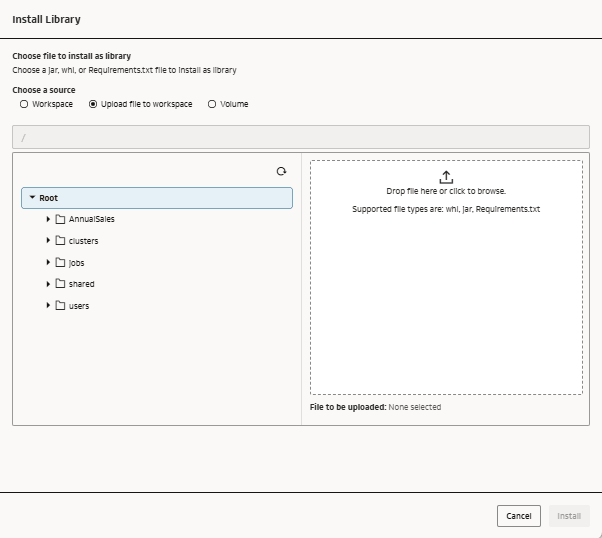
Cluster-scoped libraries are installed at the compute cluster level and are available to all notebook sessions attached to that cluster. Your library file can be a .jar file or a Wheel (*.whl) file or a requirements.txt file.
What this enables:
- Consistent environments across users and sessions
- Reproducible experiments
- Standardized dependency stacks
Example scenario:
A team standardizes on:
- PyTorch version X
- Internal feature store SDK
- Approved data access libraries
These are installed once at the cluster level and reused across all notebooks.
Key characteristics:
- Persistent across sessions
- Shared across users
- Centrally managed
Where it shines:
- Team collaboration
- Model validation
- Production pipelines
How AI Data Platform Brings This Together
What makes AI Data Platform different is how these models are intentionally connected to compute and collaboration constructs.
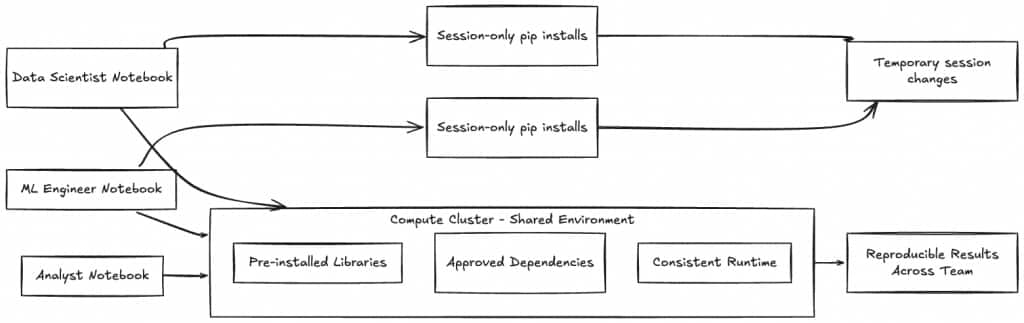
Compute Clusters as Environment Anchors
Clusters are more than compute—they define:
- Available libraries
- Runtime consistency
- Shared environments
When you attach a notebook to a cluster, you inherit its dependency stack.
This creates a natural boundary:
- Cluster = controlled, shared environment
- Notebook = flexible, user-level override
Notebook Sessions: Controlled Flexibility
Notebook sessions sit on top of clusters, allowing:
- Access to shared libraries
- Optional local overrides via pip install
This layered model avoids a common problem in other platforms:
Either everything is shared (too rigid) or everything is ad hoc (too chaotic). AIDP gives you both, in a cleanly separated manner.
Shared Environments Without Friction
By combining cluster libraries with notebook sessions, teams can:
- Collaborate in a consistent environment
- Still experiment independently when needed
A new team member can:
- Attach to an existing cluster
- Immediately inherit the correct environment
- Start working without manual setup
That’s a significant reduction in onboarding time and setup errors.
A Practical Decision Framework
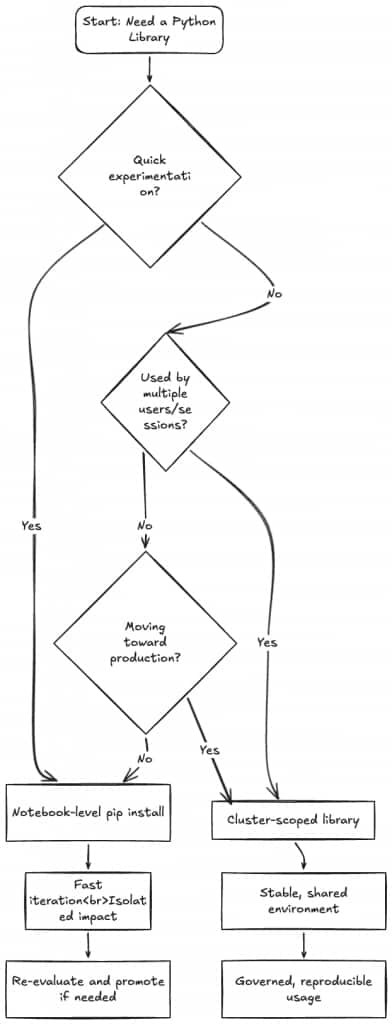
Here’s a simple way to decide where a Python dependency should be installed:
The Dependency Lifecycle in Practice
The most effective teams don’t choose one dependency management model. They choose between them intentionally.
Stage 1: Exploration
- Use notebook-level installs
- Try multiple libraries quickly
- Accept instability as part of speed
Example: Testing 3 different NLP libraries in a single day
Stage 2: Stabilization
- Identify the “working” dependencies
- Reduce unnecessary variation
- Begin sharing across team members
Transition point: Move frequently used libraries to cluster scope libraries.
Stage 3: Production Readiness
- Lock dependencies at cluster level
- Eliminate notebook-level variability
- Ensure reproducibility
Outcome:
The same stable environment with necessary dependencies that supports Training, Validation and Deployment
Common Pitfalls (and How to Avoid Them)
1. Overusing Notebook Installs
Problem: Environments become inconsistent and hard to reproduce
Fix: Promote stable dependencies to cluster level early
2. Over-centralizing Too Soon
Problem: Teams wait on environment changes, slowing innovation
Fix: Allow notebook installs during exploration
3. Ignoring Environment Drift
Problem: Different sessions behave differently over time
Fix: Use cluster libraries as the source of truth
Why This Matters for Enterprise Teams
Reproducibility at Scale
Cluster-scoped libraries ensure that:
- Experiments can be rerun reliably
- Models behave consistently across environments
Faster Collaboration
Shared environments eliminate:
- Setup friction
- Dependency mismatches
- Back-and-forth debugging
Built-in Governance
Cluster-level control allows:
- Approval of libraries
- Version standardization
- Reduced security risk
Efficient Resource Usage
Pre-installed libraries:
- Reduce repeated setup time
- Improve cluster utilization
- Speed up notebook startup
Bringing It All Together
The key insight is simple:
Notebook-level installs are for exploring. Cluster-level libraries are for scaling.
AI Data Platform doesn’t force you to choose between them. AI Data Platform gives you the option to use both, depending on your use-case and development stage.
The most effective teams:
- Start flexible
- Choose between shared and individual dependencies intentionally
- Standardize where it matters
That’s how you move from experimentation to production without getting stuck in dependency chaos.
Final Takeaway
If your team treats all Python installs the same way, you’ll either sacrifice speed or stability.
With AI Data Platform, you don’t have to.
By aligning dependency strategy with the ML lifecycle, and using the right scope at the right time, you can:
- Move faster in early stages
- Collaborate more effectively
- Deploy with confidence
For more information
We covered the cluster-scoped-library and notebook-scoped-library specific capabilities of Oracle AI Data Platform today. To explore more, check out these resources below.
Oracle AI Data Platform Workbench Documentation
Oracle AI Data Platform Workbench Github Repository
Oracle AI Data Platform Workbench Community