
A visual deployment guide for hosted applications, agent workflows, and enterprise-ready operations.
In this use case, a user uploads a CPQ document containing commercial terms, pricing selections, coverage details, and customer-specific inputs. The platform extracts these values, applies business rules against a contract template, generates required rate tables and clauses, and produces a draft agreement for review. CPQ provides the source data, while the template provides the approved legal structure into which the generated content is inserted.
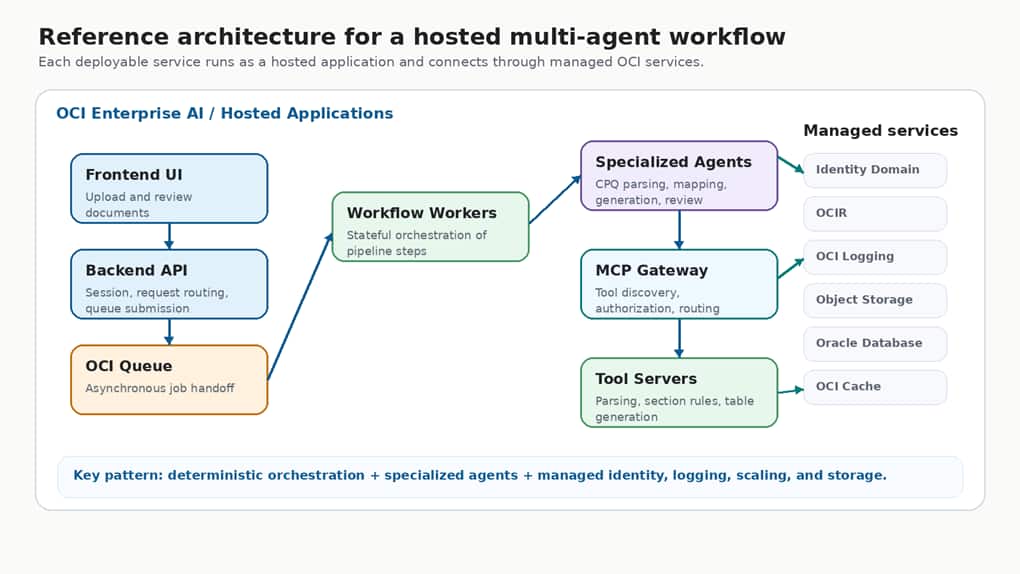
Figure: Reference architecture for hosting a multi-agent workflow on OCI Enterprise AI.
Introduction
Enterprise AI applications increasingly need more than a single model call. Real business workflows often combine document intake, deterministic orchestration, specialized agents, tool execution, identity controls, logging, and release management. OCI Enterprise AI Agent Hub provides a managed way to package those capabilities as hosted applications and operate them with enterprise-grade controls.
This blog walks through a multi-agent contract automation platform deployed on OCI Enterprise AI Agent Hub. The emphasis is intentionally high level: what the platform does, how the hosted application is created, how the deployment is activated, and which architecture patterns made the system easier to operate.
What the platform does
The use case is document automation for enterprise agreements. A user uploads a structured business document, the platform extracts relevant fields and pricing tables, applies clause and visibility rules, generates supporting tables, and produces a final document for review. The value is not only extraction; it is the ability to coordinate multiple steps reliably while preserving governance and traceability.
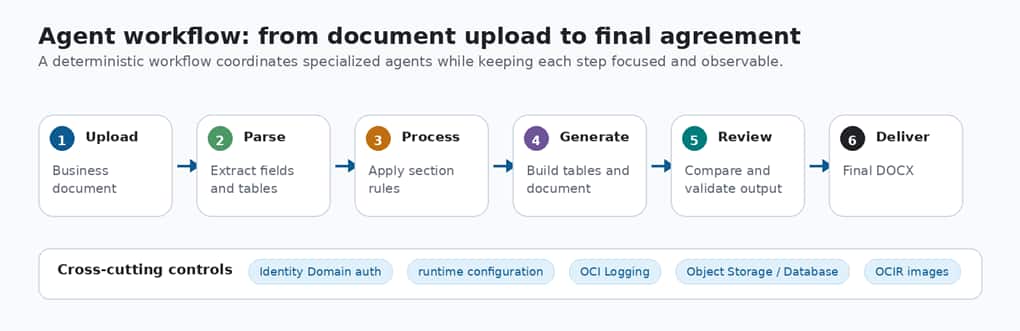
Figure: High-level agent workflow from document upload to final generated agreement.
Architecture at a glance
The architecture is organized into layers so each responsibility is easy to understand and operate. The user experience layer handles uploads and review. The application layer manages API intake, job state, and result delivery. The Agent Hub runtime hosts the orchestrator, specialized agents, MCP gateways, and tool services. Enterprise services provide data, identity, storage, and observability.
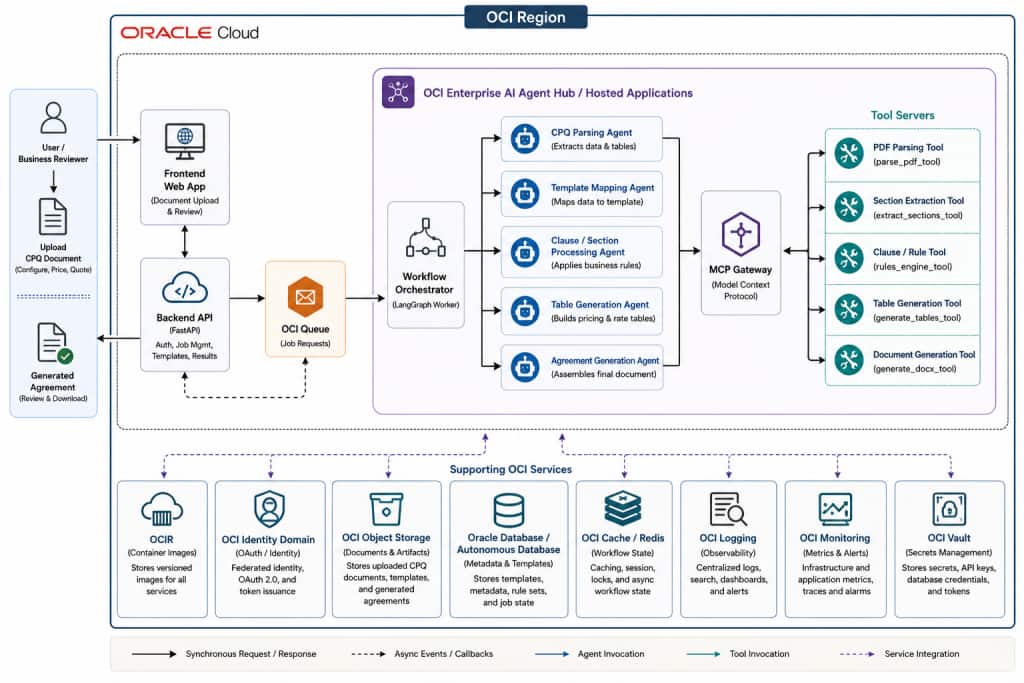
Figure: High-level architecture for a governed multi-agent deployment.
Why OCI Enterprise AI Agent Hub
Many agentic solutions begin outside a managed enterprise platform. Teams often prototype with open frameworks such as LangGraph for workflow orchestration, FastAPI for service APIs, MCP servers for tool access, and custom Python services for document parsing, table generation, or business-rule execution. This approach is flexible and fast during development, but enterprise deployment introduces additional requirements that are harder to manage manually.
For production use cases, the challenge is not only building the agent logic. The platform also needs secure application endpoints, identity-based access, autoscaling, centralized configuration, observability, container image management, and repeatable release controls. OCI Enterprise AI Agent Hub provides a managed path for bringing these existing containerized agent components into an enterprise-ready runtime.
In this contract automation use case, the workflow already has clear deployable units: a backend API, a workflow orchestrator, specialized agents, MCP gateways, and tool services. The CPQ parsing logic, template mapping logic, clause-processing logic, table-generation logic, and agreement-generation logic can each be packaged as containerized services. These services can then be published to Oracle Cloud Infrastructure Registry and deployed as hosted applications on OCI Enterprise AI Agent Hub.
This means the agent workflow does not need to be redesigned from scratch. The business logic can remain in the existing agents and tools, while OCI Enterprise AI Agent Hub provides the operational layer for hosting, authentication, scaling, logging, networking, and deployment activation.
A hosted application separates runtime configuration from release activation. The application defines how the containerized service should run, including scaling, storage, networking, authentication, environment configuration, and logging. A deployment then activates a specific container image version from OCIR and makes that version available through the application endpoint.
This separation is useful for multi-agent systems because each agent, gateway, tool server, or worker can be packaged as a versioned container image, while the operational contract around identity, scaling, networking, and observability stays consistent. Teams can update one component, activate a new deployment, validate the runtime behavior, and roll back to a previous image version when needed.
In short, OCI Enterprise AI Agent Hub is a practical fit when a team already has an agentic solution running locally, on virtual machines, on Kubernetes, or in a custom microservice environment, and wants to move that solution onto a managed enterprise AI platform with stronger operational controls.
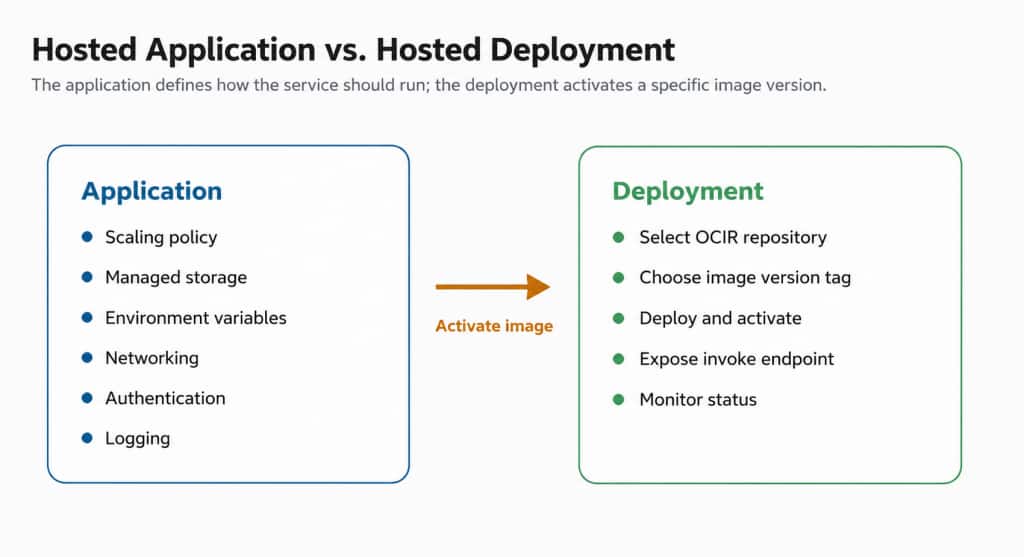
Figure: Application configuration stays stable while deployments activate specific image versions.
This separation is useful for agentic systems because each agent, gateway, tool server, or worker can be packaged as a versioned container image, while the operational contract around identity, scaling, networking, and observability stays consistent. OCI Enterprise AI provides a managed deployment path for containerized agent workloads. Teams package an agent as a container image, upload it to Oracle Cloud Infrastructure Registry, configure runtime settings such as scaling, storage, networking, and authentication, and receive an endpoint that clients or other agents can invoke. This allows teams to focus more on the agent workflow and less on undifferentiated runtime operations.
Deployment pattern
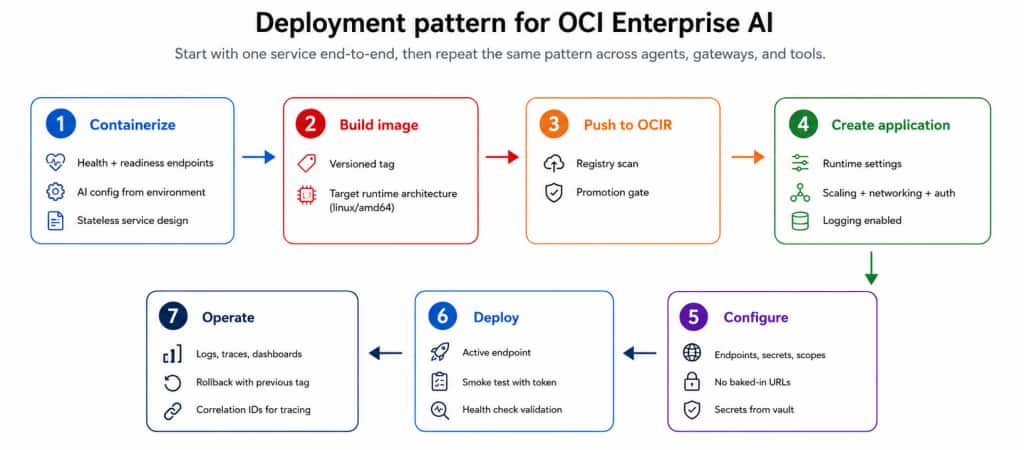
Figure : Repeatable deployment pattern for agents, gateways, and tools.
The most reliable migration pattern is not to move every service at once. Start with one representative service and prove the full runtime contract: container startup, readiness, authentication, configuration, callbacks, logs, and rollback. Once the first service is healthy, repeat the same pattern across the orchestrator, agents, gateways, and tool services.
- Containerize each service with clear health and readiness endpoints.
- Use versioned image tags so rollback is explicit and predictable.
- Externalize service URLs, scopes, feature flags, and integration settings through environment-driven configuration.
- Treat inter-service authentication as part of the design, not as a final integration step.
- Add correlation IDs before production so async callbacks can be traced end to end.
Security, configuration, and observability
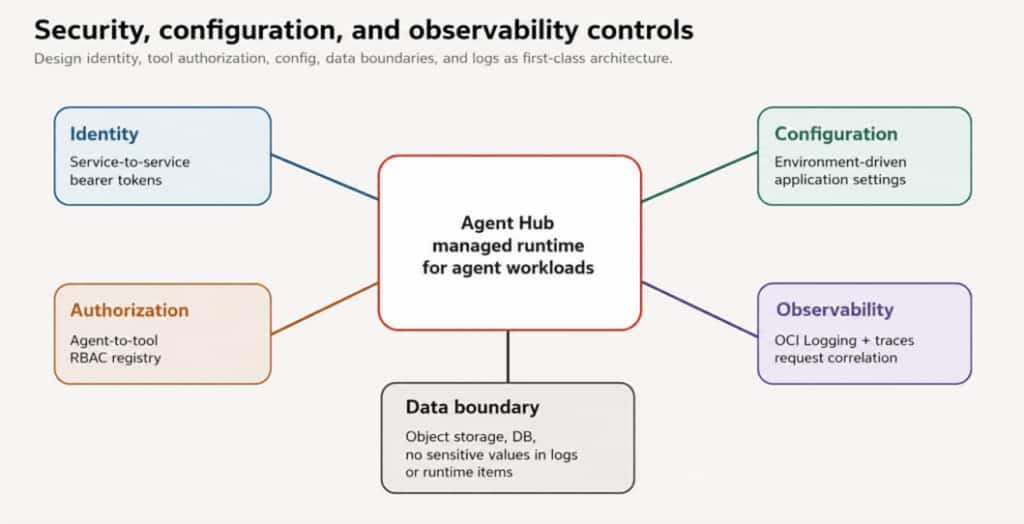
Figure: Governance controls that make the architecture production-ready.
Governance is not a separate feature bolted on after deployment. In an agentic system, every service-to-service call, tool invocation, and document artifact should be designed with identity, authorization, and traceability in mind.
The design should answer five questions before the first production deployment:
- Who or what is calling this endpoint?
- Which tools is this agent allowed to use?
- Where is configuration stored and how is it promoted?
- How can operators trace one request across every async step?
- Which data must never appear in logs, prompts, diagrams, or public blogs?
Creating a hosted application in OCI Enterprise AI
| Step | Console area | Details |
| 1 | Applications page | Navigate to Generative AI, open Applications, select the compartment, and click Create application. |
| 2 | Basic information | Provide the application name, description, and compartment. |
| 3 | Scaling | Set minimum replicas, maximum replicas, autoscaling metric, and target threshold. |
| 4 | Storage | Optionally enable managed PostgreSQL, OCI Cache, or Autonomous Database. Connection details are injected through environment variables. |
| 5 | Environment | Add runtime configuration through environment variables or vault-backed values. |
| 6 | Networking | Choose default service-managed networking or custom VCN/subnet routing. Select public or private endpoint access. |
| 7 | Authentication | Use Identity Domain authentication for secured access. Redact domain, audience, scope, client ID, and client secret values. |
| 8 | Logging | Enable resource logging so deployment issues and runtime activity can be traced through OCI Logging. |
| 9 | Deployment | Create a deployment by selecting an OCIR repository and image tag, then activate the image version. |
| 10 | Verification | Wait for Active status, confirm the invoke endpoint, and validate logs and monitoring before traffic is sent. |
How to reach the hosted application and deployment page?
To create a hosted application, sign in to the OCI Console and select the target region. In this example, the deployment is created in the US Midwest (Chicago) region.
From the OCI Console navigation menu, go to:
Analytics & AI → Generative AI → Applications
The Applications page lists the hosted applications available in the selected compartment. From here, click Create application to start the hosted application setup workflow.
Step 1: Basic information
Fill in Basic Details of the application to be created.
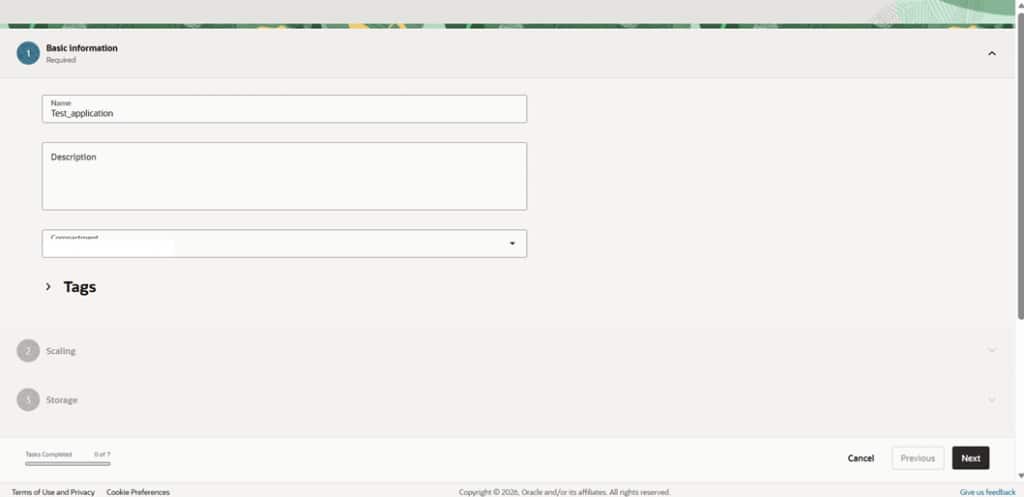
Figure: Basic information page.
Step 2: Configure autoscaling
Autoscaling controls how many replicas are running. For a predictable first deployment, a small minimum and maximum replica range is usually enough. As traffic patterns become clearer, the autoscaling metric and threshold can be tuned for CPU, memory, concurrency, or request rate.
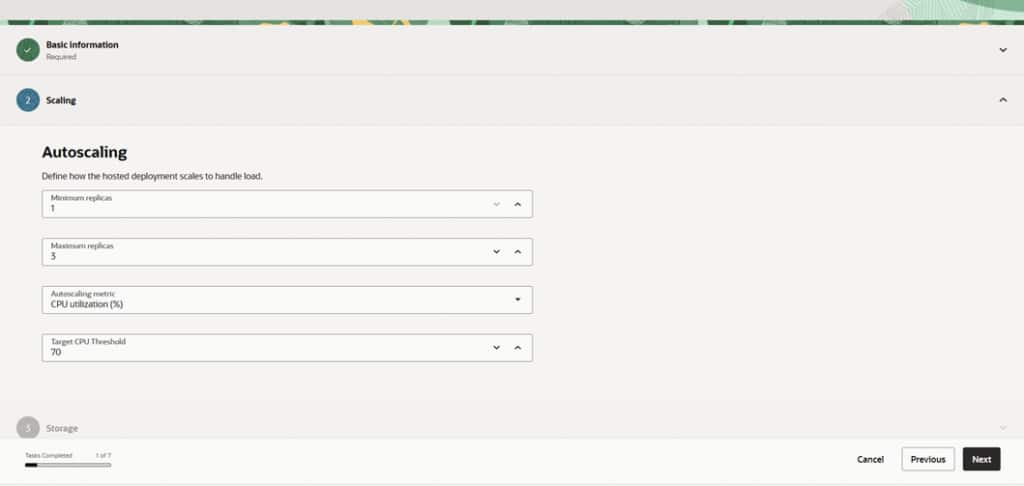
Figure: Scaling page.
Step 3: Configure managed storage
Managed storage can provide backing services such as a database or cache. The platform injects connection information into the container at runtime, which helps keep the application image stateless and reusable across environments.
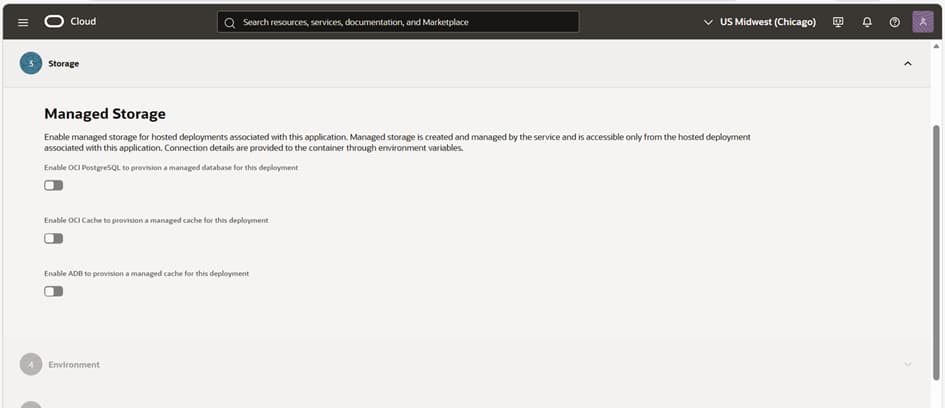
Figure: Managed storage configuration for a hosted application.
Step 4: Add environment configuration
Environment variables are used to inject runtime settings into the container. For this deployment pattern, a single structured configuration variable can reduce manual console entry and keep dependency URLs out of the image.
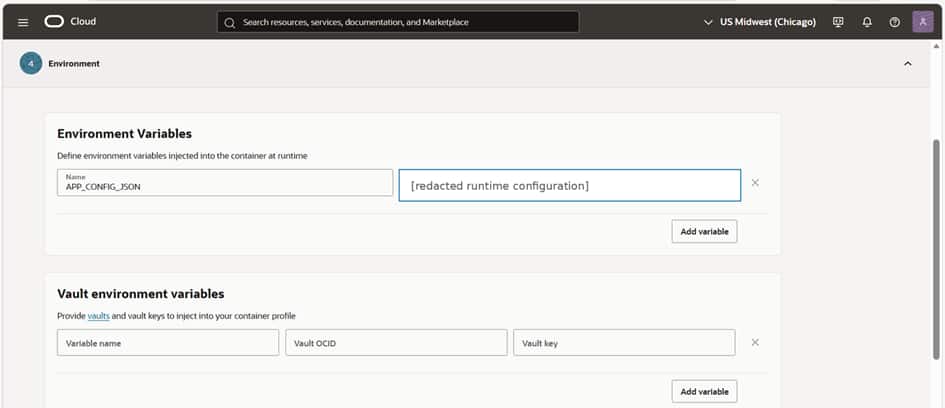
Figure: Redacted environment configuration with APP_CONFIG_JSON shown as a runtime configuration pattern.
Step 5: Configure networking
Networking determines how the hosted application reaches other systems and how callers access it. Default service-managed networking is suitable for common public-service access patterns. Custom networking can be used when the application needs private access to services inside a VCN.
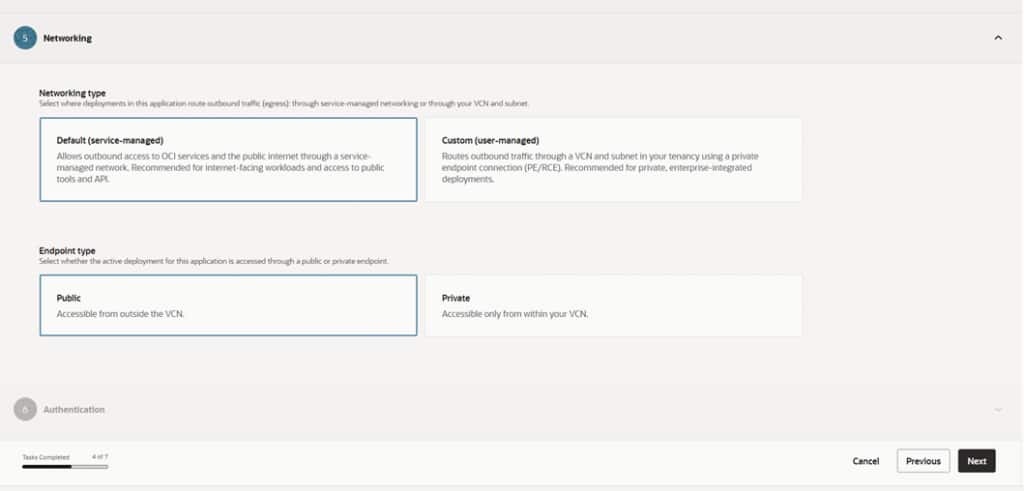
Figure: Networking.
Step 6: Configure authentication
Hosted applications can be protected with Identity Domain authentication. Callers obtain an OAuth bearer token and pass it with requests to the hosted application endpoint. This provides a consistent access model for both user-facing calls and service-to-service calls across the multi-agent workflow.
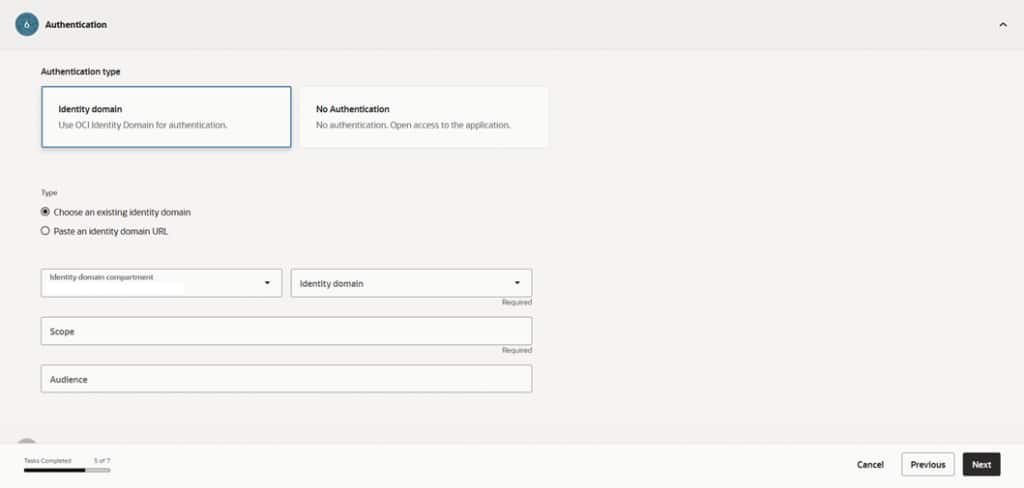
Figure: approved Authentication.
Step 7: Enable logging
Resource logging should be enabled during application creation so operators can inspect startup, readiness, deployment, and runtime events. In a multi-service agent architecture, logs become more useful when every request carries a correlation identifier across services.
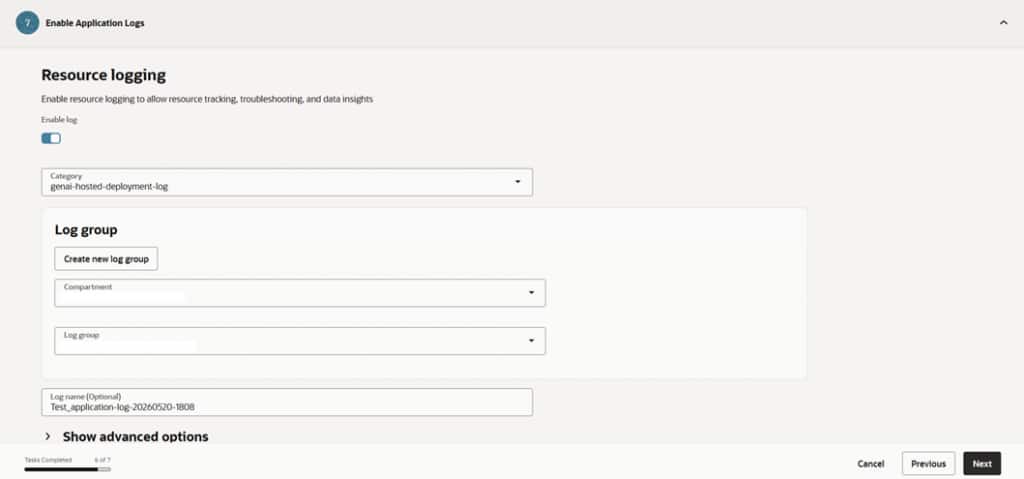
Figure: Resource logging.
Step 8: Create and activate a deployment
After the application is configured, create a deployment by selecting the container image source. The deployment references a specific image version tag from OCIR. Using versioned tags instead of latest makes rollback and auditing easier.
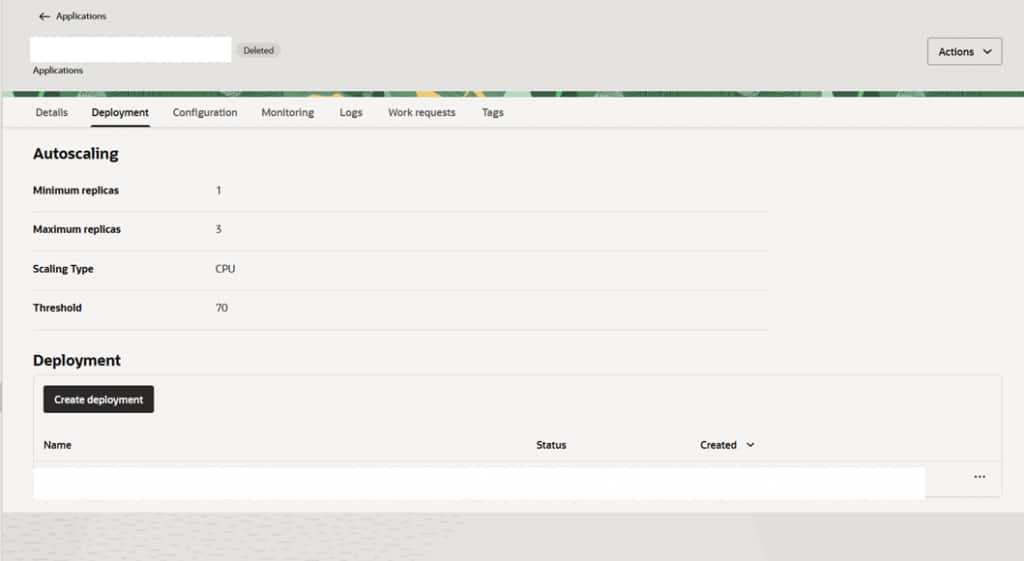
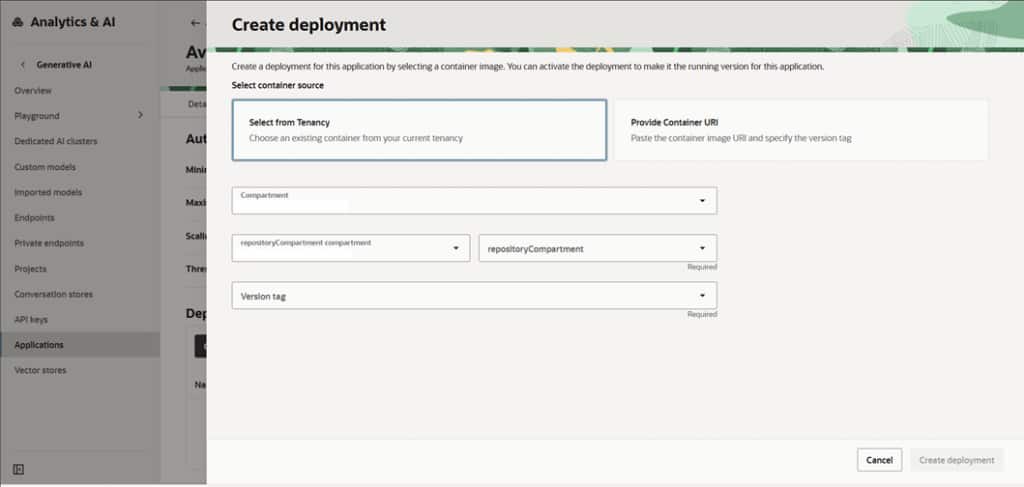
Figure: Create deployment.
Step 9: Verify status and endpoint
In OCI Enterprise AI Agent Hub, a deployment is the active runtime version of a hosted application. The application defines the stable operating configuration, while the deployment activates a specific OCIR image tag as the running service.
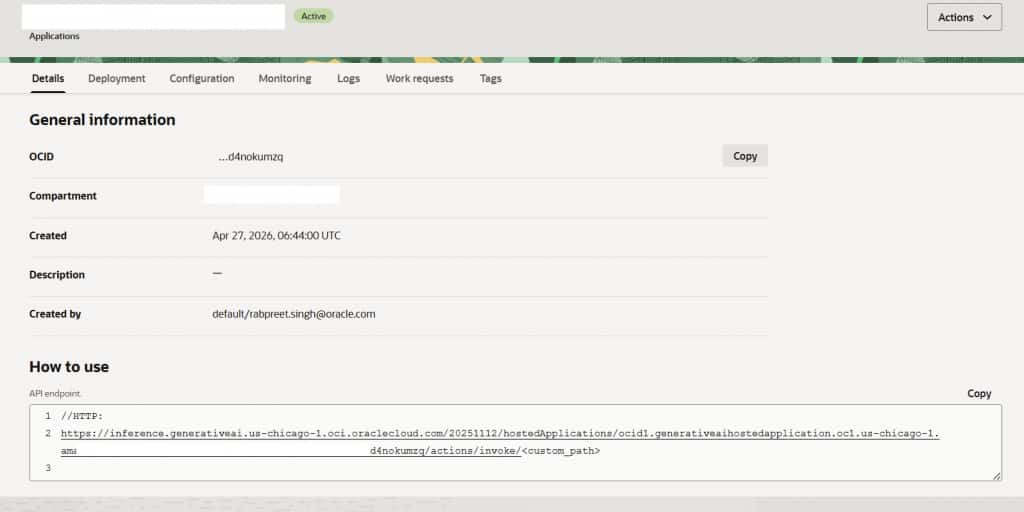
Before connecting the service to the wider agent workflow, verify that the deployment status is Active, inspect logs, copy the invoke endpoint from the application details page, and run a smoke test using an approved bearer token flow.
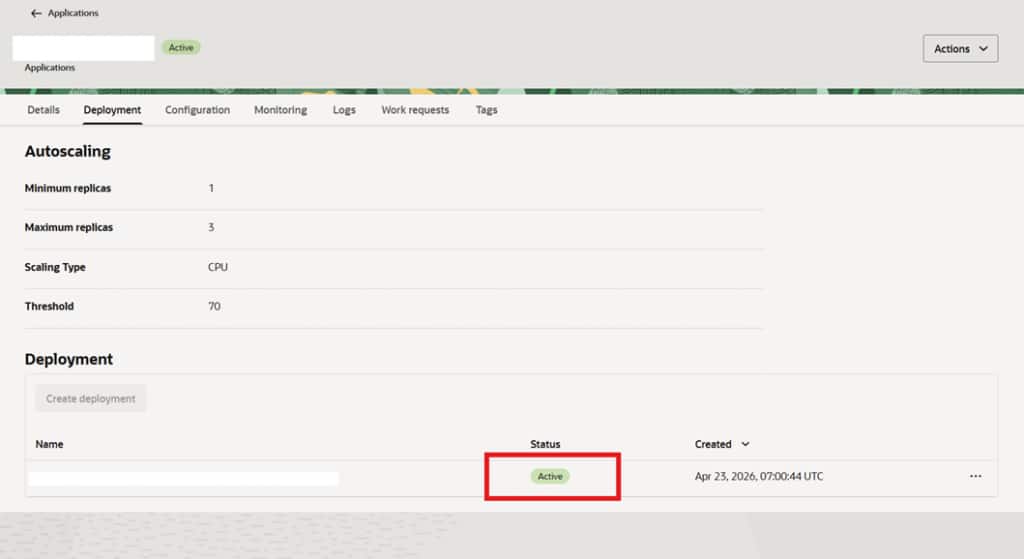
Figure: Replace with approved Active deployment and endpoint screenshot.
Technical request flow and service-to-service invocation
Once each component is deployed as a hosted application, the workflow is operated through managed application endpoints. The application endpoint becomes the stable service entry point, while the active deployment determines which container image version handles the request.
Application endpoints
Each hosted application exposes an invoke endpoint over HTTPS. This endpoint is used by external clients, backend services, orchestrators, agents, MCP gateways, and tool services to communicate with one another. The endpoint should not be hard-coded into the container image. Instead, target application endpoints should be passed through environment configuration so they can change across development, test, and production environments.
For standard request-response calls, services use HTTPS REST-style invocation. For long-running or streaming interactions, the application can expose a streaming endpoint pattern where supported by the application implementation. In this architecture, synchronous calls are used for direct orchestration steps, while asynchronous work is handled through queue messages, callback handlers, and workflow state.
How one hosted application invokes another
Service-to-service invocation follows the same access pattern as a client invoking a hosted application. The calling service reads the target application endpoint from configuration, obtains an approved OAuth bearer token, and sends the request to the target endpoint with the Authorization header.
For example, the backend API can invoke the workflow orchestrator, the orchestrator can invoke specialized agents, agents can invoke the MCP gateway, and the MCP gateway can invoke tool services. Each call uses the hosted application endpoint of the target service and includes a bearer token that is valid for the configured audience and scope.
At a high level, the invocation pattern is:
- Caller identifies the target hosted application endpoint from runtime configuration.
- Caller requests or reuses an OAuth bearer token from the configured identity domain.
- Caller sends the request to the target endpoint over HTTPS.
- Target hosted application validates the token and processes the request.
- Response, callback, or async event is returned to the workflow.
Authentication and bearer token flow
Hosted applications should be protected with Identity Domain authentication. A caller obtains an OAuth bearer token through an approved client credentials flow. The token represents the caller’s permission to invoke the hosted application and is passed in the Authorization header.
The token flow is:
- The calling service uses its configured identity information to request an access token.
- OCI Identity Domain issues a bearer token for the configured audience and scope.
- The calling service sends Authorization: Bearer with the request.
- The hosted application validates the token before accepting the request.
- The calling service caches the token and refreshes it before expiration.
This pattern is important for multi-agent systems because internal calls also need to be secured. Backend-to-orchestrator, orchestrator-to-agent, agent-to-gateway, and gateway-to-tool calls should all use the same authentication model rather than mixing custom service credentials with platform authentication.
The token itself, client secret, client ID, scope, audience, and identity domain URL should never be stored in public documentation, screenshots, diagrams, or source-controlled configuration files. Secrets should be stored in approved secret-management systems and injected securely at runtime.
This design keeps responsibilities separated. Agents focus on reasoning and task coordination. MCP gateways govern tool access. Tool servers perform specialized deterministic work. OCI services provide identity, storage, queueing, logging, monitoring, and image management.
Deployment architecture
The hosted system is organized into clear layers: frontend, backend API, asynchronous queue, workflow orchestration, specialized agents, an MCP gateway, tool servers, and managed data services. Each layer has a narrow responsibility, which makes it easier to scale, debug, and update independently.
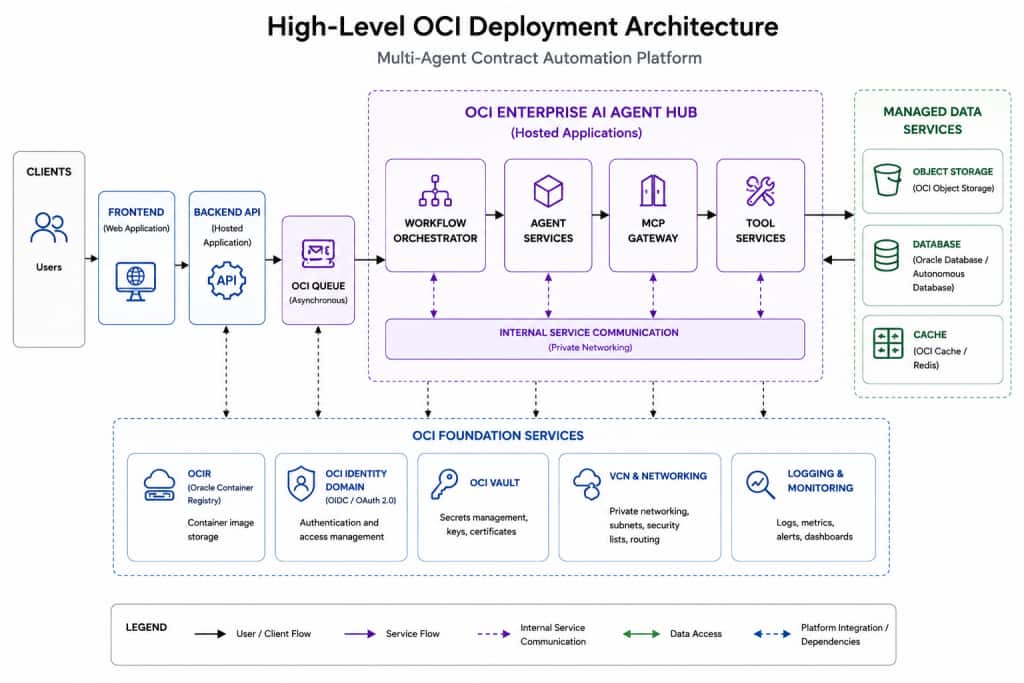
Figure: Layered deployment view for the hosted multi-agent architecture.
Container contract
Every hosted service should follow a consistent container contract. This keeps onboarding predictable and prevents avoidable deployment failures.
- Listen on 0.0.0.0 and port 8080.
- Expose /health for liveness and /ready for readiness.
- Build the image for linux/amd64 before pushing to OCIR.
- Keep the container stateless and write only temporary files to /tmp.
- Use versioned image tags and avoid relying on latest for release management.
- Validate vulnerability scan results before creating or activating the deployment.
Deployment lifecycle
Once the pattern is established, each service can follow the same path: containerize the service, build for the correct architecture, push to OCIR, verify scan results, create or update the hosted application, activate a deployment, and watch logs during the first smoke test.
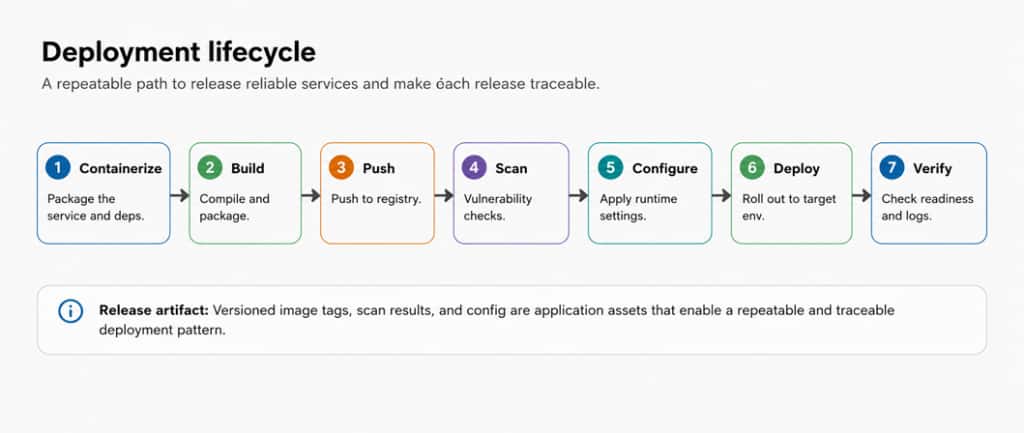
Figure: Repeatable deployment lifecycle for hosted applications.
Key implementation lessons
The migration surfaced a few patterns that are useful for any team deploying agentic applications on a managed platform.
| Lesson | Why it matters |
| Do not hard-code localhost or internal URLs | Hosted applications receive managed invoke endpoints. Service addresses should come from environment configuration. |
| Treat identity and address as separate concerns | An agent may run at one endpoint but still need a stable registered identity for authorization and tool access. |
| Plan service-to-service authentication early | Every internal call should use a consistent bearer-token pattern instead of mixing custom auth approaches. |
| Use readiness separately from liveness | /health should indicate the process is alive; /ready should indicate the service is initialized and ready for traffic. |
| Make observability a first-day feature | Correlation IDs, OCI Logging, and trace context make asynchronous workflows much easier to debug. |
| Use configuration as code | Generating environment configuration from a single source reduces manual console errors. |
| Map cross-region calls deliberately | Latency, token audience, scope, and data residency should be understood before production rollout. |
Conclusion
OCI Enterprise AI Agent Hub gives teams a managed way to deploy, scale, secure, and observe containerized AI services. For multi-agent workflows, the platform is most effective when each service has a clear responsibility, configuration is centralized, deployments use versioned images, and observability is built in from the start.
The result is a deployment model that is easier to operate than self-managed infrastructure while still supporting complex enterprise workflows such as document parsing, rule-driven generation, tool execution, and human review.