
OCI NL2SQL connects natural-language to SQL generation with Database Tools MCP Server so customers can use governed database access from an MCP compatible client.
By
- Tao Sheng, Senior Director Applied Science
- Srikanth Tadimalla – Director Software engineering
- Uday Yalamanchi – Senior Principal Software engineering
- Dave DeBarr – Senior Principal Applied Scientist
- Kris Rice – SVP Software engineering
- Jason Creighton – Senior Principal Product Management
- Dan Roth – Chief AI Scientist
- Sujith Ravi – GVP Platform Software Engineering
- Sujeeth Bharadwaj – Applied Science Architect
Estimated reading time: 6 minutes
Business users know the question they need answered. They rarely know the tables, columns, joins, or SQL needed to answer it.
A finance analyst might ask about booked revenue. A sales leader might ask about pipeline coverage. A support manager might ask about the case backlog. A supply chain team might ask which orders are at risk.
Each team uses familiar business terms, but those terms do not always match the names in the database. “Customer” might mean an account, party, bill-to customer, or service subscriber. “Region” might mean a sales territory, shipping destination, or reporting geography. Answering the question often requires business knowledge that is not visible in the wording alone.
NL2SQL provides a direct path from a business question to validated SQL. Its integration with Database Tools MCP Server completes the workflow by authorizing and running the SQL in the source database based on the identity and database permissions configured for the connection.
Together, these capabilities let teams connect an approved chat or agent client to enterprise data while queries continue to run against the source database. Customers are not required to copy the underlying database into a separate analytics store, while continuing to rely on configured OCI and database access controls. The new integration also reduced the number of steps to setup, making it easier to add NL2SQL to applications and tools that customers already use.
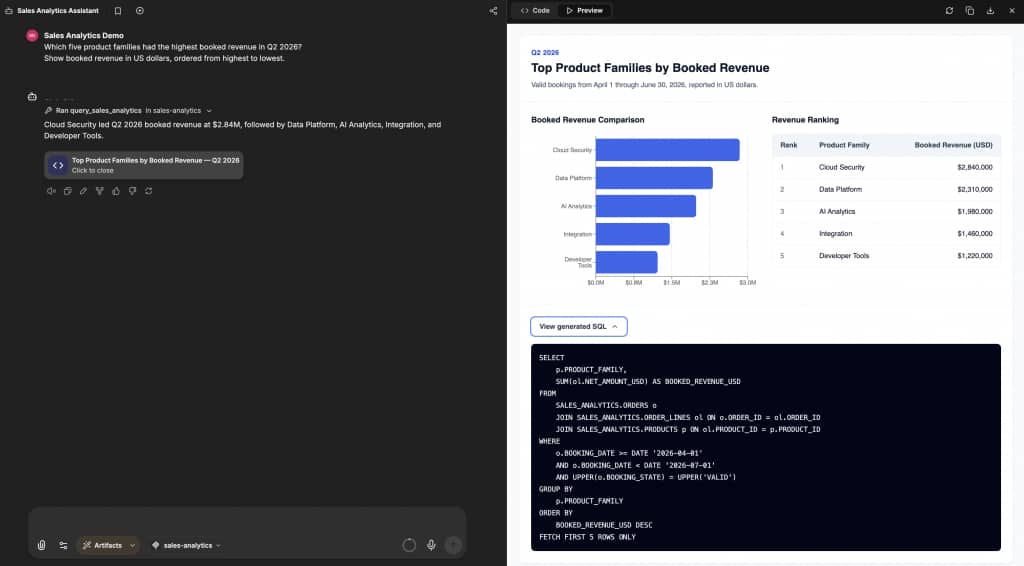
A user asks a business question and can review generated SQL and permitted database results through an MCP-connected client.
A path from question to query
NL2SQL and Database Tools MCP Server each have a clear role:
- A user asks a question through a chat or agent client.
- NL2SQL interprets the natural-language question.
- The semantic store supplies relevant database objects, business context, and relationships.
- NL2SQL generates SQL.
- Database Tools MCP Server authorizes the request and runs the SQL against the source database.
This separation matters. NL2SQL generates SQL, but it does not execute the query or override database access controls. Database Tools MCP Server manages the execution path, and the source database applies the permissions associated with the configured query connection or propagated user identity, as applicable.
This provides an additional entry point to enterprise data while continuing to use configured database controls.
Use semantic context instead of guessing from names
A database schema tells NL2SQL which objects exist. Enrichment helps explain what those objects mean.
During setup, the semantic store reads table and column metadata. It can also use database comments, annotations, synonyms, and relationships between database objects. This information helps connect the words in a user’s natural-language question to the names and structures used in the database.
For example, a finance user might ask:
Which product families produced the most booked revenue in North America last quarter?
The answer might require data from an order-line table, a product hierarchy, a customer table, and a regional mapping table. The user does not need to name each table or specify every join. The semantic store provides context that can help NL2SQL identify relevant objects and relationships..
Different teams can also use different terms for similar data:
- Finance might use “booked revenue,” “recognized revenue,” or “gross margin.”
- Sales might use “pipeline,” “coverage,” “win rate,” or “account.”
- Support might use “case,” “incident,” “severity,” or “backlog.”
- Supply chain teams might use “at-risk order,” “stockout,” “lead time,” or “late shipment.”
- Product teams might use “active user,” “adoption,” “retention,” or “usage.”
The semantic store helps map those terms to the relevant database objects. This capability goes beyond matching one word to one column. It helps ground a question in a connected database schema, including cases where an answer depends on several related tables.
Administrators use two separate Database Tools connections during setup. A higher-privileged enrichment connection reads schema artifacts and metadata that the administrator has configured the enrichment connection to access. A lower-privileged query connection supports end-user execution. Keeping these connections separate creates a separates semantic enrichment from end-user query execution between preparing semantic context and running user queries.
Oracle SQL today with broader dialect support planned
The current release generates Oracle SQL and uses Oracle Autonomous AI Database as the source database in the published quick start.
Oracle plans to expand support to additional SQL dialects, including SQLite and MySQL. If made available, this capability is intended to help customers apply a similar natural-language interaction pattern to additional data sources.
Note: Future plans and timing are subject to change.
Use the client that fits your workflow
Customers are not limited to one chat interface.
You can connect an Oracle client or your own MCP compatible chat or agent client to Database Tools MCP Server. You can also use MCP Calling in the OCI Responses API so a model can access tools exposed by the MCP server.
This flexibility lets teams add NL2SQL to an existing assistant, application, or workflow instead of asking users to adopt a separate interface.
For an MCP-based integration, the client connects to Database Tools MCP Server. The MCP server calls NL2SQL to generate SQL and manages the authorized execution flow. NL2SQL is not added directly to the Responses API tools list for this pattern.
Teams that want lower-level control can call the Generate SQL MCP tool directly and manage the generated SQL within their application.
Get started in four steps
The NL2SQL quick start organizes the initial setup into four main steps.
- Create the Database Tools connections.
Create one connection for enrichment and a separate, lower-privileged connection for queries.
- Create and enrich a semantic store.
Select the two connections, choose the approved schemas, and wait for enrichment to complete.
- Configure Database Tools MCP Server and its toolset.
Enable the workflow that uses NL2SQL to generate SQL and runs authorized queries against the source database.
- Connect a client and ask a question.
Use an Oracle client, your own MCP-compatible client, or an OCI Responses API workflow with MCP Calling.
Start with questions that have known answers, such as:
Review the generated SQL and confirm that the returned data follows the user’s database permissions. Then test the business terms, joins, and schema areas that matter most to your users.
- Which five products had the highest sales last month?
- Which regions missed their forecast last quarter?
- Which support issue categories increased the most this week?
Support longer-running workflows
Some questions generate SQL quickly but lead to database queries that take longer to complete.
The OCI Responses API supports background processing for requests that should not keep the original HTTP connection open. Set background to true, save the returned response ID, and check the response status until the work reaches a final state. Applications can also provide a cancel action.
Background processing does not make the database query run faster. It prevents a client or gateway timeout from being treated as a failed request. It also gives a custom chat client a way to show progress and recover the final result.
Get started
Read the <a href="http://NL2SQL Quick Start for a streamlined path from connections to a working client. For full setup steps, IAM policies, Console instructions, and code examples, use the NL2SQL section of the Enterprise AI Agents QuickStart. Then connect a test client to an approved schema and validate a small set of known business questions before expanding access.