


Building an agent is the easy part. Running it is where teams get stuck.
Take Maya, a developer at a software as a service (SaaS) company. Her company’s marketing application already helps customers manage multi-channel marketing campaigns end-to-end. She has built a prototype for a research assistant that will help marketers plan those campaigns using market trends, competitive insights, and their own customer and sales data.
A marketing manager could ask, “We’re planning a launch campaign for midsize manufacturers. What themes are competitors emphasizing, which customer problems appear in our open opportunities, and what should we investigate before choosing our message?”
Maya’s prototype retrieves information from a customer relationship management (CRM) system, examines sales opportunities, and researches public sources. It produces a planning brief with supporting evidence that the marketer can question and refine.
With a prototype built, now Maya needs to deploy it. Campaign managers will use the assistant inside the existing marketing application. Product marketers and other invited colleagues will contribute through a standalone workspace. Both experiences need access to the appropriate research, saved findings, and customer records.
Today, the prototype works locally on her laptop. Delivering the feature requires hosting the container, preserving research between sessions, connecting to private systems, authenticating callers, and scaling as demand grows.
Maya uses Hosted Applications in Oracle Cloud Infrastructure (OCI) Enterprise AI to bring operational settings including scaling, storage, networking, and authentication together. Maya can deploy and update her container while configuring how the application runs and how callers access it.
In this blog post, we’ll cover new Hosted Applications capabilities build on that foundation to help Maya deliver browser experiences and preserve work between sessions. We’ll also discuss how using OCI Enterprise AI Sandbox provides temporary workspaces where Maya can test the agent’s behavior before releasing it. In this example, Maya still builds the CRM integration, research tools, and customer access rules. The managed services supply the supporting infrastructure, giving her team more time to develop useful research features and traceable results.
What’s new with OCI Enterprise AI Hosted Applications
Managed sign-in for the standalone workspace
Maya needs to build a standalone workspace where invited product marketers can contribute to campaign planning. Those colleagues should be able to sign in with single sign-on (SSO) and access only the research they are authorized to use.
Hosted Applications supports browser authentication through the OAuth 2.1 Authorization Code flow with Proof Key for Code Exchange (PKCE). The managed service redirects users to an OCI Identity and Access Management (IAM) identity domain, obtains access tokens on their behalf, and establishes browser sessions using cookies.
Maya’s container does not have to implement that exchange. Her team configures the identity integration and builds the application rules that determine which campaigns and customer records each person may access. Read more about Authentication in OCI documentation.
For the feature, that means the team can spend more time designing collaboration features that address who can contribute a launch brief, review findings, or update the campaign plan.
Application paths for the interface and research services
The embedded assistant and standalone workspace serve different moments in the same user workflow.
Inside the marketing application, a campaign manager might select “Research this audience.” The application supplies campaign context, and the assistant returns findings in the planning view. The standalone workspace gives a collaborator more room to explore sources, add product positioning, and ask follow-up questions.
Either way, Hosted Applications lets clients invoke custom paths exposed by the container. Maya can use those paths for the application’s interface and research services. The existing marketing application can integrate with the research backend through an application programming interface (API). Read more about Using Application Endpoints in OCI documentation.
These are application designs Maya builds using OCI Enterprise AI. The practical value is choice. Maya can deliver a browser workspace for marketers and connect the same research capabilities to the existing application.
Persistent files for research that survives an update
Campaign planning continues across days and often across application releases. A marketer might save competitor examples on Monday, add sales feedback on Tuesday, and revise the brief after a launch meeting. Maya needs saved research to remain available when her team deploys an updated version of the assistant.
Maya uses Persistent File Storage to retain files written to a configured mount path across container restarts and redeployments. Her application can use that path for intermediate research, checkpoints, and saved artifacts. The application must explicitly write those files to the persistent mount. Files elsewhere in the container do not gain persistence from the attachment.
There is also a scaling constraint: persistent file storage currently supports one replica, so minimum and maximum replica counts must both be one. Maya should choose a storage design that fits the feature’s expected demand.
For the marketer, the visible benefit is continuity. Yesterday’s research remains available after each application update.
Application-owned authentication when integration requires it
The embedded feature may need to participate in the marketing product’s existing authentication design.
Hosted Applications includes an explicit ‘No authentication’ option for applications that manage caller authentication themselves. With this setting, the platform forwards requests without authenticating the caller, and the application must enforce any required authentication and authorization. OCI IAM permissions still govern management operations. Read more about Application-owned authentication in OCI documentation.
This gives Maya another integration option. Her team can choose platform-managed browser sessions for an appropriate standalone experience or implement its own caller authentication where the product architecture requires it.
In either arrangement, Maya’s application remains responsible for customer boundaries and campaign permissions.
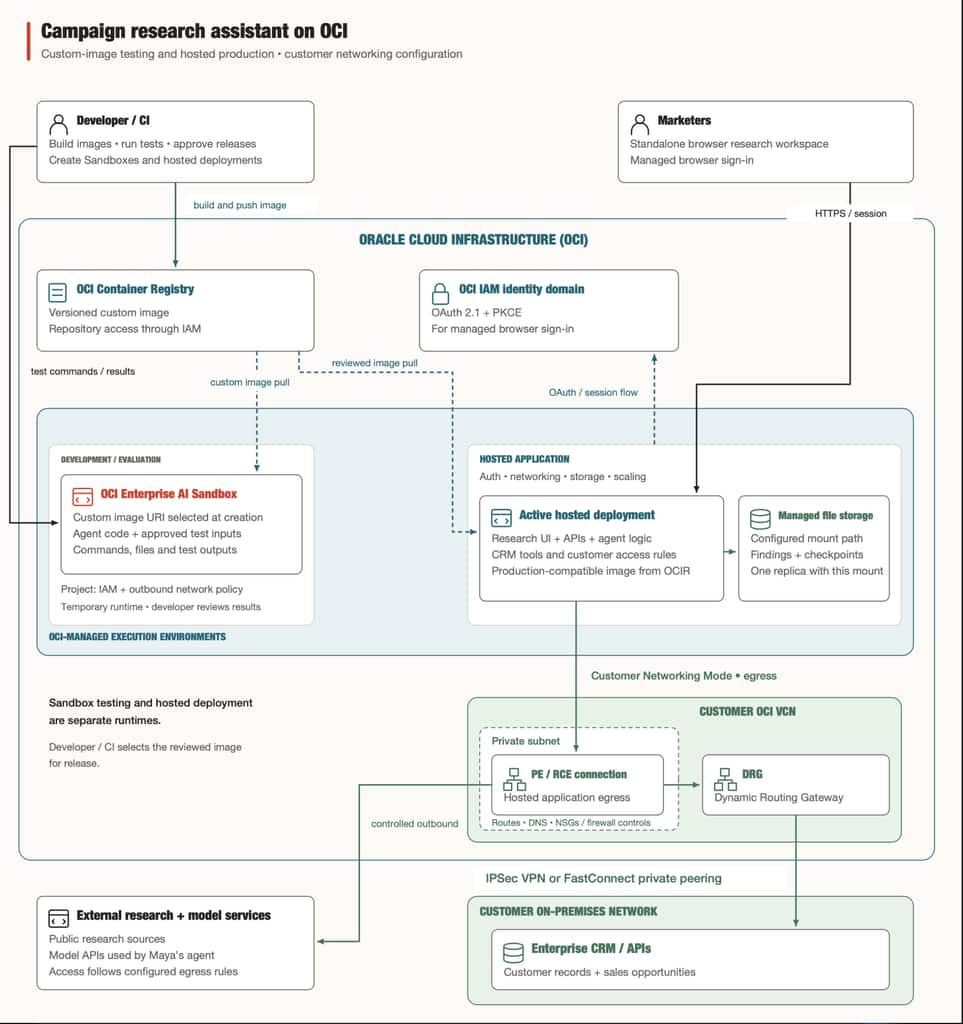
Image 1: OCI Enterprise AI Hosted Deployment and Sandbox reference architecture
Test the research agent with OCI Enterprise AI Sandbox before deploying it
Maya’s prototype produces a useful campaign brief. Before releasing the feature, she needs to understand how the agent behaves across different research tasks and data conditions. Can it reconcile campaign records with sales opportunities? What happens when customer data is incomplete? Does it distinguish open pipeline from completed sales? Can it produce a chart whose calculations match the underlying records?
OCI Enterprise AI Sandbox provides Maya a managed, temporary Linux workspace where she can run code and shell commands to test those behaviors. She can upload test inputs, execute her agent’s code, inspect the results, and download outputs without provisioning and maintaining the underlying infrastructure.
Exercise the feature with representative research tasks
Maya starts with an approved test dataset containing campaign activity, customer segments, and sales opportunities. She runs the agent against questions that reflect how marketers will use the feature, such as comparing campaign themes with needs expressed by prospective customers.
She examines the generated brief, supporting calculations, and charts. By introducing missing campaign identifiers or inconsistent sales stages, she can check whether the agent explains gaps in the evidence or produces an unsupported conclusion.
The Sandbox provides the execution environment. Maya defines the test cases and acceptance criteria. She can revise the agent’s instructions, tools, or analysis code and run the tests again.
Move the tested application into a hosted deployment
Once the feature meets her team’s release criteria, Maya packages the tested application code into a container image and creates a hosted deployment. Hosted Applications supplies the production runtime settings for authentication, networking, storage, and scaling.
The marketer encounters the finished research assistant inside the marketing application or standalone workspace. Maya uses Sandboxes behind the scenes during development to evaluate and refine the agent before releasing that experience.
Get started: take your agent from prototype to a usable feature
Maya turned her prototype into a campaign research assistant for marketers. She used Sandboxes to test the agent in a Sandbox, then configure a Hosted Application and deploy the container. This reinforces Maya’s development workflow. She then deployed the application through Hosted Applications, configuring authentication, networking, storage, and scaling for production.
Together, these services let her deliver a feature that connects market research with customer and sales evidence while reducing the infrastructure her team must manage.
To try this with your own agent, create a Hosted Application, configure its runtime settings, and deploy your container. Then follow Creating and Using a Sandbox to create a temporary workspace, run code, and retrieve the results. Start with one task your prototype already handles, and build a complete path from a user’s request to a saved result.