
AI assistants are expanding how developers and cloud engineers work with infrastructure, from translating application requirements into architecture to generating configuration and investigating deployment errors. Connecting these capabilities to Oracle Cloud Infrastructure (OCI) requires knowledge of its services, their dependencies, and the operational steps needed to complete a task.
I’ve been working on OCI Atlas to bring this knowledge into conversations with ChatGPT and Codex in supported environments. The project packages OCI service guidance and cross-service workflows as a plugin, helping an assistant reason through cloud architecture and coordinate resource tasks using available tools.
Bringing OCI Knowledge into AI Workflows
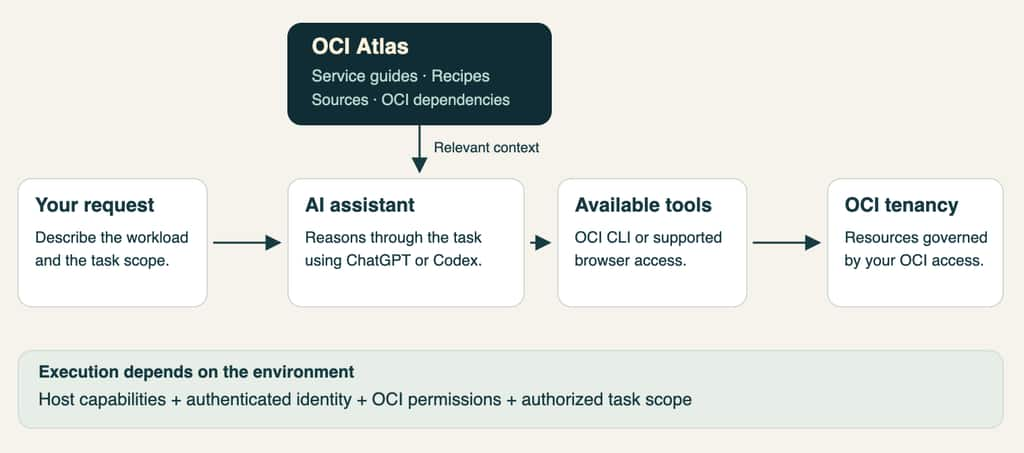
OCI Atlas combines the foundation model’s reasoning with focused guidance about OCI services and operations. Its entry skill directs the assistant to relevant references as the conversation develops, connecting the user’s request to the service knowledge needed for the task.
Version 1 includes 73 references, with 48 service guides and 12 cross-service recipes covering networking, compute, storage, databases, AI and ML, application platforms, and operations. These recipes connect individual services into workflows such as private application deployment, data ingestion, predictive model serving, and database connectivity.
For example, a question about compartments starts with tenancy foundations, while a private application design draws on architecture recipes and supporting network, identity, and database guides. This structure allows the assistant to build context around the workload without loading the entire reference collection.
I kept the guidance separate from execution so the same plugin can support architecture discussions and tool-assisted operations. The model interprets the request, OCI Atlas supplies domain knowledge, and the host’s tools provide access to the environment.
Moving from Requirements to Deployment
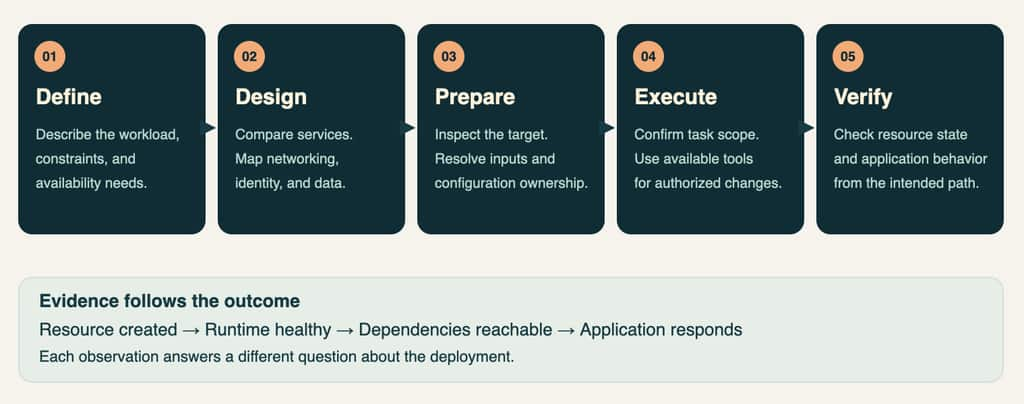
Consider a developer preparing to deploy a containerized HTTP API that needs an HTTPS entry point and has no Kubernetes requirement. The developer still needs to select a runtime, establish image access, configure networking, and determine how application availability will be managed.
We can begin with the following request:
Use OCI Atlas to plan deployment of a stateless containerized API on OCI. Compare Container Instances, OKE, and Functions, and explain the networking, permissions, and availability decisions needed before creating resources.
The assistant can compare services against the workload and identify inputs such as the image location, application port, health checks, and secrets. It can then help prepare infrastructure configuration or use available tools to carry out authorized deployment steps.
For existing environments, the workflow accounts for configuration ownership through Terraform or Resource Manager. Resource state, runtime health, backend connectivity, and application responses provide checkpoints as the deployment progresses.
Automating Cloud Management Tasks
OCI Atlas also supports workflows that begin with an existing cloud environment, where engineers need to gather information before deciding what to change. Through an available authenticated OCI CLI, an assistant can coordinate resource inspection and summarize the results around a defined objective.
For example, a user can request an inventory of visible compartments and running compute instances, then ask the assistant to explain their placement and configuration. Subsequent tasks can build on those observations while maintaining the selected identity, tenancy, region, and resource scope.
The plugin includes operational guidance for situations that require additional judgment, such as reconciling resource state after a request times out. This helps the assistant carry context across multiple steps and interpret tool results before choosing its next action.
Connecting Application Dependencies
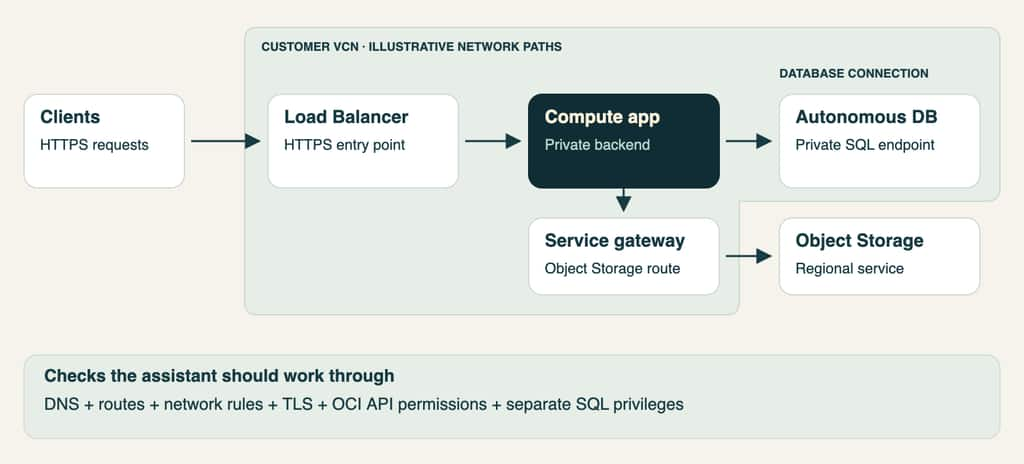
A compute application with private Autonomous Database access illustrates how OCI Atlas connects infrastructure decisions to application behavior. The design needs to account for DNS resolution, routing, network security rules, TLS configuration, and database privileges.
If the application also accesses Object Storage through a service gateway, the assistant needs to explain that separate traffic path and its authorization requirements. The application’s OCI API identity and SQL privileges serve different purposes, and both need to be considered in the deployment sequence.
Investigating Errors with AI
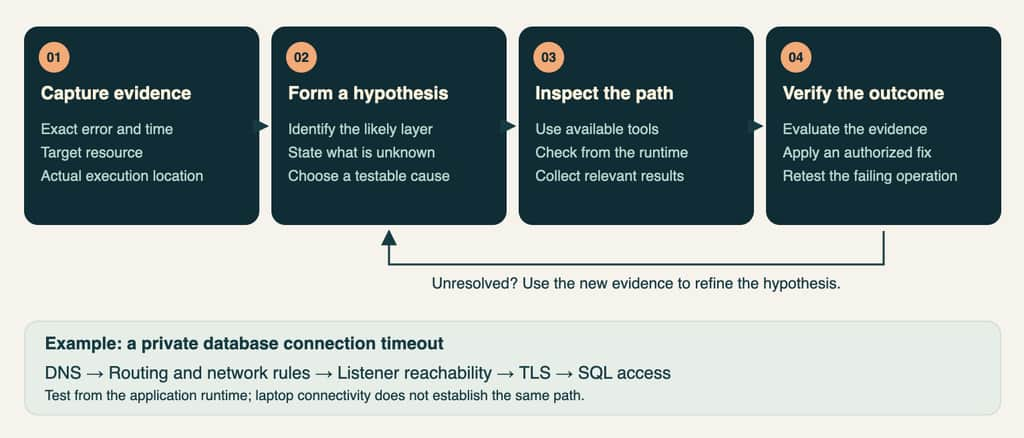
For troubleshooting, OCI Atlas guides the assistant to start with the failing operation, exact error, target resource, and execution location. Available tools can then supply observations from the application runtime, allowing the investigation to progress according to the evidence.
A private database connection timeout may lead to checks across DNS, routing, listener reachability, TLS, and SQL access. The assistant uses those results to narrow the possible causes, explain the next useful check, and assess the outcome of an authorized correction.
Getting Started with OCI Atlas
The OCI Atlas repository includes installation instructions, example prompts, service guides, and illustrated architecture walkthroughs. Available installation and execution routes depend on the client and workspace, while resource operations use the user’s authenticated OCI access and permissions.
Begin with a service comparison, application design, or scoped resource inspection, then develop the workflow around your application’s requirements. OCI Atlas is a community project released under UPL 1.0, with contributions and corrections welcome.
Explore the getting-started guide and architecture walkthroughs to bring OCI guidance into your own AI-assisted cloud workflows.