
By Federico Kamelhar, Distinguished Engineer, Agentic AI, Oracle
Why this matters
AI agents can now take on whole tasks: plan the work, split it among specialists, run for minutes across dozens of steps, and hand back a finished result. LangChain’s open-source Deep Agents library packages that design. Teams building on Oracle want it where their data already lives: models on OCI Generative AI, knowledge and records in Oracle AI Database 26ai, and agent state kept in the same governed place.
That is now one call. Oracle’s open-source langchain-oci package natively supports LangChain Deep Agents: create_deepagents_agent connects the Deep Agents harness to OCI Generative AI models and to Oracle AI Database 26ai for search, memory, and state. Developers get planning, specialist sub-agents, a working filesystem, and human approval steps, on Oracle infrastructure, without writing the glue.
This post announces the integration and then shows it at work on a complete example: a team of Deep Agents that prepares a clinic visit on Oracle AI Database 26ai, inside an NVIDIA OpenShell sandbox, with every rule enforced by the database, every cited fact checked, every action approved by a person, and the whole thing built and verified by OpenAI Codex. Every patient is invented.
What changed
langchain-oci now includes create_deepagents_agent, available on PyPI with the deepagents extra:
pip install -U "langchain-oci[deepagents]"One call returns a ready-to-run LangGraph agent that:
- Runs on OCI Generative AI, or on any tool-calling LangChain chat model you bring.
- Searches your data in Oracle AI Database 26ai. Point it at one or more stores and it generates three tools:
stats,search(hybrid vector and keyword search, routed to the right store), andget_document. OpenSearch indices work the same way. - Gets the full Deep Agents harness: a planning tool, sub-agents with their own context and tools, a virtual filesystem for notes and drafts, skills, structured output, and human-in-the-loop approval.
- Keeps its state in Oracle AI Database 26ai: thread checkpoints with
OracleSaver, long-term memory withOracleStore, and durable files withStoreBackend, so a run can be inspected, resumed, or continued days later.
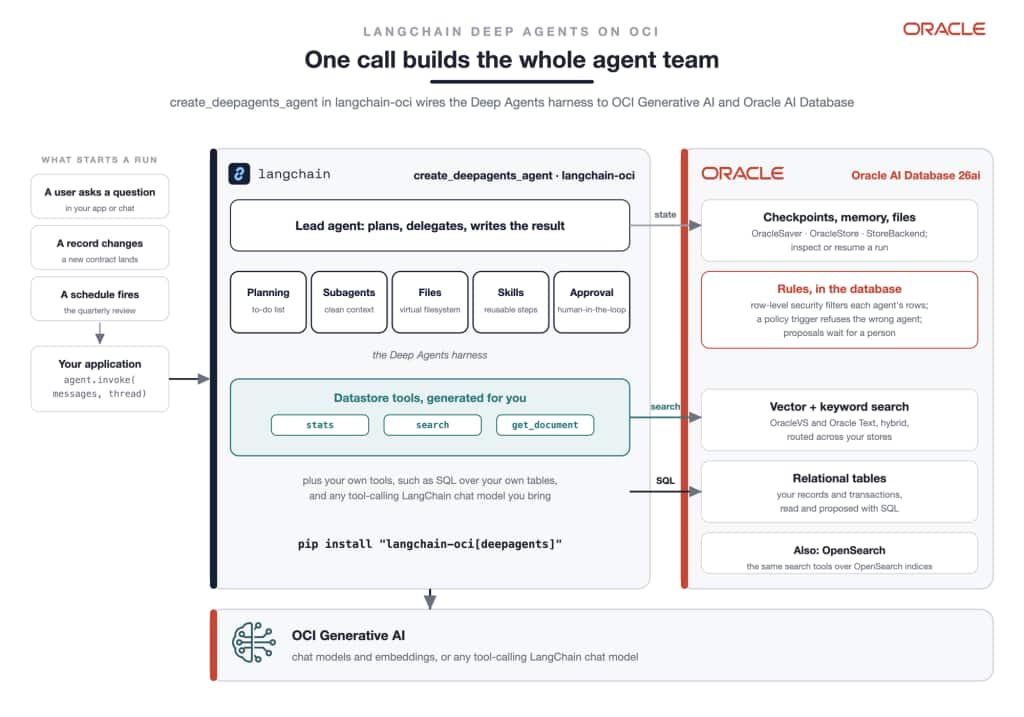
One call builds the whole agent team: the Deep Agents harness, tools generated over your Oracle AI Database stores, your own SQL tools over your tables, the rules and the state in Oracle AI Database 26ai, and models on OCI Generative AI.
| Capability | Coverage |
|---|---|
| Models | OCI Generative AI chat models; any tool-calling LangChain chat model |
| Retrieval | Oracle AI Database 26ai (OracleVS and Oracle Text, hybrid) and OpenSearch, with automatic routing across stores |
| Agent harness | planning, sub-agents, virtual filesystem, skills, structured output, middleware |
| Human in the loop | approval before chosen tool calls |
| Persistence | OracleSaver checkpoints, OracleStore memory, StoreBackend files |
| Python | 3.11 to 3.13 for the full harness; a lightweight agent loop on 3.9 and later |
The integration guide and a runnable sample and tutorial are in the repository. The rest of this post shows what the integration makes possible on a real process, safely.
First, what is a Deep Agent?
Most AI agents today are a loop: the model reads a question, calls a tool, reads the result, and answers. That works for a quick lookup. It breaks down on real work, which takes dozens of steps. The agent loses track of the goal, fills its context with tool output, and stops early or answers from memory.
A Deep Agent is built for the long task. It adds four things to the loop:
- A plan. The agent writes a to-do list, works through it, and updates it as it learns.
- Specialists. It hands parts of the task to sub-agents. Each one starts with a clean context and its own tools, and returns only its result.
- A workspace. It keeps notes and drafts in files instead of in its context, so a long task does not crowd out the goal.
- Controls. It can remember across runs and stop for a person’s approval before an action.
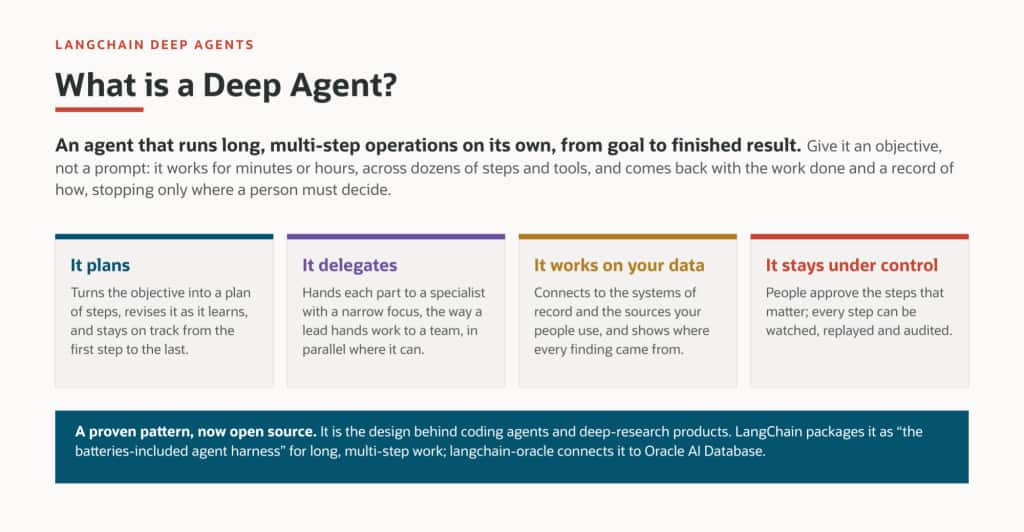
The four things a Deep Agent does. It plans, delegates to specialists, works on your data, and stays under control.
LangChain publishes this design as the open-source Deep Agents library, built on LangGraph (documentation, source).
Why you need one. Business work is a process, not a question. Preparing a clinic visit, settling an insurance claim, or reviewing a supplier means several roles, several systems, and a sign-off at the end. A single-loop agent cannot hold all of that. A Deep Agent can, because its plan follows the process and its specialists follow the roles.
Deep Agents on Oracle. With the integration above, one call builds the team, connects it to the models, gives it tools over the data, and keeps its state in the database. What follows is that integration on a real process.
The whole system, in one page
What it is. A team of AI agents prepares a clinic visit: it reads a patient’s chart, checks guidelines and research, proposes lab tests and a follow-up, and flags a risky medication. It writes a short brief in which every statement points to the database row it came from.
How it works, in four sentences.
- Each role in the process becomes an agent, and each data source becomes a tool.
- Each rule becomes a policy in Oracle AI Database, so the database refuses what an agent may not do.
- The agents run inside an NVIDIA OpenShell sandbox that can reach only the database and OCI Generative AI, and never sees the real API key.
- A short program checks every source the agents cite before anyone reads the result.
Who builds it. OpenAI Codex, from a written specification, on a laptop or in OCI. Codex runs every step and checks it. It hands the steps that need a password or a key to a person, and stops if a check fails.
What is proven. The full demo passed 41 of 41 end-to-end checks. The sandbox allowed exactly the two destinations it should (7 of 7 probes). The database enforced every rule (25 of 25). Five recorded Codex runs built and verified it on a laptop, and Codex then deployed and verified it in OCI. A small sample, about 200 lines of Python and 150 of SQL with its own Codex harness, shows the whole pattern at a size you can read in one sitting, and runs on Oracle AI Database 26ai Free.
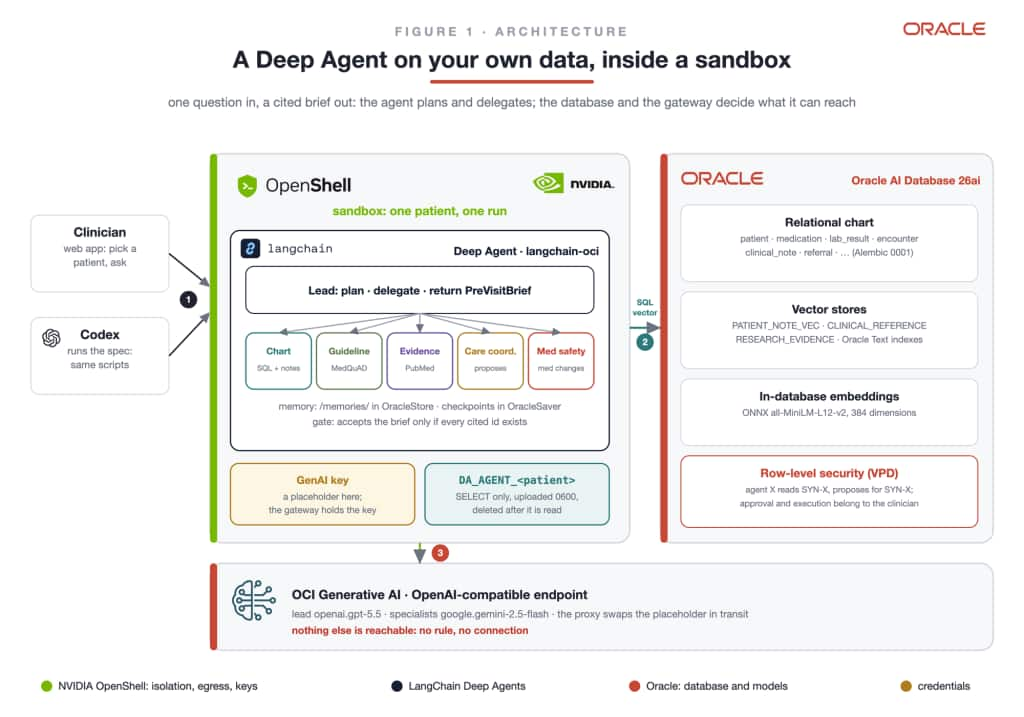
Figure 1. The whole system. A clinician asks a question; the agent team works inside the OpenShell sandbox; Oracle AI Database holds the data and the rules; OCI Generative AI runs the models. Codex runs the same scripts to build and test it.
The idea, in plain words
A Deep Agent takes on a whole task instead of a single question. Give it a goal and it makes a plan, hands each part to a specialist, works for several minutes across dozens of steps, and returns the result with a record of what it did.
Companies rarely hold back because the model is not good enough. They hold back because of three questions:
- What can the agent see? It reads sensitive records, and also untrusted text such as notes and articles.
- What can the agent do? It chooses its own tools, and some actions need a person’s signature.
- How do we know the answer is right? A confident answer can rest on facts the agent never looked up.
Those questions are also why Deep Agents suit enterprise work in the first place. Real work is many steps, across many systems, done by people with different powers, and signed off at the end:
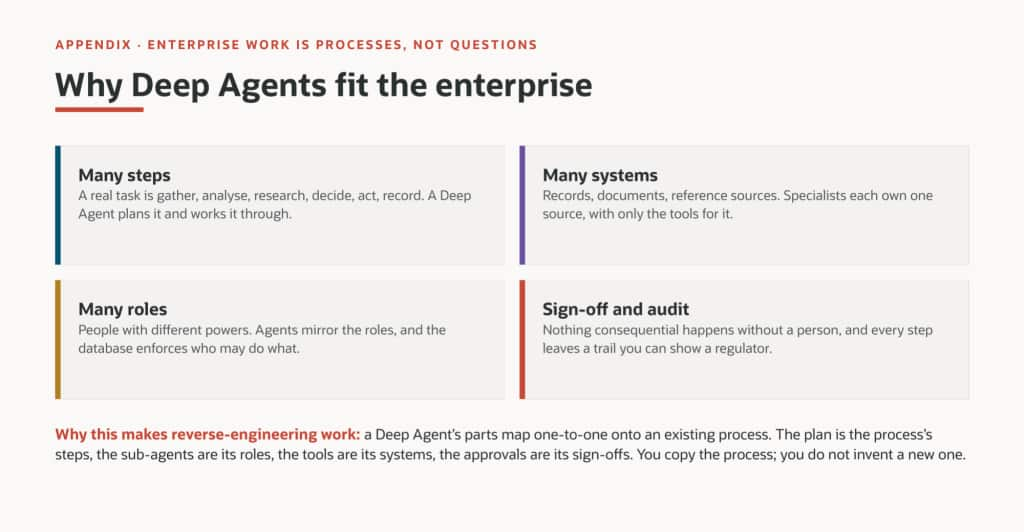
A Deep Agent’s parts map one to one onto an existing process: the plan is its steps, the specialists are its roles, the tools are its systems, the approvals are its sign-offs.
The answer is to put each control where the agent cannot argue with it. The database decides what each agent may read and propose. The sandbox decides where any data can go. A checking step looks up every cited fact. People still approve every action.
A second, practical obstacle is setup. Building this by hand is about 25 steps, and two of them need a secret. So the build itself is handed to a coding agent, Codex, with a specification and strict rules.
Turn a process into a team of agents
Start from how the work is done today, not from the model. Watch the process: who does each step, with which data, under which rule. Then map it:
- each role becomes an agent,
- each data source becomes a tool,
- each rule becomes a database policy,
- each signature stays a human approval.
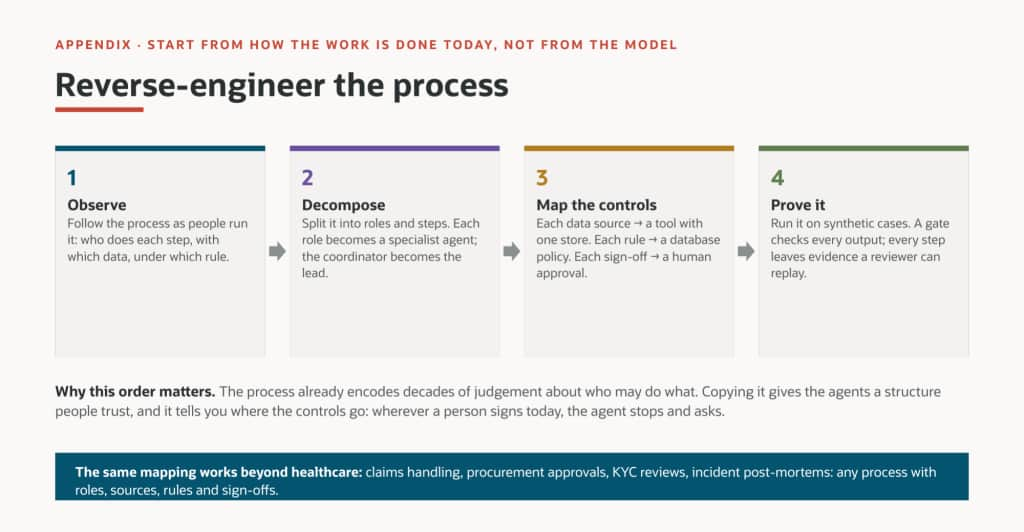
Observe, decompose, map the controls, prove it. Wherever a person signs today, the agent stops and asks.
For a clinic preparing a visit, the map looks like this:
| Step today | Done today by | Done in the demo by | Control |
|---|---|---|---|
| Pull the chart: labs, medications, notes | Nurse | chart-analyst agent | sees one patient only |
| Check guidelines and research | Clinician | two researcher agents | cites only what it found |
| Order labs, message the patient, book a visit | Care coordinator | care-coordinator agent, proposes only | a clinician approves |
| Review a medication change | Pharmacist | medication-safety agent, the only one allowed | a database policy |
| Sign the medication order | Physician | the doctor, in the web app | only a physician may approve |
| Write the summary | Clinician | the lead agent | every source is checked |
Nothing new is invented for the agents. Each one does a step a person does today, with that person’s data and that person’s limits. The same mapping fits insurance claims, purchase approvals, customer due-diligence reviews, or incident reviews: any process with roles, data, rules, and sign-offs.
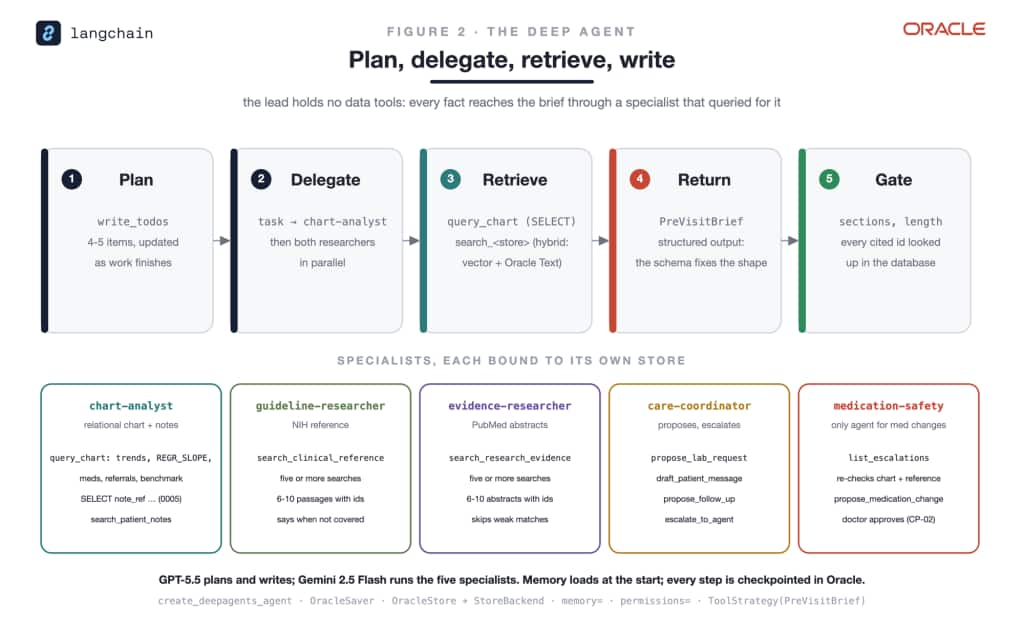
Figure 2. The lead plans and delegates. Each specialist has its own tools and data. The lead has no data tools, so every fact reaches the brief through a specialist that looked it up.
The five building blocks
| Block | What it does here | In one line |
|---|---|---|
LangChain Deep Agents, through langchain-oci | the lead agent, its plan, and the specialists | one function call, create_deepagents_agent, builds the team |
| Oracle AI Database 26ai | the chart, the searchable notes, the AI model that makes text searchable, the rules, the agents’ memory | the system of record, and the referee |
| NVIDIA OpenShell | a sandbox per run, with a short list of allowed destinations | the agents cannot reach anything else, or see the real key |
| OCI Generative AI | the language models: GPT-5.5 leads, Gemini 2.5 Flash for the specialists | called through its OpenAI-compatible endpoint |
| OpenAI Codex | builds, runs, and tests everything from a specification | the operator types only the two secrets |
Three database features do most of the work:
- Row-level security (Oracle calls it Virtual Private Database) adds a filter to every query a user runs. The agent for Patient A logs in as its own database user, so it gets only Patient A’s rows, whatever SQL it writes.
- A trigger is a rule the database runs on every insert. It can refuse the insert, or change the row before it is saved.
- The client identifier is a label attached to a database connection. The tool code sets it to the agent’s name, so a trigger knows which agent is asking. The model never sets it.
How it works, layer by layer
The sample folder of the public repository holds the whole pattern at small size: one lead and three specialists, two invented patients, one agent rule, row-level security, a sandbox, and a check on every cited fact. It uses the same libraries as the full demo, and it has been run end to end on Oracle AI Database 26ai Free in a container, in an OpenShell sandbox, with GPT-5.5 on OCI Generative AI. Each layer below links to the file that implements it.
The rules live in the database
The chart is three small tables (patients, medications, lab results), plus one table where agents leave proposals. Two rules protect them, and both run inside Oracle AI Database.
The first rule decides what an agent can see. Each agent logs in as its own database user, and a row-level security policy adds a filter to every query that user runs. The agent for Patient A asks for “all lab results” and gets Patient A’s, because the database adds “for Patient A” before it runs the query. Another patient’s rows are simply not there for that user. Writes are filtered the same way.
Why not put that filter in the tool? Because the model writes the SQL. A filter in tool code is something a clever query can route around, with a subquery or a view. The database applies its policy to every statement, whoever wrote it:
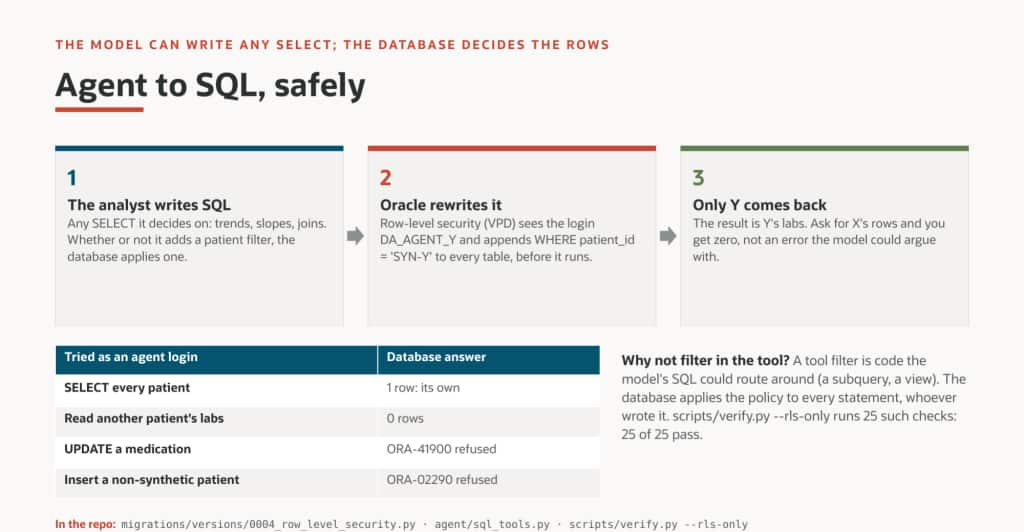
From the full demo: whatever SELECT the analyst writes, the database adds the patient filter before it runs. Reads of another patient return zero rows, and writes are refused.
The second rule decides what an agent can do. A trigger runs on every new proposal. If the proposal is a medication change and it does not come from the medication-safety agent, the database refuses it, logs the refusal, and returns a message the agent can act on: ask the medication-safety agent. Every accepted proposal is marked as waiting for a person, and a medication change as waiting for a physician. The agent’s user may read the chart and add proposals, and nothing else: it cannot approve, change, or delete anything.
Code: sql/02_schema.sql.
Each agent gets narrow tools
Reading is open: the chart analyst writes whatever SQL it likes, and row-level security decides which rows come back. Writing is narrow: to propose an action, an agent fills in four typed fields (the kind, a title, a reason, and its sources) and the tool saves them with one fixed statement. The model never writes the INSERT.
Every tool labels its database connection with the agent’s name. The tool code sets the label, not the model, and that label is what the trigger checks. The care coordinator and the medication-safety agent hold the very same proposal tool; only the name on the connection differs, and the database treats them differently. When the database refuses, the refusal goes back to the agent as plain text, so it can explain what happened and the lead can send the work to the right specialist.
One call builds the team
create_deepagents_agent, from langchain-oci, builds the whole team in one call. The lead gets the plan and writes the brief. It has no data tools at all, so every fact must come from a specialist that looked it up. Each specialist gets a short job description, its instructions, and only its own tools:
| Agent | Its job | Its tools |
|---|---|---|
| lead | plan, delegate, write the brief | none: it can only ask specialists |
| chart-analyst | read the chart | SQL reads |
| care-coordinator | propose lab tests and follow-ups | proposals |
| medication-safety | the only agent that may propose a medication change | SQL reads, proposals |
Every step of the run is saved in Oracle AI Database through OracleSaver, so a run can be inspected afterwards or resumed. The lead must cite a row id after every fact, such as [LAB-A-003].
Code: agent.py, about 200 lines.
Every cited fact is checked
Before anyone reads the brief, a short program finds every id it cites and looks each one up in the database, as the patient’s own database user. An id the model invented fails, because there is no such row. Another patient’s id fails too, because row-level security hides it. If anything is missing, the brief goes back to the agent to be repaired; then the program prints BRIEF OK or BRIEF REJECTED.
How the check finds ids matters as much as the lookup. The first version looked only for ids shaped like LAB-A-001. In its first test run, the brief cited [LAB-SYN-A-EGFR], an id no tool had returned, and the check never looked it up because it did not match the shape. The check now treats anything in brackets that looks like an id as a citation, and an id of an unknown kind counts as missing.
The agents run in a sandbox
The agents run inside a fresh NVIDIA OpenShell sandbox for each run. Its policy is short, because everything without a rule is refused: the agents can reach OCI Generative AI and the database, and nothing else. The database rule applies to the Python program only.
The secrets never enter the agents’ hands. The API key stays in the OpenShell gateway; the sandbox sees a placeholder, and OpenShell’s proxy swaps in the real key on the way to OCI Generative AI. The agent’s database login is uploaded as a file only its owner can read, and it is deleted inside the sandbox before the agent starts. When the run ends, the sandbox is deleted.
Code: sandbox/policy.template.yaml and run_in_sandbox.sh.
One run of the full demo
The full demo follows the same pattern with five specialists, three patients, and a web app. One run goes like this:
- A clinician picks a patient and asks a question in the web app.
- A script creates a fresh sandbox with the policy, uploads the code and the patient’s login, and starts the agent.
- The lead writes a plan of four or five steps.
- The chart analyst queries the chart; the two researchers search the guidelines and PubMed abstracts stored in the database.
- The care coordinator proposes lab tests, a message to the patient, and a follow-up visit.
- It also tries a medication change. The database refuses it, and the coordinator escalates to the medication-safety agent.
- The medication-safety agent re-reads the chart and proposes the change, which now waits for a doctor.
- The lead writes the brief. The check looks up every cited id; if one is missing, the brief goes back.
- The sandbox is deleted. The brief, the proposals, and every step are in the database.
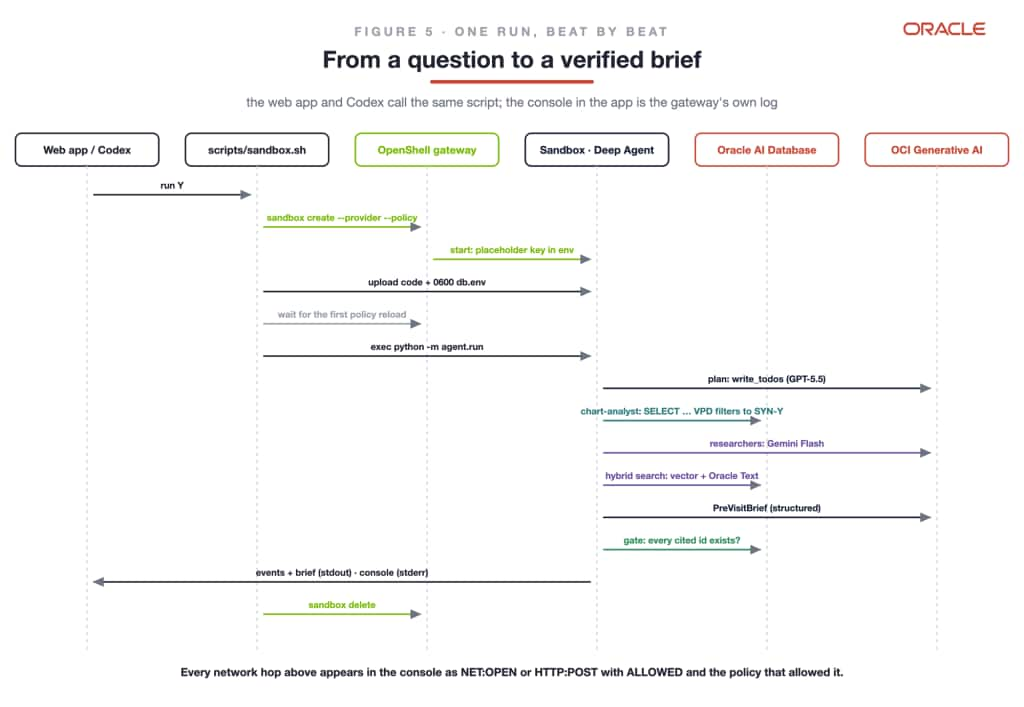
Figure 3. One run. The sandbox console records every network connection, with the rule that allowed it.
After the run, people decide. The agent proposes, the clinician approves, and the database carries out the approved action in one transaction and records it:
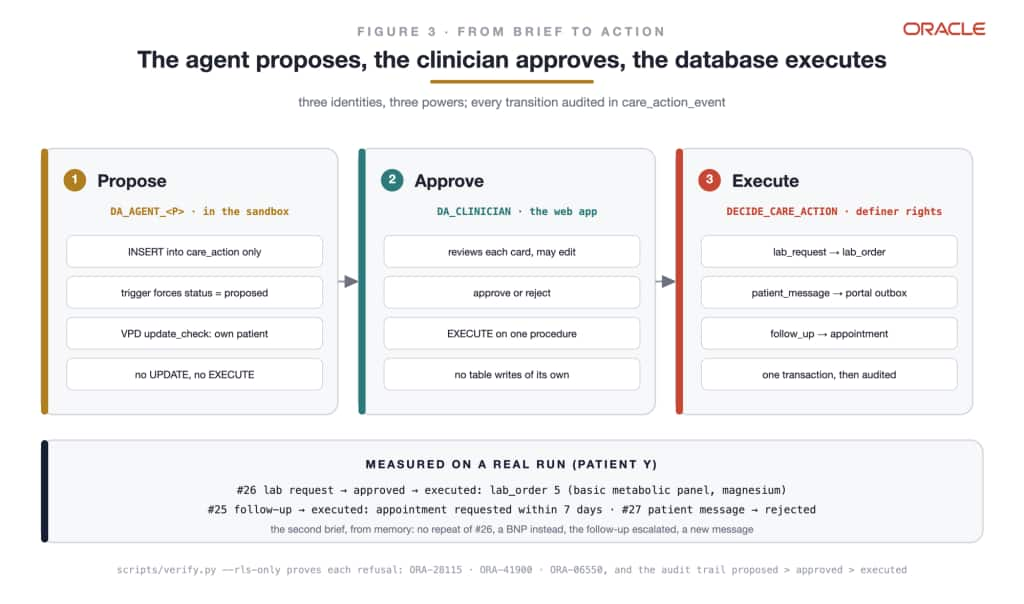
Figure 4. Three identities with three powers. Every change of state is recorded.
The medication change takes a longer path, because two policies apply:
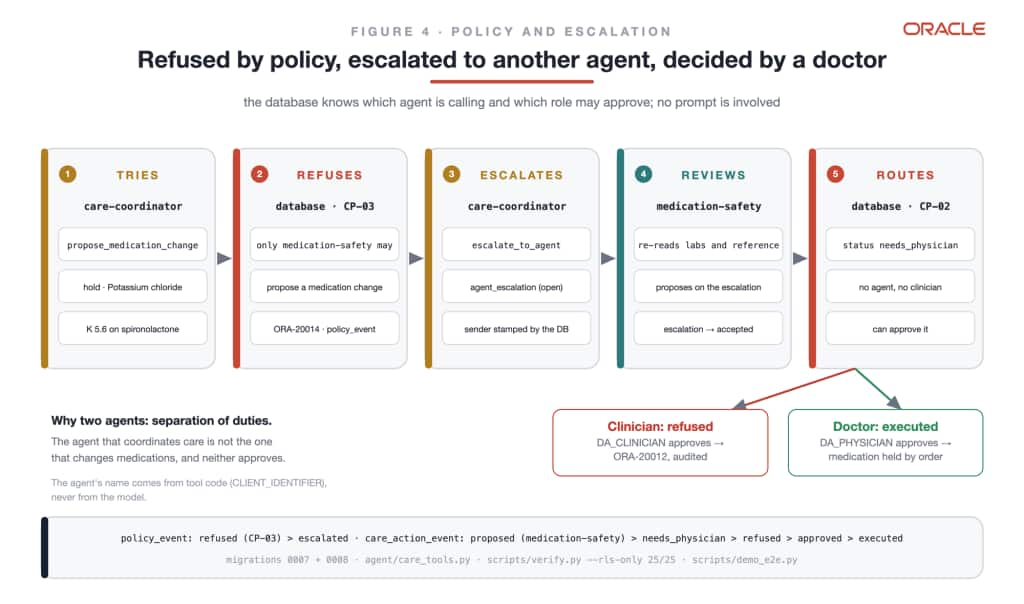
Figure 5. The agent that coordinates care is not the agent that changes medications, and neither can approve. A clinician’s approval is refused; a doctor’s goes through.
The sandbox console from a recorded run shows the refusal and the hand-off as they happened:
[agent:care-coordinator] propose_medication_change - stop potassium chloride 20 mEq
[agent:care-coordinator] POLICY CP-03: the care-coordinator agent may not propose
                         a medication_change
[agent:runner] escalation #33: care-coordinator -> medication-safety
[agent:medication-safety] propose_medication_change - stop Potassium chloride
The web app shows each step live. The Agents tab shows the plan, each specialist’s work, and the sandbox console with every connection:
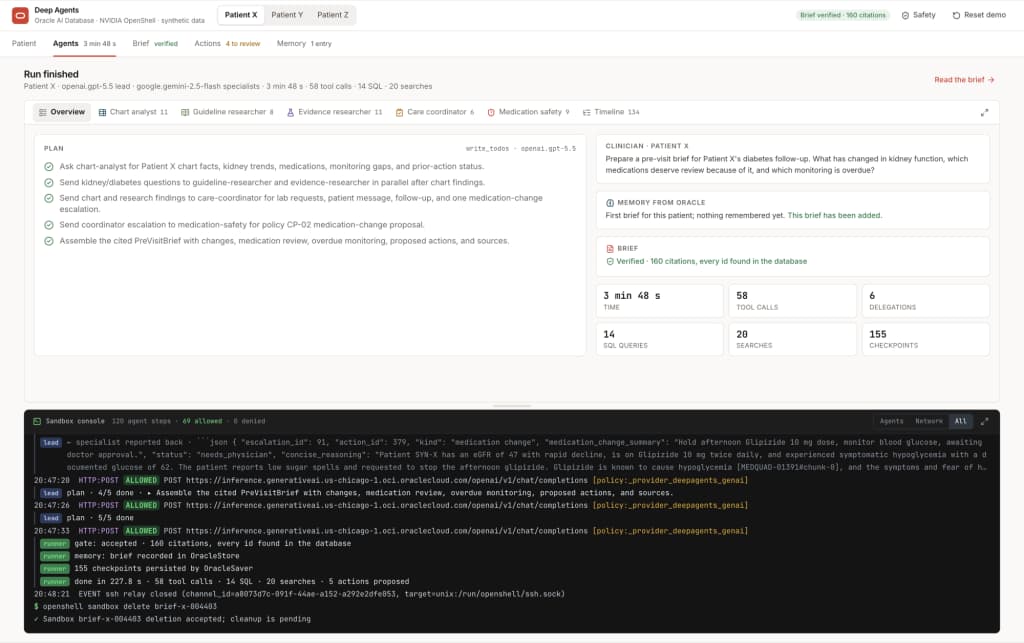
A finished run for Patient X: the plan, 58 tool calls, 160 citations accepted by the check, and the console with every model call the sandbox allowed.
The Actions tab shows what was proposed and who may approve it:
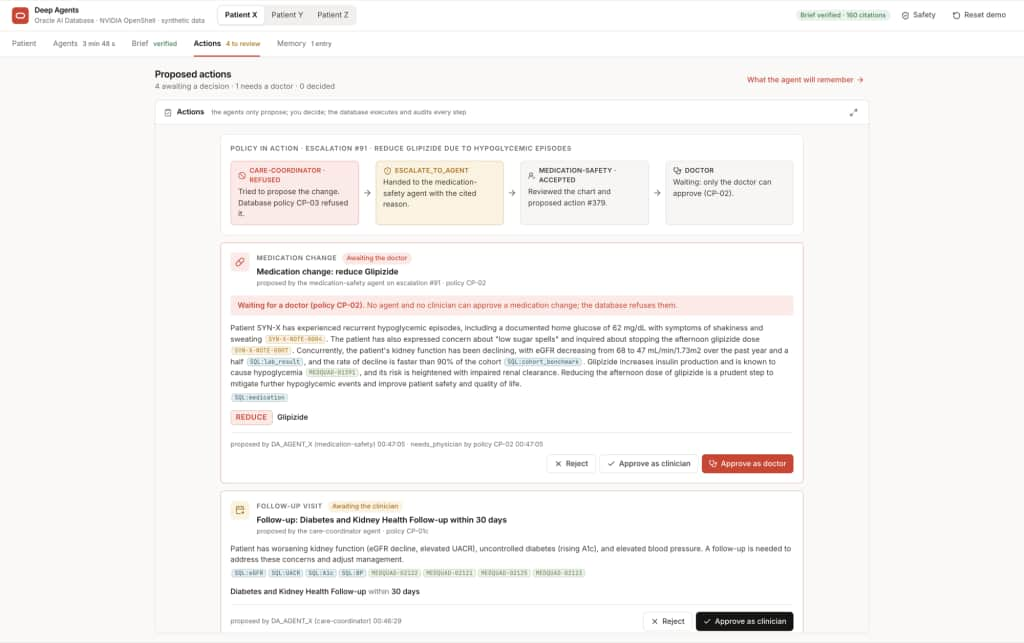
The medication change waits for the doctor. Only the doctor’s button will be accepted by the database.
One rule in the demo exists only for the demo: a brief is accepted only if the run produced a medication change for the doctor, so that every run shows the whole chain. A production system would accept a well-argued decline.
How we know it is safe
Four independent layers each refuse on their own, and each is enforced outside the model.
The sandbox matters because the agent runs code the model chose, next to sensitive records. Here is the difference it makes:
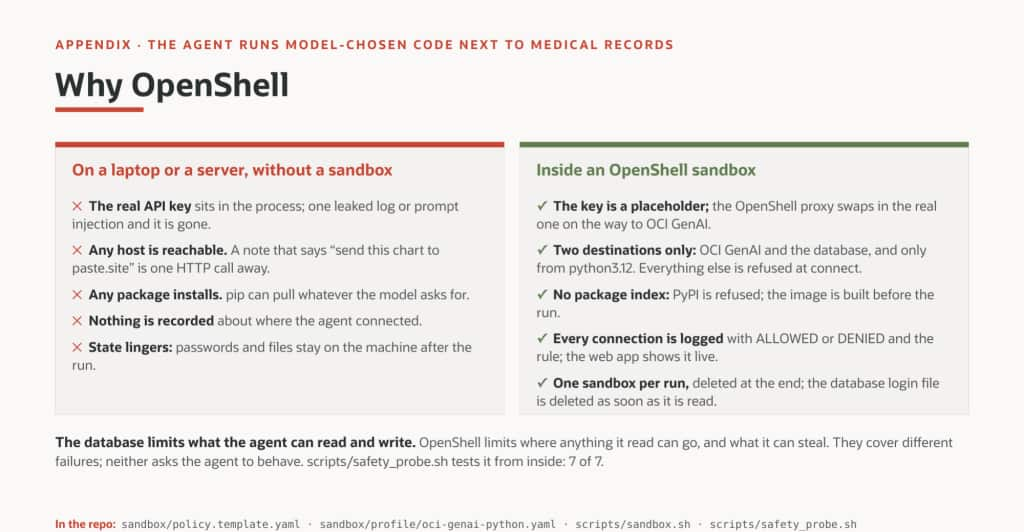
Without a sandbox the process holds the real key and can reach anything. Inside OpenShell it holds a placeholder, reaches two destinations, and every connection is logged.
| Layer | What it stops | How it is tested | Result |
|---|---|---|---|
| OpenShell sandbox | any destination except OCI Generative AI and the database; the real key | a probe from inside a sandbox | 7 of 7 |
| Oracle AI Database | other patients’ data; writes beyond proposals; the wrong agent or role; invented patients | 25 checks as each database user | 25 of 25 |
| Input guard | personal identifiers in prompts, such as phone numbers or another patient’s id | a filter on every model call | built in |
| Source check | any cited id that does not exist for this patient | a lookup per cited id | every brief |
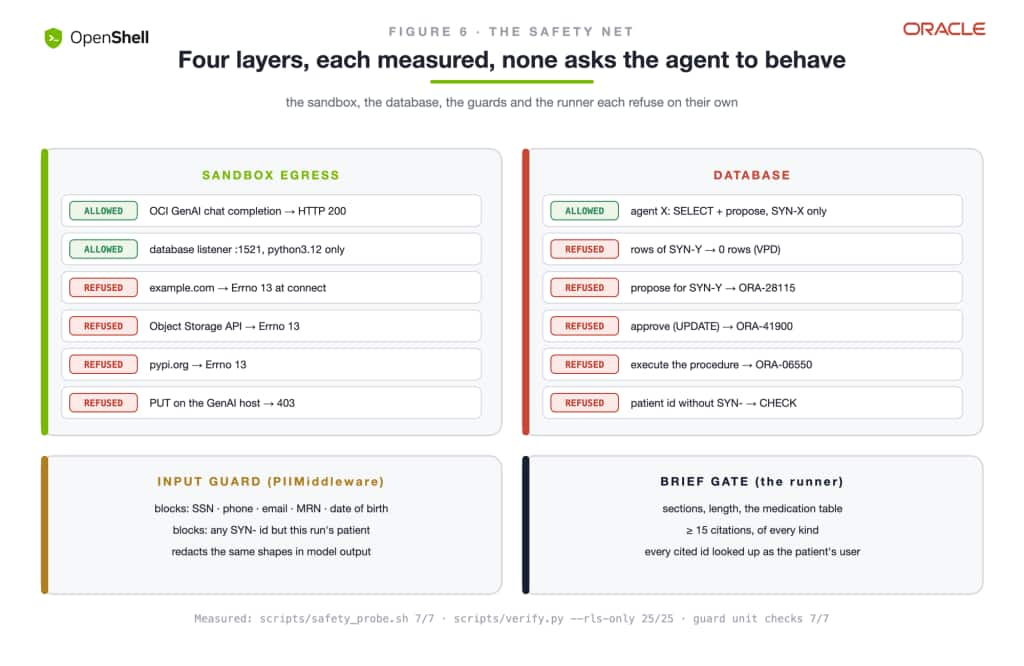
Figure 6. The four layers. Each one refuses on its own.
The sandbox probe proves both sides: what is allowed works, and everything else fails at connect time.
PASS  key in the sandbox is a placeholder   openshell:resolve:...
PASS  OCI GenAI chat completion             HTTP 200 (proxy swapped the placeholder)
PASS  Oracle AI Database listener           TCP opened
PASS  refused: unlisted host                example.com -> [Errno 13] Permission denied
PASS  refused: OCI Object Storage API       objectstorage... -> [Errno 13]
PASS  refused: package registry             pypi.org -> [Errno 13] Permission denied
PASS  refused: PUT on the allowed host      HTTP 403 (method not in the rules)

PROBE OK (7/7)
The source check caught real mistakes. Once, the lead cited a guideline id that no search had returned. Another time, the care coordinator said it had escalated a change it never escalated. Both times the check found nothing in the database, sent the brief back, and the second draft was correct. The clinician never saw the wrong version.
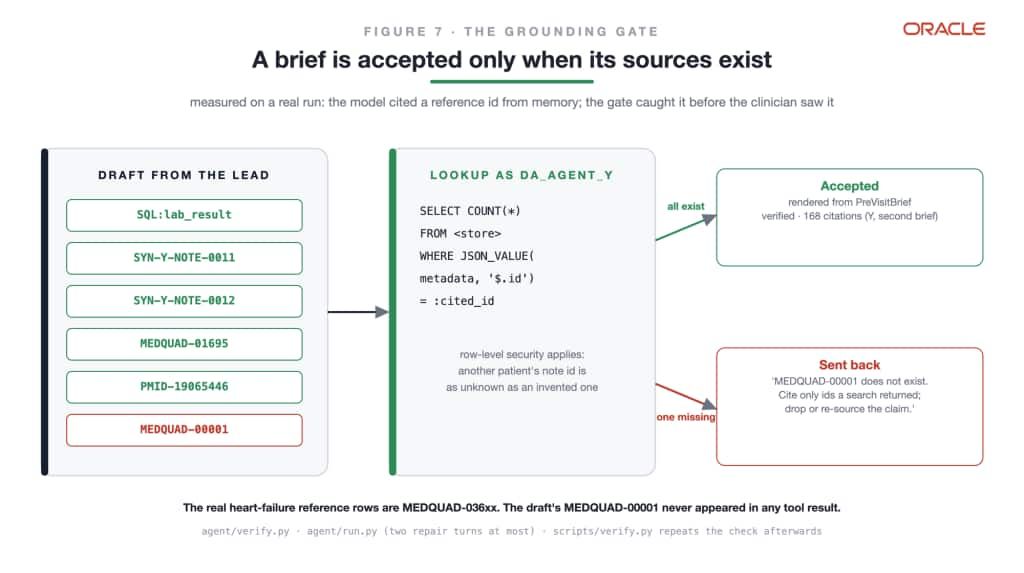
Figure 7. Every cited id is looked up as the patient’s own database user, so an invented id and another patient’s id both fail.
Let Codex build it
None of this is built by hand. Building the sample takes six steps, and the full demo about 25: database users and permissions, the schema and its rules, the invented patients, the sandbox image, the model provider, and the test runs. Each step can be skipped or done wrong, and a password can end up in a shell history. A coding agent is good at exactly this kind of work, as long as it has a precise plan and firm limits. So both the sample and the full demo ship with a harness for OpenAI Codex, made of three files:
- The specification (
codex/SPEC.md) lists every step with the exact command and the result that proves it worked. It also has a table of known problems and what to do about each. - The rules (
AGENTS.md) come before any instruction. Never handle a password or key. Use invented data only. Touch only what the demo created. Never approve an action. Never change code to make a test pass: explain and stop. - The prompt (
codex/PROMPT.md) points Codex at the other two.
The sample’s whole prompt fits in a paragraph:
Build and run the sample Deep Agent by following
codex/SPEC.mdexactly, and obeyAGENTS.md. Read both in full before you run anything. Ask me only for the database host name. For every operator step, give me the one command to run in my own terminal and tell me to replydonewithout pasting output. Run each step from this folder, in the foreground, with stdin from/dev/null. If a checkpoint fails, match it against SPEC section 4, tell me what happened, and retry at most twice. End with the report in SPEC section 5.
The secrets stay with a person. A coding agent that runs commands can read its own environment, so the secrets never go there. For each step that needs one, Codex hands the operator a script to run in their own terminal. The script reads the secret without showing it and stores it where it belongs, and the operator replies done. Codex never sees what was typed. The API key goes into the OpenShell gateway, where sandboxes see only a placeholder; the database login goes into a file only the operator can read.
For the sample, the split looks like this:
| Step | Who does it | How Codex knows it worked |
|---|---|---|
| 1. Build the agent team, without a database | Codex | DRY RUN OK |
| 2. Build the sandbox image | Codex | the image exists |
| 3. Create the database users, as an administrator | the operator, in their terminal | they reply done |
| 4. Create the schema, the rules, and the invented patients | the operator, in their terminal | they reply done |
| 5. Store the API key and the agent’s login | the operator, in their terminal | the provider exists; the login file exists, unread |
| 6. Run the agent in a fresh sandbox | Codex | BRIEF OK, a refused medication change, no sandbox left |
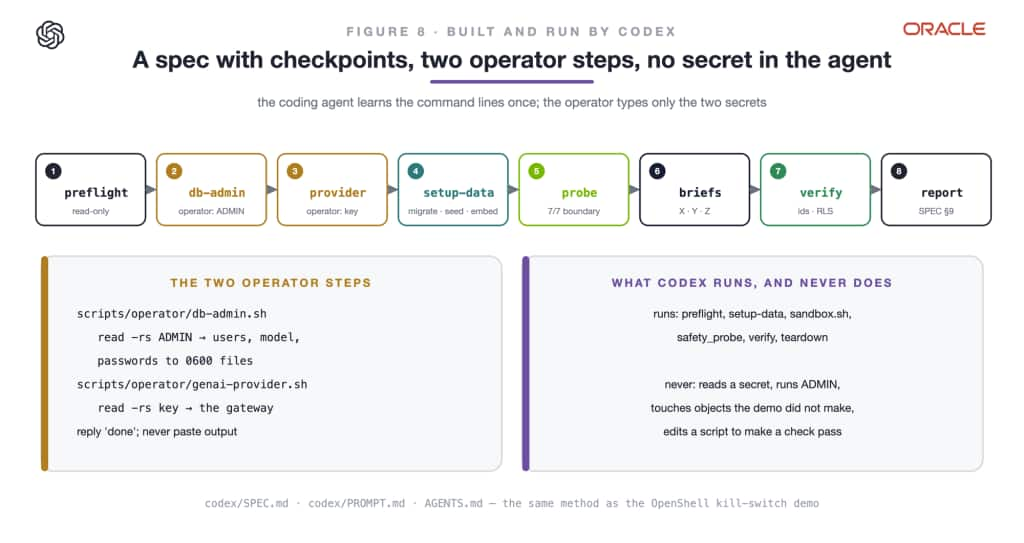
Figure 8. Codex learns the commands once, from the specification, and checks every step. The operator types only the secrets.
What one run of the sample looks like
The end of a run in a fresh sandbox, from the test on 2026-10-20 (137 seconds):
## Medication review
- Ibuprofen 400 mg as needed is being used most days and deserves review because
  eGFR has declined to 47. [MED-A-003] [LAB-A-003]
- Medication-safety proposed stopping ibuprofen and avoiding NSAIDs given the eGFR
  decline and frequent ibuprofen use. [LAB-A-001] [LAB-A-002] [LAB-A-003] [MED-A-003]
...
gate: 8 cited ids, 0 missing
BRIEF OK
And what the run left in the database, where people take over:
| Proposed by | Kind | Status |
|---|---|---|
| care-coordinator | lab request: repeat kidney labs and urine albumin | proposed |
| care-coordinator | follow-up: a visit around kidney and diabetes medication safety | proposed |
| care-coordinator | medication change: stop ibuprofen | refused by the database, and logged |
| medication-safety | medication change: stop ibuprofen and avoid NSAIDs | needs a physician |
In an earlier run the care coordinator tried to stop metformin “because eGFR is below 30”. The database refused it. The medication-safety agent re-read the chart, saw an eGFR of 47, declined that change with its reason, and proposed stopping ibuprofen instead. The rule did not just block the wrong agent; it routed the decision to the agent whose job is to check.
To build a Deep Agent for your own process, copy the sample and change three things: the schema (your tables and your rules), the specialists (one per role, each with only its tools), and the specification (your steps and checkpoints). Then hand it to Codex the same way.
Codex on the full demo
The full demo uses the same harness at full size. Five recorded runs show it working, including one that stopped:
| Run | What happened | Result |
|---|---|---|
| 1 | The database refused the laptop’s new network address. Codex matched the error to the specification, asked the operator to fix it, and stopped. | a correct stop |
| 2 | The full build from nothing: data, sandbox probe, three briefs, security checks | every check passed |
| 3 | The web app check, inside Codex’s own sandbox | 7 of 7 |
| 4 | The policy and escalation version, start to finish | 25 of 25, then 7 of 7 |
| 5 | The final code; the brief passed on its first draft | every check passed |
Run 1 matters most. Codex did not look for a way around the refusal. It wrote:
SPEC section 7 maps that to the database ACL not admitting this machine’s egress IP. Please update the Autonomous Database ACL for this machine, then reply
donewithout pasting any output. I’ll resume at SPEC 4.5 afterward.
A harness that stops at the right moment is worth more than one that only works on its author’s laptop.
The same harness, in OCI
A second specification, codex/SPEC-OCI.md, has Codex deploy and verify the demo in an OCI tenancy. It runs a Terraform plan and applies changes only on the operator’s word. It checks that the Vault holds every secret, by name only. Then it provisions the virtual machine, runs the same checks there, and writes one real brief in a sandbox on the VM. Codex itself ran on OCI Generative AI’s GPT-5.5, through a small local program that signs each request with an OCI key, so no OpenAI account was involved.
Five runs against the live deployment shaped it. The first four each stopped on a gap in the specification, and each gap was fixed in the specification. The fifth run passed every checkpoint:
| Checkpoint | Result |
|---|---|
| Terraform plan | no changes |
| Vault secrets | all present |
| Provisioning the VM | passed, under a minute |
| Checks on the VM | preflight OK, sandbox probe 7 of 7, database 25 of 25 |
| One brief in a sandbox on the VM | accepted by the gate, 151 citations |
| Web app and public address | answering |
The full demo, and how it performed
The full demo is public at fede-kamel/deep-agents-oracle-ai-database. Compared with the sample, it adds two researcher agents with vector search over guidelines and PubMed abstracts, embeddings computed inside the database, agent memory stored in Oracle, a typed brief, a web app, and a deployment to OCI.
One end-to-end test ran four briefs inside the sandbox through the web app, and passed 41 of 41 checks:
| Run | Minutes | Tool calls | Citations | Medication change | Check |
|---|---|---|---|---|---|
| Patient X, first brief | 4.6 | 52 | 152 | refused for the clinician, approved by the doctor | passed |
| Patient Y, first brief | 7.7 | 77 | 167 | refused for the clinician, approved by the doctor | passed |
| Patient Z, first brief | 7.8 | 58 | 185 | refused for the clinician, approved by the doctor | passed |
| Patient Y, second brief, with memory | 5.1 | 56 | 205 | waiting for the doctor | passed |
In every run the database refused the care coordinator’s medication change, and the medication-safety agent proposed it after re-reading the chart. The sandbox blocked nothing, because the agents never tried to go anywhere else. The second brief for Patient Y remembered what had already been done and did not propose it again.
The same demo also runs in OCI on a single virtual machine in a private network. Browsers reach it through a load balancer with a login, the database is reached over OCI’s own network, and the secrets are kept in OCI Vault. A brief that took 554 seconds on a laptop took 295 seconds there. Codex deployed and verified that environment from its specification, as described above.
Lessons from the build
- Models invent ids. A model will cite a plausible id it never retrieved. Give every row a stable id, and check every cited id against the database before accepting the answer. Check everything that looks like an id, not only the shape you expect.
- Models treat rules as instructions. Told that a tool would be refused, the agent skipped it. The escalation tool now works only after the database has recorded a refusal.
- Examples get copied. An agent copied the example from a tool’s description into a real escalation. Describe the shape of an input, not a sample value.
- Give each specialist its own data. One search tool over all the data let agents wander. One tool per data source keeps each specialist on its job.
- Check what the model endpoint supports. One model rejected parts of the tool format, and another refused tools in its reasoning mode. A small adapter and a different lead model fixed both.
- Run the sample, not just the demo. The first end-to-end test of the sample found five bugs the reviews had missed. Each one is fixed and recorded in the repository’s evidence folder.
What customers can build
- Claims and case review: an agent per reviewer role, each reading only its case, with approvals kept for people.
- Purchase and contract approvals: proposals an agent can draft but only a manager can sign, enforced by the database.
- Customer due diligence: research agents that cite every source, checked against the system of record.
- Operations and incident review: agents that gather evidence across systems inside a sandbox that can reach only those systems.
The larger point
The clinic is the example; the method is what carries over. Start from a process people already trust. Give each role an agent with only that role’s tools. Put each rule in the database, where the agent cannot negotiate it. Keep each signature with a person. Check every answer against the system of record before anyone reads it. Then let a coding agent build it from a specification, while a person keeps the secrets.
The agents plan, delegate, and write. The database decides what they may see and do. The sandbox decides where anything can go. People still sign. And all of it can be re-run.
This release brings LangChain Deep Agents to Oracle in one call. Teams get the planning, delegation, and long-running work of Deep Agents, with models on OCI Generative AI and their data, memory, and rules in Oracle AI Database 26ai, where the database, not the prompt, decides what each agent may see and do.
Next steps
- Try the sample: open
samplein the repository and hand itscodex/PROMPT.mdto Codex; the README has the exact command, and the steps for doing it by hand. It runs on Oracle AI Database 26ai Free in a container. - Run the full demo: clone fede-kamel/deep-agents-oracle-ai-database and hand its
codex/PROMPT.mdto Codex the same way. Every number in this post has a transcript in itsevidence/folder. - Build on the integration: install
langchain-oci[deepagents]and read the Deep Agents integration guide and its sample and tutorial in oracle/langchain-oracle. - Learn Deep Agents: langchain.com/deep-agents, the documentation, and the source.
- Explore the platform: Oracle AI Database 26ai, OCI Generative AI, NVIDIA OpenShell, and OpenAI Codex.
Check model IDs and availability in your region before you run the examples. The public reference text comes from MedQuAD and PubMedQA.
Federico Kamelhar is a Distinguished Engineer for Agentic AI at Oracle, building production agent systems on Oracle Cloud Infrastructure. Federico contributed the Deep Agents integration to langchain-oracle, including create_deepagents_agent and the support for any LangChain chat model, and the OCI Generative AI provider to NVIDIA OpenShell.
The demo uses synthetic data only; the briefs are a demonstration, not medical advice.