
Introduction
Oracle Notification Service (ONS) is installed and configured as part of the Oracle Clusterware installation. All nodes participating in the cluster are automatically registered with the ONS during Oracle Clusterware installation. The configuration file is located on each node in $ORACLE_HOME/opmn/conf/ons.config. See the Oracle documentation for further information. This article focuses on the client side.
Oracle RAC Fast Application Notification (FAN) events are available starting in database 11.2. This is the minimum database release required for WLS Active GridLink. FAN events are notifications sent by a cluster running Oracle RAC to inform the subscribers about the configuration changes within the cluster. The supported FAN events are service up, service down, node down, and load balancing advisories (LBA).
fanWatcher Program
You can optionally test your ONS configuration independent of running WLS. This tests the connection from the ONS client to the ONS server but not configuration of your RAC services. See the fanWatcher sample program (rename to fanWatcher.java) for details to get, compile, and run the fanWatcher program. I’m assuming that you have WLS 10.3.6 or
later installed and you have your CLASSPATH set appropriately. You would run the test program using something like
java fanWatcher “nodes=rac1:6200,rac2:6200” database/event/service
If you are using the database 12.1.0.2 client jar files, you can handle more complex configurations with multiple clusters, for example DataGuard, with something like
java fanWatcher “nodes.1=site1.rac1:6200,site1.rac2:6200;nodes.2=site2.rac1:6200,site2.rac2:6200” database/event/service
Note that a newline is used to separate multiple node lists. You can also test with a wallet file and password, if the ONS server is configured to use SSL communications.
Once this program is running, you should minimally see occasional LBA notifications. If you start or stop a service, you should see an associated event.
Auto ONS
It’s possible to run without specifying the ONS information using a feature call auto-ONS. The auto-ONS feature cannot be used if you are running with
– an 11g driver or 11g database. Auto-ONS depends on protocol flowing between the driver and the database server and this feature was added in 12c.
– pre-WLS 12.1.3. Auto-ONS is supported starting in WLS 12.1.3.
– an Oracle wallet with SSL communications. Configuration of the wallet requires also configuring the ONS information.
– complicated ONS topology. In general, auto-ONS can figure out what you need but there are cases where you need to specify it precisely. In WLS 12.2.1, an extension of the ONS configuration allows for specifying the exact topology using a property node list. See http://docs.oracle.com/middleware/1221/wls/JDBCA/gridlink_datasources.htm#BABGJBIC for more information.
If you have some configurations that use an 11g driver or database and some that run with 12c driver/database, you may want to just specify the ONS information all of the time instead of using
the auto-ONS simplification. The fanWatcher link above indicates how to test fanWatcher using auto-ONS.
WLS ONS Configuration and Testing
The next step is to ensure that you have end-to-end configuration running. That includes the database service for which events will be generated to the AGL datasource that
processes the events for the corresponding service.
On the server side, the database service must be configured RCLB enabled. RCLB is enabled for a service if the service GOAL (NOT CLB_GOAL) is set to either SERVICE_TIME or THROUGHPUT. See the Oracle documentation for further information on using srvctl to set this when creating the service.
On the WLS side, the key pieces are the URL and the ONS configuration.
The URL is configured using a long format with this service name specified. The URL can use an Oracle Single Client Access Name (SCAN) address, for example,
jdbc:oracle:thin:@(DESCRIPTION=(ADDRESS=(PROTOCOL=TCP)(HOST=scanname)(PORT=scanport))(CONNECT_DATA=(SERVICE_NAME=myservice)))
or multiple non-SCAN addresses with LOAD_BALANCE=on, for example,
jdbc:oracle:thin:@(DESCRIPTION=(ADDRESS_LIST=(LOAD_BALANCE=ON)(ADDRESS=(PROTOCOL=TCP)(HOST=host1)(PORT=1521))(ADDRESS=(PROTOCOL=TCP)(HOST=host2)(PORT=1521)))(CONNECT_DATA=(SERVICE_NAME=myservice)))
Defining the URL is a complex topic – see the Oracle documentation for more information.
As described above, the ONS configuration can be implicit using auto-ONS or explicit. The trade-offs and restrictions are also described above. The format of the explicit ONS information is described at http://docs.oracle.com/middleware/1221/wls/JDBCA/gridlink_datasources.htm#BABGJBIC.
If you create the datasource using the administration console with explicit ONS configuration, there is a button to click on to test the ONS configuration. This tests doing a simple handshake with the ONS server.
Of course, the first real test of your ONS configuration with WLS is deploying the datasource, either when starting the server or when targeting the datasource on a running server.
In the administration console, you can look at the AGL runtime monitoring page for ONS, especially if using auto-ONS, to see the ONS configuration.

You can look at the page for instances and check the affinity flag and instance weight attributes that are updated on LBA events. If you stop a service using something like
srvctl stop service -db beadev -i beadev2 -s otrade
that should also show up on this page with the weight and capacity going to 0.
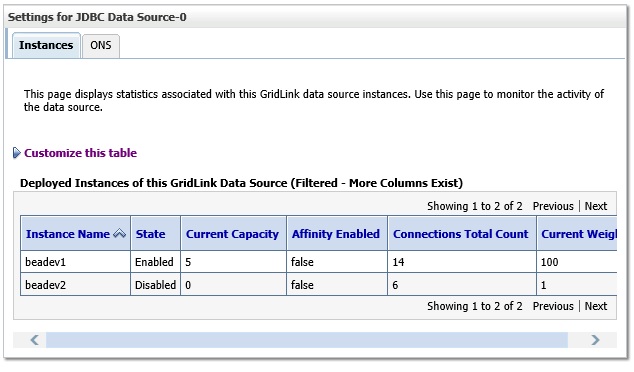
If you look at the server log (for example servers/myserver/logs/myserver.log) you should see a message tracking the outage like the following.
….
<Info> <JDBC> … <Datasource JDBC Data Source-0 for service otrade received a service down event for instance [beadev2].>
If you want to see more information like the LBA events, you can enable the JDBCRAC debugging using –Dweblogic.debug.DebugJDBCRAC=true. For example,
…
<JDBCRAC> … lbaEventOccurred() event=service=otrade, database=beadev,event=VERSION=1.0 database=beadev service=otrade { {instance=beadev1 percent=50
flag=GOOD aff=FALSE}{instance=beadev2 percent=50 flag=UNKNOWN aff=FALSE} }
There will be a lot of debug output with this setting so it is not recommended for production.