
Say you want to calculate conditional totals. For example, a staffing report that includes:
- The number of employees with 10+ years of service
- The total salaries for programmers
- The mean salary for clerks
You could write a separate query for each. But it’s more efficient to do it all in one query.
From Oracle AI Database release 23.26.1, you can use the filter clause.
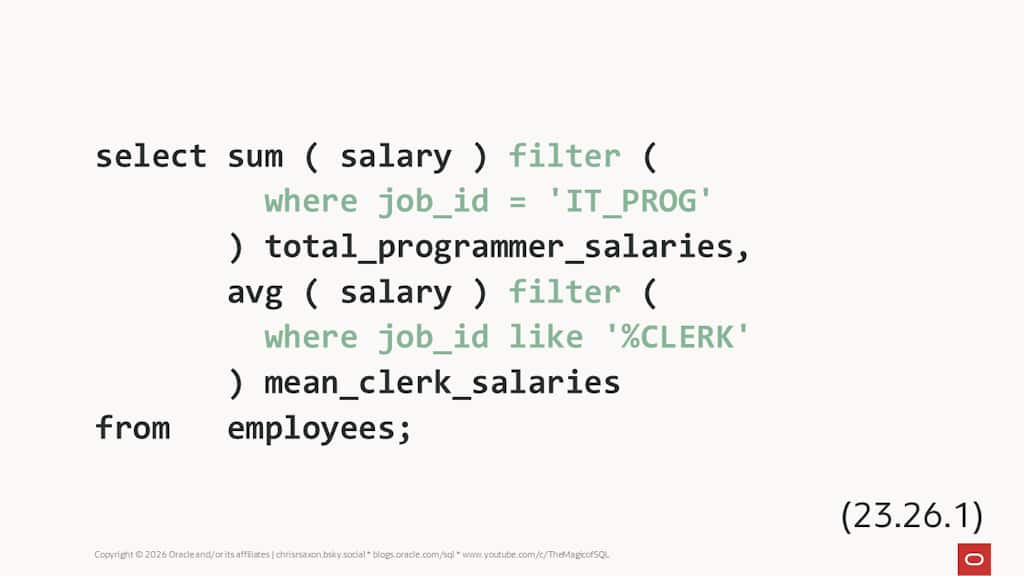
This comes after the aggregation function. It has a where clause that identifies the rows you want to include in the calculation.
This gives a simple way to compute conditional totals. You can also use this method to pivot rows into columns, such as the count of employees in each department:
You can use any row-level SQL condition in the filter clause. Subqueries are unsupported however, so the following raises an error:
To use a subquery, move the condition into a case expression as in releases before filter was available.
Conditional aggregates with CASE
To filter aggregates in earlier releases, put a case expression inside the aggregate. This returns the column you want to aggregate when the condition is true and null otherwise.
For example, you could write the query at the top of this post like so:
Here’s the condition with a subquery as a case expression:
Filtering window functions
You can also filter window functions to get conditional running totals or moving averages. To do this, place the filter clause between the function and the over clause.
For example, this finds the running total of rep salaries and moving average of clerk salaries:
Again, you can use a case expression on earlier releases to get these conditional totals.
Performance
If you want fast queries (and who doesn’t?!), note the database applies the filter during aggregation. This means it happens after the where clause.
If the same condition applies to all the aggregations in a query, you should place it in the where clause. Use filter to apply different conditions to each aggreation.
For example, these queries both return the number of employees, total salary, and mean salary for employees in department 50. The first uses the where clause, the second the filter clause:
The first query is more efficient, because it only groups rows for department 50. The second groups all the rows.
You can verify this by looking at their execution plans. Pay close attention to the full scan of employees – in the first plan this returns 45 rows, the second 107:
On large data sets this can make a huge performance difference. Place common conditions in in the where clause for optimal plans.
Download Oracle AI Database to try these out today!