

In the highly competitive telecommunications industry, speed, and accuracy in configuring complex product bundles are critical. Operators often manage thousands of SKUs, pricing rules, eligibility and compatibility logic, configuration rules, nested dependencies, device-and-plan bundles, add-ons such as roaming or entertainment packs, and time-bound promotions or discounts. When these bundles take too long to load or respond, the impact is immediate: slower sales cycles, order risk, longer customer wait times, and a weaker user experience.
Sales teams rely heavily on Siebel Configurator to quickly build and customize complex product offerings. One way to alleviate slow performance is to ensure product modelling guidelines and best practices are followed. Another way is the ability to tune Siebel. Siebel provides several Server Component caching parameters that can be tuned to enhance configurator performance, based on the product model. The guidance is based on customer-specific learnings and in-house experiments.
How configurator caching helps
The Object Manager (OM) in Siebel handles user sessions and configurator data in memory. By caching frequently used product models, attributes, and structures, OM reduces repetitive database lookups, improving response times and scalability. A configurator session typically loads the compiled product definition, applies the class structure, fetches attributes, and creates a product object instance. Each step can either hit the cache, which is fast, or query the database, which is slower.
The aim is simple: keep the most frequently accessed data in memory. However, higher cache values can increase memory footprint and impact stability if not sized correctly. Validate changes with PSR testing and monitor memory utilization closely. Refer to the latest Siebel Configurator Performance Tuning Guide for additional information.
Key cache parameters to tune
1. eProdCfgNumOfCachedAttrs: Controls how many product attributes, such as color, plan type, and capacity, are cached. Attributes are often reused across products, so caching prevents repeated database queries. Higher values reduce DB load but can waste memory if too many rare attributes are cached. Best practice is to count and cache the most used attributes and monitor logs for reload patterns.
2. eProdCfgNumOfCachedClasses: Controls how many class definitions are cached. Classes define how components relate. Without caching, class data reloads for each session. Higher values improve configurator startup time but consume memory. Cache top-level bundles and frequently used classes while avoiding unnecessary over-caching.
3. eProdCfgNumOfCachedProducts: Defines how many compiled product definitions are cached. Compiling a product model is resource intensive. Caching compiled models allows instant re-use and gives a huge performance boost for frequently configured products, but it can be memory-intensive if set too high. Focus on high-demand products such as flagship devices or core service bundles.
4. eProdCfgNumbOfCachedWorkers: Defines the maximum number of Configurator Workers cached in memory per Object Manager process. A Worker is the rule-execution engine thread that validates every user selection during a configuration session. This is one of the most critical settings: too low a value results in frequent worker creation, slow Customize response, and CPU spikes; too high a value results in excessive memory usage, OM instability, possible crashes, or swapping. Each worker can serve 2-3 concurrent users, so fewer workers are needed compared to earlier versions.
As a best practice, always enable Snapshot mode by setting eProdCfgSnapshotFlg = TRUE. Calculate workers per OM as the lesser of memory-based capacity or concurrent config users per OM divided by 3. General formula: Preferred workers per model per OM = RoundUp((Users per OM / Number of models) x 1.25). Cache factories first because factories are 3-5 times more expensive to build than workers. For more details, refer to MOS Doc 477007.1.
For example, if one OM supports 25 users and 1 model, eProdCfgNumbOfCachedWorkers can be set to 25. If 25 users are spread across 12 models, cache about 3 workers per model per OM. For multi-model or memory-constrained systems, consider Dedicated Configurator Servers with Distributed Cache.
Tuning data from in-house models
We used a typical Telco product bundle as shown below. Defaults are indicated by the values in brackets.
| Promotion | # of Promotion Components | # of Products | # of Attributes |
| PSR_Supremo Quadplay | 5 (4) | 1861 (25) | 427 (15) |
The tuned parameters values were:
| Parameter | Default Value | Tuned Value |
| eProdCfgNumOfCachedAttrs | 100 | 500 |
| eProdCfgNmOfCachedClasses | 100 | 500 |
| eProdCfgNumOfCachedProducts | 1000 | 5000 |
| eProdCfgNumbOfCachedWorkers | 50 | 50 |
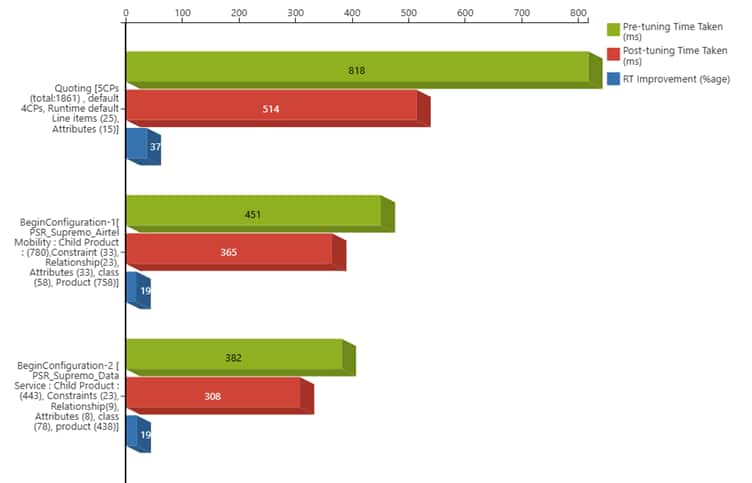
Before tuning, quoting took approximately 818 ms, and Begin Configuration took approximately 451 ms. After tuning, quoting improved to approximately 514 ms, about 37% faster; Begin Configuration improved to approximately 365 ms, about 19% faster. These improvements translate into smoother configurator sessions, faster quoting, and higher user satisfaction.
Business impact
The optimization led to measurable improvements. Quoting became over 40% faster, configurator sessions saw approximately 20% time-savings per session, customer wait times during plan and device selection were significantly reduced, and user satisfaction increased.
The key lesson: tuning caching parameters together yields far greater performance improvements than adjusting them individually. Telecom environments benefit when frequently used configurations are effectively cached. Always validate improvements with PSR testing before and after changes and monitor memory usage closely to avoid over-allocation and ensure system stability.
Get started
Start by reviewing your Siebel Configurator cache parameters against your most frequently used product models. Tune them carefully, validate the impact through PSR testing, and monitor memory usage to ensure performance gains are achieved without compromising system stability.