
Supply chains are under extreme pressure to obtain goods in a timely fashion. The Wall Street Journal said in February 2022, ‘U.S. Inflation Rate Accelerates to a 40-Year High of 7.5%’. This among other supply chain challenges forces organizations to make difficult decisions, adapting to new processes to cut costs wherever they can. Now more than ever, doing business with certain Suppliers may cause more headaches. How do you decide which Supplier to choose and retain? PeopleSoft provides multiple tools to help organizations obtain a unique view of their Supplier data (Supplier 360 View, Supplier Watch List, Supplier Scorecarding, and Procurement Dashboards).
 Supplier 360 provides users a comprehensive view of a particular Supplier or a comparison of Suppliers. The Supplier 360 view consolidates Supplier details, transactions, and audit information in a single dashboard. Supplier data can be viewed in Analysis View or Comparative View. In Analysis View all the metrics associated with a single Supplier will be displayed whereas in Comparative View users can select two or more Suppliers and compare their data. The Supplier 360 View displays several pagelets containing metrics, analytics, graphs, various transaction details, and pivot grids corresponding to Suppliers.
Supplier 360 Analysis and comparison of details sourced from PeopleSoft Finance and Procurement modules. Here is a list of all Supplier 360 metrics available for analysis and comparison arranged by PeopleSoft License:
| eSettlements:
Purchasing:
|
Accounts Payable:
Purchasing or Payables:
|
 PeopleSoft Supplier Scorecard measures Supplier performance against a set of targets to ensure suppliers are meeting the needs of the organization. The Supplier Scorecarding process consists of evaluation templates containing weighted sections and questions which can be used to evaluate and score Suppliers utilized by your organization. Evaluation responses can be solicited from users across an organization. Results are collected, validated, and posted making them available for review and analysis to help determine whether a supplier is performing up to the expectations of the organization.
PeopleSoft Supplier Scorecarding also contains objective Key Performance Indicator (KPI) questions and scores incorporated into templates, evaluations, and the overall scorecard results. This allows reviewers to view and analyze both objective and subjective scored questions within the same scorecard.
 Supplier Watch List aggregates data from Purchase Orders, Procurement Contracts, and Sourcing Events and displays violations based upon configurable objectives. Users determine which Supplier(s) to include and when used with Supplier Scorecarding, users can quickly view overall performance and trend metrics.
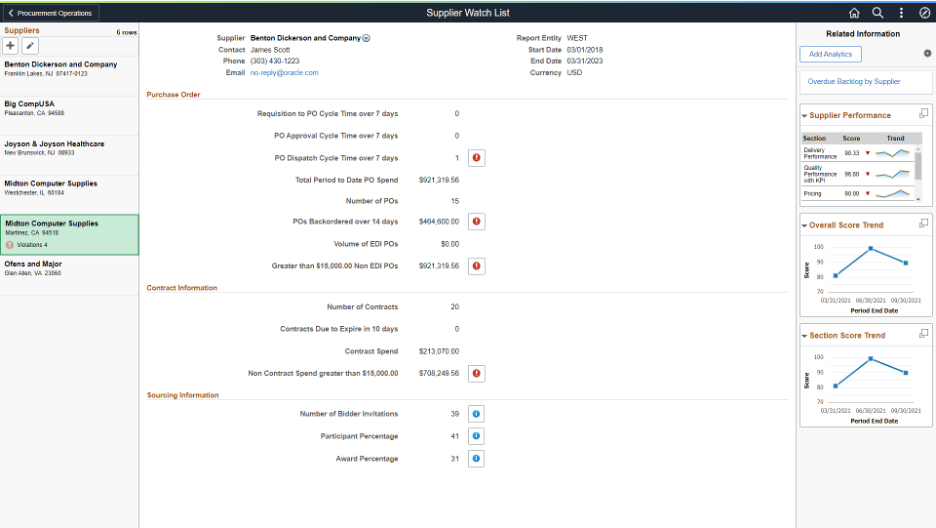
Figure 1 – Supplier Watch List with Scorecarding Performance Metrics
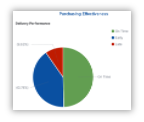 PeopleSoft’s Procurement Dashboards leverages Elastic Search and Kibana capabilities to provide insight into procurement. Users can control the timeline to display the data and then drill into various visualizations. These filters adjust the data across all visualizations.
Procurement Dashboards include:
- Purchasing Effectiveness – Designed for Procurement Managers to view Purchase Volume, Payment Terms, Top Suppliers, Rejections, and Returns by Supplier.
- Procurement Contracts – Designed for Procurement Contract Managers/Administrators to view Contract-related information such as Contract Vs Non-Contract Spend, Contracts Expiry by Month, and much more.
- Purchasing Operations – Designed for Buyers to view Purchase Order trend based upon various status such as Purchase Order Status, PO Acknowledgement Status, Budget Status, etc. to identify Purchase Order that needs attention.
When the time comes to make a difficult decision with a supplier, you have various options to analyze their past performance to determine if you want to continue doing business with that supplier or find another supplier.
For more information on the above features, please visit our PeopleSoft Information Portal for links to Video Feature Overview presentations.