
Warehouse and Storage locations are an indispensable and integral part of every manufacturing and non-manufacturing enterprise whose core function is to receive, store and eventually ship goods. The storage location is a designated “custodian” of the goods , which maintains value derived from the cost of the goods. The safety and security of goods stored in warehouse is important to every enterprise.
Storage locations are designed appropriately to store the Items to ensure the safety and security of goods. Goods may be stored on shelves, pallets, in boxes, crates, containers, drums and even in the designated floor space.
Peoplesoft Inventory supports most all the necessary functionality that any storage location needs. In this blog I would like to explain how containers are handled in the Inventory module, as one of the safe methods of storage or shipping items in a container.
PeopleSoft Inventory supports functionality around the containerisation of goods. Containers are defined with attributes such as
- Specific Identification of a container.
- Physical measurements of a container such as length, width and height.
- The purpose for which a container is used. Is it for storage or for shipping ?
- The attributes of the goods stored in a container. This could be raw material, accessory items or finished goods.
- Storing only one single item or an assortment of items.
- Defining multiple types of containers which could be bins, cartons, pallets or Crates based on the need of a warehouse.
Peoplesoft Inventory allows containers for storage of items and shipping the items. Let’s see how these two functionalities work in PeopleSoft Inventory.
How to use a container in PeopleSoft Inventory for storage purposes:
Once the container types and container categories are defined , the relevant transactions are enabled for container information. Containers are selected during routine receiving , issue and transfer transactions.
Container ID generation:
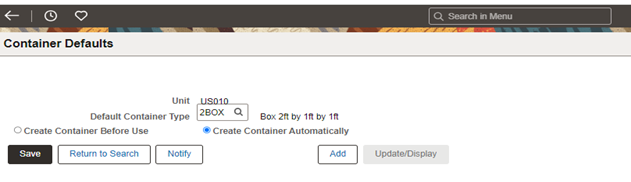
The container defaults component enables users to either create container first and use the same in the transactions OR create containers dynamically during the transactions.
How to use a container in PeopleSoft Inventory for shipping goods:
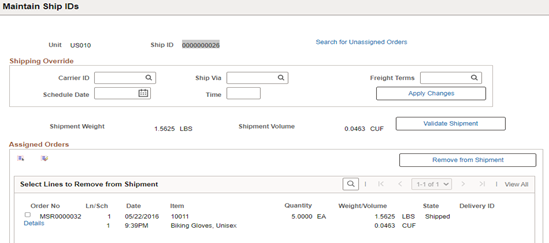
Demand lines that are yet to be assigned to a Shipment ID are fetched here and added to the Shipment ID. Other shipping details regarding Carrier ID, Freight terms, Container volume etc [if available] are also maintained here.
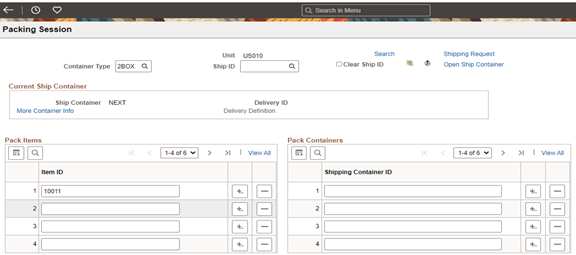
Packing session: The items in the Shipping ID are packed into the shipping container. A shipping container can contain items from many demand lines and based on the parameters defined during the container creation, the volume of the container that is utilized for the shipped item is validated.
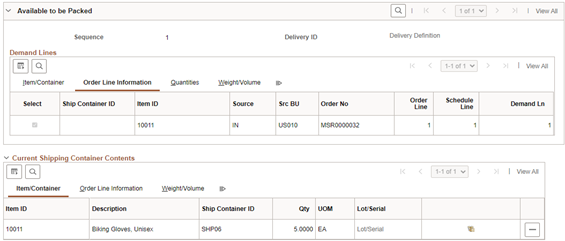
Finally, when the Shipping/Issues transaction is created, the information on the container is carried forward until the invoice generation.
In summary, using storage containers enables a user to:
- Stock receiving/issues , material transfers, adjustments by containers.
- Build containers for finished goods from the Manufacturing process.
- Display and update additional container information.
Here is an article on Route codes.